Architecture as a Guardrail: Structurally Excluding Error Classes
When people discuss guardrails for agents, the conversation usually centers on checks: input and output validation, moderation, judges. All of these operate at runtime — they inspect what goes into the model or what comes out, and react to undesired content. One category regularly receives short shrift: architectural decisions that structurally rule out unwanted behavior. Where the model cannot express something, no one needs to check it. Where information is never transmitted, no one can manipulate it. And where a flow is cast in code, the model cannot throw it into disarray. The best error handling is the kind that an error never reaches in the first place.
This article collects such decisions based on our demo application Flight42, which we use to illustrate Agentic UI with Angular. That includes an application-specific DSL instead of generated markup, minimal context transfer, tool granularity, workflows with deterministic steps — and sandboxes that let the model write code instead of results. The client is built with Angular and CopilotKit, communication runs over AG-UI, and the agents are implemented with Mastra.
📂 Source code (see branch copilotkit)
A DSL Instead of Generated Markup
The first decision concerns the generative dashboard of the demo. The user describes in free text what they want to see — "my boarding passes, the booked flights, and the weather" — and the application assembles the appropriate interface. Technically, this is based on A2UI, a protocol that describes interfaces as structured data that the client renders. An introduction to A2UI can be found in my article on the topic.
The obvious approach: the model generates the A2UI markup directly. That is exactly what our first version looked like — and it took 37 seconds and over 46,000 tokens for a single dashboard. The model had to produce an extensive structure token by token, make tool calls for the data along the way, and occasionally get confused, which forced correction loops. How we sped that up by a factor of 300 is described in a separate article in detail; here we are interested in the architectural decision behind it.
It reads as follows: the model no longer generates markup, but only a small, application-specific DSL — a compact description of which tiles the dashboard should show:
{
  "tiles": [
    { "type": "boardingPasses", "count": 2 },
    { "type": "bookedFlightsList", "showCheckInButton": true },
    { "type": "flightSearch", "defaultFrom": "Graz", "defaultTo": "Hamburg" },
    { "type": "rentalCars" },
    { "type": "hotels" },
    { "type": "weatherList" }
  ]
}
This DSL is defined as a Zod schema. The agent is limited to a single step: it translates the request into the DSL, nothing more. The model learns how the DSL is structured through examples in the system prompt.
The generated DSL is passed by the model to the renderDashboard tool. That tool validates the generated DSL against the Zod schema, and violations are returned to the model as errors, enabling it to correct its call.
The actual work is done by the route: it intercepts the call's arguments, deterministically compiles the DSL into the full A2UI interface, and derives from it directly which data needs to be loaded — entirely without further reasoning by the model. Because the DSL is compact, it can also be cached exceptionally well: for an already-known dashboard, the model is not called at all.
Stale content is not a concern here, because A2UI separates structure and data via data binding: only the structure of the interface comes from the cache; the data bound to it is fetched fresh by the application on every call.
The result looks the same to the user as before:
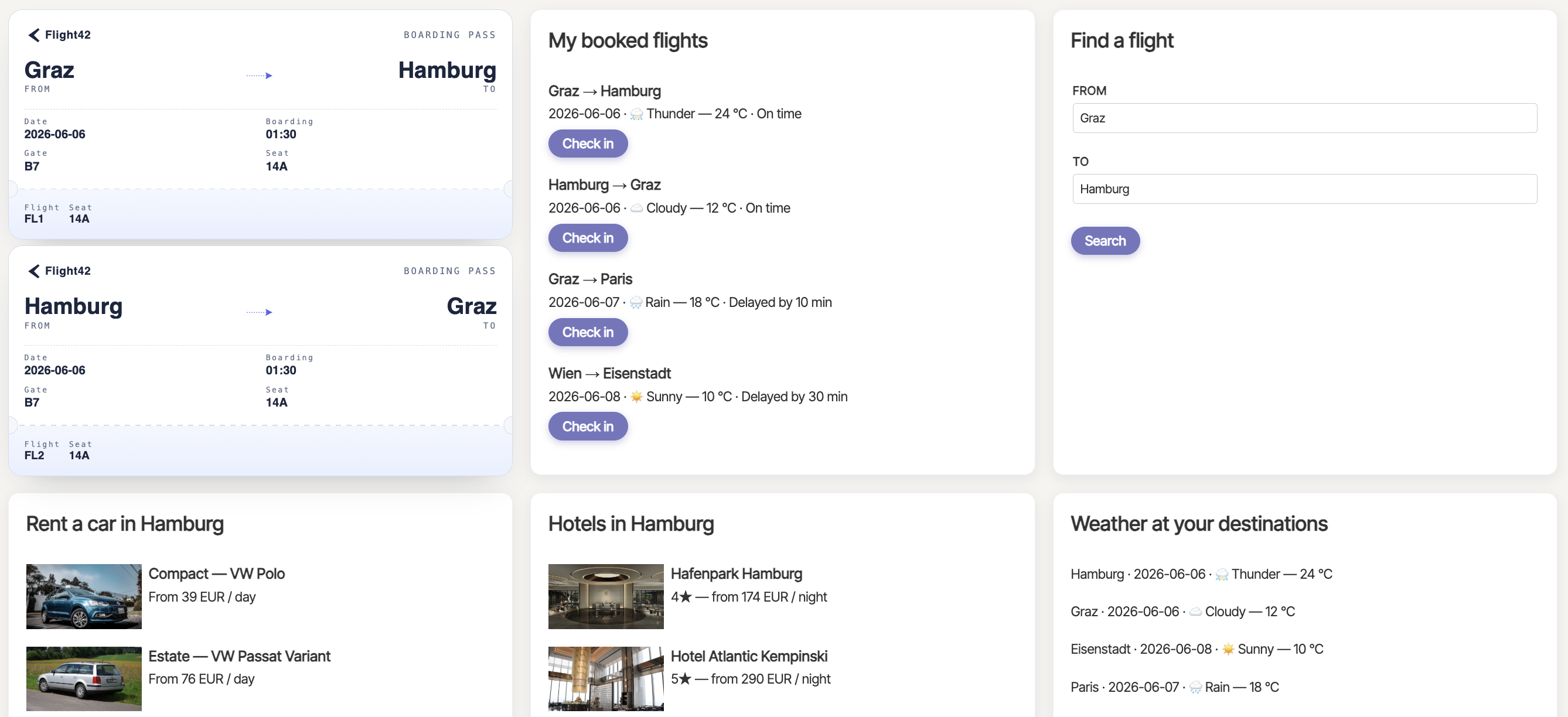
The original motivation for this redesign was performance. The second gain is at least as valuable: control. The model simply cannot express anything that the DSL does not provide for — no unexpected layout, no invented components, no smuggled content. Each of these cases would have to be intercepted by output checks when directly generating markup; here they do not exist as possibilities at all. The price is the flip side of the same coin: requests that the DSL does not anticipate cannot be handled by the solution. For most business applications, that is a good trade, because predictability matters more there than unlimited dynamism.
Context That Never Goes on a Journey
The second decision concerns not what the model produces, but what it gets to see.
A2UI allows so-called Custom Catalogs: the client announces its own UI components — names, schemas, description texts — so that the agent can use them in generated interfaces. The boarding passes in the dashboard of the previous section are exactly such a case: behind them is the TicketWidget, an Angular component of the client that the agent merely names.
In the demo, the catalog descriptions travel as a context entry from the client to the server and end up there as a section in the agent's system or developer prompt. That is convenient for local development, but it opens a channel: a manipulated client can slip prepared component descriptions to the agent — and a description text in the system or developer prompt is an ideal place for a prompt injection.
The architectural answer to this: the client now transmits only the id of the catalog. In the demo, a flag when registering the catalog suffices:
// src/app/app.config.ts
export const appConfig: ApplicationConfig = {
  providers: [
    [...]
    provideA2uiCatalog(customCatalog, {
      sendCatalogDescription: false
    }),
    [...]
  ],
};
A2UI dual license protects
The renderer still receives the catalog in full — locally the application renders unchanged. However, the client now only passes the catalog ID to the server. The schemas and descriptions are fetched by the server from a trusted registry that it controls itself — in the simplest case, a map that associates catalog IDs with stored catalog descriptions. This makes the attack channel disappear entirely — not because a filter checks the descriptions, but because they never leave the client. What is not transmitted cannot be manipulated in transit. This is the same least-privilege principle known from tool provisioning, applied to context: accept as little as possible from the client, draw as much as possible from sources the server trusts.
Tool Granularity as an Architectural Decision
The design of the tools also determines how much room for error the model has at all — in both directions.
An example of deliberately fine granularity is provided by the demo's co-planning: the user and the agent work together on an action plan, and for changes the client offers the model targeted frontend tools — swapPlanSteps exchanges two steps, movePlanStep moves one, removePlanStep removes one. Each of these tools is a small, clearly defined operation that addresses steps by their stable IDs:
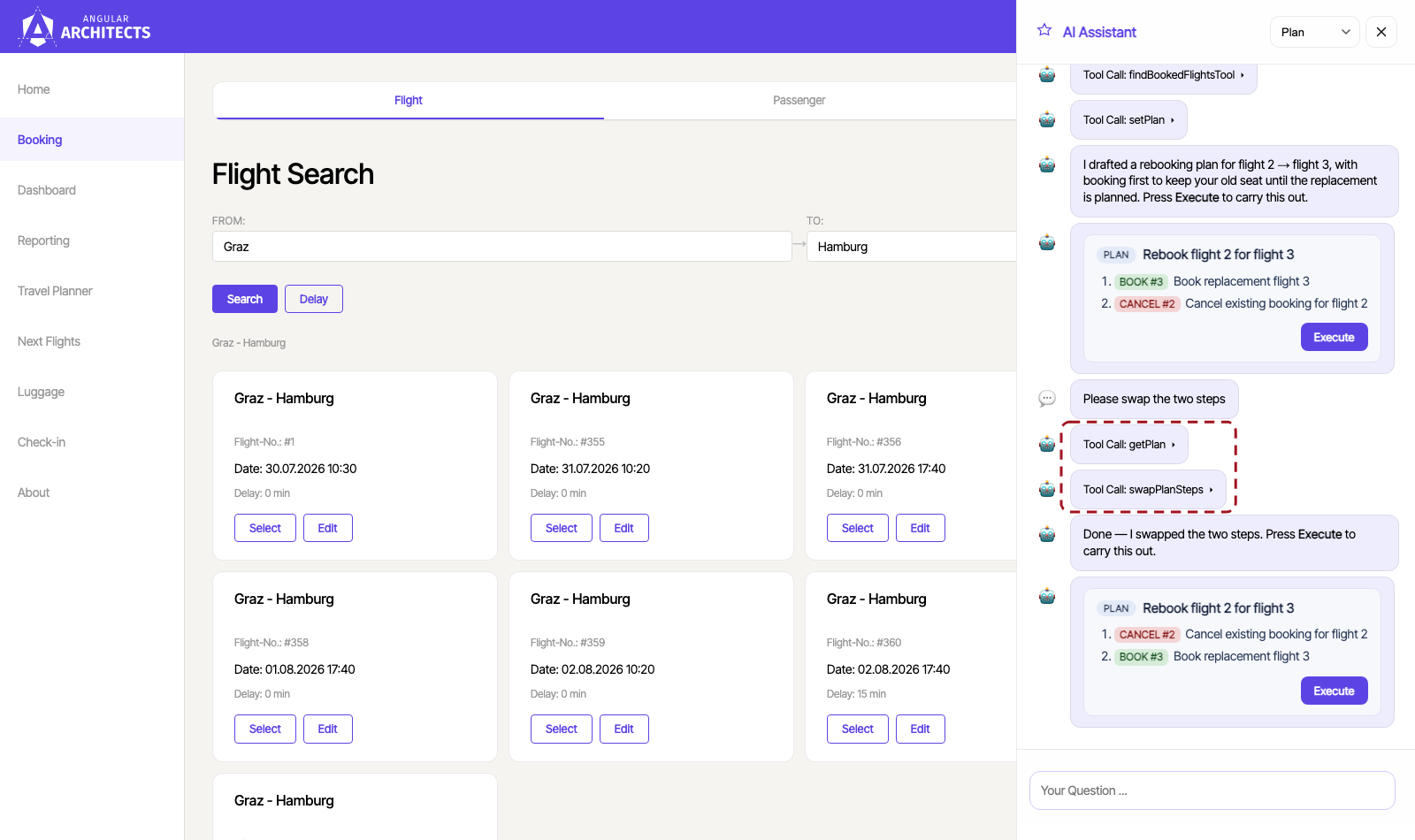
A tool that works with two stable IDs leaves the model almost no room for error. The alternative — the model outputting the entire plan anew for every change — sounds simpler but is the most error-prone variant of all: when re-outputting, steps can be lost, details can mutate, formulations can drift. The fine tools exclude this error class because the plan itself never travels through the model; it lives in application state, and the model only expresses change requests.
The same logic can be turned in the opposite direction. For complex actions with a fixed choreography — such as rebooking a flight: cancel plus rebook, in the right order, with rollback in case of errors — a deliberately coarse tool is the safer choice: a transaction in code rather than a choreography in the model.
The decision criterion is the same in both cases: degrees of freedom belong where judgment is required — and nowhere else. Which steps get swapped is decided by the model; how a rebooking runs transactionally correct is decided by code.
Agentic UI with Angular
If you want to embed such architectural decisions not just in isolated cases but systematically into larger applications:
In my book Agentic UI mit Angular, I go into these patterns and trade-offs in detail.
Workflows: The Model Understands, the Code Works
The decisions shown so far limit individual interactions. The next one concerns entire processes — and it is perhaps the most important architectural decision in agentic systems: dividing a process into agentic and deterministic steps.
The demo's travel planner assembles package tours — flights and hotels for a route like "Graz to Rome, with a dinner stop in Vienna." The fact that flights must be loaded first, then hotels, and a total plan emerges at the end is established before the first request arrives. There is no reason to have the model reinvent this order on every call — and plenty of reasons against it: reproducibility, testability, cost.
The demo therefore deliberately divides the work:
- An agent with a cheap, weak model extracts the criteria from the free user request — a rough plan of flight legs and overnight cities. Pure language understanding, no decisions.
- Deterministic workflow steps load the data with these criteria: flight candidates per leg, hotels per city. No model anywhere in sight.
- A finalizer agent with a stronger model makes the actual selection from the candidates — the only place where judgment matters.
- Code validates the selection before it reaches the user.
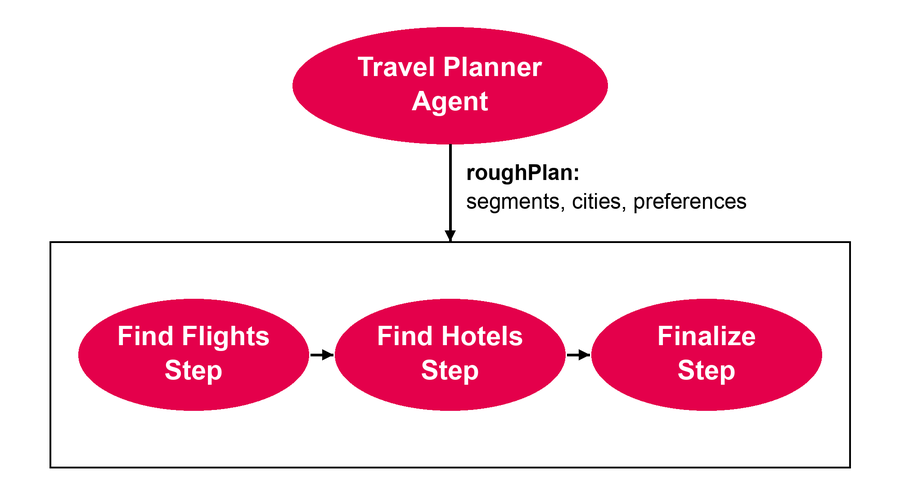
The first two workflow steps are ordinary TypeScript code: a loop over the flight legs of the rough plan fetches flight candidates per leg — a direct service call without a detour through a model — and similarly the second step loads the hotel options per overnight city.
Only the last step brings a model back into play. It weighs price against arrival time and hotel location against star category; its answer is validated against a target schema. And even it is not blindly trusted: afterward, code deterministically re-checks the selection — every chosen flight must actually be among the candidates for its leg, every hotel among the options for its city; otherwise, a fallback to the first candidate applies. Hallucinated flight numbers are thereby structurally excluded: the model selects, but the selection set is defined by code. That is precisely the reason for the entire workflow detour — it creates the places where code can control the model: before the model call through curated candidates, after it through validated selection.
For the user, this structure becomes visible because the step boundaries travel via AG-UI events into the client, which builds a progress display from them:
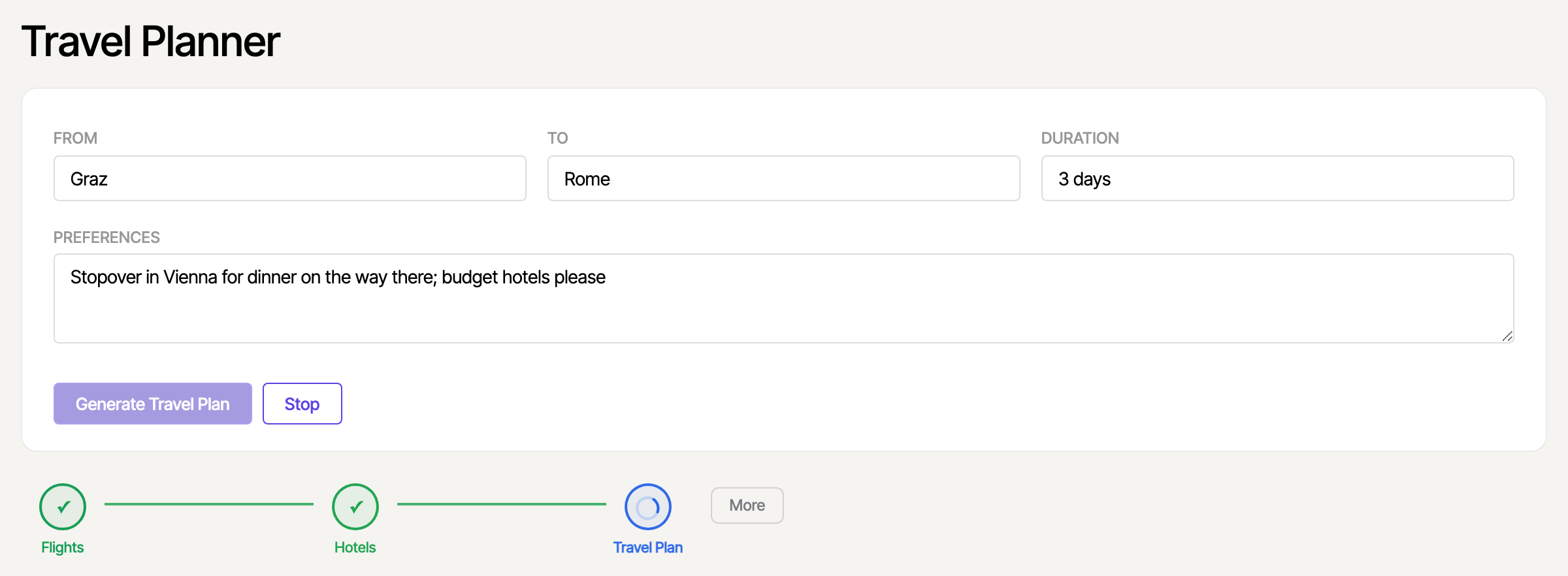
The division of labor pays off threefold. Cost: two of three steps consume no tokens at all, and the criteria extraction runs on the mini model. Quality: the finalizer sees only curated candidates instead of half the database. And reliability: order, data retrieval, and validation are code — testable with perfectly ordinary unit tests.
Determinism Does Not End at the Server
The decisions so far all live in the backend. The mindset behind them — trusting the model only where there is no deterministic alternative — does not end at the API boundary, though. A look into the Angular client shows the same pattern one level higher in the stack.
The travel planner renders its itinerary from the model's tool calls and could simply rely on the model outputting the hotels in the correct order next to the flights. But it does not: its store deterministically orders the hotels along the route — not just when the plan is first set, but on every plan change:
// src/app/domains/ticketing/feature-travel-planner/travel-plan-store.ts
withMethods((store) => ({
  setPlan(plan: TravelPlan): void {
    patchState(store, {
      summary: plan.summary,
      flights: plan.flights,
      hotels: orderHotelsByRoute(plan.hotels, plan.flights),
    });
  },

  addFlight(flight: FlightInfo): void {
    patchState(store, (state) => {
      const flights = upsertById(state.flights, flight);
      return { flights, hotels: orderHotelsByRoute(state.hotels, flights) };
    });
  },
  [...]
})),
The helper function orderHotelsByRoute assigns each hotel to the first flight leg that arrives in its city. The order the user sees is thus code, not model output:
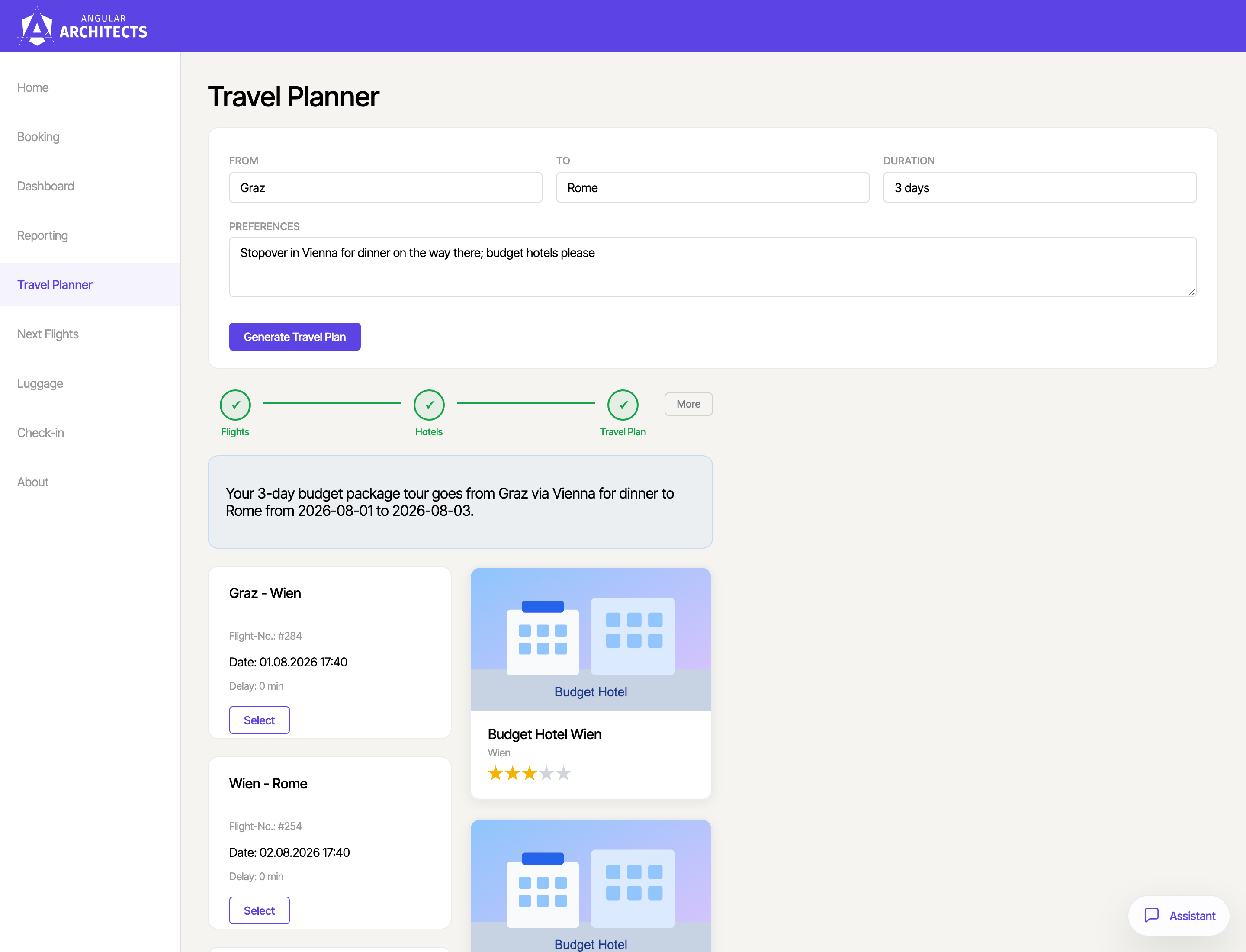
This is the same pattern as with the dashboard's DSL and the downstream check in the workflow: the model delivers content, but the structure — order, assignment, consistency — is ensured by deterministic code. Those who build Agentic UIs should treat their own client the same way as the server: reliability is a matter of code, even in the frontend.
Designing the Sandbox: Let the Model Write Code, Not Results
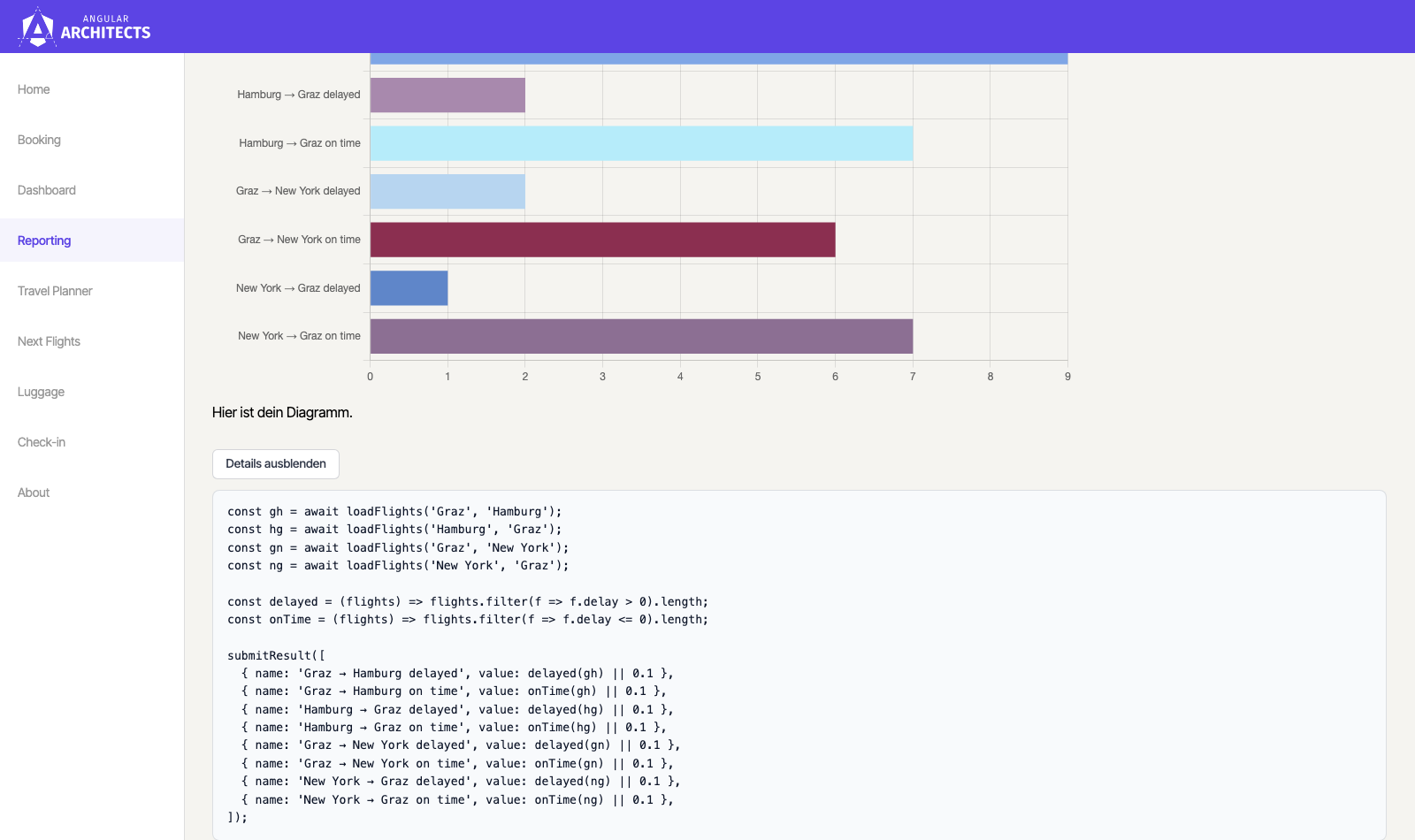
The final architectural choice is the most consequential—and, at first glance, the least intuitive. In the demo, the reporting page answers natural-language questions about flight data by producing a chart:
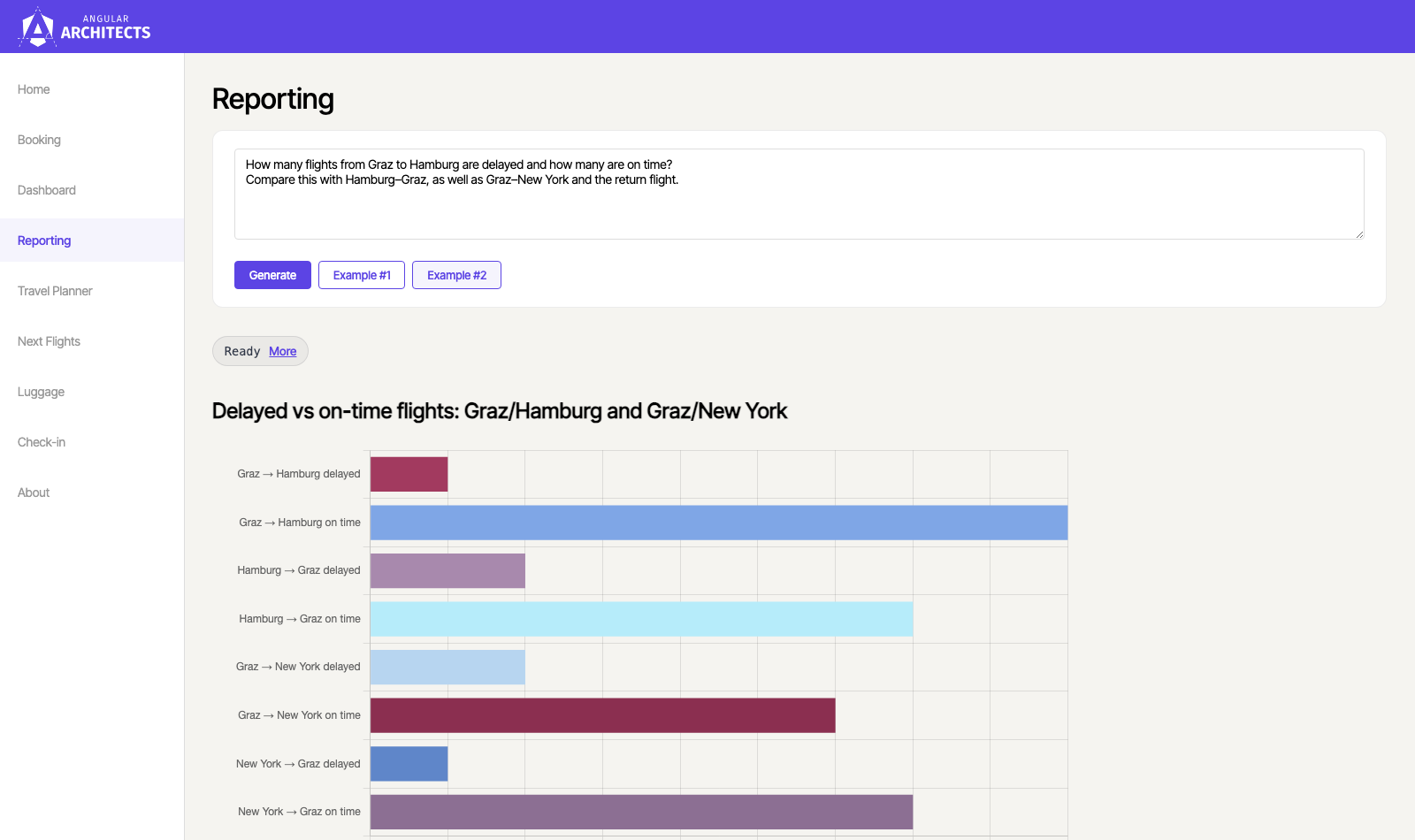
The obvious approach would be to feed the raw flight data to the model and let it compute the ratios itself. Frontier models have improved at this more than their reputation suggests—yet relying on them for arithmetic remains risky. Reliability degrades as the dataset grows, token-based processing makes arithmetic a persistent weak spot, and the deeper problem isn't the error rate but its invisibility: a miscalculated figure looks just like a correct one. There's also the economic dimension—every row of data would need to pass through the context window, consuming tokens and adding latency.
Where language models demonstrably excel, however, is generating code. So we invert the task: the model doesn't perform calculations—it describes how they should be performed, as a compact JavaScript snippet. Execution is handled by deterministic code, results become reproducible, and the snippet itself remains open to inspection.
Running LLM-generated code on your own server, though, demands an isolation layer, since the code is transitively derived from user input—whoever controls the prompt influences the code. The demo uses quickjs-emscripten: the QuickJS JavaScript engine compiled to WebAssembly. The model-generated code runs inside a fully functional but empty JavaScript world: communication with the outside is simply not part of the design—no network access, no filesystem, no visibility into the surrounding server process or its configuration. The only entry points are host functions we explicitly pass in.
The server-side tool executeJavaScript receives the model-generated code, runs it inside the Quickjs Emscripten sandbox, and derives the name/value pairs for the bar chart:
// ai-server/src/mastra/tools/execute-javascript.ts
const dataItemSchema = z.object({
  name: z.string(),
  value: z.number(),
});

const dataItemsSchema = z.array(dataItemSchema);

export const executeJavaScriptTool = createTool({
  id: 'executeJavaScript',
  description: `
    Runs a snippet of JavaScript inside a hardened QuickJS sandbox to
    aggregate flight data into chart-ready \`{ name, value }\` pairs. [...]
  `,
  inputSchema: z.object({
    code: z.string().describe(
      `
          Module body. Use \`await loadFlights(from, to)\` to load flights
          for each connection, aggregate into \`{ name, value }[]\`, then
          call \`submitResult(items)\` exactly once.
        `,
    ),
    title: z.string().describe('Human-readable chart title.'),
  }),
  outputSchema: z.object({
    data: dataItemsSchema,
    code: z.string(),
    title: z.string(),
  }),
  execute: async ({ code, title }) => {
    let captured: z.infer<typeof dataItemsSchema> = [];

    await runSandbox(code, {
      functions: {
        loadFlights: (from: string, to: string) => {
          return fetchFlights(from, to);
        },
        submitResult: (items: z.infer<typeof dataItemsSchema>) => {
          captured = items;
        },
      },
    });

    return { data: captured, code, title };
  },
});
The helper function runSandbox wraps the low-level quickjs-emscripten API to make it more ergonomic.
This example illustrates just how narrow those entry points become: loadFlights delegates to the same API used by the regular flight search. Generated code can therefore load only flight data—nothing else. submitResult, in turn, is the sole return channel: the snippet delivers its outcome through exactly one call to this function.
The data flow is worth noting: the raw flight data exists strictly inside the sandbox execution. The model never sees it—as a tool result, it receives only the finished aggregate, a few dozen bytes instead of hundreds of data rows. The sandbox thus serves not just as a security boundary but as a cost boundary as well. And via the Details button, you can review exactly what code the model wrote—a level of transparency no directly computing model could offer:
For those who want to push the principle of minimal attack surface even further, a general-purpose programming language isn't strictly necessary: for aggregations, a single expression in a query language like JSONata often suffices—no loops, no side effects, no JavaScript engine required. The trade-off mirrors the dashboard DSL: less expressive power in exchange for more control.
Key Takeaways
Every decision shown here follows the same principle: shrink the model's space of possibilities rather than police its outputs. The DSL removes the model's ability to produce unexpected markup. Minimal context transfer removes a compromised client's ability to inject instructions. Granular tools prevent the model from losing steps when restating a plan—and coarse, transactional tools prevent it from executing a choreography incorrectly. The workflow encodes ordering and selection sets in code, making hallucinated flight numbers structurally impossible. The client determines its own display logic. And the sandbox gives generated code an empty world with exactly two doors—the model specifies how to compute, rather than computing itself.
Architecture doesn't replace the other guardrails: input and output validation, human-in-the-loop patterns, approval flows, and budgets retain their roles. But it determines how much those checks still need to catch. When architecture is consulted first—can the model even make this error?—the remaining validation code, threshold tuning, and reliance on the day-to-day performance of a non-deterministic system all shrink. The guiding principle is simple: the model understands intent; structure, process, and guarantees come from code.
Interested in Production-Ready Agentic UI Architectures?
In my workshop, we cover AG-UI, A2UI, MCP apps, HITL patterns, and modern Angular architectures for real-world agentic systems.

FAQ
What does “Architecture as a Guardrail” mean?
It means making architectural decisions that structurally rule out unwanted agent behavior rather than detecting it afterward: a DSL that can only express what's intended; context that is never transmitted; tools shaped so that certain errors become impossible; workflows that fix ordering and selection sets in code; sandboxes that open only explicitly defined doors to generated code.
How do architecture guardrails differ from input and output checks?
Checks observe and intervene: they examine messages or responses and block, filter, or rewrite them—deterministically or with model support. Architecture guardrails operate earlier: they shape the system so that an entire class of errors cannot occur. Both complement each other—the more architecture excludes, the less work remains for checks to do.
How does a DSL make LLM outputs more controllable?
The model only translates the user request into a compact description defined by a Zod schema; the actual structure—such as the A2UI markup of a dashboard—is then produced by deterministic code. The model thus cannot express anything the DSL doesn't provide for. Side benefits: significantly faster generation, fewer tokens, and cacheability. The cost is reduced generative flexibility.
Why does the workflow combine a weak and a strong model?
Because the tasks differ in difficulty: extracting cities and dates from a sentence is reliably handled by an inexpensive mini-model, while weighing candidate options requires judgment and therefore a strong model. In between, deterministic steps load data without any model involvement, and after selection, code validates the result against the candidate lists—making hallucinated selections impossible.
Why have the model write code instead of computing the result directly?
Because language models are demonstrably strong at code generation but unreliable at arithmetic over larger datasets—and incorrect numbers are invisibly wrong. Generated code, by contrast, runs deterministically, is inspectable, and is reproducible. Inside a sandbox like QuickJS (isolated via WebAssembly, with time and memory limits and only explicitly passed host functions), the attack surface stays minimal, and raw data never has to travel through the context window.