
The Challenge
When I started on a fresh project a few months back, the main concern for our team was the sheer scale of the application and, consequently, its bundle size.
NOTE: Our codebase relied on importing partial _scss-variable files throughout. These partials should never make their way into the compiled CSS output.
Struggling with Size
Shrinking a bundle is a battle many of us know well. I'm obsessive about optimization and want the final bundle as lean as possible once the app is stable. Since this project kicked off around Feb 20, and getting familiar with a new codebase and team takes time, I held off on diving into performance work right away. I did implement lazy loading and migrated to Angular 9, which trimmed the bundle somewhat, but the idle bundle size I was aiming for remained out of reach.
A Glimmer of Hope
Success in these efforts relies on keeping hope alive. That hope arrived while I was resolving a bug, thanks to Igor who pointed me to source-map-explorer, for which I ended up building a custom Angular builder.
Once you integrate this builder and run it, it reports the size for every single chunk—services, components, directives, the Angular framework, and all third-party libs that contribute to what lands in your final bundle.
The analyzer produces output like this:
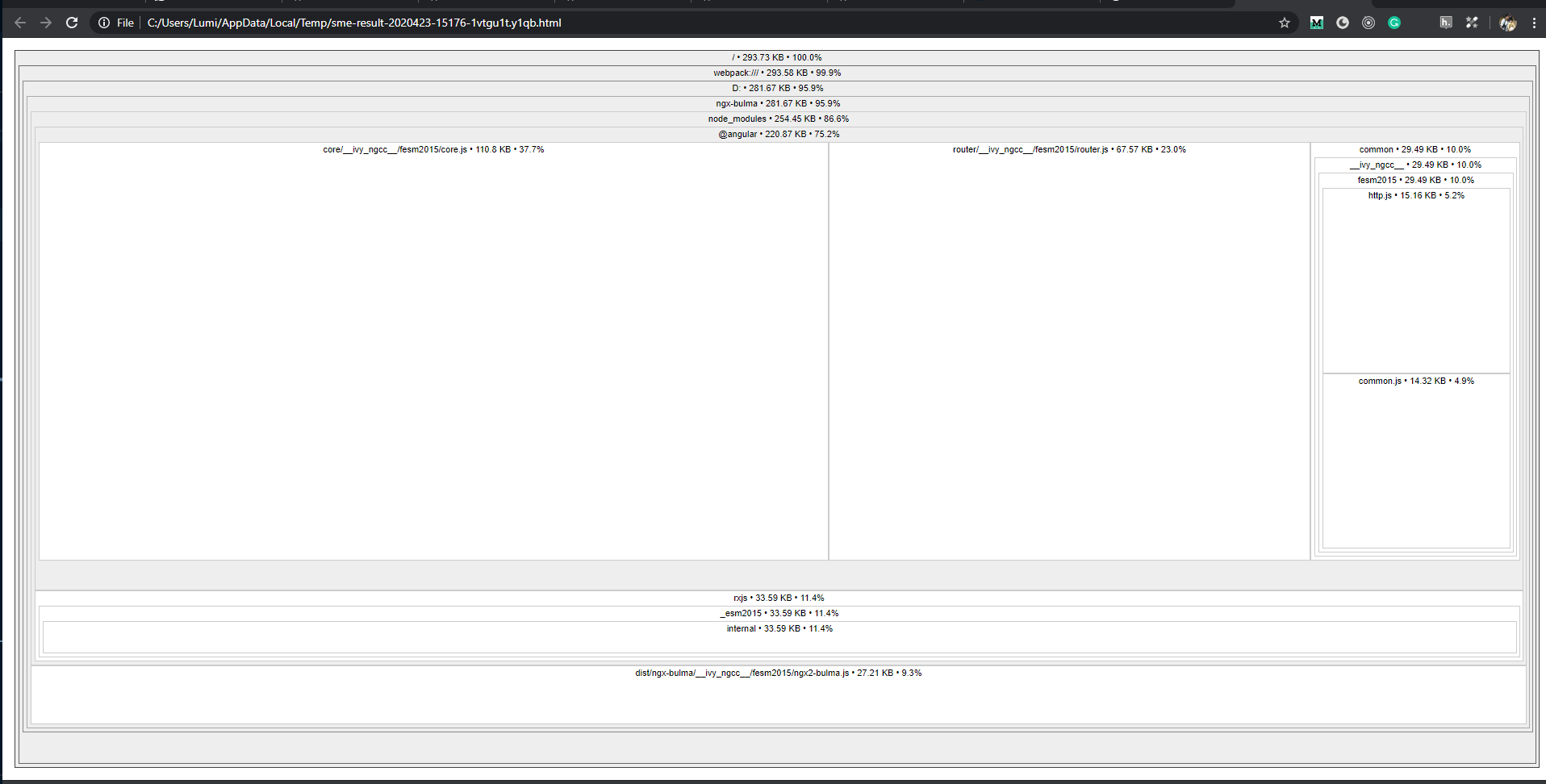
Analyzer Output 1.0
The numbers above cover the entire application. You can zoom out to uncover more details that are tucked away.
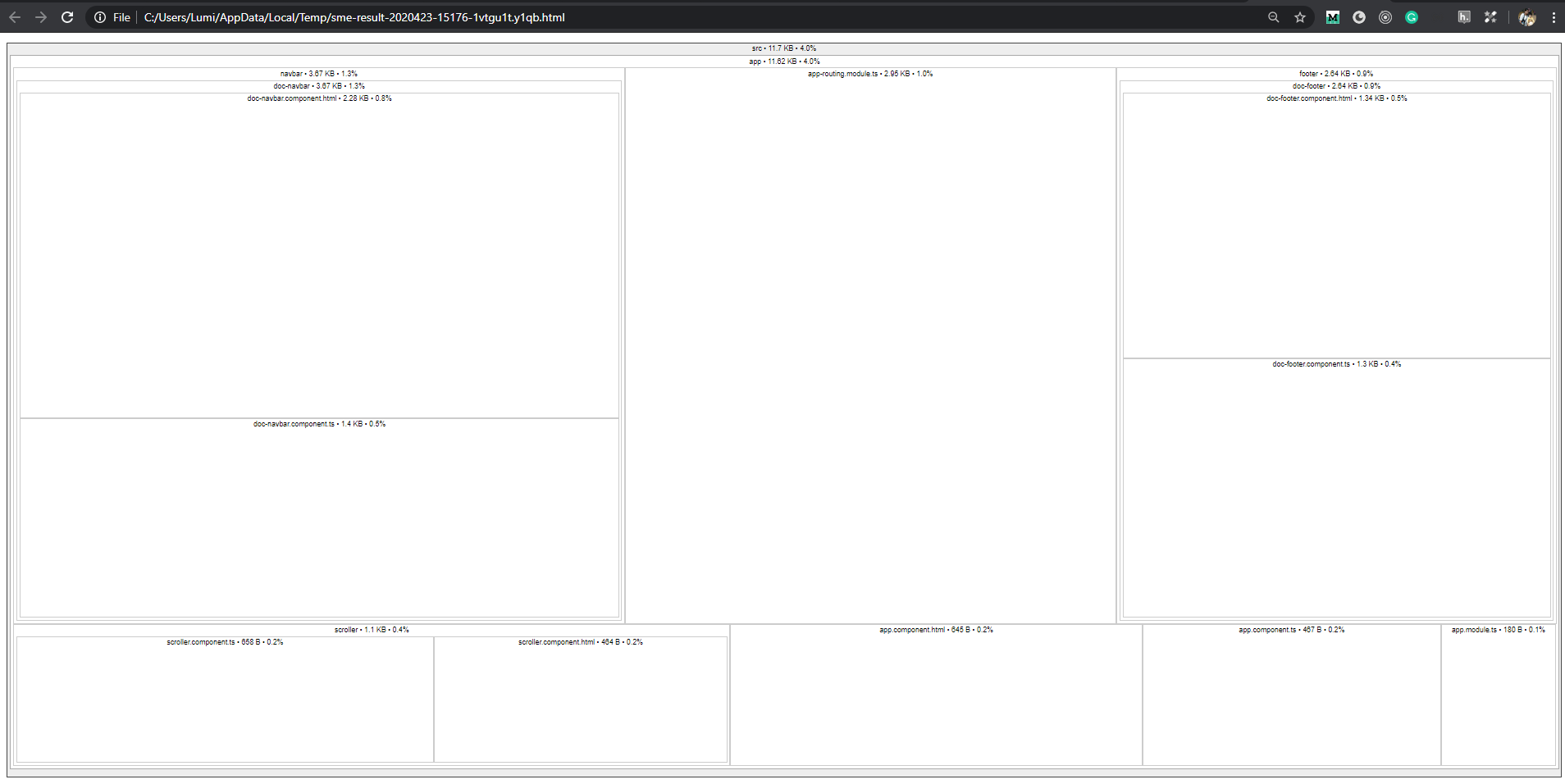
Showing Each Component Size 1.1
That image is what I saw after zooming and clicking on the src folder. Now I had the size for each and every component in the main bundle. The builder also lets you analyze lazy loaded chunks.
After reviewing the report for our app, I was taken aback—most components sat at a minimum of 90KB. That's massive when you consider we had around 160 components. And adding a new one only made things worse. Armed with the component sizes, I dug deeper to understand what was inflating them.
Identifying the Root Cause
Knowing the size was one thing; the next step was pinpointing the source of the bloat.
While tackling a bug, I stumbled upon this code snippet—you'll see that scss-variables is imported even though nothing from it is being used. I decided to delete it and re-run the analyzer. The bundle shrank by 20KB. That was just from a single component, and I knew there were more cases like this.
@import '../../../themes/scss-variables';

:host {
  .image,
  .placeholder,
  .spinner {
    display: none;
    width: 100%;
    position: relative;
  }
We were misusing SCSS, and it was driving up the bundle size.
Incremental Fixes
A lesson I've picked up over time: take slow, measured steps when you're new to a project. So I tackled one item at a time, and cleaning up unused SCSS imports was the first move.
Cleaning Up Dead Imports
To give you a sense of our setup, we rely on a custom Material theme, so there are plenty of SCSS files. We had custom-material-theme.scss with our custom colors, and I noticed some components were importing that file as well.
@import '../../../../themes/custom-material-theme';
@import '../../../../themes/scss-variables';

:host {
  .documents-list {
  }
}
That import was clearly pointless, but since it existed, it contributed to the growing bundle. The next step was to strip out every custom-material-theme.scss import. After this cleanup, we cut the main bundle by 250KB and shaved another 250-300KB off the lazy loaded modules.
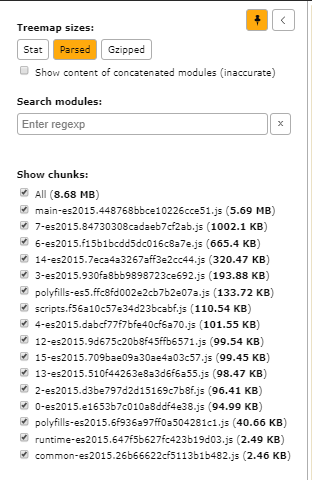
Before Removing Imports
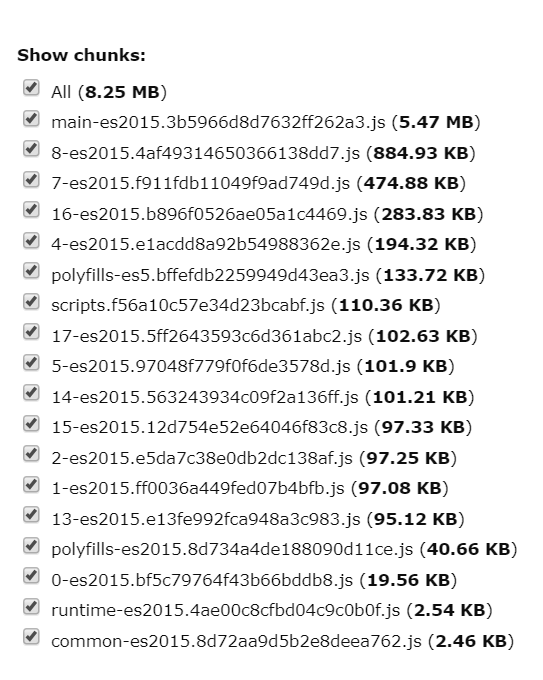
After Removing Imports
Implementing Budget Limits
Angular comes with a great safeguard: budgets to prevent bundle sizes from spiraling out of control. If you're not using them, you should be. When I got on board, I enabled the anyComponentStyle check, and the build started failing—many components had styles exceeding 65KB.
"budgets": [
  {
    "type": "initial",
    "maximumWarning": "2mb",
    "maximumError": "5mb"
  },
  {
    "type": "anyComponentStyle",
    "maximumWarning": "6kb",
    "maximumError": "10kb"
  }
]
Adjusting ViewEncapsulation
I'd worked with ViewEncapsulation before when building a component library at a prior job. We chose ViewEncapsulation.None because we wanted developers to have the freedom to override component styles. Most component libraries adopt this encapsulation mode for the same reason. What it does is push the styles into a global CSS file.
Let's walk through a demo to illustrate the problem. I'll skip the details on setting up a custom Material theme; you can grab the sample code from: https://github.com/santoshyadav198613/scssdemo
Once you've downloaded it, run this command:
npm run analyze
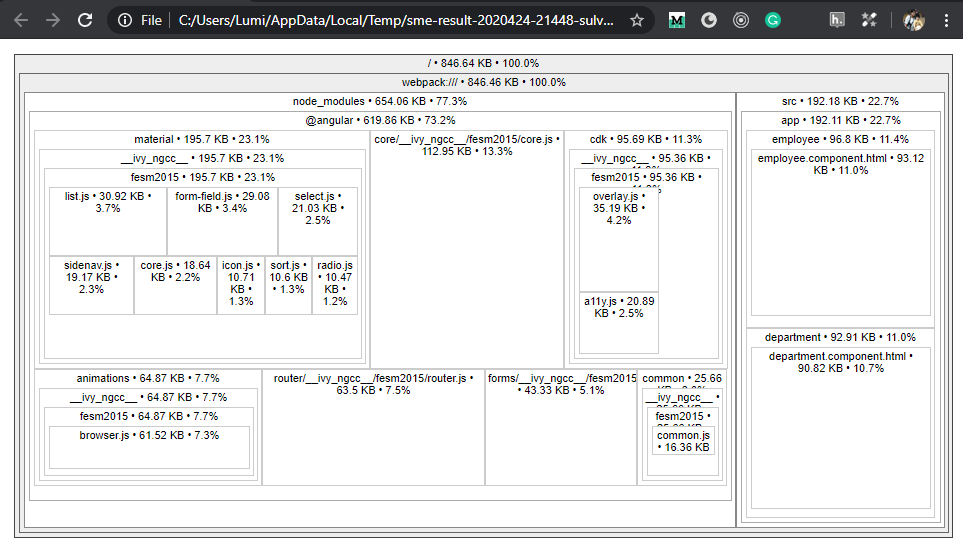
Notice the sizes for the employee and department components—they're each over 90KB, hitting close to the same issue we faced.
Now, let's fix it:
Open employee.component.ts and add the snippet below. We're enabling encapsulation: ViewEncapsulation_._None. Do the same for department.component.ts as well.
import { ViewEncapsulation } from '@angular/core';

@Component({
  selector: 'app-employee',
  templateUrl: './employee.component.html',
  styleUrls: ['./employee.component.scss'],
  encapsulation: ViewEncapsulation.None
})
Run the analyzer command again to see the updated bundle sizes.
npm run analyze
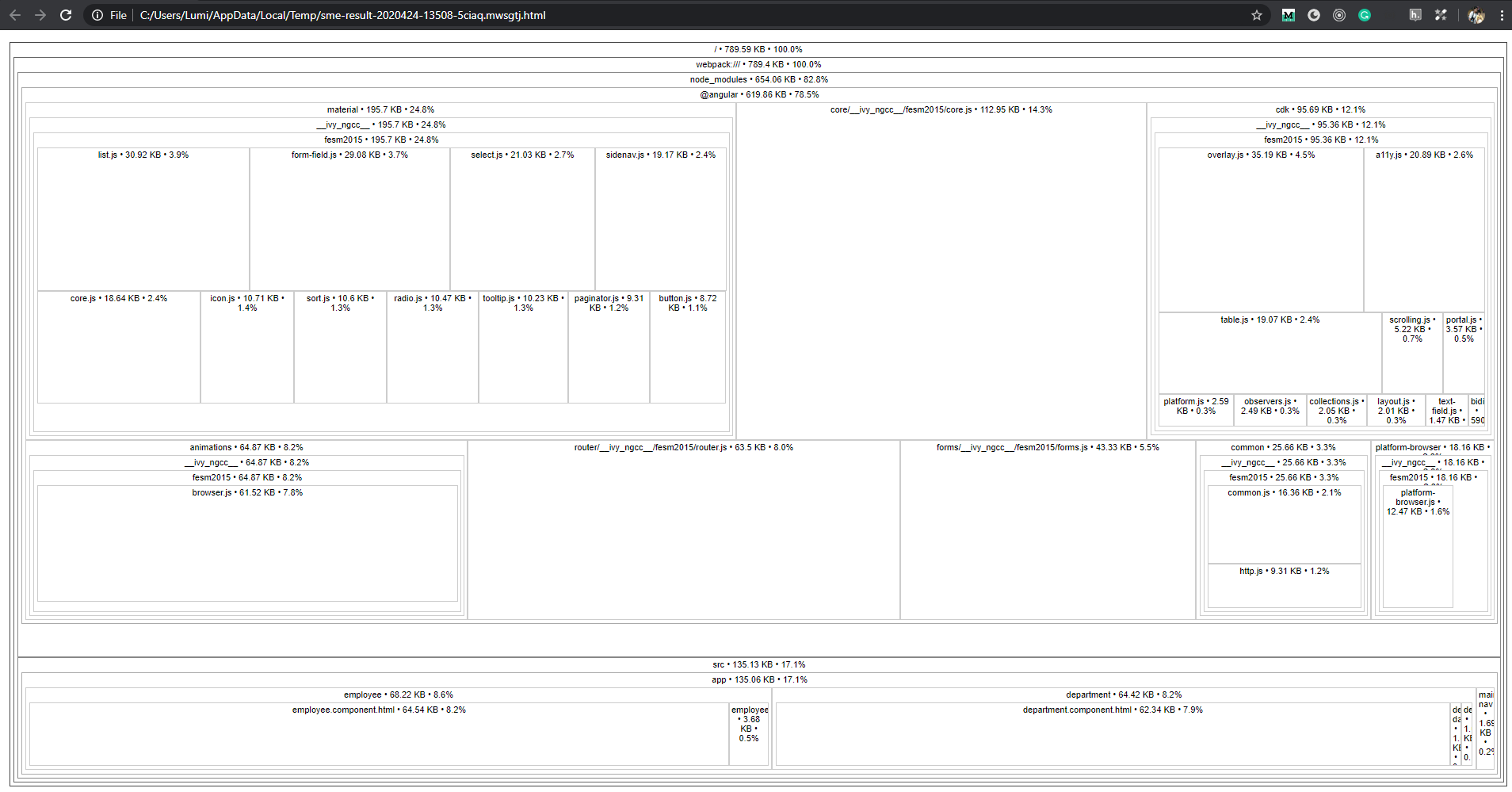
The employee and department components each dropped by about 25-30KB. That's just for one component—imagine the impact across a large project with dozens or hundreds of components; this could save megabytes.
But wait, there's a catch. Using ViewEncapsulation_._None sends the styles to the global file, which can cause conflicts. Let's add an <h1> element to both components to illustrate this.
// In employee component
<h1>Employee</h1>

// In department component
<h1>Department</h1>
Now add this styling in employee.component.scss
h1 {
  background-color: $color-nordic-blue;
  color: $color-white;
}
and this in department.component.scss
h1 {
  background-color: $color-green;
  color: $color-white;
}
Start the app with ng serve and you'll see both employee and department adopt the same styling—that's the side effect of having encapsulation set to None.
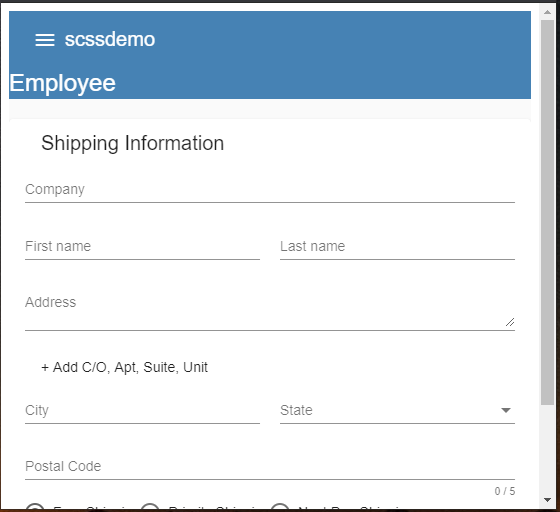
Employee View

Department View
We created another problem instead of just optimizing. Let's sort this out next.
NOTE: I've seen many projects relying on :host to scope styles. Take a look at your own code and see if you can replace it.
Scoping with HostBinding
HostBinding allows you to bind a DOM property as a host-binding property—that's what we'll use to fix this.
Open employee.component.ts and update it as shown:
@HostBinding('class') class = 'app-employee';
And for department.component.ts, use this:
@HostBinding('class') class = 'app-department';
With this change, a class named app-employee gets applied to EmployeeComponent, and app-department gets added to DepartmentComponent. Inspect the elements in dev tools to verify.


NOTE: The class name can be anything, but I like naming it the same as the selector so it's easy to remember for overrides later.
Next, wrap all your component styles inside these new classes.
Open department.component.scss and enclose all the CSS within app-department.
.app-department {
  h1 {
    background-color: $color-green;
    color: $color-white;
  }

  .full-width-table {
    width: $full-width;
  }
}
Do the same for employee.component.scss, then run the app again—everything should work. If you inspect the h1 tags and check the Styles tab, you'll see scoping like this:


Run the analyzer once more to confirm the bundle stays the same.
When to Avoid This Method
This technique pushes styles into the global stylesheet. If you don't want consumers to override component styles, steer clear of this approach.
Impact on Our Project
Curious about the effect on our own app? Here are the numbers, and we're still not done optimizing.
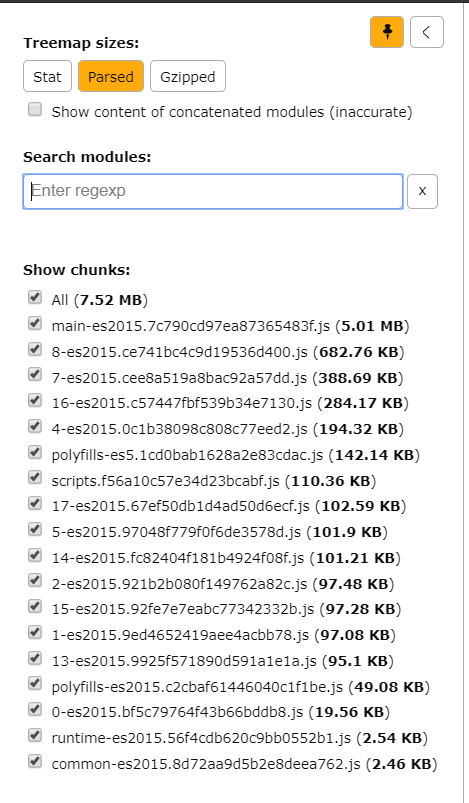
Bundle Size
Final Thoughts
Our app's bundle was hefty, and it worried me from day one. At first, I turned to standard tactics like lazy loading—that did help—but it didn't uncover why the chunks were still bloated. Getting a per-component size breakdown gave me the insight I needed to locate the problem areas.
We swapped out all the :host usages for @HostBinding('class') combined with ViewEncapsulation_._None, and that delivered a major reduction in bundle size.
During code reviews, be diligent—verify imports are actually necessary and being used properly.
The improved code can be found at https://github.com/santoshyadav198613/scssdemo/tree/feat–add-encapuslation
If you're facing similar bundle size issues, give this a try and share your results with the community.