Understanding the Foundations of React-Spring
Animations play a crucial role in shaping user experience, bringing a layer of polish and interactivity to applications. However, crafting animations that perform well across a wide range of browsers and devices can be a challenging endeavor. This calls for a solution that is both efficient and straightforward when it comes to creating and controlling animation flows.
As the saying goes — "Animations breathe life into UI components."
React has grown into a mature front-end framework where virtually anything can be achieved. From styling techniques to complex state management, the ecosystem offers numerous paths for any given task, and animations are no exception. You can animate React interfaces using pure CSS, direct JavaScript, or through third-party libraries. While these approaches are valid, they can sometimes introduce friction. That's where React-Spring comes into the picture — a library designed specifically to streamline animation handling for React elements with strong performance characteristics.
React-Spring leverages spring physics to provide a modern and flexible animation experience. In essence, it merges the ease of use from React-motion with the robust interpolation and high-performance animation capabilities that developers expect from modern tools. This makes it an excellent companion for anyone looking to animate React components without the typical overhead.
Core Concepts of React-Spring
The library offers APIs for both functional and class-based components. While the hooks API is the primary focus for the modern React developer, the underlying concepts translate directly to its class-based components. Given the broader community shift towards functional architecture, the examples here use the hooks-based approach.
At the heart of the library is the concept of a spring. In this context, a spring is used as a basic gatekeeper— it controls the transition of a specified value from its source point to its destination. Think of it as the principle that guides an element from state 'a' to state 'b' smoothly.
There are five distinct hooks that form the foundation of React-Spring:
- useSpring — manages the animation of a single element between two points.
- useSprings — handles a collection of springs, typically used for lists where each item animates independently.
- useTransition — focuses on adding and removing elements to/from the DOM.
- useTrail — orchestrates multiple springs that follow one another sequentially.
- useChain — sequences animations by setting an order in which they occur.
Building a Simple Illustration
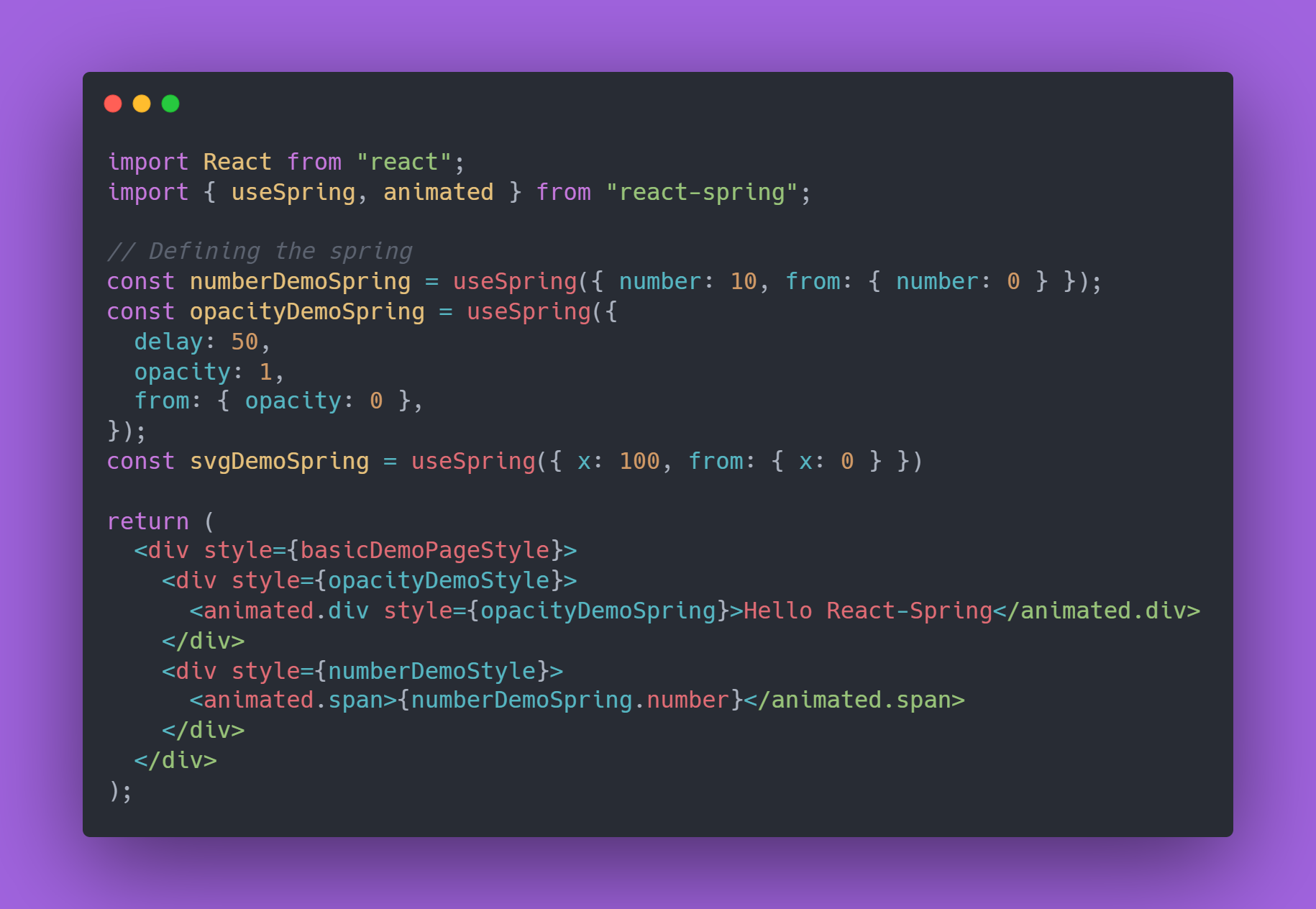
A simple useSpring example
In this demonstration, the useSpring hook is called twice to set up two separate animation states. In the first instance, an object labeled from contains the starting value, while the number property holds the end value for that numeric animation. The second call also uses a from object for its initial configuration, followed by an opacity property (define the ending opacity) and a delay property that adds a time buffer before the animation kicks off. Additionally, the library's animated component is used as a wrapper to apply these dynamic values efficiently.
React-Spring's abilities go beyond numeric values — springs can handle CSS properties, color values, lengths (both absolute and relative), angles, scroll positions, certain HTML attributes, and even string patterns, making it highly versatile.
Exploring Compound Animations
import React from "react";
import { useSpring, animated } from "react-spring";
import "../style.css";

const calc = (x, y) => [
	-(y - window.innerHeight / 2) / 20,
	(x - window.innerWidth / 2) / 20,
	1.1,
];
const trans = (x, y, s) =>
	`perspective(600px) rotateX(${x}deg) rotateY(${y}deg) scale(${s})`;

const cardContainerStyle = {
	margin: "auto",
	width: "30%",
	marginTop: "15vh",
};

export const UseSpringDemoPage = () => {
	const [props, set] = useSpring(() => ({
		xys: [0, 0, 1],
		config: { mass: 5, tension: 350, friction: 40 },
	}));
	return (
		<div style={cardContainerStyle}>
			<animated.div
				class="card"
				onMouseMove={({ clientX: x, clientY: y }) => set({ xys: calc(x, y) })}
				onMouseLeave={() => set({ xys: [0, 0, 1] })}
				style={{ transform: props.xys.interpolate(trans) }}
			/>
		</div>
	);
};
Code snippet for a 3D card
The code example illustrates how to animate a card in 3D space. To achieve this, an array named xys is used to track the X, Y, and scale axes, while a config object is set up to define the physical characteristics — such as mass, tension, and friction — that dictate how the spring behaves.
On the card element itself, event handlers like onMouseMove and onMouseLeave are bound. These calculate the cursor's coordinates relative to the element and use the interpolate method from React-Spring to apply thoughtful transform values based on the cursor position.
Interpolation here is the technique where the library generates new animation outputs by combining elements of these updates. Known as interpolate in React-Spring, this method is instrumental in weaving together various state changes into a single flowing motion.
Managing Dynamic Lists and Transitions
Beyond a single spring, the useTransition hook expands your creative control, allowing you to manage a list of components as they mount, unmount, or reorder. This is where the animation logic gets particularly powerful—each item adheres to the same transition rules you define at the hook level.
import React, { useState, useCallback } from "react";
import { useTransition, animated } from "react-spring";
import "../style.css";

const items = [
	({ style }) => (
		<animated.div
			style={{
				...style,
				background:
					"url(https://images.pexels.com/photos/1904769/pexels-photo-1904769.jpeg?auto=compress&cs=tinysrgb&dpr=1&w=500) no-repeat",
			}}
		/>
	),
	({ style }) => (
		<animated.div
			style={{
				...style,
				background:
					"url(https://images.pexels.com/photos/775201/pexels-photo-775201.jpeg?auto=compress&cs=tinysrgb&dpr=1&w=500) no-repeat",
			}}
		/>
	),
	({ style }) => (
		<animated.div
			style={{
				...style,
				background:
					"url(https://images.pexels.com/photos/2387866/pexels-photo-2387866.jpeg?auto=compress&cs=tinysrgb&dpr=1&w=500) no-repeat",
			}}
		/>
	),
];

export const UseTransitionDemoPage = () => {
	const [index, setIndex] = useState(0);
	const onClick = useCallback(
		() => setIndex((state) => (state + 1) % items.length),
		[]
	);
	const transitions = useTransition(index, (p) => p, {
		from: { opacity: 0, transform: "translate3d(0, 100%, 0)" },
		enter: { opacity: 1, transform: "translate3d(0, 0%, 0)" },
		leave: { opacity: 0, transform: "translate3d(-50%,0,0)" },
	});

	console.log(transitions);

	return (
		<div className="useTransitionDemoPage">
			<div className="simpleTransitionDemo" onClick={onClick}>
				{transitions.map(({ item, props, key }) => {
					const Page = items[item];
					return <Page key={key} style={props} />;
				})}
			</div>
		</div>
	);
};
Code snippet for a transition demo
In the given example, a set of images is being managed as items. The useTransition hook call establishes the animation sequence: a from configuration for entering, plus custom logic for the enter and leave states within the defined styles object.
The hook returns an array of phase objects that basically signal whether an item is being added to the DOM, removed, or in a sustained state. In the rendering logic, we spread the result onto transitions.map() and attach them to their respective elements in the pagination. This pattern allows for a smooth transition as the user interacts with within the list.
Observing its Effect in Action
Description of the final output
Concluding Thoughts
While implementing animations can be a tricky part of front-end development, having an approach that is both simplified and optimized makes the process much more approachable, empowering developers to craft fluid interfaces. React-Spring stands out as a powerful, well-structured library to incorporate those polished touches into React components.
We've explored how you can have fun with useSpring for direct animations, useTransition for dynamic list management, and touched on other core hooks. React-Spring proves to be a flexible utility that doesn't overcomplicate things. I hope these examples show you how easy it can be to integrate rich animation into your next React project. Special mention to the contributors over at React-Spring for crafting such a resourceful library.
The complete code samples are available at this GitHub repository:
[
ritesh-sharma33/react-spring-example
Created with StackBlitz ⚡️. Contribute to ritesh-sharma33/react-spring-example development by creating an account on GitHub.
GitHubritesh-sharma33
](https://github.com/ritesh-sharma33/react-spring-example)
Thanks for taking the time to read this. Your patience is much appreciated.