
Introducing the New Typed Forms API
The fourteenth major release of Angular ships with a significant upgrade to the Reactive Forms module. I originally touched on this during the fourth Angular Meetup, and after spending more time with the framework, I'm returning to the subject to walk through the key highlights and outline a set of recommended practices.
In essence, the new API assigns explicit types to the values stored inside FormControl instances, and it also types the collection of controls contained within structures like FormGroup, FormArray, and the newly introduced FormRecord.
For the following examples, I will deliberately instantiate controls using their constructors rather than the more conventional FormBuilder. This approach lets us examine the precise modifications made to each class.
Initializing a Control
const nameControl = new FormControl(‘John’);At first glance, the initialization syntax appears unchanged.
Previously, however, the nameControl.value property would have surfaced as type any. Now, the inferred type is string | null.
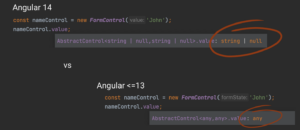
Harnessing strongly typed values shields us from a class of bugs that arises when a value is manipulated in a manner inconsistent with its true type. This also enhances the developer experience, as the IDE can offer intelligent autocompletion and flag potential type conflicts at design time.
To guarantee that the stored value aligns with the declared type, the entire API of the FormControl class has been updated. Consequently, methods like setValue, patchValue, and reset now accept arguments that strictly conform to the control's generic type.
Initializing a FormGroup
const addressForm = new FormGroup({
  line1: new FormControl(''),
  country: new FormControl('PL'),
});
The generic type of a FormGroup is derived from the types of its constituent controls. Given such an initialization, TypeScript infers the structure automatically:
{
  line1: FormControl<string | null>,
  country: FormControl<string | null>,
}
This improvement eliminates the prior need for type casting when accessing nested controls. In the past, each control was loosely typed as AbstractControl without any information about its value type.
To facilitate this inference, restrictions have been placed on removing controls. If a control is to be removable from a FormGroup, it must be explicitly designated as optional. This optional state is mirrored in the value type that the FormGroup exposes.
A similar rule applies to adding controls post-initialization. To introduce a control not present in the initial value, its corresponding key must be declared as optional within the FormGroup's generic type.
Direct Generic Type Specification
Manually specifying the generic type for a complex form can become a verbose and cumbersome undertaking that clutters the form's declaration. It’s generally advisable to lean on TypeScript's inference capabilities whenever feasible. The optionality of controls is one of the few scenarios where explicit type specification becomes necessary.
In my experience, this particular situation is infrequent, and given its inherent complexity, a deep dive is better suited for a future, dedicated case-study article.
Another instance where type inference falls short is when a form is passed down to a child component through an input. This challenge can be sidestepped by re-thinking how the form is shared. For instance, we can hoist the creation logic into a dedicated "presenter" service. This service is provided at the parent component's level and is injected into both the parent and child components. This pattern allows for convenient form sharing while leveraging the type inferred directly from its initialization.
Dealing with Dynamic Control Sets
A common question arises: "What if I don't know the exact set of controls or their keys ahead of time, as they are added dynamically based on user actions or server responses?"
For these scenarios, the FormArray or the brand-new FormRecord class are the tools of choice. FormRecord, akin to FormGroup, stores controls under string keys but does not mandate their explicit declaration upfront.
Let's first examine FormArray, which permits adding or removing controls on the fly, with the condition that they are compatible with the array's generic type.
Example of FormArray Initialization
const readBooks = new FormArray([
      new FormControl('The Black Obelisk'),
      new FormControl('Arch of Triumph'),
    ]);
The type of controls a FormArray can accommodate is inferred from the controls passed during initialization or from an explicitly provided generic type. When initializing an empty FormArray, providing the type explicitly is crucial. If we initialize it with an empty array and don't specify the type, the array becomes practically useless, as we are unable to add any controls to it. A correct initialization is shown here:
const readBooks = new FormArray<FormControl<string | null>>([]);However, some might prefer key-based access over a list. For such cases, we turn our attention to the new FormRecord class.
Example of FormRecord Initialization
const readBooksByAuthor = new FormRecord({
  'Erich Maria Remarque': new FormArray([
    new FormControl('The Black Obelisk'),
    new FormControl('Arch of Triumph'),
  ]),
});
This example showcases a doubly dynamic structure: a map of authors, each with a list of books. The generic type passed to FormRecord defines the kind of control it can store. In this case, that type is FormArray<FormControl<string | null>>. When creating an empty FormRecord, this generic type must be passed in explicitly.
Understanding the Null in the Type
You may have noticed null appearing within the generic type of initialized FormControls. This is because the default behavior of the reset method is to set the control's value to null. Consequently, the type must reflect the possibility that the value could be null.
This default reset action carries some risk. It's easy to inadvertently introduce a null into a location where it's not expected, potentially creating a subtle and hard-to-trace bug. Consider the earlier addressForm example with a default county value of 'PL'. Calling reset on the entire form without arguments would set the country control to null, overwriting the intended default.
More often than not, we anticipate a form reset to restore its pre-interaction state. To accommodate this expectation, a new property, nonNullable, has been added to the control configuration props.
Initializing a nonNullable FormControl
const nameControl = new FormControl('', { nonNullable: true });With this configuration, calling reset will restore the control to its initial value. As a bonus, the generic type is narrowed, omitting null from the possible value set.
FormBuilder and NonNullableFormBuilder
Employing FormBuilder can significantly reduce the boilerplate code associated with form initialization. When constructing a FormGroup or FormArray with it, we don't need to wrap values in FormControl instances, as the builder handles that automatically.
Consider the following example of form initialization using an injected FormBuilder (fb):
const addressForm = this.fb.group({
  line1: '',
  city: 'PL',
});
The advantages become even more pronounced when we want to mark all controls as nonNullable following recommended practices. For this purpose, a dedicated NonNullableFormBuilder class is available. It can be injected directly via dependency injection, and its use ensures that all created controls default to the nonNullable setting.
Handling Create and Edit Modes
Let's consider a component hosting a form that operates in either "create" or "edit" mode. The mode depends on whether data is passed to the component via an input, which is used to initialize the form in edit mode.
A common pattern is to initialize the form inside the OnInit hook, using the incoming data if present or falling back to default values otherwise.
This approach has a fundamental flaw: by decoupling the form's declaration from its initialization, we prevent TypeScript from inferring its type structure.
To overcome this, we can initialize the form with default values at the point of declaration and, should data arrive later, populate the form using the setValue or patchValue method.
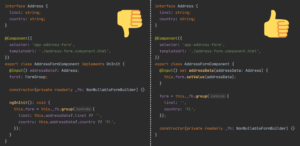
This strategy ensures the form is fully populated. Moreover, combined with the use of NonNullableFormBuilder, the behavior of the reset method becomes predictable; it will consistently revert the form to its default state, which also represents its starting point in creation mode.
In the scenario above, all controls store simple strings. Thus, the default empty control value can be an empty string.
But what if we are working with Number or Date controls? In those instances, an initial value of null might be more appropriate than a default number or a specific date. A clean solution is to cast the "initial null" to the type expected by the control.
Here is an example:
addressForm = this._fb.group({
  line1: '',
  country: 'PL',
  countryCode: null as number | null,
  creationDate: null as Date | null
});
Simplifying the Migration Path
Updating to v14 automatically renames all existing usages of the form classes to their untyped legacy equivalents (UntypedFormControl, UntypedFormGroup, UntypedFormBuilder, etc.). This facilitates a step-by-step migration to the new typed API and makes it easy to spot which forms have already been refactored.
Recommended Practices and Tips
Below is a compilation of best practices and tips for working with typed forms:
- If you haven't already, update Angular and start leveraging typed forms.
- Prioritize TypeScript's type inference. Avoid explicitly declaring types unless absolutely necessary (i.e., for initially empty
FormArrayandFormRecord). - Be wary of explicitly specifying a form's type—its declaration should always be paired with its initialization. For data that arrives asynchronously, use
setValue/patchValueto fill it in. - Configure controls with the
nonNullableflag to tighten their types. - Prefer
FormBuilder, and specificallyNonNullableFormBuilder, for creating forms and controls. - Access nested controls via the
controlsproperty instead of thegetmethod. Usinggetcauses the type to be widened toAbstractControl<string> | null, losing the specificFormControl<string>type. - Be aware that reading data via the
valueproperty of a container excludes any disabled controls. This is reflected in the value type, where disabled controls are marked withundefined. If you want to include disabled controls in the output, or if you wish to avoid theundefinedunion in the type, consider using thegetRawValuemethod. Alternatively, you can read directly from the specific control'svalue.
Guaranteeing Runtime Compliance with Types
Unfortunately, we cannot be entirely certain the value stored at runtime will always align with the declared type.
There is always a risk of type mismatch between a variable and its declared type in JavaScript. To mitigate this, we can enforce strict typing measures, such as enabling TypeScript's strict mode.
However, mismatches can also originate from Angular's own form bindings. When a control is bound to an input element, Angular lacks a mechanism to validate that the type of data coming from the user interface matches the type the control expects.
Here's an illustrative example:
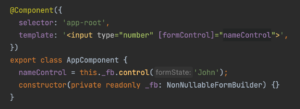
The compiler will not flag this as an error here. After user interaction, the control could contain numbers instead of strings. At this point, there is no immediate remedy. The author of Typed Forms acknowledges this as a known limitation but hints that solving it is on the roadmap (see the RFC, under the "Control Bindings" section).
Final Thoughts
We highly recommend incorporating typed forms into your upcoming projects.
Please share your experiences, any obstacles you've faced, and your overall impression of this new feature in the comments below!