Understanding CSS Modules
If you are new to CSS Modules, there are several well-written guides that explain the concept in detail. I suggest reviewing them before proceeding:
The case for CSS Modules in Angular projects
There are several situations where adopting CSS Modules in an Angular application makes sense:
- When your application is embedded as a web-component or rendered inside an iframe on a third-party site, and you need to protect your styles from being overridden by the host page.
- When you have set ViewEncapsulation.None globally, CSS Modules can prevent accidental style clashes between your own components.
- When external libraries bring in their own styles that conflict with yours, CSS Modules offer a way to isolate your rules.
Bringing CSS Modules into Angular
The integration relies on two tools: postcss-modules and posthtml-css-modules.
During the build process, postcss-modules takes every class name defined in your style files and transforms it into a unique hashed identifier.
Illustration: consider a style file named app.component.scss
.grid-container {
    display: grid; grid-template-rows: auto;
    grid-template-rows: 90px calc(100vh - 170px) 80px;
    width: 100vw; height: 100vh;
}

.header {
    background-color: #1ba0f7;
    display: flex;
    align-items: center;
    justify-content: flex-start;
    img {
        width: 64px;
        height: 64px;
    }
}

.footer {
    background-color: #1ba0f7;
}
Contents of app.component.scss
Once processed, every class selector gets rewritten as shown here:
._3Kuna {
    display: grid;
    grid-template-rows: auto;
    grid-template-rows: 90px calc(100vh - 170px) 80px;
    width: 100vw;
    height: 100vh;
}

._2-SC8 {
    background-color: #1ba0f7;
    display: flex;
    align-items: center;
    justify-content: flex-start;

    img {
        width: 64px;
        height: 64px;
    }
}

._2w5qX {
    background-color: #1ba0f7;
}
app.component.scss after processing with postcss-modules
Following this step, postcss-modules generates a companion .json file for each style sheet. This file holds the key-value pairs that map the original class names to their hashed counterparts. For app.component.scss, the generated mapping file is named app.component.scss.json:
{
  "grid-container":"_3Kuna",
  "header":"_2-SC8",
  "footer":"_2w5qX"
}
Contents of app.component.scss.json
In the next stage, posthtml-css-modules scans every component.html template and substitutes each class with the corresponding hashed value found in the .json mapping.
For this mechanism to work, the regular class attribute in your templates must be renamed to css-modules so that posthtml-css-modules knows which tokens need rewriting.
Here's an instance where posthtml-css-modules processes app.component.html. Observe that the attribute is css-modules rather than class:
<div css-module="grid-container">
  <div css-module="header">
    <a href="https://angular.io/" target="_blank">
      <img src="assets/img/angular_logo.png">
    </a>
  </div>
  <div>
      <router-outlet></router-outlet>
  </div>
  <div css-module="footer">
  </div>
</div>
app.component.html before transformation
After processing, the attribute css-module is converted back to class, and the hashed class name is inserted as its value:
<div class="_3Kuna">
  <div class="_2-SC8">
    <a href="https://angular.io/" target="_blank">
      <img src="assets/img/angular_logo.png">
    </a>
  </div>
  <div>
      <router-outlet></router-outlet>
  </div>
  <div class="_2w5qX">
  </div>
</div>
app.component.html after transformation
This is the core workflow for using CSS Modules in an Angular setup. The remaining question is:
How do we run these tools on every build?
The @angular-builders/custom-webpack package gives us the ability to modify the default build configuration of an Angular application. With it, we can inject these two plugins into the build pipeline.
Initially, we need to add the necessary dependencies:
npm install @angular-builders/custom-webpack
postcss-modules posthtml-css-modules posthtml-loader raw-loader lodash -D
Command to install required packages
After that, we must instruct the Angular builder to use our custom configuration. To accomplish this, I placed a file named extra-webpack.config.js at the project root:
const postcssModules = require('postcss-modules');
const path = require('path');
const AngularCompilerPlugin = require('@ngtools/webpack');

module.exports = (config, options) => {
    /*  SCSS EXTEND */
    const scssRule = config.module.rules.find(x => x.test.toString().includes('scss'));
    const postcssLoader = scssRule.use.find(x => x.loader === 'postcss-loader');
    const pluginFunc = postcssLoader.options.plugins;
    const newPluginFunc = function () {
        var plugs = pluginFunc.apply(this, arguments);
        plugs.splice(plugs.length - 1, 0, postcssModules({ generateScopedName: "[hash:base64:5]" }));
        return plugs;
    }
    postcssLoader.options.plugins = newPluginFunc;

    /*  HTML EXTEND */
    config.module.rules.unshift(
        {
            test: /\.html$/,
            use: [
                { loader: 'raw-loader' },
                {
                    loader: 'posthtml-loader',
                    options: {
                        config: {
                            path: './',
                            ctx: {
                                include: { ...options },
                                content: { ...options }
                            }
                        },
                    }
                },
            ]
        },
    );

    const index = config.plugins.findIndex(p => p instanceof AngularCompilerPlugin.AngularCompilerPlugin);
    const oldOptions = config.plugins[index]._options;
    oldOptions.directTemplateLoading = false;
    config.plugins.splice(index);
    config.plugins.push(new AngularCompilerPlugin.AngularCompilerPlugin(oldOptions));
    return config;
};
Contents of extra-webpack.config.js
Next, the angular.json file needs to be adjusted to point to this new configuration object:
{
  "$schema": "./node_modules/@angular/cli/lib/config/schema.json",
  "version": 1,
  "newProjectRoot": "projects",
  "projects": {
    "angular-css-modules": {
      ...
      "root": "",
      "sourceRoot": "src",
      "prefix": "app",
      "architect": {
        "build": {
          "builder": "@angular-builders/custom-webpack:browser",
          "options": {
            "customWebpackConfig": {
                "path": "./extra-webpack.config.js"
            },
            ...
          },
          "configurations": {
            "production": {
              ...
            }
          }
        },
        "serve": {
          "builder": "@angular-builders/custom-webpack:dev-server",
          "options": {
            "browserTarget": "angular-css-modules:build"
          },
          "configurations": {
            "production": {
              "browserTarget": "angular-css-modules:build:production"
            }
          }
        }
        ...
      }
    }},
  "defaultProject": "angular-css-modules"
}
Relevant portion of angular.json
A comprehensive guide on customising the Angular build can be found in the @angular-builders/custom-webpack documentation.
Let's break down the logic inside extra-webpack.config.js.
The initial segment:
const postcssModules = require('postcss-modules');
const path = require('path');
const AngularCompilerPlugin = require('@ngtools/webpack');

module.exports = (config, options) => {
    /*  SCSS EXTEND */
    const scssRule = config.module.rules.find(x => x.test.toString().includes('scss'));
    const postcssLoader = scssRule.use.find(x => x.loader === 'postcss-loader');
    const pluginFunc = postcssLoader.options.plugins;
    const newPluginFunc = function () {
        var plugs = pluginFunc.apply(this, arguments);
        plugs.splice(plugs.length - 1, 0, postcssModules({ generateScopedName: "[hash:base64:5]" }));
        return plugs;
    }
    postcssLoader.options.plugins = newPluginFunc;
    ...
};
First part of extra-webpack.config.js
In this block, we are looking for the webpack rule that governs processing of .scss files (since the project uses the SCSS syntax). Once located, we navigate to the postcss-loader rules, as postcss-modules operates as a plugin within it. The plugin is then appended to the loader's plugin array with the desired settings.
The configuration here sets the generateScopedName option to [hash:base64:5]. This tells the tool to generate hash-based names using the base64 encoding algorithm, producing hashes that are 5 characters long. Further details are available in the documentation.
The second segment:
const postcssModules = require('postcss-modules');
const path = require('path');
const AngularCompilerPlugin = require('@ngtools/webpack');

module.exports = (config, options) => {
	...
    /*  HTML EXTEND */
    config.module.rules.unshift(
        {
            test: /\.html$/,
            use: [
                { loader: 'raw-loader' },
                {
                    loader: 'posthtml-loader',
                    options: {
                        config: {
                            path: './',
                            ctx: {
                                include: { ...options },
                                content: { ...options }
                            }
                        },
                    }
                },
            ]
        },
    );

    const index = config.plugins.findIndex(p => p instanceof AngularCompilerPlugin.AngularCompilerPlugin);
    const oldOptions = config.plugins[index]._options;
    oldOptions.directTemplateLoading = false;
    config.plugins.splice(index);
    config.plugins.push(new AngularCompilerPlugin.AngularCompilerPlugin(oldOptions));
    return config;
};
Second part of extra-webpack.config.js
We now introduce a fresh rule tailored for .html files. This rule is added to the tail of the rules array. The rationale is that webpack evaluates these rules in reverse order, and we must avoid interfering with Angular's own HTML compilation. Our sole objective is to swap the css-module attribute in templates for the standard class attribute, with the hashed value in place.
Upon execution of the posthtml-loader, it looks for plugins. These can be defined in the options property for plugins or through a separate configuration file, where the loader will locate it via the path option, more like this:
                    options: {
                        config: {
                            path: './',
                            ctx: {
                                include: { ...options },
                                content: { ...options }
                            }
                        },
                    }
Example of loader configuration
The loader is set to search for a configuration file by the name of posthtml.config.js.
module.exports = ({ file, options, env }) => {
	return ({
 		plugins: [
            require('posthtml-css-modules')(file.dirname.concat('/').concat(file.basename.replace('.html', '.scss.json')))
        ]
    })
};
Contents of posthtml.config.js
In the posthtml.config.js file, I configure the posthtml-css-modules plugin. The plugin receives a parameter that points to the .json file holding the class mapping. The path is constructed by taking the current HTML file path—for example, component-name.component.html—and swapping the .html extension with scss.json to locate the corresponding mapping file in the same directory.
Dealing with ngClass: how to hash a class from an expression
The standard configuration of postcss-modules and posthtml-css-modules does not handle the ngClass directive. We can address this manually by leveraging Lodash and a custom webpack loader for the HTML rule.
Lodash provides a template function that allows us to interpolate values within the 'interpolate' delimiters (<%= =>). In templates where we rely on ngClass or a static class binding, we must introduce a helper function for interpolation. I've named this function getHashedClass, and it receives the intended class name as its argument.
Example template:
<div [ngClass]="{'<%= getHashedClass(`visible`) %>': isVisible}">
</div>
example.component.html
During the build step, our custom loader replaces <%= getHashedClass(`visible`) %> with the corresponding hashed string for the visible class. The output looks like this:
<div [ngClass]="{'_1WXX': isVisible}">
</div>
example.component.html after build
To achieve this transformation, we write a small webpack loader. This loader is essentially a JavaScript module. I have placed the implementation in the file html-css-modules.loader.js, located at scripts/loaders/ at the project root:
const lodash = require('lodash');
const loaderUtils = require('loader-utils');
const commonFunctions = require('../common-functions');

module.exports = function(source) {
    var options = loaderUtils.getOptions(this); // loader options
    var newTemplate = source; // Default response current html file
    try {
        // Read the Component Json File that contains the mapped classes names with hashed names.
        var componentJson = commonFunctions.importJson(options.file.replace('.html', '.scss.json'));
        // If the template includes the lodash function getHashedClass we should change it by the non hashed class name
        if (!componentJson || !newTemplate.includes('getHashedClass')) {
            return;
        }
        var replacerResult = modifyTemplateLodash(source, options.file, componentJson);
        if (!replacerResult) {
            replacerResult = modifyTemplateManually(source, options.file, componentJson);
            if (!replacerResult) {
                replacerResult = source;
            }
        }
        newTemplate = replacerResult;
    }
    catch(error) {
        console.log(`Fail on file: ${options.file} \n Error Details: + ${error}`);
    }
    finally {
        return newTemplate;
    }
}

function modifyTemplateLodash(source, file, json) {
    let newTemplate = source;
    try {
        if (!newTemplate || !json) {
            newTemplate = null;
            return;
        }
        // Function to lookup hashed class names
        let getHashedClass = function (unhashedClass) {
            return json[unhashedClass];
        }
        // Use lodash to template it, passing the class lookup function
        let compiled = lodash.template(newTemplate);
        newTemplate = compiled({
            getHashedClass: getHashedClass
        });
    }
    catch (error) {
        console.log(`Lodash Fail on file: ${file} \n Error Details: + ${error}`);
        newTemplate = null;
    }
    finally {
        return newTemplate;
    }
}

function modifyTemplateManually(source, file, json) {
    let newTemplate = source;
    try {
        if (!newTemplate || !json) {
            newTemplate = null;
            return;
        }
        // Get all the places where use getHashedClass
        const arrayClassNames = newTemplate.match(/<%=[ ]{0,}getHashedClass.*?\(([^)]*)\)[ ]{0,}%>/gi);
        let hashedClassName;
        let className;
        if (arrayClassNames) {
            for (let classToReplace of arrayClassNames) {
                className = classToReplace.replace(/<%=[ ]{0,}getHashedClass.*?\(/gi, '').replace(/\)[ ]{0,}%>/gi, '');
                if (className) {
                    className = className.replace(/`/gi, '').replace(/'/gi, '').replace(/"/gi, '');
                    hashedClassName = json[className];
                    if (hashedClassName) {
                        newTemplate = newTemplate.replace(classToReplace, hashedClassName);
                    }
                }
            }
        }
        return newTemplate;
    } catch (error) {
        console.log(`Html Manually Fail on file: ${file} \n Error Details: + ${error}`);
        newTemplate = null;
    }
    finally {
        return newTemplate;
    }
}
Contents of html-css-modules.loader.js
This loader runs against each component.html file.
The loader begins by identifying the component.scss.json file, which holds the mapping of classes to hashes (generated earlier by posthtml-css-modules). A utility function, which I've named importJson, performs this lookup:
const fs = require('fs');
const path = require('path');

function importJson(filePath) {
  try {
      if (!fs.existsSync(filePath)) {
          throw new Error(`Json file in path: ${filePath}, doesn't exists.`);
      }
      return JSON.parse(fs.readFileSync(filePath).toString());
  } catch (e) {
      throw new Error(`Fail getting json file in path: ${filePath}. Error: ${e}`);
  }
}

module.exports = {
  importJson
}
Contents of common-functions.js
If the mapping file is present and the template includes the term getHashedClass, the process moves forward. Otherwise, the loader simply returns the original HTML template unchanged.
If processing continues, the loader invokes the modifyTemplateLodash function, which relies on Lodash's template mechanism:
        ...
        // Function to lookup hashed class names
        let getHashedClass = function (unhashedClass) {
            return json[unhashedClass];
        }
        // Use lodash to template it, passing the class lookup function
        let compiled = lodash.template(newTemplate);
        newTemplate = compiled({
            getHashedClass: getHashedClass
        });
        ...
Code excerpt from modifyTemplateManually
Here we set up the template function to intercept occurrences of <%= getHashedClass(`unhashedClass`) %> and swap in the value pulled from the .json mapping using the unhashedClass string as the key.
You may notice that html-css-modules.loader.js also contains a separate function named modifyTemplateManually. This was introduced to cover a corner case I encountered where Lodash's template function threw an error for certain inputs. This fallback performs the identical string substitution but without relying on the Lodash parser. It only executes if modifyTemplateLodash fails.
Finally, the custom loader needs to be registered in the extra-webpack.config.js for the HTML rule so it gets invoked on every template:
const postcssModules = require('postcss-modules');
const path = require('path');
const AngularCompilerPlugin = require('@ngtools/webpack');


module.exports = (config, options) => {

    /*  SCSS EXTEND */
    const scssRule = config.module.rules.find(x => x.test.toString().includes('scss'));
    const postcssLoader = scssRule.use.find(x => x.loader === 'postcss-loader');
    const pluginFunc = postcssLoader.options.plugins;
    const newPluginFunc = function () {
        var plugs = pluginFunc.apply(this, arguments);
        plugs.splice(plugs.length - 1, 0, postcssModules({ generateScopedName: "[hash:base64:5]" }));
        return plugs;
    }
    postcssLoader.options.plugins = newPluginFunc;

    /*  HTML EXTEND */

    config.module.rules.unshift(
        {
            test: /\.html$/,
            use:(info) => {
                return [
                    { loader: 'raw-loader' },
                    {
                        loader: path.resolve('./scripts/loaders/html-css-modules.loader.js'),
                        options: {
                            file: info.resource
                        }
                    },
                    {
                        loader: 'posthtml-loader',
                        options: {
                            config: {
                                path: './',
                                ctx: {
                                    include: { ...options },
                                    content: { ...options }
                                }
                            },
                        }
                    },
                ]
            }
        },
    );

    const index = config.plugins.findIndex(p => p instanceof AngularCompilerPlugin.AngularCompilerPlugin);
    const oldOptions = config.plugins[index]._options;
    oldOptions.directTemplateLoading = false;
    config.plugins.splice(index);
    config.plugins.push(new AngularCompilerPlugin.AngularCompilerPlugin(oldOptions));
    return config;
};
Update to extra-webpack.config.js
Summary
This is the approach for integrating CSS Modules into an Angular application.
Now, let's examine a component that uses CSS Modules both pre- and post-build. To demonstrate, I created the InfoComponent:
import { Component, OnInit } from '@angular/core';

@Component({
  selector: 'app-info',
  templateUrl: './info.component.html',
  styleUrls: ['./info.component.scss']
})
export class InfoComponent implements OnInit {
  public postcssPlugins: any[];
  public matSlideValue: boolean = false;
  constructor() {}

  ngOnInit() {}
}
info.component.ts
<div css-module="info-container">
    <div css-module="info-card">
        <a href="https://github.com/css-modules/css-modules" target="_blank">
            <img css-module="css-logo" src="assets/img/css-modules-logo.png">
        </a>
        <h3>What are CSS Modules?</h3>
        <p>
            CSS files in which all css-module names and animation names are scoped locally by default.
        </p>
    </div>
    <div css-module="info-card">
        <h3>How to implement CSS Modules in Angular?</h3>
        <p>
            Thanks to <a href="https://github.com/postcss/postcss-loader" target="_blank">postcss-loader</a> and the plugin <a href="https://github.com/css-modules/postcss-modules" target="_blank">postcss-modules</a>.<br>
            Also, thanks to <a href="https://github.com/posthtml/posthtml-loader" target="_blank">posthtml-loader</a> and the plugin <a href="https://github.com/posthtml/posthtml-css-modules" target="_blank">posthtml-css-modules</a>
        </p>
    </div>
    <div css-module="info-card">
        <h3>How to use CSS Modules in ngClass directive?</h3>
        <p>
            Like this: <mat-slide-toggle [(ngModel)]="matSlideValue">Slide me!</mat-slide-toggle>
        </p>
        <p>See the result:</p>
        <p [ngClass]="{'<%= getHashedClass(`slide-on`) %>': matSlideValue}">
            If Slide is On I will be blue
        </p>
        <p [ngClass]="{'<%= getHashedClass(`slide-off`) %>': !matSlideValue}">
            If Slide is Off I will be red
        </p>
        <p [className]="matSlideValue ? '<%= getHashedClass(`slide-on`) %>' : '<%= getHashedClass(`slide-off`) %>'">
            Slide On = blue and Slide off = red
        </p>
    </div>
</div>
info.component.html
@mixin card-border {
    padding: 5px 12px;
    margin-top: 10px;
    border-radius: 10px;
    box-shadow: 0 0 14px 0 rgba(0, 0, 14, 0.1);
}

.info-container {
    display: flex;
    flex-direction: column;
    padding: 0 10px;

    .info-card {
        @include card-border;
    }

    .css-logo {
        width: 64px;
        height: 64px;
    }

    .slide-on {
        color: #1ba0f7;
    }

    .slide-off {
        color: red;
    }
}
info.component.scss
In info.component.html, the css-module attribute is applied, getHashedClass is used within the ngClass and className directives, and every class referenced in the template is declared in info.component.scss.
Upon building the project, a info.component.scss.json file is generated:
{
  "info-container": "_3E86Z",
  "info-card": "_1X6Xe",
  "css-logo": "_3O5Kn",
  "slide-on": "_1s_mr",
  "slide-off": "_2pkpl"
}
info.component.scss.json
Here's a runtime snapshot of InfoComponent:
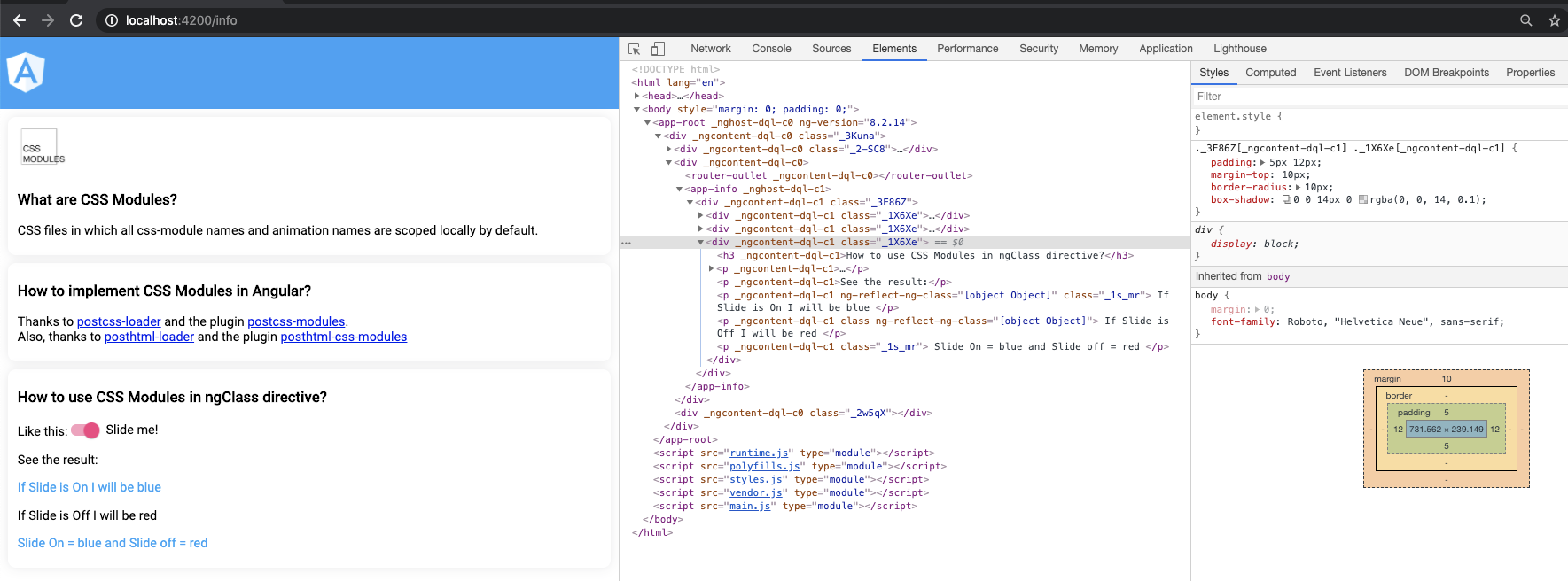
InfoComponent at runtime
The class names are visibly hashed in both the HTML and the associated styles.
Moreover, adjusting the slide value will dynamically change the text colors displayed below:
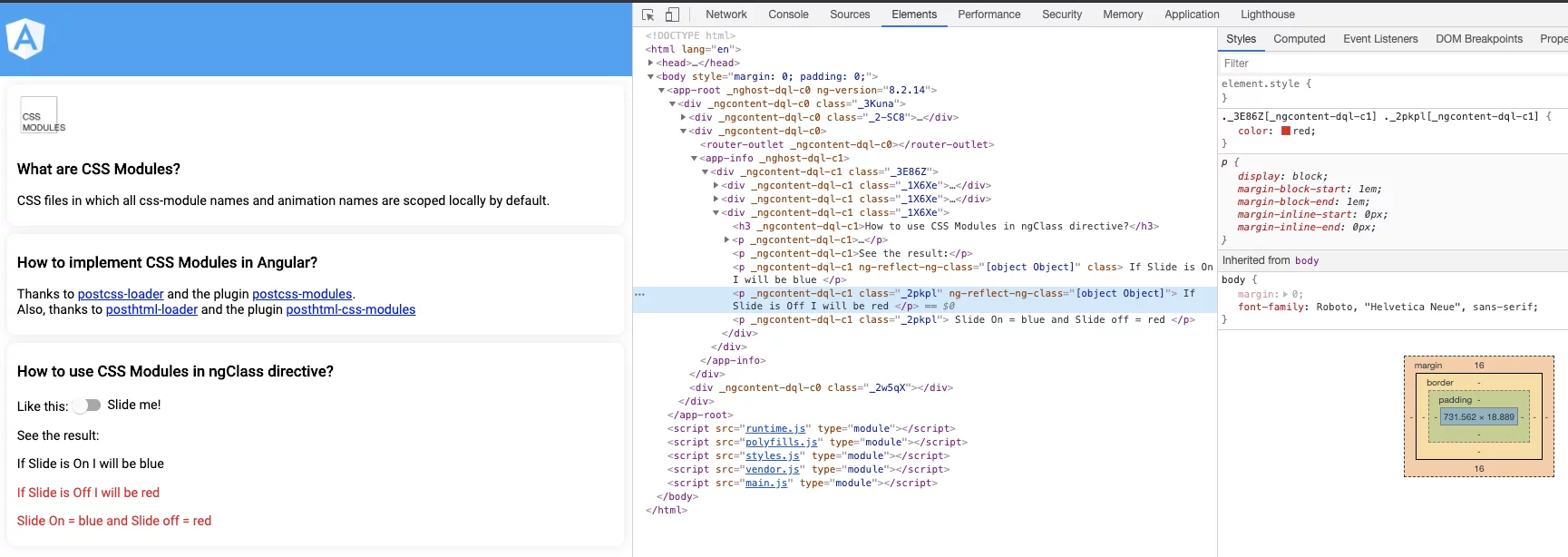
You can try the live application yourself, available here.
The full source code for this Angular application is also on GitHub.
Final Thoughts
To properly evaluate CSS Modules in Angular, it's best to revisit the scenarios outlined in the earlier section, "Why would you want to use CSS Modules with Angular?"
1. Your application is embedded as a web-component or within an iframe, and you need to shield it from the host site's styles.
This was my initial motivation. In my work, we have a web app served as a web-component on external sites, but those sites' styles were leaking into and overriding ours. Adopting CSS Modules resolved this for rules using class name selectors. Here's an example:
.my-class-name {
	background-color: red;
}
However, it didn't prevent overrides on rules that target raw HTML element selectors:
div {
	background-color: red;
}
I haven't yet found a comprehensive fix for all such cases. I've been pointed toward ViewEncapsulation.ShadowDom, but haven't tried it, and its browser support isn't universal.
2. If you're using ViewEncapsulation.None and want to avoid style clashes between components.
From my perspective, CSS Modules are a strong fit here. The main alternatives (that I'm aware of) are:
- implementing the BEM naming convention
- maintaining extreme discipline with class naming.
I find the CSS Modules approach more straightforward than BEM. Relying on manual naming rigor is time-consuming and often leads to conflicts sooner or later.
If you're wondering why one would choose ViewEncapsulation.None in the first place, I suggest reading this related article.
3. External libraries are overriding your application styles, and you want to block that.
I haven't personally faced this, nor have I simulated it to see the outcome (though I plan to and will update this section accordingly). I suspect it would behave like scenario 1: it would handle class name selectors but not those based on HTML elements.
One final note: if you're concerned that this method slows down development because the original class names are hidden at runtime, know that in my own projects, I run the build without CSS Modules during development and testing. Only after finishing do I switch to the CSS Modules build to verify everything functions correctly.
The configuration for running the project with or without CSS Modules is detailed at the end of this piece.
Conclusion
I trust this article has been informative and useful.
The Angular project code implementing this CSS Modules approach is available here.
Acknowledgements
I'd like to thank Jeb for his guidance when I getting started with @angular-builders/custom-webpack and for fielding my more unconventional inquiries.
Also, a thank you to Lars for his input, feedback, and for reviewing this article.
Appendix: Toggling CSS Modules On and Off
It's straightforward. You add a configuration in the angular.json file to set up a custom build that extends the standard build. This custom build swaps the css-module attribute for class and eliminates getHashedClass without hashing the class names themselves.
My current angular.json looks like this:
{
  "$schema": "./node_modules/@angular/cli/lib/config/schema.json",
  "version": 1,
  "newProjectRoot": "projects",
  "projects": {
    "angular-css-modules": {
    ...
    }},
  "defaultProject": "angular-css-modules"
}
Next, add a property under the project element:
{
  "$schema": "./node_modules/@angular/cli/lib/config/schema.json",
  "version": 1,
  "newProjectRoot": "projects",
  "projects": {
    "angular-css-modules": {
       ...
    },
    "angular-css-modules-plain": {
      "projectType": "application",
      "schematics": {
        "@schematics/angular:component": {
          "style": "scss"
        }
      },
      "root": "",
      "sourceRoot": "src",
      "prefix": "app",
      "architect": {
        "build": {
          "builder": "@angular-builders/custom-webpack:browser",
          "options": {
            "customWebpackConfig": {
                "path": "./extra-webpack-plain.config.js"
            },
            "outputPath": "dist/angular-css-modules",
            "index": "src/index.html",
            "main": "src/main.ts",
            "polyfills": "src/polyfills.ts",
            "tsConfig": "tsconfig.app.json",
            "aot": true,
            "assets": [
              "src/favicon.ico",
              "src/assets"
            ],
            "styles": [
              "src/styles.scss"
            ],
            "scripts": []
          },
          "configurations": {
            "production": {
                ...
            }
          }
        },
        "serve": {
          "builder": "@angular-builders/custom-webpack:dev-server",
          "options": {
            "browserTarget": "angular-css-modules-plain:build"
          },
          "configurations": {
            "production": {
              "browserTarget": "angular-css-modules-plain:build:production"
            }
          }
        },
        "lint": {
            ...
        }
      }
    },
  "defaultProject": "angular-css-modules"
}
I've added angular-css-modules-plain. This custom configuration relies on ./extra-webpack-plain.config.js to augment the default build.
So, we need to create that extra-webpack-plain.config.js:
const path = require('path');
const AngularCompilerPlugin = require('@ngtools/webpack');

module.exports = (config, options) => {

    /*  HTML EXTEND */
    config.module.rules.unshift(
        {
            test: /\.html$/,
            use:(info) => {
                return [
                    { loader: 'raw-loader' },
                    {
                        loader: path.resolve('./scripts/loaders/html-plain-class-name.loader.js'),
                        options: {
                            file: info.resource
                        }
                    }
                ]
            }
        },
    );

    const index = config.plugins.findIndex(p => p instanceof AngularCompilerPlugin.AngularCompilerPlugin);
    const oldOptions = config.plugins[index]._options;
    oldOptions.directTemplateLoading = false;
    config.plugins.splice(index);
    config.plugins.push(new AngularCompilerPlugin.AngularCompilerPlugin(oldOptions));
    return config;
};
extra-webpack-plain.config.js
We only modify the HTML rule to swap css-module for class and strip out getHashedClass without replacing class names in the templates. No changes are needed for style files since they aren't hashed by default.
We also set up a custom loader, html-plain-class-name.loader.js, to handle these replacements:
var lodash = require('lodash');
var loaderUtils = require('loader-utils');

module.exports = function(source) {
    var options = loaderUtils.getOptions(this);
    var newTemplate = removeCssModulesAttribute(source, options.file);; // Default response current html file without css-module
    try {
        var replacerResult = modifyTemplateLodash(newTemplate, options.file);
        if (!replacerResult) {
            replacerResult = modifyTemplateManually(newTemplate, options.file);
            if (!replacerResult) {
                replacerResult = source;
            }
        }
        newTemplate = replacerResult;
    }
    catch(error) {
        console.log(`Fail on file: ${options.file} \n Error Details: + ${error}`);
    }
    finally {
        return newTemplate;
    }
}

function removeCssModulesAttribute(template, file) {
    try {
        if (!template) {
            return template;
        }
        return template.replace(/css-module/gi, "class");
    }
    catch (error) {
        console.log(`Fail on file: ${file} \n Error Details: + ${error}`);
        return template;
    }
}

function modifyTemplateLodash(source, file) {
    let newTemplate = source;
    try {
        if (!newTemplate) {
            newTemplate = null;
            return;
        }
        if (newTemplate.includes('getHashedClass')) {
            var getHashedClass = function (unhashedClass) {
                return unhashedClass;
            }
            var compiled = lodash.template(newTemplate);
            newTemplate = compiled({
                getHashedClass: getHashedClass
            });
        }
    }
    catch (error) {
        console.log(`Lodash Fail on file: ${file} \n Error Details: + ${error}`);
        newTemplate = null;
    }
    finally {
        return newTemplate;
    }
}

function modifyTemplateManually(source, file) {
    let newTemplate = source;
    try {
        if (!newTemplate) {
            newTemplate = null;
            return;
        }
        const arrayClassNames = newTemplate.match(/<%=[ ]{0,}getHashedClass.*?\(([^)]*)\)[ ]{0,}%>/gi);
        let className;
        if (arrayClassNames) {
            for (let classToReplace of arrayClassNames) {
                className = classToReplace.replace(/<%=[ ]{0,}getHashedClass.*?\(/gi, '').replace(/\)[ ]{0,}%>/gi, '');
                if (className) {
                    className = className.replace(/`/gi, '').replace(/'/gi, '').replace(/"/gi, '');
                    newTemplate = newTemplate.replace(classToReplace, className);
                }
            }
        }
        return newTemplate;
    } catch (error) {
        console.log(`Html Manually Fail on file: ${file} \n Error Details: + ${error}`);
        newTemplate = null;
    }
    finally {
        return newTemplate;
    }
}
html-plain-class-name.loader.js
This loader scans for the css-module attribute and swaps it with class. It then locates getHashedClass and replaces it with the value of the unhashedClass parameter. If the modifyTemplateLodash operation fails, there's a fallback modifyTemplateManually that performs the same task without Lodash.
Finally, add a script to package.json to launch the app without CSS Modules:
{
  "name": "angular-css-modules",
  "version": "1.0.0",
  "scripts": {
    "ng": "ng",
    "start": "node server/server.js",
    "start:app":"ng serve angular-css-modules",
    "start:app:plain":"ng serve angular-css-modules-plain",
    "build": "ng build angular-css-modules",
    "test": "ng test angular-css-modules",
    "lint": "ng lint angular-css-modules",
    "e2e": "ng e2e angular-css-modules",
  },
  ...
}
package.json
That's all there is to it. Running npm run start:app starts the project with CSS Modules, whereas npm run start:app:plain runs it without them.
The repository contains this dual configuration for easy switching.