Concept and Worked Example
When an AI assistant is integrated into an application, it can draw display components from a predefined set. But a more advanced option exists: having the assistant generate new code dynamically, which then powers entirely flexible areas of the interface.
That's the core of this post. We show how to turn a natural-language request into the code that shapes and transforms data, then display the resulting output as a chart. To keep the system secure, the generated script runs inside a sandboxed environment rather than directly in the app.
📂 Source Code (🔀 branch hashbrown_chart_runtime)
To illustrate how an AI assistant and code generation can cooperate, the demo app enables users to create report charts ad hoc. The user types a plain-language description, and the app renders the chart almost immediately:
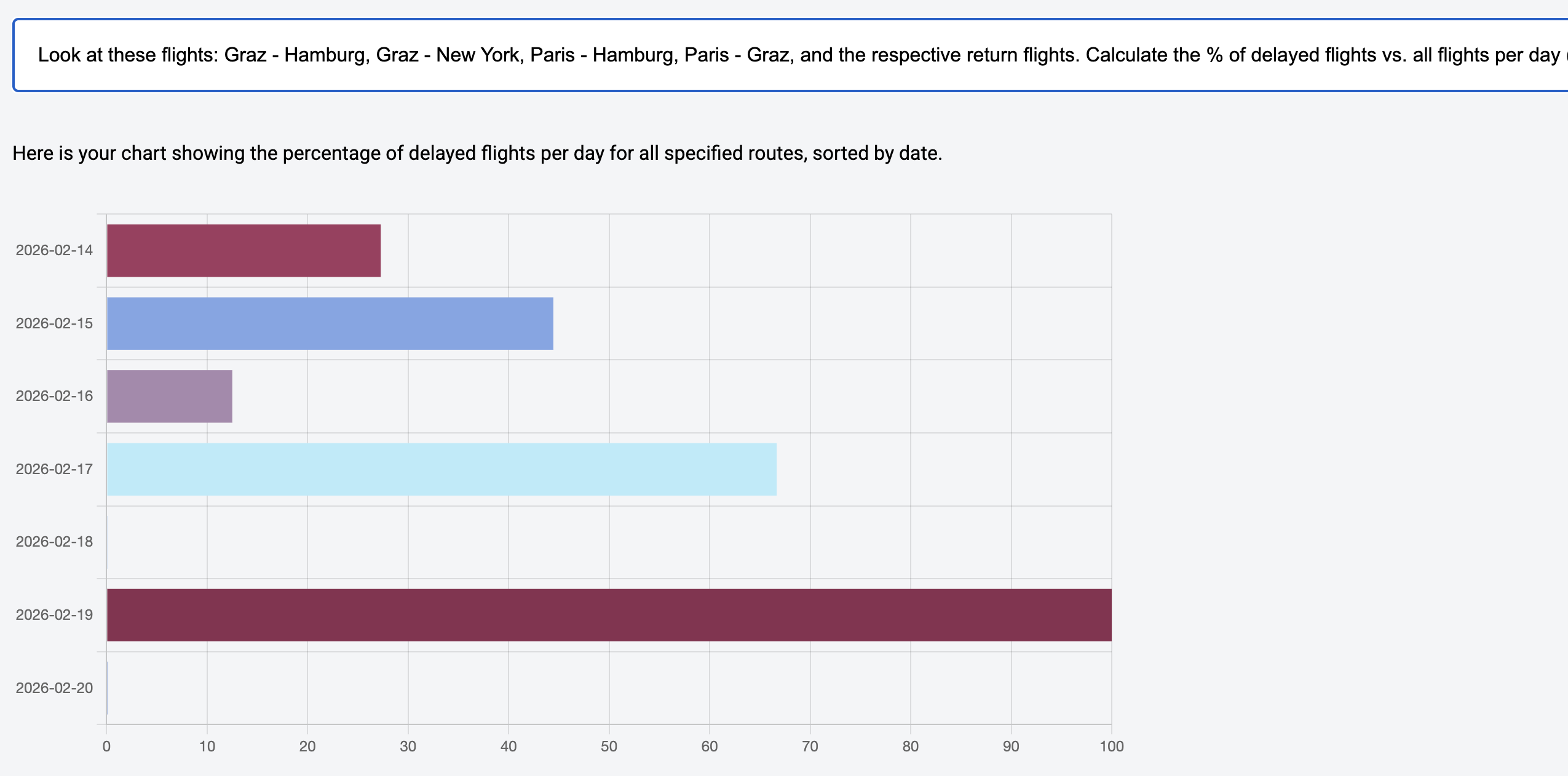
In the screenshot above, this requirement was entered:
Look at these flights: Graz - Hamburg, Graz - New York,
Paris - Hamburg, Paris - Graz, and the respective return
flights. Calculate the % of delayed flights vs. all flights
per day (ignore the time). Sort by date.
At first, it might look like this could be done with techniques from earlier posts: the model fetches data through tool calls, picks a chart component, and paints it with the loaded values.
That view, however, skips an essential step. The raw data must be processed between retrieval and display. Here, for instance, we have to count the total number of flights and the number of delayed ones per day, and then relate those two figures.
Large language models are fundamentally text predictors—they extend a sequence and answer based on what they've seen. Arithmetic or aggregation isn't their strong suit. But they are quite skilled at articulating what steps lead to a desired result. That's the leverage point: we let the model describe the required processing steps as JavaScript. At runtime, that can lead to code similar to this:
// Code generated by an LLM to prepare data
// to be displayed in a chart.

const routes = [
  { from: 'Graz', to: 'Hamburg' },
  { from: 'Hamburg', to: 'Graz' },
  { from: 'Graz', to: 'New York' },
  { from: 'New York', to: 'Graz' },
  { from: 'Paris', to: 'Hamburg' },
  { from: 'Hamburg', to: 'Paris' },
  { from: 'Paris', to: 'Graz' },
  { from: 'Graz', to: 'Paris' },
];

let flights = [];

routes.forEach((route) => {
  flights = flights.concat(loadFlights(route));
});

// Aggregate by date
const flightsByDate = {};

for (const flight of flights) {
  const date = flight.date.split('T')[0]; // ignore time

  if (!flightsByDate[date]) {
    flightsByDate[date] = { total: 0, delayed: 0 };
  }

  flightsByDate[date].total++;

  if (flight.delay > 0) {
    flightsByDate[date].delayed++;
  }
}

// Create data sorted by date
const data = Object.keys(flightsByDate)
  .sort()
  .map((date) => {
    const total = flightsByDate[date].total;
    const delayed = flightsByDate[date].delayed;
    const percentage = ((delayed / total) * 100) || 0.1;

    return { name: date, value: percentage };
  });

generateChart({ data });
The generated script delegates to two app-provided functions. It starts by invoking loadFlights to pull in the data, and finishes by passing the aggregated results to generateChart.
Thus the model doesn't just produce code—it also decides which application functions the code should rely on. Those functions might return pre-aggregated values rather than full objects, which would lighten the load on the runtime and make report generation faster.
Implementation Using Hashbrown
Hashbrown offers two core building blocks for this pattern: a structuredCompletionResource and a JavaScript runtime.
The structuredCompletionResource sends a prompt to the language model and gets back a structured reply. Unlike the chatResource and uiChatResource used elsewhere, this variant is stateless. It's not for holding a conversation; it's for getting one well-formed answer to a specific request. In our case, that answer is an object holding both a message for the user and the generated source code.
That source code is handed off to the runtime through tool calling. The runtime executes it in a sandbox that has no direct access to the application's internals. The following snippet shows how the two pieces fit together:
import {
  createRuntime,
  createRuntimeFunction,
  createToolJavaScript,
  structuredCompletionResource,
} from '@hashbrownai/angular';

[...]

@Component({
  selector: 'app-reporting',
  imports: [...],
  templateUrl: './reporting.component.html',
  styleUrl: './reporting.component.css',
})
export class ReportingComponent {
  message = signal('');
  input = signal<string | undefined>(undefined);
  data = signal<DataItem[]>([]);

  runtime = createRuntime({
    functions: [
      createRuntimeFunction(/* ... */),
      createRuntimeFunction(/* ... */),
    ],
  });

  generator = structuredCompletionResource({
    model: 'gpt-5-chat-latest',
    input: this.input,
    system: `
      You are Report42, a UI assistant that [...]
      Take the user's request [...] and generate JavaScript code that [...]
    `,
    schema: s.object(`Whether request was successful`, {
      type: s.enumeration(`Success or error?`, ['success', 'error']),
      message: s.string(`Additional information for the user`),
      code: s.string(`The generated JavaScript code`),
    }),
    tools: [
      createToolJavaScript({
        runtime: this.runtime,
      }),
    ],
  });

  submit(): void {
    this.input.set(this.message());
  }

  [...]
}
The example binds the message Signal to an input field where the user types their request. When the user submits, the submit method copies that value into the input signal, which triggers the structuredCompletionResource.
The createRuntime call takes the functions the code is allowed to invoke and builds the JavaScript runtime around them. That runtime is then registered as a tool for the structuredCompletionResource. The system prompt tells the model how to turn the request into code.
The schema enforces the shape of the model's response. It includes a flag for whether code generation succeeded, a human-readable message, and the source code itself.
Next, we'll look more closely at how the functions are defined and what the system prompt contains.
Modern Angular
This article has been adapted from my book Modern Angular - Architecture, Concepts, Implementation. The book covers everything you need for building today's business applications with Angular: Signals and state patterns, architecture, AI assistants, testing, and concrete solutions for common real-world problems.
Runtime Functions
The createRuntimeFunction helper produces a function that generated code can call inside the JavaScript runtime. Here's how loadFlights is defined:
createRuntimeFunction({
  name: 'loadFlights',
  description: `
    Searches for flights and returns them.

    ## Rule
    For the search parameters, airport codes are NOT used but the city name.
    First letter in upper case.
  `,
  args: s.object('search parameters for flights', {
    from: s.string('airport of departure'),
    to: s.string('airport of destination'),
  }),
  result: s.array(`loaded flights`, FlightSchema),
  handler: async (input) => {
    const flightService = inject(FlightService);
    const result = flightService.find(input.from, input.to);
    return await firstValueFrom(result);
  },
});
The language model reads the description and the schema for the arguments (args) to decide whether and how to invoke the function. The result schema tells the model what return value to expect. That schema is based on a central definition describing the structure of a flight:
import { s } from '@hashbrownai/core';

export const FlightSchema = s.object('Flight to be displayed', {
  id: s.number('The flight id'),
  from: s.string('Departure city. No code but the city name'),
  to: s.string('Arrival city. No code but the city name'),
  date: s.string('Departure date in ISO format'),
  delay: s.number('If delayed, this represents the delay in minutes'),
});
Now let's examine the generateChart function:
createRuntimeFunction({
  name: 'generateChart',
  description: `Creates a chart`,
  args: s.object(`Chart description`, {
    data: s.array(
      `name/value pairs to display in chart`,
      s.object(`a single name/value pair to display in the chart`, {
        name: s.string(`name`),
        value: s.number(`the value to display`),
      })
    ),
  }),
  handler: async (input) => {
    this.data.set(input.data);
  },
});
One detail here is subtle but important: the handler pushes the incoming data straight into a component signal. So unlike loadFlights, generateChart is not a data source—it's a sink that receives data from the runtime.
The chart itself is drawn using chart.js, a widely used library. The rendering logic lives in an effect that isn't shown here.
System Prompt with One-Shot Prompting
The system prompt given to structuredCompletionResource keeps the code generation on track. It lays out the core steps, includes a working example, and lists general rules:
You are Report42, a UI assistant that helps passengers with creating and
displaying a chart with flight information.

- Voice: clear, helpful, and respectful.
- Audience: power users who want to get a chart

## Your Tasks

1. Take the user's request for a chart and generate JavaScript code that ...

   a) uses the tool _loadFlights_ as often as needed to retrieve the needed data

   b) Aggregate the received data according to the user's request.
      Replace 0 with 0.1

   c) Pass the data to the tool _generateChart_ to display a chart

2. Pass the JavaScript code to the runtime

## Example for the JavaScript Code

- User: How many flights are there from Graz to London and from Graz to Munich?
- Assistant
- Code:

  const flights1 = loadFlights({ from: 'Graz', to: 'London' });
  const flights2 = loadFlights({ from: 'Graz', to: 'Munich' });
  const data = [
    { name: 'Graz - London', value: flights1.length },
    { name: 'Graz - Munich', value: flights2.length },
  ];
  generateChart({ data });

- Answer: Here is your chart.

## Rules

- Never use additional web resources for answering requests
- **Always** pass the generated code to the JavaScript runtime
Including an example like this—often called one-shot prompting—has proven to boost model performance on code-generation tasks like these.
Wrap-Up
Language models aren't built for performing exact, multi-step calculations. Their real strength is answering questions. That can extend to giving precise answers in the form of JavaScript instructions.
Tool calling lets the generated code invoke clearly specified functions like loadFlights or generateChart, and structured output forces the model's reply into a fixed, checkable shape: code, status, and user feedback.
A sandboxed JavaScript engine runs the code and keeps it from interfering with the wider application. With a library like Hashbrown, code generation, tool use, and structured replies are easy to string together—and it even ships with its own runtime for just this purpose.