Router Resources: A Signal-Based Take on Route Guards
Signal-native resolvers that run in parallel and can opt out of blocking navigation
Resolvers have been part of the Angular Router since its earliest days. Their job is to fetch data ahead of route activation, returning an Observable or Promise in the process. In an ecosystem where data access increasingly flows through resource, rxResource, and httpResource, resolvers feel out of place. Starting with version 22.2.0-next.5, the router introduces an experimental counterpart: Router Resources. Beyond aligning with Signals, they offer a performance win because the router executes them concurrently instead of sequentially.
This article walks through the new API, demonstrates both variants using our Flights42 sample app, and closes by examining how Router Resources interact with Signal Stores.
📂 Source code (branch: 22.2.0-next.5)
Understanding Router Resources
Router Resources add a resources property to a route definition, which supplies ordinary resources. The router manages their lifecycle and forwards the resulting values to the component.
The second motivation behind the new API carries at least as much weight as the cleaner interface: performance. Classic resolvers are executed by the router one after another along the route hierarchy. If a parent route needs 2 seconds for its data and a child route needs 3, the user waits 5 seconds before navigation completes. Router Resources, by contrast, all start at the same time — even when they block. In the same scenario, navigation finishes in just 3 seconds, matching the slowest resource:
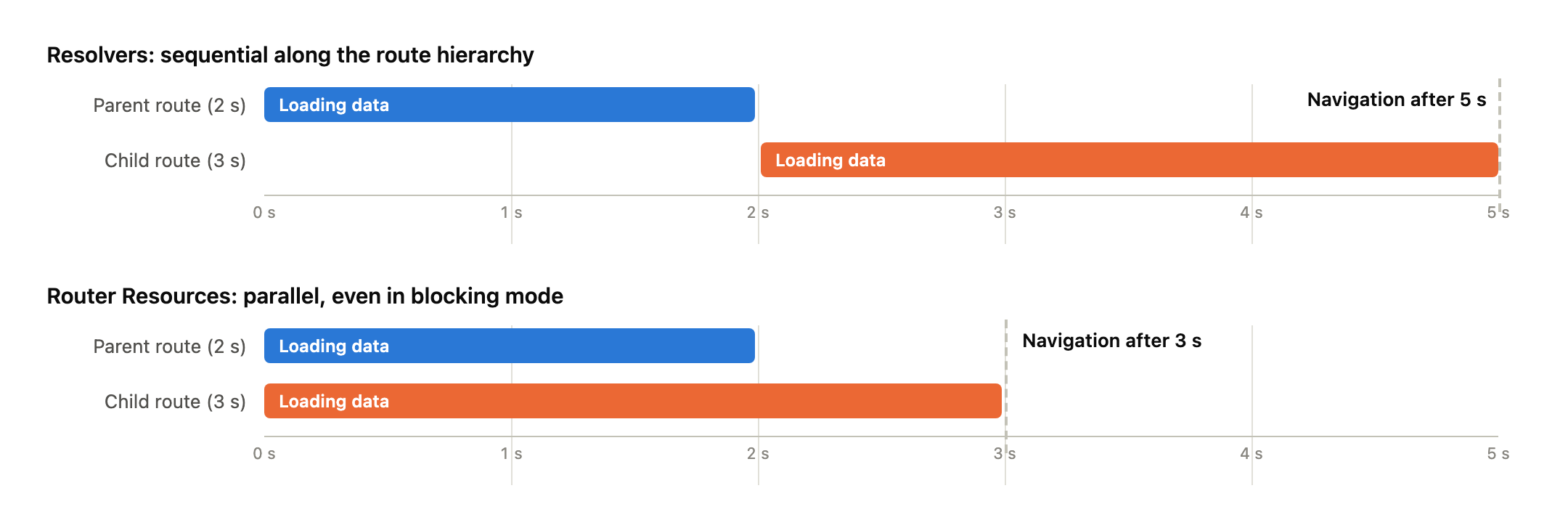
Aside from such blocking Router Resources, they can also be marked as non-blocking. In that case the router does not wait at all. It activates the route immediately and hands the still-pending resource to the component, which is then responsible for surfacing the loading state.
Setting Up Router Resources
The feature is turned on via withRouterResources when the router is configured:
// src/app/app.config.ts

import {
  ɵwithRouterResources as withRouterResources,
  provideRouter,
  withComponentInputBinding,
} from '@angular/router';

[...]

export const appConfig: ApplicationConfig = {
  providers: [
    [...]
    provideRouter(routes, withComponentInputBinding(), withRouterResources()),
  ],
};
Router Resources are still experimental, which is why their imports carry the ɵ prefix: in 22.2.0-next.5 the router only exports the new symbols privately, so the demo aliases them to their intended public names at import time. Additionally, withComponentInputBinding is enabled so the router binds resource outputs as inputs on the component.
The resources property itself is not part of the public Route type yet. The runtime already evaluates it; to satisfy the compiler, the demo augments the type with a small declaration:
// src/app/domains/shared/util-common/resource-route.d.ts

import { Resource } from '@angular/core';
import {
  ɵResourceContext as ResourceContext,
  ɵResourceResult as ResourceResult,
} from '@angular/router';

declare module '@angular/router' {
  interface Route {
    resources?: (
      ctx: ResourceContext,
    ) => ResourceResult | Promise<ResourceResult>;
  }

  interface ActivatedRoute {
    resources?: Record<string, Resource<unknown> & { reload(): boolean }>;
  }
}
The second half of that declaration — resources on ActivatedRoute — becomes relevant later when we discuss reloading.
Blocking Router Resources
With those preliminaries out of the way, the first Router Resource can be defined. The route that edits a passenger fetches the record before the component renders:
// src/app/domains/ticketing/ticketing.routes.ts

{
  path: 'passenger-edit/:id',
  component: PassengerEdit,
  resources: (ctx) => ({
    passenger: createSimplePassengerResource(ctx.params),
  }),
},
The resources function executes in an injection context and receives a ResourceContext. Among other things, that context exposes params, queryParams, and data as Signals. The factory function derives the id from those and creates a perfectly ordinary httpResource:
// .../feature-booking/passenger-edit/simple-passenger-resource.ts

import { computed, inject, Signal } from '@angular/core';
import { Params } from '@angular/router';

import { PassengerClient } from '../../data/passenger-client';

export function createSimplePassengerResource(params: Signal<Params>) {
  const passengerClient = inject(PassengerClient);
  const id = computed(() => Number(params()['id'] ?? 0));
  return passengerClient.findPassengerResourceById(id, {
    withDefaultValue: false,
  });
}
By default, such a resource is blocking. Like a resolver, the router waits until a value is available, and only then activates the route. Thanks to withComponentInputBinding, what arrives in the component is not the resource object itself but the already unwrapped value:
// src/app/domains/ticketing/feature-booking/passenger-edit/passenger-edit.ts

@Component({ [...] })
export class PassengerEdit {
  [...]
  protected readonly passenger = input.required<Passenger>();
}
That is the same input a resolver used to populate. From the component's perspective the switch is invisible, which keeps migration straightforward. If the route parameter changes later while the component is being reused, the resource picks up the new value on its own, since ctx.params is a Signal.
One detail deserves a closer look: the call above disables the default value of httpResource using withDefaultValue: false. In 22.2.0-next.5, a resource with a default value does not block — from the router's point of view, a value already exists. This behavior is expected to change eventually. Until then, omit defaultValue whenever blocking is the goal.
Non-Blocking Router Resources
Not every navigation needs to pause for data. Often it is preferable to render the target page immediately and reflect the loading state there. That is exactly what nonBlocking provides. The demo's baggage management screen uses it for its detail route:
// src/app/domains/luggage/feature-luggage/luggage.routes.ts

import { ɵnonBlocking as nonBlocking, Routes } from '@angular/router';

[...]

{
  path: ':id',
  component: LuggageDetail,
  resources: (ctx) => ({
    luggage: nonBlocking(createLuggageResource(ctx.params)),
  }),
},
The factory function createLuggageResource mirrors the passenger example and delegates to the LuggageClient. That client's loader is intentionally slow so the effect is easy to observe:
// src/app/domains/luggage/data/luggage-client.ts

findLuggageById(id: Signal<number>) {
  return resource({
    params: id,
    loader: async ({ params: id }) => {
      // Absichtlich verzögert, um den Ladezustand sichtbar zu machen
      await new Promise((resolve) => setTimeout(resolve, 2000));
      return this.getLuggage().find((item) => item.id === id);
    },
  });
}
The router now activates the route right away. In this scenario the component does not receive an unwrapped value; instead, the full Resource arrives as an input:
// src/app/domains/luggage/feature-luggage/luggage-detail/luggage-detail.ts

@Component({ [...] })
export class LuggageDetail {
  readonly luggage = input.required<Resource<Luggage | undefined>>();
}
That gives the template access to all of the resource's state signals, such as isLoading and error:
<!-- src/app/domains/luggage/feature-luggage/luggage-detail/luggage-detail.html -->

@let resource = luggage();
@let item = resource.value();

@if (resource.isLoading()) {
  <p>Loading luggage …</p>
} @else if (resource.error()) {
  <p>Luggage could not be loaded.</p>
} @else if (item) {
  <form> [...] </form>
}
The division of labor is crisp: blocking resources deliver ready-to-use values and guarantee that the destination screen is complete. Non-blocking resources ship the entire loading lifecycle and leave rendering of the intermediate state to the page itself.
Modern Angular
✓ Already upgraded to Angular 22!
For more on resources, Signals, and modern Angular architecture, my new eBook Modern Angular is the place to look. It covers Signals, architecture, testing, AI assistants, and practical solutions for contemporary business applications.
Reload and Redirect
Two further capabilities set Router Resources apart from resolvers. The first concerns refreshing data. Previously, re-fetching a resolver's data meant reactivating the route, for instance with onSameUrlNavigation: 'reload'. That approach reruns the entire navigation, guards and resolvers included. A Router Resource, on the other hand, can be reloaded deliberately without triggering any navigation at all.
With a blocking resource, though, the component only receives the value — not the resource. Access to it comes from the ActivatedRoute, which exposes all resources of the current route under their keys:
// src/app/domains/ticketing/feature-booking/passenger-edit/passenger-edit.ts

import { ActivatedRoute } from '@angular/router';

[...]

@Component({ [...] })
export class PassengerEdit {
  [...]
  private readonly passengerResource =
    inject(ActivatedRoute).resources?.['passenger'];

  protected reload(): void {
    // Lädt nur diese Resource neu, ohne die Route erneut zu aktivieren
    this.passengerResource?.reload();
  }
}
The ?. accounts for the fact that the demo can run the same route with a resolver as well; in that case no resource exists. A button in the template invokes reload. Since the router binds the value of a blocking resource via an effect, the fresh record flows into the component automatically after loading. In the demo this also resets the form, because passengerModel is a linkedSignal based on the input: local edits are discarded and the data comes straight from the server.
The second capability concerns missing data. In the blocking example, httpResource reports an unknown passenger as an error, since the API answers with 404. With a blocking resource the router aborts navigation and raises a NavigationError; the user remains on the current page. Usually a redirect is the more sensible reaction, for instance to a not-found page. To achieve that, the loader throws a RedirectCommand. The router cancels the navigation and redirects to the given URL.
Since httpResource does not accept a custom loader, the demo falls back to resource for this case. The new factory function calls the PassengerClient and translates a 404 error into a redirect:
// .../feature-booking/passenger-edit/passenger-resource.ts

import { HttpErrorResponse } from '@angular/common/http';
import { inject, resource, Signal } from '@angular/core';
import { Params, RedirectCommand, Router } from '@angular/router';
import { firstValueFrom } from 'rxjs';

import { PassengerClient } from '../../data/passenger-client';

export function createPassengerResource(params: Signal<Params>) {
  const passengerClient = inject(PassengerClient);
  const router = inject(Router);

  return resource({
    params: () => Number(params()['id'] ?? 0),
    loader: async ({ params: id }) => {
      try {
        return await firstValueFrom(passengerClient.findById(String(id)));
      } catch (error) {
        if (error instanceof HttpErrorResponse && error.status === 404) {
          // Bricht die Navigation ab und leitet um, statt sie scheitern zu lassen
          throw new RedirectCommand(router.parseUrl('/not-found'));
        }
        throw error;
      }
    },
  });
}
The route passenger-edit/:id now uses this factory in place of createSimplePassengerResource; the not-found route shows a plain notice page. Navigating to passenger-edit/999999 lands there without the target page ever rendering. This only works with blocking resources, since they are the only kind the router still waits on. For non-blocking resources navigation has already completed, an error arrives in error(), and the component decides on its own how to respond.
Router Resources and Signal Stores
In many applications the data is not fetched by the route but by a Signal Store. In the demo, the PassengerDetailStore manages the currently selected passenger. It receives an id, then loads the record autonomously through an embedded resource. How does such a store work together with a blocking Router Resource?
The demo offers one answer. A hand-written resource sets the id on the store inside its loader, waits until the store finishes loading, and then yields the store's value:
// .../feature-booking/passenger-edit/store-passenger-resource.ts

export function createStorePassengerResource(params: Signal<Params>) {
  const store = inject(PassengerDetailStore);
  const passengerLoaded = waitFor(store.passengerIsLoading, false);

  return resource({
    params: () => Number(params()['id'] ?? 0),
    loader: async ({ params: id, abortSignal }) => {
      store.setPassengerId(id);
      await passengerLoaded(abortSignal);
      return store.passengerValue();
    },
  });
}
The helper function waitFor builds the bridge from the Signals world to the Promise world of the loader. It observes the provided signal with an effect and resolves a promise as soon as the expected value turns up. I will skip its source here; the linked original is short enough.
This approach works, but it does not fully convince me. The store already loads reactively whenever its id changes. The resource above exists only so the router has something to await. That is a second wrapper around a mechanism that is already complete on its own.
The wrapper becomes unnecessary if the direction is reversed: rather than building a resource around the store, the store exposes its own resource. A small Signal Store is enough for that. It creates the resource inside withProps and offers it in two flavors — internally the writable one, externally a read-only view:
// .../feature-booking/passenger-edit/passenger-store.ts

export const PassengerStore = signalStore(
  { providedIn: 'root' },

  withState({
    passengerId: 0,
  }),

  withProps((store) => {
    const _passenger = inject(PassengerClient).findPassengerResourceById(
      store.passengerId,
      { withDefaultValue: false },
    );

    return {
      _passenger,
      passenger: _passenger.asReadonly(),
    };
  }),

  withMethods((store) => ({
    // Akzeptiert einen Wert oder ein Signal
    load: signalMethod<number>((id) => patchState(store, { passengerId: id })),
  })),
);
The underscore in _passenger is more than a naming convention: NgRx Signals treats members named that way as private and removes them from the store's public type. Only passenger remains visible from outside, the asReadonly read-only projection of the same resource. It can only be modified through load. That method builds on signalMethod and accepts either a value or a signal; in the latter case it keeps the id reactively up to date. The factory function for the route passes the id signal along to load and returns the store's resource:
// .../feature-booking/passenger-edit/shared-passenger-resource.ts

export function createSharedPassengerResource(params: Signal<Params>) {
  const store = inject(PassengerStore);
  const id = computed(() => Number(params()['id'] ?? 0));
  store.load(id);
  return store.passenger;
}
Store and router now share one resource. The router waits for it and binds its value to the component; parameter changes on a reused component still reach the store through the signal; and whoever needs the value or the loading state outside the route can read it straight from the store. Since the resource has no default value, it blocks as intended.
Assessing Router Resources with Stores — and an Alternative
These considerations reveal one thing above all: patterns for combining Router Resources and stores still need to emerge. Each variant shown here has its cost. The bridge through waitFor wraps the store a second time, the shared store has to be built specifically for that purpose and hand out its resource, and the guard gives up blocking entirely. Angular and NgRx may also need to move closer together on this front.
Anyone who does not need blocking in the first place can skip both options. In that case a guard that kicks off the store synchronously and returns true immediately is enough:
export const passengerGuard: CanActivateFn = (route) => {
  const store = inject(PassengerDetailStore);
  store.setPassengerId(Number(route.paramMap.get('id') ?? 0));
  return true;
};
Navigation proceeds without delay, the store loads in the background, and the component sources both value and loading state directly from the store. That matches the non-blocking behavior described above, yet it does not require an extra resource at all. The two blocking variants are thus reserved for situations where the router genuinely has to wait on store data.
Go deeper: Angular Architecture Workshop (Remote, Interactive, Advanced)
Become an expert in enterprise-wide, long-lived Angular applications with our Angular Architecture Workshop!

German version | English version
Kernaussage
Mit Router Resources wird das Nachladen von Routen-Daten nahtlos in das Signal-Modell integriert. Die Route definiert ihre Daten als reguläre Resources, der Router führt sie gleichzeitig aus und übergibt die Resultate als Inputs an die Zielkomponente. Der frühere sequenzielle Resolver-Ablauf gehört der Vergangenheit an; im dargestellten Szenario reduzierte sich die Verzögerung von 5 auf 3 Sekunden.
Blockierende Resources verhalten sich funktional wie Resolver, jedoch mit einer verbesserten Schnittstelle. Nicht blockierende Varianten liefern den gesamten Ladezustandszyklus direkt an die betreffende Seite. Über die ActivatedRoute lässt sich eine Resource auch ohne eine erneute Navigation erneut auslösen. Ein RedirectCommand innerhalb des Loaders ermöglicht Umleitungen, falls erforderliche Daten fehlen. Bei der Verwendung zusammen mit Signal Stores ist eine sorgfältige Abwägung nötig: Für Fälle, in denen eine Blockierung erforderlich ist, sollte der Store seine eigene Resource zur Verfügung stellen oder eine separate Resource als Brücke dienen. Andernfalls genügt es, den Store über einen Guard anzustoßen. Auch wenn dieser Ansatz noch nicht final ausgereift ist, weist er zweifellos in die richtige Richtung.