Reactive Design Patterns for Angular Forms: A Catalog
For many enterprise-level Angular applications, the ReactiveFormsModule stands as the cornerstone module. Through Angular forms, users can create, update, and search data, while features like validation and autocompletion elevate the overall user experience.
Forms and graphical user interfaces, in general, are prime candidates for the benefits offered by the reactive programming paradigm. While numerous Angular modules, including HttpClientModule and RouterModule, are built on RxJS, the full potential of this reactive API often remains untapped in many Angular projects.
This article outlines a catalog of design patterns for constructing Angular forms, cultivated through years of practical application. These patterns rest on two foundational principles: clear separation of responsibilities and a reactive programming approach to manage the intricacies of complex forms.
Before exploring the first pattern, let's provide an overview of the patterns we will cover and their intended purposes.
An Overview of the Patterns
A design pattern offers a general, reusable solution to a frequently occurring problem in a specific context. While these patterns are demonstrated with Angular, their applicability extends to other frameworks. The primary objectives are:
- Improving maintainability
- Minimizing the occurrence of bugs
This set of patterns forms the core of a pattern language developed for building sophisticated Angular forms. The diagram below illustrates the primary patterns and their interdependencies:
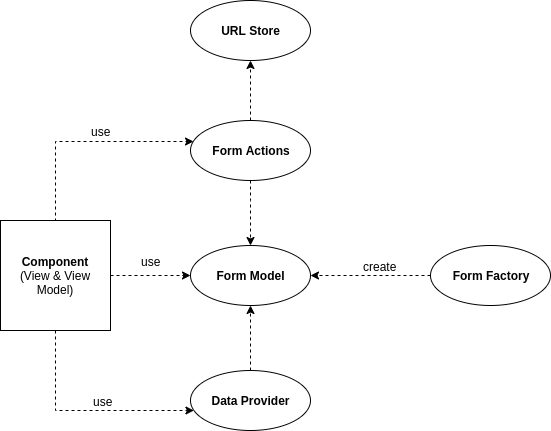
At the heart of this language lies the Form Model. We will begin by examining this central concept.
Understanding the Form Model
FormGroup and FormControl are fundamental to Angular Forms. These components are untyped and provide a low-level, general-purpose API. In complex applications, these raw components often fall short as the primary abstraction within Angular components. A higher-level, domain-specific abstraction is necessary.
To manage application complexity, we must introduce an abstraction layer above the standard Angular API. This layer, termed the Form Model, is a wrapper around a FormGroup instance. It offers a purpose-built API over Angular's generic forms API, allowing us to use domain-specific terminology instead of the framework's generic model terms.
Here is a simple illustration:
class PersonCreationForm {
  readonly initialValue;

  constructor(private formGroup: FormGroup) {
    this.initialValue = formGroup.value;
  }

  get asFormGroup() {
    return this.formGroup;
  }

  isValid(): Observable<boolean> {
    return this.formGroup.statusChanges.pipe(
      map(() => this.formGroup.valid),
      startWith(false)
    );
  }

  ageIsGreaterThan(min: number): Observable<boolean> {
    return this.formGroup.valueChanges.pipe(
      map(value => value.age),
      distinctUntilChanged(),
      map(it => it > min),
      startWith(false)
    );
  }
}
The PersonCreationForm class exhibits the following traits:
- It provides a high-level API: ageIsGreaterThan() abstracts away the low-level details to check if the age surpasses a given value.
- It exposes a reactive API: except for the asFormGroup() property, all data is accessible through Observables.
- It offers Angular non-reactive properties as Observables: the isValid() method returns an Observable that emits whenever the FormGroup.valid property changes.
- It adds missing functionality, such as access to the form's initial value, which the standard Angular form model does not provide.
- It maintains access to the underlying FormGroup.
Note: The form model is a leaky abstraction because the view still needs direct access to the wrapped FormGroup.
This form model can be integrated into a component as shown below:
@Component({
  selector: "person-creation-form",
  template: `
    ...
    <form [formGroup]="form.asFormGroup">
    ...
    </form>
    ...
  `
})
export class PersonCreationFormComponent {
  form: PersonCreationForm;

  ageIsGreaterThanTen: Observable<boolean>;
  formIsValid: Observable<boolean>;

  constructor(formBuilder: FormBuilder) {
    this.form = createFormModelUsing(formBuilder);

    this.ageIsGreaterThanTen = this.form.ageIsGreaterThan(10);
    this.formIsValid = this.form.isValid();
  }
}

function createFormModelUsing(formBuilder: FormBuilder): PersonCreateForm {
  const formGroup = formBuilder.group({
    name: "",
    age: ""
  });

  return new PersonCreateForm(formGroup);
}
The sole responsibility of PersonCreationFormComponent is to define the view and establish the connection to the Form Model.
The complete source code is available here.
Now, let's consider the proper way to create this form model.
Form Factory
The initial step in adding a complex form to a page involves creating a FormGroup and linking it to the template. This process typically defines fields, initial values, and validators. All too often, this creation logic gets tangled with other business logic directly inside the component.
This form creation, or the instantiation of the Form Model, should be isolated. The Form Factory pattern addresses this by separating the construction logic, keeping the presenting component oblivious to these details.
Let's demonstrate this pattern:
@Injectable()
class PersonCreationFormFactory {
  constructor(private formBuilder: FormBuilder) {}

  create(): PersonCreationForm {
    const formGroup = this.createFormGroup();
    return new PersonCreationForm(formGroup);
  }

  private createFormGroup() {
    return this.formBuilder.group({
      name: [""],
      age: [""]
    });
  }
}
PersonCreationFormFactory is a basic example of a form factory, with only FormBuilder as a dependency. More complex scenarios might involve additional dependencies for setting initial data.
The factory can be injected directly, or we can use the factory provider configuration:
@Component({
  selector: "person-creation-form",
  template: `...`,
  providers: [
    PersonCreationFormFactory,
    {
      provide: PersonCreationForm,
      useFactory: (factory: PersonCreationFormFactory) => factory.create(),
      deps: [PersonCreationFormFactory]
    }
  ]
})
export class PersonCreationFormComponent {

  constructor(public form: PersonCreationForm) {
  }
}
While the useFactory syntax is somewhat verbose, it becomes worthwhile when implementing the patterns discussed here, as it simplifies the injection of the Form Model.
In essence, the Form Factory is responsible for:
- Creating the form group
- Defining validation rules
- Setting initial values
The source code for this pattern is available here.
With these two patterns, we can construct a form model to capture user input. The next pattern addresses providing the data users will select from.
Form Data Provider
Forms often enhance user interaction with dynamic features like autocomplete. This logic, while typically utilized in the view, is often prepared in the component class, mixing concerns.
The Form Data Provider pattern encourages moving this logic into a dedicated service used exclusively by the component's template. This service's unique role is to supply the dynamic data required by the fields.
Consider this example:
@Injectable()
class PersonCreationFormDataProvider {
  constructor(private httpClient: HttpClient) {}

  searchCountry = (termChanged: Observable<string>): Observable<string[]> =>
    termChanged.pipe(
        debounceTime(200),
        distinctUntilChanged(),
        switchMap(term => term.length < 3 ? of([]) : this.findCountryBy(term)),
        map(values => values.map(country => country.name))
      );

  private findCountryBy(term: string) {
    return this.httpClient.get<any[]>(`https://restcountries.eu/rest/v2/name/${term}?fields=name`);
  }
}
The searchCountry method accepts an Observable that emits the search term and returns an Observable containing the results, leveraging the restcountries.eu API.
The data returned can depend on the search term or even other field values. For instance, a city field could depend on the selected country. In such a case, the searchCity method would depend on both the search term and the form model. We keep this example simple for clarity, but real-world Form Data Providers can be significantly more complex.
To use PersonCreationFormDataProvider, we set it as a component provider, inject it into the component, and use it only within the template.
@Component({
  selector: "person-creation-form",
  template: `
    <form [formGroup]="form.asFormGroup" class="form-horizontal">
      ...
      <div class="form-group">
        <label for="country">Country</label>
        <input id="country" type="text" formControlName="country" class="form-control" [ngbTypeahead]="formDataProvider.searchCountry"/>
      </div>
	  ...
    </form>
  `,
  providers: [
    PersonCreationFormFactory,
    {
      provide: PersonCreationForm,
      useFactory: (factory: PersonCreationFormFactory) => factory.create(),
      deps: [PersonCreationFormFactory]
    },
    PersonCreationFormDataProvider
  ]
})
export class PersonCreationFormComponent {
  ageIsGreaterThanTen: Observable<boolean>;
  formIsValid: Observable<boolean>;

  constructor(
    public form: PersonCreationForm,
    public formDataProvider: PersonCreationFormDataProvider
  ) {
    this.ageIsGreaterThanTen = this.form.ageIsGreaterThan(10);
    this.formIsValid = this.form.isValid();
  }
}
For large forms with numerous autocomplete fields and complex dependencies, using multiple data provider services is advisable to keep the code manageable. One could even dedicate a provider per field. For simpler forms, a single service for the entire form might suffice.
The source code is available here.
Now that users can input and select data, we need to add form actions.
Form Actions
Every form includes at least one action to execute once fields are filled. This action logic is frequently intermingled with creation and computation code. While not an issue for simple forms, mixing this logic in complex forms makes the codebase implicit and difficult to follow.
The Form Actions pattern offers a solution by placing all action logic into a dedicated class, thus enhancing maintainability.
@Injectable()
class PersonCreationFormActions {
  validateButtonClicked = new Subject<void>();
  resetButtonClicked = new Subject<void>();

  constructor(private form: PersonCreateForm) {
    this.handleValidateButtonClick();
    this.handleResetButtonClick();
  }

  private handleValidateButtonClick() {
    this.validateButtonClicked
        .subscribe(() => alert('The form is validated!'))
  }

  private handleResetButtonClick() {
    this.resetButtonClicked
        .subscribe(() => this.form.reset())
  }
}
The PersonCreateFormActions example uses a simplified implementation for demonstration. The form offers two actions: validating and resetting.
@Component({
  selector: "person-creation-form",
  template: `
    <form [formGroup]="form.asFormGroup" class="form-horizontal">
      ...
      <button class="btn btn-primary" [clickEvent]="formActions.validateButtonClicked">Validate</button>
      <button class="btn btn-secondary" [clickEvent]="formActions.resetButtonClicked">reset</button>
    </form>
    ...
  `,
  providers: [
    PersonCreationFormFactory,
    {
      provide: PersonCreationForm,
      useFactory: (factory: PersonCreationFormFactory) => factory.create(),
      deps: [PersonCreationFormFactory]
    },
    PersonCreationFormDataProvider,
    PersonCreationFormActions
  ]
})
export class PersonCreationFormComponent {
  ageIsGreaterThanTen: Observable<boolean>;
  formIsValid: Observable<boolean>;

  constructor(
    public form: PersonCreationForm,
    public formDataProvider: PersonCreationFormDataProvider,
    public formActions: PersonCreationFormActions
  ) {
    this.ageIsGreaterThanTen = this.form.ageIsGreaterThan(10);
    this.formIsValid = this.form.isValid();
  }
}
Instead of direct click event bindings, we employ a custom directive to handle click events. This way, the view notifies our service's subjects directly.
@Directive({
  selector: '[clickEvent]'
})
export class ClickEventDirective {
  @Input() clickEvent: Subject<void>;

  @HostListener('click') onClick() {
    this.clickEvent.next();
  }
}
The source code for this pattern is available here.
We now have the essential patterns for forms that create or update entities. Next, we'll discuss a pattern designed for search forms.
Search Form Pattern
Users frequently want to share search results or bookmark their specific search criteria. In SPAs, the best practice is to store these criteria in the URL's query parameters, leveraging native browser features for history and URL sharing.
A basic implementation could be:
export interface ParamsConverter<T> {
  fromUrl(Params): T;

  toUrl(T): Params;
}

export const URL_STORE_CONVERTER = new InjectionToken<ParamsConverter<any>>('ParamsConverter');

@Injectable()
export class UrlStore<T> {
  changed: Observable<T>;
  refreshed = new Subject<T>();
  changedOrRefreshed: Observable<T>;

  constructor(
    @Inject(URL_STORE_CONVERTER) private converter: ParamsConverter<T>,
    private router: Router,
    private route: ActivatedRoute,
  ) {
    this.changed = this.route.queryParams.pipe(map(converter.fromUrl));
    this.changedOrRefreshed = merge(this.changed, this.refreshed);
  }

  setSource(paramsChanges: Observable<T>) {
    paramsChanges.subscribe(params => {
      const urlParams = this.converter.toUrl(params);
      const extras = {
        relativeTo: this.route,
        queryParams: removeEmptyAtrributes(urlParams),
      } as NavigationExtras;

      this.router.navigate(['.'], extras).then(result => {
        const urlIsTheSame = result === null;
        if (urlIsTheSame) {
          this.refreshed.next(params);
        }
      });
    });
  }
}
The UrlStore is a generic class that can be extended using the ParamsConverter interface. Its API consists of: - It allows URL updates via the setSource method, which could alternatively be implemented as a Subject attribute. - It exposes three attributes to track URL changes: changed, refreshed, and changedOrRefreshed.
In a search form, the URL store is used within the form actions class to update the query parameters.
@Injectable()
class PersonCreationFormActions {
  searchButtonClicked = new Subject<void>();

  constructor(
    private form: PersonCreateForm,
    private urlStore: UrlStore<PersonSearchCriteria>
  ) {
    this.handleSearchButtonClick();
  }

  private handleSearchButtonClick() {
    const searchAction = this.searchButtonClicked.pipe(
      map(it => this.form.asFormGroup.value)
    );
    this.urlStore.setSource(searchAction);
  }
}
The source code for this pattern is available here.
This concludes the pattern catalog. Let's address some common questions that arise when implementing these patterns.
Frequently Asked Questions
Why isn't Angular a fully reactive framework?
Angular's form API, for instance, isn't entirely reactive. FormControl has properties like valid without a reactive counterpart. Similarly, while Angular internally uses RxJS for @Output(), it doesn't expose an observable for listening to output events. However, Angular does offer numerous reactive APIs, such as the Router and HttpClient.
Is @Output() redundant?
Under the hood, @Output() is based on RxJS Observables, but the subscription isn't exposed in the application code. To fully leverage Observables, we can pass a Subject as an input.
Why not use Presentational and Container patterns?
These are considered an anti-pattern, promoted in frameworks with limitations Angular doesn't have. An Angular component should focus on view and view-model responsibilities. Moving away from this pattern is a decision that has lead to much cleaner code.
Why rely solely on component providers?
Our implementation primarily uses component providers, which offer the key advantage of having the same lifecycle as their associated component.
What about code navigation?
Adopting these patterns can complicate file navigation. Using a capable IDE that facilitates moving between related files becomes important.
What about third-party libraries?
When adopting a reactive approach, careful consideration is needed when choosing third-party libraries. They should expose reactive APIs. For example, our autocomplete example used ngx-bootstrap because it provides a reactive API. If you create a home-grown component library, it's wise to expose both reactive and conventional APIs to accommodate different team preferences.
Conclusion
This article has presented a pattern language for the most utilized parts of Angular in enterprise forms. Each pattern was explained with enough detail to convey the overall concept, as specific implementations will vary according to the use case.
Adopting these patterns results in better-structured applications that are easier to understand, maintain, and test.