With version 14 of Angular, the Standalone API made its debut, and by version 15, it graduated to a stable status—no longer just a „developer preview”. This shift has sent ripples across the developer community, standing out as one of the most refreshing changes to the framework since IVY came onto the scene. In this piece, we’ll dive deep into what this means for us, the upsides and downsides of Standalone components, and where they might be headed in the future.
A component marked as standalone—and the same holds true for directives and pipes—is defined by adding the recently introduced standalone flag to the decorator and assigning it a value of true.
@Component({
  selector: 'footer',
  template: '<ng-content></ng-content>',
  standalone: true,
})
export class FooterComponent {}
A standalone component declared in this manner is eligible for import by another standalone component, incorporated into a module, or referenced inside a route configuration. Crucially, it must not appear within a module’s declarations array; attempting to place it there triggers a compile-time error.
|
|
Moving forward, our components can import both Standalone components and modules, just as we do with modules.
@Component({
  selector: 'footer',
  template: '<ng-content></ng-content>',
  standalone: true,
  imports: [CommonModule, VerticalNavigationItemComponent]
})
export class FooterComponent {}
Up to this point, Angular has made a clear separation between two categories of Injectors—those tied to modules and those tied to elements. Yet, with the advent of bootstrapping an Angular app devoid of custom modules (aside from Angular’s own), this naming has become somewhat outdated, prompting a shift in our terminology. Consequently, the former module injector is now rebranded as the environment injector.
You can set up environment injectors in several ways:
- @NgModule.providers
- @Injectable({provideIn: „…”})
- passing providers as an argument to the bootstrapAplication function (for a “standalone” setup)
- specifying providers inside the routing configuration
The initial pair of methods are nothing novel; however, the latter two demand our particular attention.
bootstrapAplication
Introduced recently, this function enables us to launch an application built exclusively with standalone components. It accepts the 'root component’ of our app as its primary parameter—that component must carry the standalone flag—and a configuration object as its secondary input, which currently serves solely to house the providers destined for our root injector. In return, the function yields Promise<ApplicationRef>.
Here is how initializing a module-driven app differs from starting one driven by a component:
|
|
In a standalone application, there are no modules, so resolving the Injector dependencies based on them is no longer an option. The resolution of providers within a component follows a distinct path from what we had with modules (this will be covered in more detail later). To address this, we now have an additional helper function: importProvidersFrom. Its role is to gather all providers from the specified modules and standalone components—or, more precisely, the modules that those standalone components import. This function is restricted to use inside the bootstrapApplication method or in routing configurations; using it in the provider definitions of a component is not allowed. The reason we haven't needed such a function until now is that in a module-based setup, importing a module caused Angular to automatically include all its providers, along with those from any modules it imported, into our injector. The graph below illustrates this mechanism and also shows how importProvidersFrom will operate on the given modules. In our example of bootstrapping a standalone application, it ensures that things like HttpClient and Router get added to our injector.
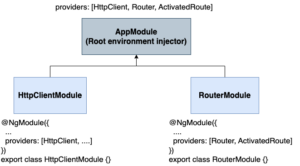
It’s also worth noting that this capability could eventually be removed or become far less necessary, since Angular is expected to ship specialized utilities for setting up specific modules—routing being a likely candidate.
|
|
Router providers
Now, in a routing configuration, it's possible to include providers that are scoped to the components rendered under that path and any nested routes.
export const ROUTES: Route[] = [
  {
    path: 'admin',
    providers: [
      AdminService,
      {provide: ADMIN_API_KEY, useValue: '12345'},
    ],
    children: [
      path: 'users', component: AdminUsersComponent,
      path: 'teams', component: AdminTeamsComponent,
    ],
  },
  // ... other application routes that don't
  //     have access to ADMIN_API_KEY or AdminService.
];
To grasp how router providers are going to behave, it helps to compare them with the current mechanism behind environment injectors in lazy-loaded modules. When a module is loaded lazily, Angular spins up a fresh environment injector for it. That injector duplicates the root environment injector and bundles in every provider that comes from the modules inside that lazy-loaded tree. (Think back to the diagram from the previous section, but swap the root environment injector for the one created during lazy loading.)
Router providers follow this same pattern, but now they don't rely on lazy loading to set up an environment injector for a cluster of components associated with a particular route. Instead, this happens for each provider block defined within the route configuration. The resulting environment injector holds duplicates of the root environment injector along with any providers specified in the providers array for that specific path.
For those of us dealing with state management, routing is set to become the go-to place for bootstrapping the next slice of our application state.
export const CART_ROUTES: Routes = [{
    path: '',
    component: CartComponent,
    providers: [
        importProvidersFrom(StoreModule.forFeature(cartFeature)),
        importProvidersFrom(EffectsModule.forFeature([CartEffects])),
    ],
    children: [
        [...]
    ]
}
One might wonder why not choose CartComponent. The reason is that component providers work exactly as they always have—whatever we include in the component's providers array gets attached to the Element Injector tied to that component instance, and it never bubbles up to the root like the module in our earlier diagram did. Since application state is global, a registered piece of state must be reachable from anywhere in the app, which means it needs to be set up at the global level.
Standalone Injector
So far, the modifications appear to have caused considerable disruption, and there's more to come. Under specific circumstances, Angular is required to generate a brand-new "standalone injector." This mechanism exists to bridge the gap between the traditional modular approach and the new standalone syntax. A typical scenario that triggers this injector's creation is the following:
// an existing "carousel-card" component with an NgModule
@Component({
  selector: 'carousel-card',
  templateUrl: './carousel-card.component.html',
  styleUrls: ['./carousel-card.component.scss'],
})
export class CarouselCardComponent {
  constructor(private readonly _carouselCardService: CarouselCardService) {}
}

@NgModule({
  declarations: [CarouselCardComponent],
  providers: [CarouselCardService],
  exports: [CarouselCardComponent],
})
export class CarouselCardModule {}

@Component({
  selector: 'carousel',
  template: '<carousel-card></carousel-card>',
  styleUrls: ['./carousel.component.scss'],
  standalone: true,
  imports: [CarouselCardModule],
})
export class CarouselComponent {}
The DateModalComponent standalone component depends on DatePickerComponent, which lacks the standalone flag, so we're required to import its hosting module (DatePickerModule). Moreover, CalendarService, utilized by that component, is also registered as a provider within this module.
During instantiation of our standalone component, Angular must verify that every provider required by the component and its dependencies—including module-based ones—is available. To satisfy this, a dedicated "standalone injector" is instantiated as a descendant of the "environment injector" that governs the component’s creation context.
The router API underwent simplification to accommodate standalone components. As a result, modules are no longer a prerequisite for enabling lazy loading.
Lazy-loading a single component
Any standalone component can now be lazy-loaded via the loadComponent function:
export const ROUTES: Route[] = [
  {path: 'admin', loadComponent: () => import('./admin/panel.component').then(mod => mod.AdminPanelComponent)},
  // ...
];
Lazy loading of component groups
You can use loadChildren today to pull in all child routes at once, bypassing the need to set up a separate lazy-loaded module with RouterModule.forChild for declaring those routes.
// In the main application:
export const ROUTES: Route[] = [
  {path: 'admin', loadChildren: () => import('./admin/routes').then(mod => mod.ADMIN_ROUTES)},
  // ...
];

// In admin/routes.ts:
export const ADMIN_ROUTES: Route[] = [
  {path: 'home', component: AdminHomeComponent},
  {path: 'users', component: AdminUsersComponent},
  // ...
];
The scope of these enhancements is substantial, and it marks a major milestone for Angular development—what comes next appears even more promising.
Share your experience with the new API in the comment section below.