
What’s new in Angular v14?
On June 2nd, the fourteenth major release of Angular officially landed. Below, we take a closer look at the key features and changes introduced in ng14 that are worth paying attention to.
Standalone components
One of the most anticipated additions finally made it into version 14. This feature directly addresses a long-standing criticism that Angular was hard to pick up for newcomers, with NgModules often cited as a major hurdle. At the same time, it opens the door to a range of new possibilities and use cases that we’re only beginning to explore.
Now, components, directives, and pipes can be marked as standalone by simply setting the standalone flag to true in their decorator configuration.
@Component({
  standalone: true,
  selector: 'photo-gallery',
  imports: [ImageGridComponent, MatButtonModule],
  template: `
    ... <image-grid [images]="imageList"></image-grid>
  `,
})
export class PhotoGalleryComponent {
  // component logic
}
As demonstrated above, the decorator accepts an imports array, much like an NgModule. This array can contain other standalone components, such as ImageGridComponent, as well as full modules like MatButtonModule. Standalone components can also be used by traditional modules, so integration with existing code is straightforward.
That said, the arrival of standalone components does not spell the end for modules. They were originally designed to help organize applications into clear, functional units, and there are still scenarios where they make sense — especially in libraries. For instance, in the example below, both ImageCarouselComponent and ImageSlideComponent must be available together so that the carousel functions correctly within a given theme.
@NgModule({
  imports: [ImageCarouselComponent, ImageSlideComponent],
  exports: [ImageCarouselComponent, ImageSlideComponent],
})
export class CarouselModule {}
This shift has ripple effects beyond component declarations — routing is another area that gains new capabilities.
Routing
Lazy loading is now supported for standalone components.
export const ROUTES: Route[] = [
  {path: 'admin', loadComponent: () => import('./admin/panel.component').then(mod => mod.AdminPanelComponent)},
  // ...
];
The snippet above assumes that AdminPanelComponent is marked as standalone. And that’s not all — routing is poised to become a more central part of our applications. With the ability to define providers directly at the route level, routes can now manage their own dependencies, much like modules once did.
export const ROUTES: Route[] = [
  {
    path: 'admin',
    providers: [
      AdminService,
      {provide: ADMIN_API_KEY, useValue: '12345'},
    ],
    children: [
      path: 'users', component: AdminUsersComponent,
      path: 'teams', component: AdminTeamsComponent,
    ],
  },
];
In this case, AdminService and ADMIN_API_KEY will only be injectable within the admin route and its child routes.
Page titles
Another handy improvement is the ability to define page titles directly in route configuration. Previously, this required injecting the Title service and manually calling setTitle(). Now, the title can be set declaratively alongside the other route settings.
const routes: Routes = [{
  path: 'home',
  component: HomeComponent
  title: 'My App - Home'  // <-- Page title
}, {
  path: 'about',
  component: AboutComponent,
  title: 'My App - About Me'  // <-- Page title
}];
Typed forms
This is another highly requested feature — the related GitHub issue dates all the way back to 2016. With typed forms, the values inside controls, groups, and arrays are now type-safe, which means better compile-time checks and IDE support. Best of all, the transition is incremental. After running ng update, existing forms from version 13 will be migrated automatically, as shown in the example below for a standard FormGroup.
// v13 untyped form
const cat = new FormGroup({
   name: new FormGroup(
      first: new FormControl('Barb'),
      last: new FormControl('Smith'),
   ),
   lives: new FormControl(9)
});

// v14 untyped form after running `ng update`
const cat = new UntypedFormGroup({
   name: new UntypedFormGroup(
      first: new UntypedFormControl('Barb'),
      last: new UntypedFormControl('Smith'),
   ),
   lives: new UntypedFormControl(9)
});
All existing form models are converted to their counterparts with the Untyped prefix during migration. This is intentional — it allows developers to introduce typing gradually without breaking anything. Once a form is fully typed, your IDE will be able to assist with autocompletion and flag potential issues early.
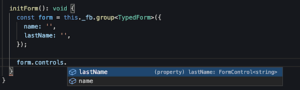
You can experiment with this in the playground.
Protected fields in templates
To round things off, here’s a smaller but welcome change: fields marked as protected can now be used directly inside templates.
@Component({
  selector: 'my-component',
  template: '{{ message }}',  // Now compiles!
})
export class MyComponent {
  protected message: string = 'Hello world';
}
There’s plenty more to explore in this release. The full list of updates is available in the changelog, and the official Angular blog post covers the highlights in more detail. Which of these changes were you most excited about? Let us know in the comments.