The Pursuit of Improved Context
That's what drove me to begin gathering documentation designed for AI consumption. Here are a few standout examples:
- Model Context Protocol: https://modelcontextprotocol.io/llms-full.txt provides the full documentation set in one file
- Daisy UI v5: https://daisyui.com/llms.txt offers both extensive docs and versions tailored for individual components
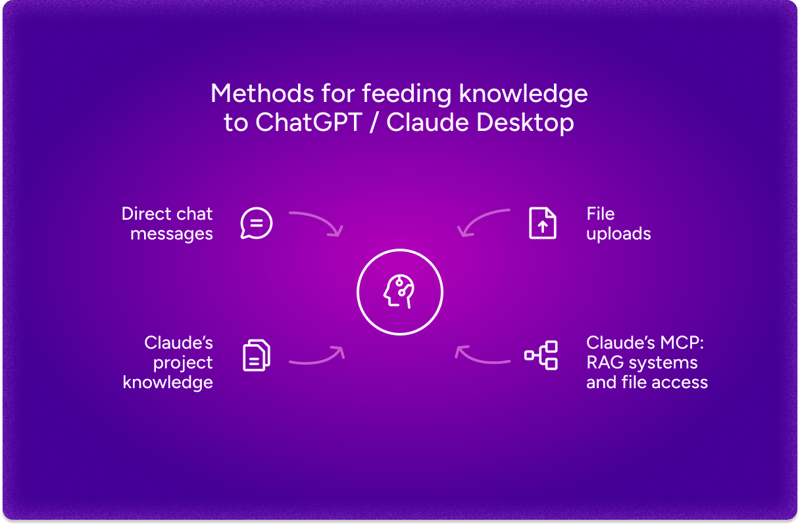
A few different methods exist for supplying this knowledge to your AI assistant:
- Pasting the documentation directly into a chat message with the LLM
- Attaching relevant files to your conversation
- Employing a Retrieval-Augmented Generation (RAG) system to fetch information on demand
During this journey, I've put together AI-friendly documentation for Angular, available at: https://github.com/gergelyszerovay/ai-friendly-docs/
Update (June 2025):
The Angular team has released two official LLMs.txt files aimed at helping LLMs and related code-generation tools produce improved modern Angular code:
- llms.txt - an index file that points to key files and resources.
- llms-full.txt - a more comprehensive compilation of resources describing Angular's operation and how to construct Angular applications.
Moving Past Simple File Uploads
Although most chat interfaces allow file uploads, Claude Desktop goes a step further with its Project Knowledge feature. This capability enables you to supply documents, code, and other materials that Claude can consult during interactions. Boasting a large context window of 200,000 tokens (approximately 500 pages of text), Claude can sustain a thorough grasp of intricate projects, leading to notably more precise responses.
A context window, for clarification, refers to the amount of information an LLM can retain during a single conversation—consider it the AI's working memory. It is quantified in tokens, which are the fundamental units LLMs process (roughly matching word fragments). To illustrate, the phrase "I love programming in TypeScript" could be segmented into tokens such as ["I", "love", "program", "ming", "in", "Type", "Script"]. A wider context window allows the LLM to weigh more information when crafting its replies.
How RAG Systems Work Their Magic
RAG (Retrieval-Augmented Generation) is the engine driving these context-aware AI interactions. Instead of indiscriminately feeding all information into the model, RAG systems smartly pull the most pertinent pieces for your specific query.
It's akin to having a knowledgeable librarian rather than being handed a stack of books—the librarian knows precisely where to locate the answer you're after. When your documentation features distinct headings and well-organized sections, the retrieval mechanism can zero in on relevant information with greater accuracy.
Beneath the surface, RAG systems operate by transforming your documentation into vector embeddings—numerical representations that encapsulate semantic meaning. When you pose a question, the system converts it into the same format and identifies the most similar sections within your documentation. Quite clever, isn't it?
I plan to explore RAG systems in greater depth in a future article, so keep an eye out if you're interested in building your own.
Crafting Superior Angular Documentation
These are the principles that have proven most effective in my work on AI-friendly documentation:
Build a single comprehensive file covering the entire framework or library documentation for situations requiring broad understanding
Create separate, specialized files for individual features that can be added selectively when you need focused information
Ensure clear header hierarchies so AI systems can grasp how different documentation segments relate to one another
I've put these ideas into practice in my Angular documentation project. Beginning with the official Angular docs, I've produced both a thorough angular-full.md file and separate feature-focused files located in the sections directory. This setup offers flexibility in how you supply context to your AI assistants.
Why Clear Header Structures Matter
The third principle (preserving clear header hierarchies) merits special consideration because it significantly influences how well AI systems can traverse your documentation.
Allow me to demonstrate with an example from the Angular documentation. The original file guide/components/inputs.md starts with:
# Accepting data with input properties

Tip: This guide assumes you've already read the [Essentials Guide](essentials).
Read that first if you're new to Angular.

Tip: If you're familiar with other web frameworks, input properties
are similar to _props_.

When you use a component, you commonly want to pass some data to it.
A component specifies the data that it accepts by declaring **inputs**:

// ...
Based solely on the file name and its contents, it's not readily apparent that this document covers component inputs within Angular's component architecture.
In my AI-friendly version in guide-components.md, I've inserted an extra header that supplies this vital context:
# Guide Components

// ...

## Accepting data with input properties

Tip: This guide assumes you've already read the [Essentials Guide](essentials).
Read that first if you're new to Angular.

Tip: If you're familiar with other web frameworks, input properties
are similar to _props_.

When you use a component, you commonly want to pass some data to it.
A component specifies the data that it accepts by declaring **inputs**:

// ...
This layered structure helps AI systems recognize that component inputs are a sub-topic within the broader subject of Angular components. This context proves especially valuable for retrieval systems that might extract only a portion of the documentation, as it enables the AI to correctly situate the information within Angular's component framework.
Being Deliberate About Context Size
One significant insight I've gained is to be selective about what you place in your AI's context window.
Sending the entire angular-full.md file isn't always the wisest choice. For example, when working on Angular components, you're likely to achieve superior outcomes by including only sections/guide-components.md and possibly a couple of related files like guide-templates.md or guide-di.md.
This focused strategy enables the AI to concentrate on what truly matters without being sidetracked by irrelevant documentation. Sometimes, when it comes to context, less genuinely proves to be more.
A Practical Demonstration
Consider a common query: "Are standalone components the default in Angular?"
This question is particularly useful for testing because the standalone option changed its default value over time. Prior to Angular 19.0.0, it was set to false; starting with version 19, it became true. I ran this question through several LLMs, each time giving them different levels of documentation context.
ChatGPT (GPT-4o)
Case 1: No documentation supplied
🧑: Are standalone components default in Angular?

🤖: No, standalone components are not the default in Angular. By default,
Angular components are part of NgModules, meaning they must be declared
inside an @NgModule.

However, Angular introduced standalone components in Angular 14 to allow
components to work without being declared inside an @NgModule. Instead,
they use the standalone: true flag in their decorator.
The answer here is stale, missing any awareness of what changed in Angular 19. This shows exactly why supplying context is essential.
Case 2: Complete Angular documentation included
🧑: Are standalone components default in Angular?
🤖: No, standalone components are not the default in Angular, but they
are encouraged as a simplified way to build applications. In Angular
versions before 19.0.0, the standalone option defaults to false, meaning
components are part of an NgModule by default. However, newer Angular
versions allow developers to migrate existing applications to standalone
mode incrementally without breaking changes.
The improvement is noticeable. The model now recognizes the version cutoff correctly, although it remains somewhat cautious about confidently stating that they are now the default starting from v19.
Case 3: Only guide-components.md provided
🧑: Are standalone components default in Angular?
🤖: Yes, in Angular, components are standalone by default. This means
you can directly add them to the imports array of other components without
needing an NgModule. However, components created with older versions of
Angular may have standalone: false in their @Component decorator,
requiring them to be part of an NgModule.
Important Note: In Angular versions before 19.0.0, the standalone option
defaulted to false.
This turns out to be the ideal scenario. With the precise documentation in place, the answer is both the most accurate and delivered with the most confidence.
These tests underscore the influence that well-prepared documentation context has on AI output. Posing this question to different LLMs without any documentation often results in answers that sound reasonable but may not reflect recent changes. The model relies on its training data, which can be outdated or incomplete.
Supplying the appropriate section of Angular documentation changes the outcome substantially. The contrast is similar to asking a developer who hasn't touched Angular in a year versus one who works with the current release on a daily basis.
Incorporating Code Context
Documentation alone doesn't complete the picture. When you want AI to genuinely help with coding tasks, it's often necessary to supply source code alongside the documentation.
If your goal is to prepare source code for AI consumption, Repomix (https://repomix.com/) is worth a look. This tool consolidates an entire codebase into one file designed to be friendly to AI models.
It manages token counts to stay within context limits, filters out sensitive material, and supports multiple output formats. Used together with AI-friendly documentation, it covers the need to pass both docs and code to models.
Comparing AI-Friendly Docs to Web Retrieval
Why invest effort in AI-friendly documentation when so many LLMs now have web access?
Web access brings real value, yet it falls short in several ways when compared to carefully prepared documentation:
Version Relevance: Search results can surface details about a different release than the one you're using. Documentation crafted with AI in mind can target your exact version, clearing up ambiguity.
Reliable Quality: The quality of web content is all over the place. Curated documentation gives the LLM access to confirmed, trustworthy information, avoiding dubious or stale pages.
Consistent Context: Pulling facts from many web pages forces the model to reconcile contradictions. A single set of curated docs offers a cohesive picture, producing steadier responses.
Fewer Fabrications: When solid documentation is available, models are less tempted to invent details to cover gaps, cutting down on hallucinations and boosting precision.
Going back to our standalone components question, a web query could easily pick up outdated information from any number of sources. The curated documentation, on the other hand, pinpointed the version-specific change in Angular 19 and gave us a much sharper answer.
What Comes Next
The main point from our exploration is that structuring docs with AI consumption in mind meaningfully raises the quality of LLM responses. Working with Angular documentation and tools such as Repomix has shown that careful organisation yields noticeably better output.
Based on this work, two main paths stand out for boosting AI performance:
Enriched Context: This strategy has been the heart of this article — feeding models additional context through structured docs and source code. It works with existing models and simply gives them more useful material.
Standardised Tool Access: The next major step comes from adopting common integration standards, chiefly the Model Context Protocol (MCP) introduced by Anthropic. MCP lays out a shared specification for how AI models interact with external tools. Older setups relied on bespoke integrations for each AI service; MCP establishes a common format for defining tools, making calls, and handling results.
These two approaches reinforce one another: more effective documentation clarifies which tools are appropriate, and connected tools expand the model's range. I'm currently working on RAG tools built on MCP and plan to write about them soon in these articles:
- Building Your Own RAG System: Enhancing Claude with Your Documentation
- How to Get Better Technical Answers from Claude Using Your Own Documentation
About the Author
My name is Gergely Szerovay. I spent years working as a data scientist and full-stack developer, and for the past three years I've been a frontend tech lead focused on Angular. To track how AI-assisted development is evolving, I've begun creating AI tools publicly, documenting the process on AIBoosted.dev.
You can follow me on Substack (Angular Addicts), Substack (AIBoosted.dev), Medium, Dev.to, X or LinkedIn for more on Angular and building AI apps with AI, TypeScript, React, and Angular.