
Theoretical Foundation: Strategic Design from DDD
Strategic Design, one of the two original pillars of Domain-driven Design (DDD), has established itself as the foundational approach for organizing contemporary frontends. The core idea is to partition a software system into distinct sub-domains. For instance, an airline might identify sub-domains such as the following:
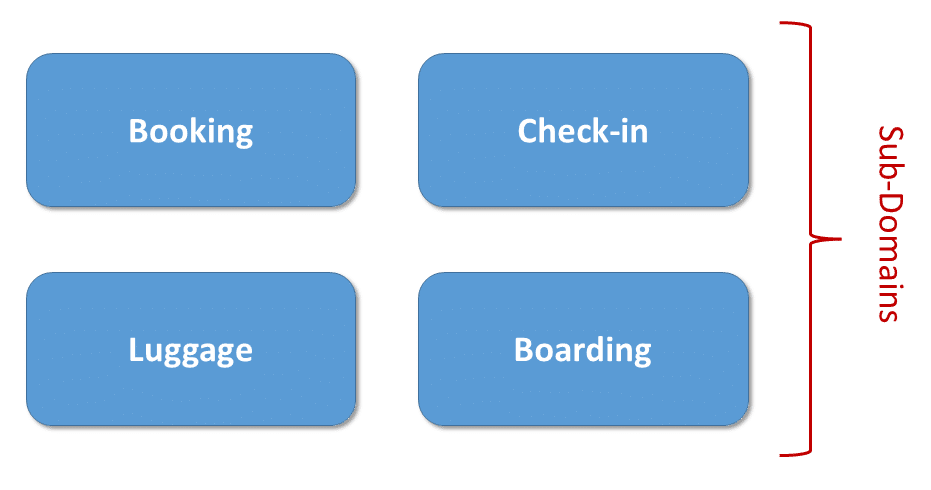
Determining these domains requires a careful examination of the business processes that need support. The collaboration between developers and architects, on one side, and domain experts, on the other, is indispensable. Workshop techniques like Event Storming, which merge DDD with principles from agile methodologies, are particularly effective for this purpose.
The identified sub-domains are then transformed into bounded contexts. Whereas a sub-domain refers to a section of the real world (the "problem space"), a bounded context represents the corresponding part of the software system (the "solution space"). Each bounded context maintains its own model, which reflects a specific perspective of the sub-domain as implemented in code. Consequently, a flight in the boarding context is not necessarily equivalent to a flight in the booking context. This approach prevents the creation of an unwieldy, one-size-fits-all model and guarantees that each context depicts its respective view of reality with precision.
Dividing a system into bounded contexts also yields low coupling, which in turn enhances maintainability. In the example above, Booking might, for instance, expose only a handful of selected services. Alternatively, details about booked flights could be disseminated via messaging in the backend. In larger projects, it is customary to allocate one or more contexts to a dedicated sub-team, thereby adhering to Conway's Law.
Ideally, each sub-domain corresponds to exactly one bounded context, although for technical or organizational reasons, a sub-domain may be split into multiple contexts. A context map illustrates the relationships and dependencies among the various contexts:
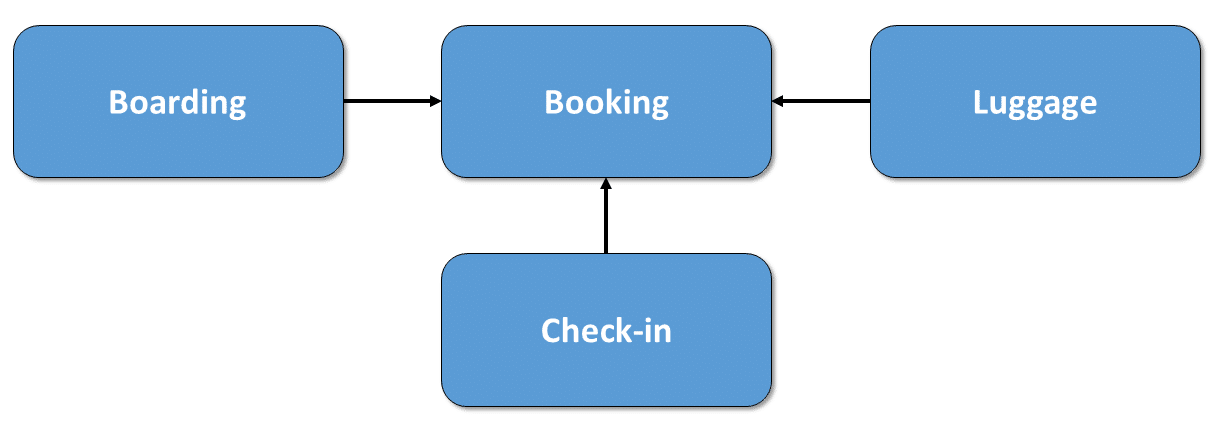
Strategic Design offers several Context Mapping Patterns for shaping the connections between bounded contexts. For example, one context might expose selected aspects through a service. Additionally, a context can shield itself from modifications in another context by introducing an anti-corruption layer that translates between the differing models.
Translating to Code: The Architecture Matrix
To map these concepts into source code, it is sensible to subdivide each context further into distinct modules:
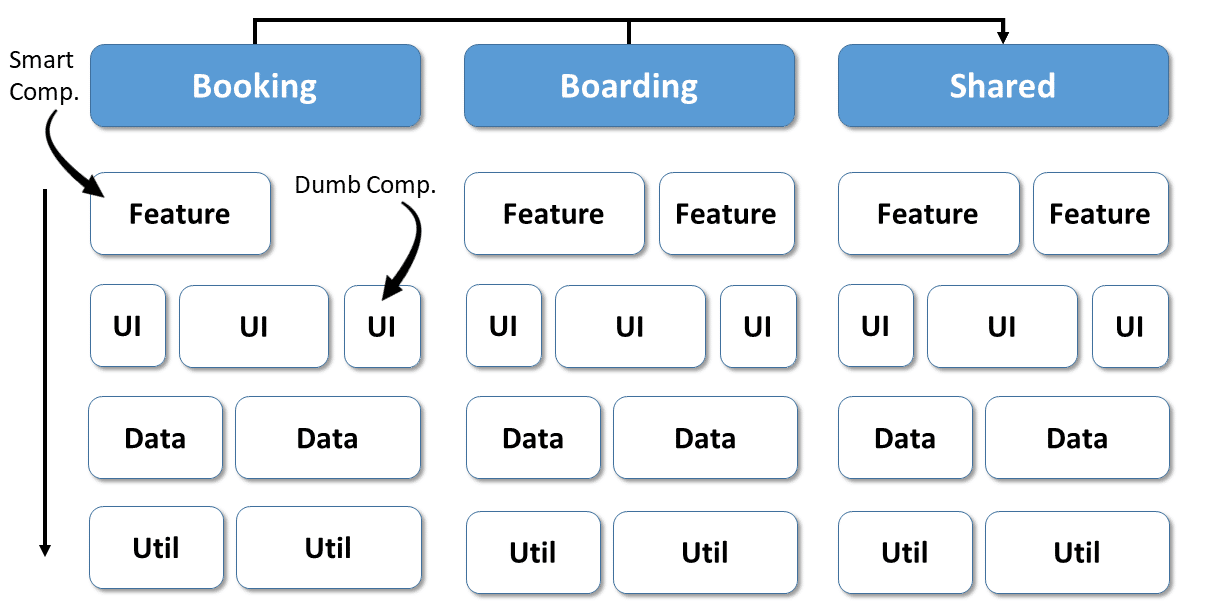 Categorizing these modules enhances clarity. Nrwl proposes several categories (originally intended for libraries) that have proven valuable in day-to-day practice:
- feature: A feature module implements a specific use case (or a technical capability) using smart components. Because these components are narrowly focused on a single feature, they are not highly reusable. Smart components interact with the backend, typically through a store or services in the Angular ecosystem.
- ui: UI modules contain dumb or presentational components. These are reusable elements that assist in implementing features without knowing any particular one. A design system is typically built from such components. UI modules may also house general technical components applicable across all use cases—for instance, a ticket component that ensures uniform ticket presentation in different features. These components normally communicate with their surroundings only via properties and events, having no direct access to the backend or a store.
- data: Data modules encompass the domain model (or rather, the client-side representation of it) along with the services operating on it. Such services validate entities and handle backend communication. State management—including the provision of view models—can also reside in data modules, which proves especially useful when multiple features within the same context rely on shared data.
- util: General helper functions and similar utilities are found in utility modules. Examples include logging, authentication, and date handling.
Another important implementation consideration is the shared area, which provides code accessible to all contexts. This area should primarily contain technical code; use-case-specific logic usually belongs within the individual contexts.
The structure outlined here brings order to the codebase: there is less debate about where to place or locate specific pieces of code. Moreover, two straightforward yet effective rules can be derived from this matrix:
- To enforce low coupling, each context may only interact with its own modules. The sole exception is the shared area, which is accessible to every context.
- Each module may only access modules positioned in lower layers of the matrix. In this sense, each module category constitutes a layer.
Both rules reinforce the decoupling of individual modules and contexts while helping to prevent cyclic dependencies.
Folder Layout for the Architecture Matrix
The architecture matrix is mirrored in the source tree using folders: each context gets its own directory, which in turn contains a subdirectory for each of its modules:
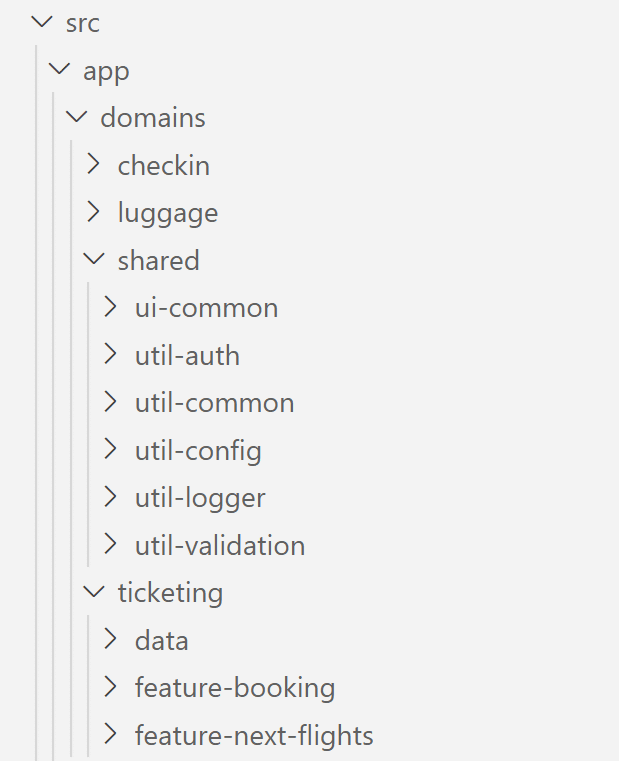
Module names are prefixed with the category label. This convention makes it immediately obvious where a given module fits within the architecture matrix. Inside these modules, you will find typical Angular building blocks such as components, directives, pipes, and services.
Since the advent of standalone components (and standalone directives and pipes), Angular modules are no longer required. Instead, the standalone property is set to true:
@Component({
  selector: 'app-flight-booking',
  standalone: true,
  imports: [CommonModule, RouterLink, RouterOutlet],
  templateUrl: './flight-booking.component.html',
  styleUrls: ['./flight-booking.component.css'],
})
export class FlightBookingComponent {
}
For components, the compilation context must also be imported. This context comprises all other standalone components, directives, and pipes referenced in the template.
An index.ts file defines the module's public interface. This file acts as a barrel, determining which parts of the module are accessible from outside:
export * from './flight-booking.routes';Care must be taken with the published constructs, as breaking changes tend to affect dependent modules. Conversely, anything not exported here is considered an implementation detail of the module, making changes to those parts far less risky.
Enforcing Your Architecture with Sheriff
The architecture described above rests on several conventions:
- Modules may only communicate with modules in the same context as well as shared
- Modules may only communicate with modules in lower layers
- Modules may only access the public interface of other modules
The open-source Sheriff project enables these conventions to be enforced through linting. Any violation is flagged with an error in the IDE or printed to the console:
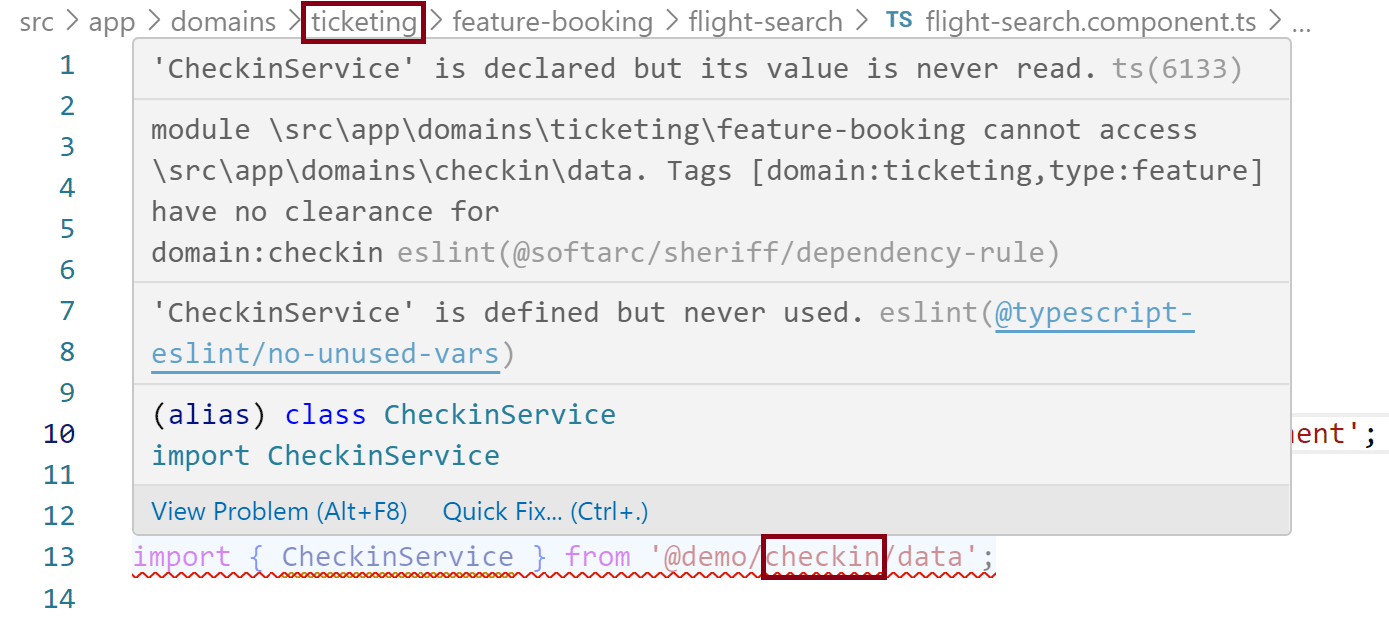
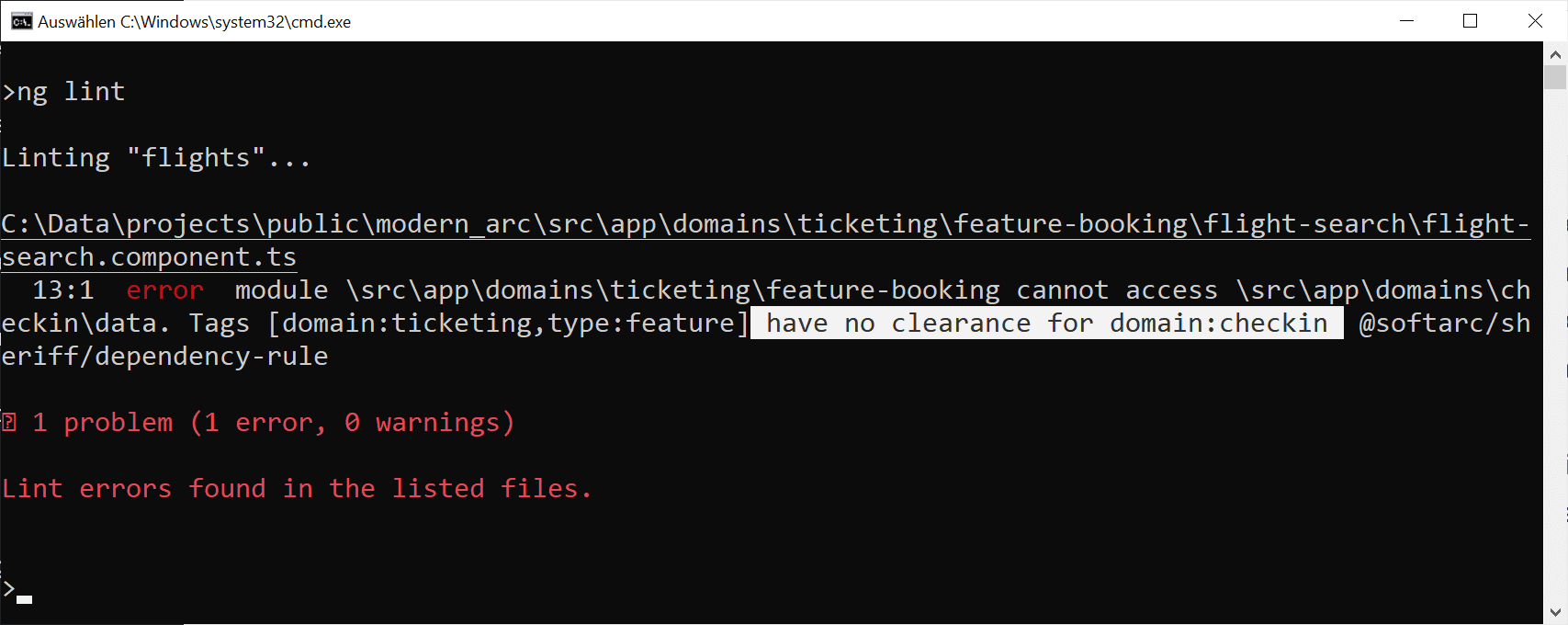 The former provides immediate feedback during development, whereas the latter can be automated within the build pipeline. This setup can, for example, stop code that breaches the defined architecture from ever reaching the main or dev branch of the repository.
To get started with Sheriff, the following two packages need to be installed via npm:
npm i @softarc/sheriff-core @softarc/eslint-plugin-sheriff -DThe first package contains Sheriff itself; the second offers the integration with eslint. The latter must be registered in the .eslintrc.json file located at the project root:
{
  [...],
  "overrides": [
    [...]
    {
      "files": ["*.ts"],
      "extends": ["plugin:@softarc/sheriff/default"]
    }
  ]
}
Sheriff treats any folder containing an index.ts as a module. By default, Sheriff prevents this index.ts from being bypassed, thereby prohibiting access to implementation details by other modules.
The sheriff.config.ts file at the project root specifies which folders correspond to individual modules. Each module is assigned one or more tags, such as type:feature or type:ui. These tags form the basis for dependency rules (depRules), which dictate which modules are permitted to access which others.
The following example shows a Sheriff configuration tailored to the architecture matrix discussed earlier:
import { noDependencies, sameTag, SheriffConfig } from '@softarc/sheriff-core';

export const sheriffConfig: SheriffConfig = {
  version: 1,

  tagging: {
    'src/app': {
      'domains/<domain>': {
        'feature-<feature>': ['domain:<domain>', 'type:feature'],
        'ui-<ui>': ['domain:<domain>', 'type:ui'],
        'data': ['domain:<domain>', 'type:data'],
        'util-<ui>': ['domain:<domain>', 'type:util'],
      },
    },
  },
  modules: {
    root: ['*'],

    'domain:*': [sameTag, 'domain:shared'],

    'type:feature': ['type:ui', 'type:data', 'type:util'],
    'type:ui': ['type:data', 'type:util'],
    'type:data': ['type:util'],
    'type:util': noDependencies,
  },
};
The tags reference folder names. Expressions such as <domain> or <feature> act as placeholders. Every module beneath src/app/domains/<domain> whose folder name starts with feature-* will thus receive the tags domain:<domain> and type:feature. In the case of src/app/domains/booking, those would be domain:booking and type:feature.
The dependency rules under modules leverage the individual tags. For instance, they specify that a module may only reach modules within the same domain plus domain:shared. Additional rules ensure that each layer only accesses layers beneath it. Thanks to the root: ['*'] rule, all folders in the root directory that have not been explicitly categorized are granted access to every module. This typically applies to the application shell.
Pay particular attention to the enableBarrelLess property. When set to true, all content within folders named internal is considered an implementation detail of that module. Consequently, it cannot be accessed from other modules, even if the configured rules would otherwise allow it. When enableBarrelLess is omitted or set to false, Sheriff expects every module to contain an index.ts that exports the module's public API. Everything else is regarded as internal.
Lean Path Mappings
Path mappings help eliminate hard-to-read relative paths in imports. They allow, for instance, replacing
import { FlightBookingFacade } from '../../data';with
import { FlightBookingFacade } from'@demo/ticketing/data' ;These three-part imports consist of the project or workspace name (for example, @demo), the context name (for example, ticketing), and a module name (for example, data), thereby reflecting the intended position in the architecture matrix.
This notation can be enabled with a single path mapping in tsconfig.json at the project root, regardless of how many contexts or modules exist:
{
  "compileOnSave": false,
  "compilerOptions": {
    "baseUrl": "./",
    [...]
    "paths": {
      "@demo/*": ["src/app/domains/*"],
    }
  },
  [...]
}
After making this change, it is advisable to restart IDEs such as Visual Studio Code so they pick up the update.
Looking Ahead: Further Architectural Insights
Additional information on enterprise-grade Angular architectures can be found in our complimentary eBook (5th edition, 12 chapters):
- Based on which criteria can a vast application be divided into sub-domains?
- How can we ensure the solution stays maintainable for years or even decades?
- What Micro Frontend options does Module Federation offer?
Feel free to download it now!
Closing Thoughts
Strategic design breaks a system down into multiple sub-domains, each realized as a bounded context with minimal coupling between them. Because of this loose coupling, modifications in one part of the application are less likely to ripple into unrelated areas. The resulting structure assigns distinct modules to each context, and the community-driven tool Sheriff enforces that these modules interact only through pre-defined, allowed communication paths.