
Why Lazy-Loaded Modules Need a Home for Shared Styles
When working with lazy-loaded feature modules, one recurring question is where to put the shared styles (CSS or SCSS) that belong to a specific module and should load together with it.
A common solution I found through searching was to configure the SCSS files in angular.json so they get built as a separate file and then inject them into the DOM from a component inside the feature module. You can read more about that approach in this article.
While that works, exploring other Angular features led me to a simpler way to load these styles just when the feature loads.
The key was using ViewEncapsulation — specifically the None strategy.
Understanding ViewEncapsulation
ViewEncapsulation is a component-level setting that determines whether the component's own template and styles can influence the rest of the application.
Angular provides three main encapsulation strategies:
- Emulated: Styles are scoped to the component, preventing conflicts with others. This is the default behavior.
- None: No encapsulation is applied at all.
- ShadowDom: Uses a Shadow DOM for style encapsulation. More details are available in MDN's documentation on Shadow DOM.
If you're new to ViewEncapsulation, the official Angular documentation covers it in depth.
Lazy-Loading Shared Styles with ViewEncapsulation
Step 1: Structure the Base Component
To lazy load styles along with the feature module, create a root component that hosts the child components. If the module has multiple routes, this component can serve as a base for all of them.
Here's the project structure I used:
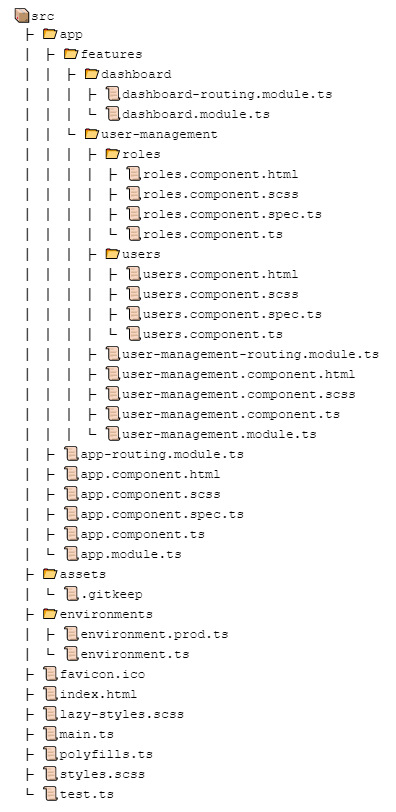
In this structure, there are two feature modules.
Inside user-management, there are two components — users and roles — that share common styles.
The module defines separate routes for each, so I use a base component to hold the shared styles.
Here are the routing files:
import { NgModule } from '@angular/core';
import { Routes, RouterModule } from '@angular/router';

const routes: Routes = [
  {
    path: 'user-management',
    loadChildren: () => import('./features/user-management/user-management.module').then(m => m.UserManagementModule),
    pathMatch: 'prefix'
  },
  {
    path: 'dashboard',
    loadChildren: () => import('./features/dashboard/dashboard.module').then(m => m.DashboardModule),
    pathMatch: 'prefix'
  },
];

@NgModule({
  imports: [RouterModule.forRoot(routes)],
  exports: [RouterModule]
})
export class AppRoutingModule { }
app-routing.module.ts
import { NgModule } from '@angular/core';
import { Routes, RouterModule } from '@angular/router';
import { RolesComponent } from './roles/roles.component';
import { UserManagementComponent } from './user-management.component';
import { UsersComponent } from './users/users.component';


const routes: Routes = [
  {
    path: '',
    component: UserManagementComponent,
    children: [
      { path: 'users', component: UsersComponent },
      { path: 'roles', component: RolesComponent }
    ]
  },
];

@NgModule({
  imports: [RouterModule.forChild(routes)],
  exports: [RouterModule]
})
export class UserManagementRoutingModule { }
user-management-routing.module.ts
Step 2: Add Shared Styles to the Base Component
Place all the feature-specific shared styles in the stylesheet associated with the base component.
<router-outlet></router-outlet>
user-management.component.html
.card {
    border-radius: 4px;
    border: 1px solid #eee;
    background-color: #fafafa;
    height: 40px;
    width: 200px;
    margin: 0 8px 16px;
    padding: 16px;
    display: flex;
    flex-direction: row;
    justify-content: center;
    align-items: center;
    transition: all 0.2s ease-in-out;
    line-height: 24px;
  }
user-management.component.scss
The template for this base component only contains the router outlet, making it a clean container for loading child views.
Step 3: Disable Encapsulation on the Base Component
Set the ViewEncapsulation property of the base component to None.
import { Component, OnInit, ViewEncapsulation } from '@angular/core';

@Component({
  selector: 'app-user-management',
  templateUrl: './user-management.component.html',
  styleUrls: ['./user-management.component.scss'],
  encapsulation: ViewEncapsulation.None
})
export class UserManagementComponent implements OnInit {

  constructor() {
  }

  ngOnInit(): void {
  }
}
user-management.component.ts
That's all there is to it!
What I found from using this approach:
- No duplication of shared styles
- Shared styles load only when the feature module is loaded
- Fewer configuration steps
- No manual DOM injection needed
Once the module is loaded, ViewEncapsulation set to None makes these styles globally available, so there's a risk of clashing with global styles. This risk exists whether you use this method or dynamically inject styles into the DOM. To avoid conflicts, give the shared style classes unique names or wrap them under a module-specific selector.
Alternatively, you could use the ShadowDom strategy to create a fully isolated style scope. That way, component styles won't interfere with global styles — though global styles won't apply to the feature module either.
With these options, you can pick what fits your situation best.
Summary
To lazy-load feature-specific common styles, use the ViewEncapsulation feature without injecting styles manually. Set the encapsulation strategy to None on the base or root component of the feature, and store all shared styles in the stylesheet tied to that component. This ensures styles are only fetched when the feature module itself is loaded.
The demo source code is available in this GitHub repository.
Thanks for reading — I hope this approach proves useful in your own projects.
Happy lazy loading.