
Understanding Virtual Scroll and Its Limitations
The Angular CDK has included a virtual scroll toolkit since version 7.
Out of the box, it performs admirably when all your items share a fixed size. You simply tell cdk-virtual-scroll-viewport the item dimensions, and everything falls into place. Smooth scrolling to a specific item and tracking the currently visible index while the user scrolls work seamlessly. But what happens when your items come in varying sizes? That’s where a custom virtual scroll strategy steps in, teaching the viewport how to handle your unique items.
For my project, I needed a mobile-friendly calendar display. The goal was flawless month-to-month scrolling, with each month potentially having a different height due to varying week counts. Let’s dive into what makes a virtual scroll strategy tick and build our own from scratch.
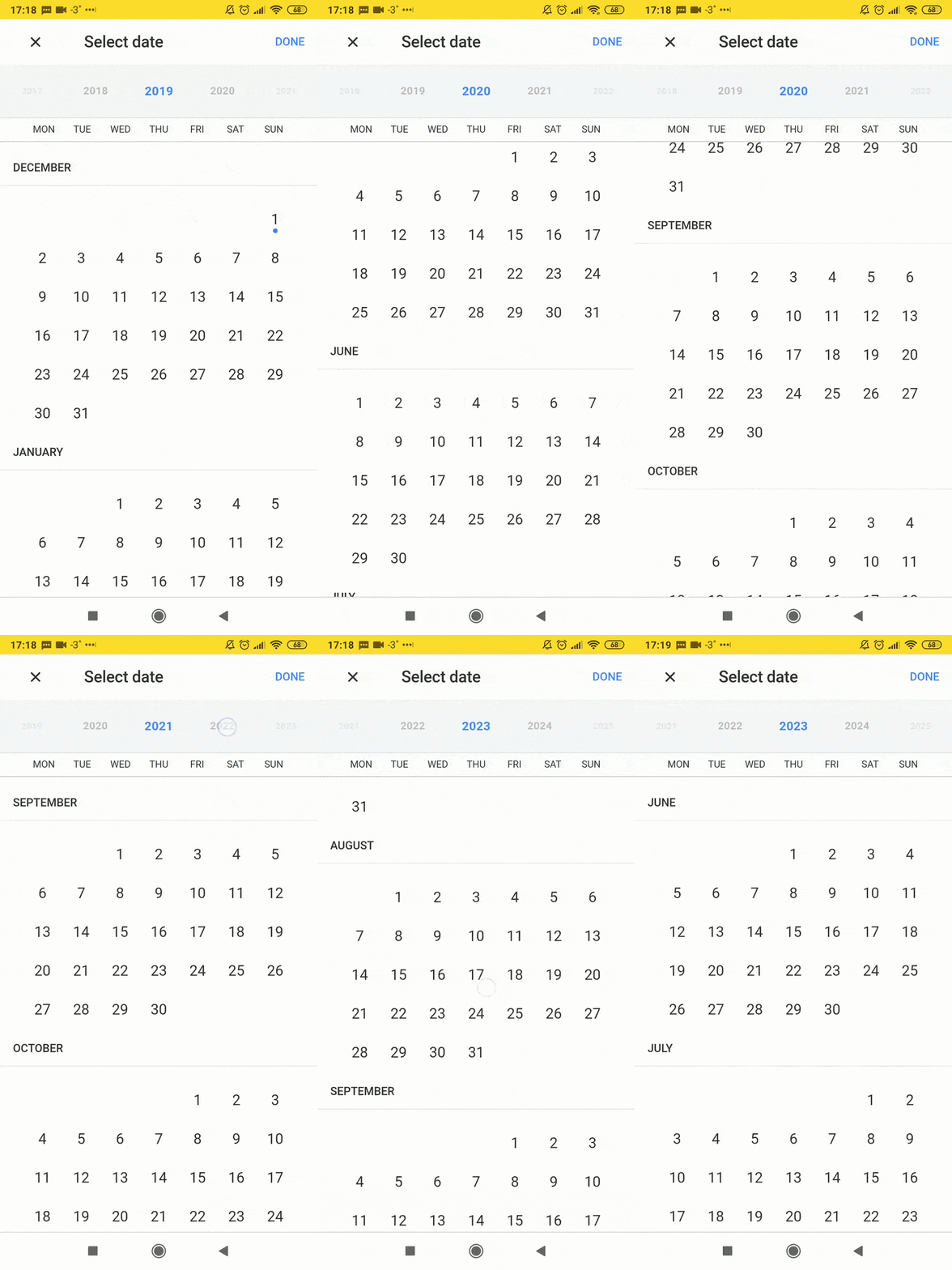
A working mobile calendar (in Russia, weeks start on Monday)
Computing Month Heights
Calendar patterns repeat every 28 years—when you don’t consider skipped leap years. Every century, the leap year is omitted, unless the year is divisible by 400. Since we’re only dealing with years from 1905 to 2100, we won’t run into any edge cases that would cause trouble.
Starting from 1905 and covering 196 years gives us seven full cycles. We might be off by one week in February 2100, but that’s at the very tail end of our range and won't make a difference.
Since all computations happen during scrolling, speed is critical. To compute heights on the fly, I prepared a constant representing an entire cycle—an array of 28 sub-arrays, each holding 12 month sizes:
function getCycle(label: number, week: number): readonly number[][] {
   return Array.from({length: 28}, (_, i) =>
       Array.from(
           {length: 12},
           (_, month) => label + weekCount(i, month) * week,
       ),
   );
}
The result gets stored in **const CYCLE = getCycle(64, 48);**
This function takes the month label height and week height as its parameters (64 and 48 pixels, respectively, for the demo above). To count the number of weeks in a month, use this straightforward method:
function weekCount(year: number, month: number): number {
   const firstOfMonth = new Date(year + STARTING_YEAR, month, 1);
   const lastOfMonth = new Date(year + STARTING_YEAR, month + 1, 0);
   const days = firstOfMonth.getDay() + lastOfMonth.getDate();

   return Math.ceil(days / 7);
}
We’ll also need a helper to retrieve the height for a specific year and month from within the cycle.
function reduceCycle(lastYear: number = 28, lastMonth: number = 12): number {
   return CYCLE.reduce(
       (total, year, yearIndex) =>
           yearIndex <= lastYear
               ? total +
                 year.reduce(
                     (sum, month, monthIndex) =>
                         yearIndex < lastYear ||
                         (yearIndex === lastYear && monthIndex < lastMonth)
                             ? sum + month
                             : sum,
                     0,
                 )
               : total,
       0,
   );
}
Calling it without arguments gives us the total height of an entire 28-year cycle.
To plug our custom logic into the virtual scroll, we provide the strategy via the ****VIRTUAL_SCROLL_STRATEGY**** injection token:
{
   provide: VIRTUAL_SCROLL_STRATEGY,
   useClass: MobileCalendarStrategy,
},
Our class must conform to the VirtualScrollStrategy interface:
export interface VirtualScrollStrategy {
   scrolledIndexChange: Observable<number>;
   attach(viewport: CdkVirtualScrollViewport): void;
   detach(): void;
   onContentScrolled(): void;
   onDataLengthChanged(): void;
   onContentRendered(): void;
   onRenderedOffsetChanged(): void;
   scrollToIndex(index: number, behavior: ScrollBehavior): void;
}
The attach and detach methods handle initialization and cleanup, respectively. The one that does the heavy lifting is onContentScrolled—it fires each time the user scrolls the container. The Angular CDK debounces these calls using requestAnimationFrame, so this method runs at most once per frame.
When the collection we’re iterating over changes, the virtual scroll triggers onDataLengthChanged. Our scenario never changes the dataset, but if your items did change, you’d reuse most of the attach logic here—recalculating both the total height and the currently visible range.
The CdkVirtualScrollViewport calls onContentRendered and onRenderedOffsetChanged when we manually set a new rendered items range or adjust the offset. For our calendar, these aren’t necessary. If your strategy does require them, the logic is simple: in onContentRendered, calculate the new offset; in onRenderedOffsetChanged, do the reverse and derive the rendered range from the updated offset.
Another essential method is scrollToIndex, which scrolls to a specific element. The companion scrolledIndexChange observable tracks the index of the first visible item.
Let’s start with the straightforward methods before tackling the core logic:
export class MobileCalendarStrategy implements VirtualScrollStrategy {
   private index$ = new Subject<number>();

   private viewport: CdkVirtualScrollViewport | null = null;

   scrolledIndexChange = this.index$.pipe(distinctUntilChanged());

   attach(viewport: CdkVirtualScrollViewport) {
       this.viewport = viewport;
       this.viewport.setTotalContentSize(CYCLE_HEIGHT * 7);
       this.updateRenderedRange(this.viewport);
   }

   detach() {
       this.index$.complete();
       this.viewport = null;
   }

   onContentScrolled() {
       if (this.viewport) {
           this.updateRenderedRange(this.viewport);
       }
   }

   scrollToIndex(index: number, behavior: ScrollBehavior): void {
       if (this.viewport) {
           this.viewport.scrollToOffset(this.getOffsetForIndex(index), behavior);
       }
   }

   // ...
}
We need to convert between two things: the index of an element given an offset, and the offset given an index. The former can be handled with the reduceCycle function we defined:
private getOffsetForIndex(index: number): number {
   const month = index % 12;
   const year = (index - month) / 12;

   return this.computeHeight(year, month);
}

private computeHeight(year: number, month: number): number {
   const remainder = year % 28;
   const remainderHeight = reduceCycle(remainder, month);
   const fullCycles = (year - remainder) / 28;
   const fullCyclesHeight = fullCycles * CYCLE_HEIGHT;

   return fullCyclesHeight + remainderHeight;
}
To sum up the heights of all preceding items, we first count how many full 28-year cycles come before it. Then we reduce one cycle up to the target month. Handling the reverse—finding an index from an offset—is a bit trickier:
private getIndexForOffset(offset: number): number {
   const remainder = offset % CYCLE_HEIGHT;
   const years = ((offset - remainder) / CYCLE_HEIGHT) * 28;

   let accumulator = 0;

   for (let year = 0; year < CYCLE.length; year++) {
      for (let month = 0; month < CYCLE[year].length; month++) {
          accumulator += CYCLE[year][month];

          if (accumulator - CYCLE[year][month] / 2 > remainder) {
              return Math.max((years + year) * MONTHS_IN_YEAR + month, 0);
          }
      }
   }


   return 196;
}
First, we calculate the total height of all whole cycles that fit within the given offset. Next, we iterate through the cycle array, adding heights until we pass the offset. We also compare against half of each month’s height (CYCLE[year][month] / 2). This way, we don’t just get the topmost visible item, but the one closest to the visible boundary—making it easier to snap into place when scrolling wraps up.
Now comes the main rendering function, which decides which items to display:
private updateRenderedRange(viewport: CdkVirtualScrollViewport) {
   const viewportSize = viewport.getViewportSize();
   const offset = viewport.measureScrollOffset();
   const {start, end} = viewport.getRenderedRange();
   const dataLength = viewport.getDataLength();
   const newRange = {start, end};
   const firstVisibleIndex = this.getIndexForOffset(offset);
   const startBuffer = offset - this.getOffsetForIndex(start);

   if (startBuffer < BUFFER && start !== 0) {
       newRange.start = Math.max(0, this.getIndexForOffset(offset - BUFFER * 2));
       newRange.end = Math.min(
           dataLength,
           this.getIndexForOffset(offset + viewportSize + BUFFER),
       );
   } else {
       const endBuffer = this.getOffsetForIndex(end) - offset - viewportSize;

       if (endBuffer < BUFFER && end !== dataLength) {
           newRange.start = Math.max(0, this.getIndexForOffset(offset - BUFFER));
           newRange.end = Math.min(
               dataLength,
               this.getIndexForOffset(offset + viewportSize + BUFFER * 2),
           );
       }
   }

   viewport.setRenderedRange(newRange);
   viewport.setRenderedContentOffset(this.getOffsetForIndex(newRange.start));
   this.index$.next(firstVisibleIndex);
}
Let’s walk through the sequence. We fetch the container size, the current scroll offset, the visible range, and the total item count. From there, we locate the first visible item and the corresponding offset for rendering. Once we have these, we need to adjust the range and offset without causing jitter while scrolling or when heights vary. A BUFFER constant determines how much content we render outside the visible area. From experience, 500px works well. If the distance to the first visible item drops below that buffer, we expand the rendered range to cover twice the buffer size. On the other end of the range, a single buffer suffices since we’re moving in the opposite direction. This logic applies symmetrically for both scroll directions. After updating the range and computing its offset, we emit the index of the current top item.
Once the strategy is ready, it’s just a matter of registering it with the providers and using the virtual scroll in the template:
<cdk-virtual-scroll-viewport
   (scrolledIndexChange)="activeMonth = $event"
>
   <section
       *cdkVirtualFor="let month of months; templateCacheSize: 10"
   >
       <h1>{{month.name}}</h2>
       <our-calendar [month]="month"></our-calendar>
   </section>
</cdk-virtual-scroll-viewport>
The trickiest part left is snapping smoothly to the nearest month. On mobile, scrolling often continues after you lift your finger, so pinpointing the exact moment to align the visible month to the top can be tricky. We’ll use RxJs to handle this—subscribing to touchstart followed by touchend, then using the race operator to determine if the scroll is still running or if the touch ended without any inertia. If no scroll event fires within the debounce window, we trigger the alignment; otherwise, we wait for the remaining scroll to settle. We also add takeUntil(touchstart$) because a new touchstart event cancels any inertial movement—in that case, we should reset our stream to its starting point.
const touchstart$ = touchStartFrom(monthsScrollRef.elementRef.nativeElement);
const touchend$ = touchEndFrom(monthsScrollRef.elementRef.nativeElement);

// Smooth scroll to closest month after scrolling is done
touchstart$
   .pipe(
       switchMap(() => touchend$),
       switchMap(() =>
           race<unknown>(
               monthsScrollRef.elementScrolled(),
               timer(SCROLL_DEBOUNCE_TIME),
           ).pipe(
               debounceTime(SCROLL_DEBOUNCE_TIME * 2),
               take(1),
               takeUntil(touchstart$),
           ),
       ),
   )
   .subscribe(() => {
       monthsScrollRef.scrollToIndex(this.activeMonth, 'smooth');
   });
Worth noting: the Angular CDK relies on the native
ScrollBehavior. Safari still doesn’t support it as of 2k19. You can work around this by implementing your own smooth scroll inside thescrollToIndexmethod.
Check out the live demo—make sure to open it on a phone or enable device emulation in DevTools so touch events work properly. You can explore the source code on StackBlitz.
Thanks to dependency injection and the Angular team’s forward thinking, we can tailor scrolling to our exact needs. Handling virtual scroll for items with varied heights sounds daunting at first. But if you can reliably compute each item’s size, writing a custom strategy turns out to be quite manageable. Just remember that calculations will run frequently and must be efficient. Whether you’re displaying cards that might or might not have extra content affecting height, plan a fast sizing algorithm and feel free to build your own strategy.