This is the second post in the series “Rethinking Authentication for SPAs: Easier and More Secure with Gateways” — the first one looked at why storing security tokens directly in the browser can be problematic.
The earlier discussion in this series highlighted several challenges with client-side token storage. As a result, a long-standing pattern — one that OAuth 2.0 for Browser-Based Apps also endorses — has gained renewed attention: performing OAuth 2.0 on the server and keeping token management there.
To prevent that logic from leaking into every server-side API, we can wrap it inside a reusable reverse proxy. I refer to this component as an authentication gateway:
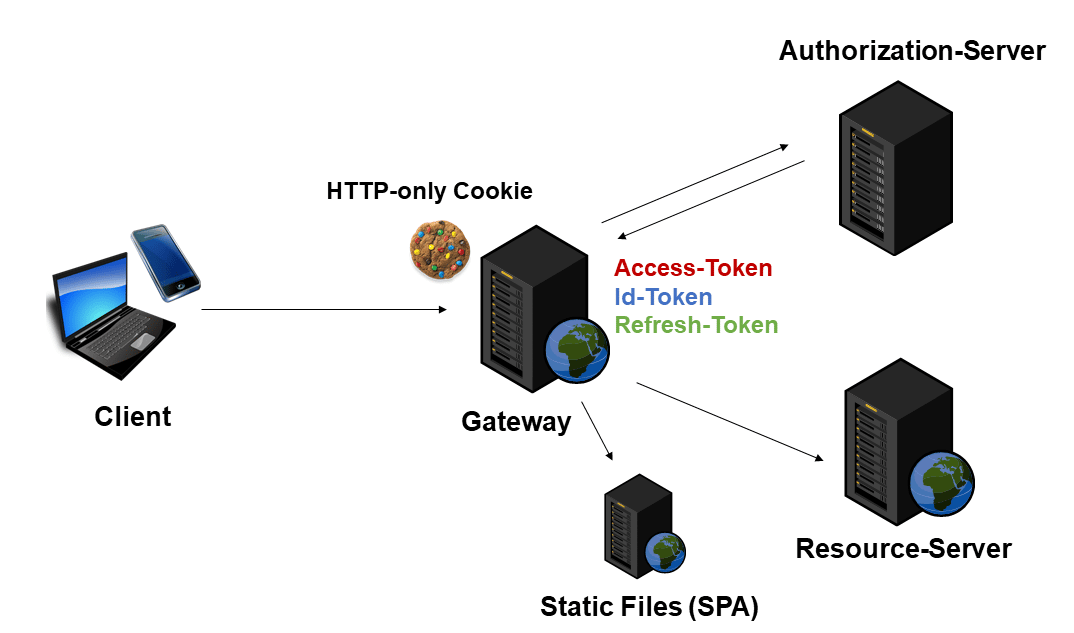
The idea is simple: combine the strengths of both sides. Every request from the client passes through the gateway. That gateway manages the acquisition and renewal of tokens and forwards them to the resource server (the Web API). Critically, the tokens never reach the browser. Instead, the client only receives an HTTP-only cookie that represents the user’s session with the gateway.
Because tokens are kept out of the browser, many of the attack vectors discussed earlier are no longer applicable. What’s more, the frontend becomes much simpler — the user is authenticated without any custom code in the SPA.
To trigger (re)authentication or a logout, the gateway simply redirects the user to a dedicated URL. Information about the currently logged-in user can be fetched through a lightweight gateway endpoint.
What’s in a Name
This pattern goes by several terms. Some call it forward authentication, others refer to it as a backend for frontend (BFF). I personally avoid the latter label in this context, since a BFF is usually domain-specific and there isn’t necessarily a one-to-one mapping between an authentication gateway and a BFF, or between a BFF and the downstream API. In other words: a BFF may handle authentication gateway duties, but it doesn’t have to.
Guarding Against XSRF: Token or SameSite Cookie
One issue remains: reintroducing cookies means we need to defend against cross-site request forgery (XSRF). The gateway’s session cookie should therefore be HTTP-only and also set with the SameSite attribute. That said, SameSite doesn’t mean Same Origin — the “site” concept spans all subdomains. So a vulnerable application on another subdomain, such as a basic CMS, could become a weak point.
Hence, adding an XSRF token is a prudent extra step. The gateway issues a random string, and the SPA must send it back on each API call. This lets the gateway verify that the request truly comes from the originally authenticated user.
This can be automated within the SPA. In Angular, it works out of the box. Once Angular’s HttpClient detects a cookie named XSRF-TOKEN, it automatically adds an X-XSRF-TOKEN header to every backend request. Both names are configurable.
Building a Gateway
With the concept clarified, the practical question is: where do we find an implementation? There are plenty of commercial solutions, often far more feature-rich than what we’ve described. Popular options include gateways from Kong and Traefik. The major cloud platforms also offer PaaS alternatives, such as Azure Web Apps and Amazon API Gateway. Additionally, Identity Server provides the Backend for Frontend (BFF) Security Framework, and an open-source project called OAuth2 Proxy has implemented this idea for quite some time.
For this article, however, I want to highlight a more adaptable approach — one that lets us tailor the gateway to different identity providers and add framework-specific behavior, like the Angular XSRF handling mentioned earlier. The current implementation has been validated against:
- Keycloak
- Auth0
- Identity Server
- Azure Active Directory
The gateway is built on YARP, a recently released reverse proxy from Microsoft. The name stands for “Yet Another Reverse Proxy.” YARP is notably lightweight and offers many built-in features, including routing, load balancing, health checks, and distributed tracing. What sets YARP apart is its extensibility, especially since it sits on top of ASP.NET Core.
Not a Microsoft or ASP.NET Core fan? That’s fine: .NET Core runs on Windows, Linux, and Mac, and the gateway is usually shipped inside a docker container. For most tweaks, you only need to edit a configuration file.
Another advantage of YARP is that it works with all middleware components in the ASP.NET Core ecosystem — including the OIDC middleware we need.
The source code for this gateway is available, complete with a Dockerfile and sample configurations for several identity solutions.
The YARP configuration, stored in appsettings.json, defines one route for the API and another for the SPA:
{
    "ReverseProxy": {
        "routes": {
            "apiRoute": {
                "ClusterId": "apiCluster",
                "AuthorizationPolicy": "authPolicy",
                "match": {
                    "Path": "api/{**remainder}"
                }
            },
            "appRoute": {
                "ClusterId": "appCluster",
                "AuthorizationPolicy": "authPolicy",
                "match": {
                    "Path": "{**remainder}"
                }
            }
        },
        "clusters": {
            "apiCluster": {
                "destinations": {
                    "destination1": {
                        "Address": "http://demo.angulararchitects.io"
                    }
                }
            },
            "appCluster": {
                "destinations": {
                    "destination1": {
                        "Address": "http://localhost:4200"
                    }
                }
            }
        }
    }
}
The apiRoute matches all requests beginning with api/, while the appRoute handles everything else and forwards to the SPA. Each route points to a cluster — a set of services that can answer the same requests. Clusters are what enable YARP’s load balancing. In this case, since we’re focused on OAuth 2.0 and OIDC, each cluster references a single address, either the API or the SPA.
The configuration also carries gateway-specific and OIDC-middleware settings:
[...]
  "Gateway": {
    "SessionTimeoutInMin": "60",
    "Url": "http://localhost:8080"
  },
  "Apis": [
    {
      "ApiPath": "/flight-api/",
    },
    {
      "ApiPath": "/passenger-api/",
    }
  ],
  "OpenIdConnect": {
    "Authority": "https://login.microsoftonline.com/e402[…]/v2.0",
    "ClientId": "90c82e3f-[…]",
    "ClientSecret": "fj67Q[…]",
    "Scopes": "openid profile email offline_access api://flight-api/read-write",
    "QueryUserInfoEndpoint": false
  },
[...]
The Gateway section defines the session timeout for token storage and the URL the gateway responds on.
The Apis section lists the paths YARP should forward to APIs. For those calls, the gateway attaches an access token — and if one is missing or expired, it performs a silent token refresh.
OIDC middleware settings live under OpenIdConnect. These values typically come from your authorization server’s configuration. The Authority field holds the server’s URL. The SPA should be registered there as a client with matching ClientId and ClientSecret. The Scopes determine what the client may do on the user’s behalf. The values openid profile email give the client access to the user’s basic profile, while offline_access requests a refresh token per OIDC.
The final scope, api://flight-api/read-write, is specific to this use case and authorizes the client to talk to the API.
Frontend Authentication Code
Since all authentication and token logic is now inside a reusable proxy, both the API and the SPA get dramatically simpler. The API only has to validate the access token — a task most frameworks already support with ready-made components.
The frontend code is equally straightforward:
@Injectable({
  providedIn: 'root'
})
export class AuthService {

  constructor(private http: HttpClient) { }

  loadUserInfo(): Observable<unknown> {
    return this.http.get<unknown>('/userinfo');
  }

  login(): void {
    location.href = '/login';
  }

  logout(): void {
    location.href = '/logout';
  }

}
To see who the user is, the client simply calls a dedicated gateway endpoint. For login or logout, there are two more endpoints the SPA can redirect the user to. That’s all there is to it.
Hands-On Demo
To run it yourself, start the gateway and browse to http://localhost:8080. Prefer not to run it locally? Use my live demo at https://demo-auth-gateway.azurewebsites.net.
After signing in, the SPA fetches the current user’s details via the endpoint mentioned above. When it calls an API, the gateway attaches the access token and refreshes it transparently when needed:
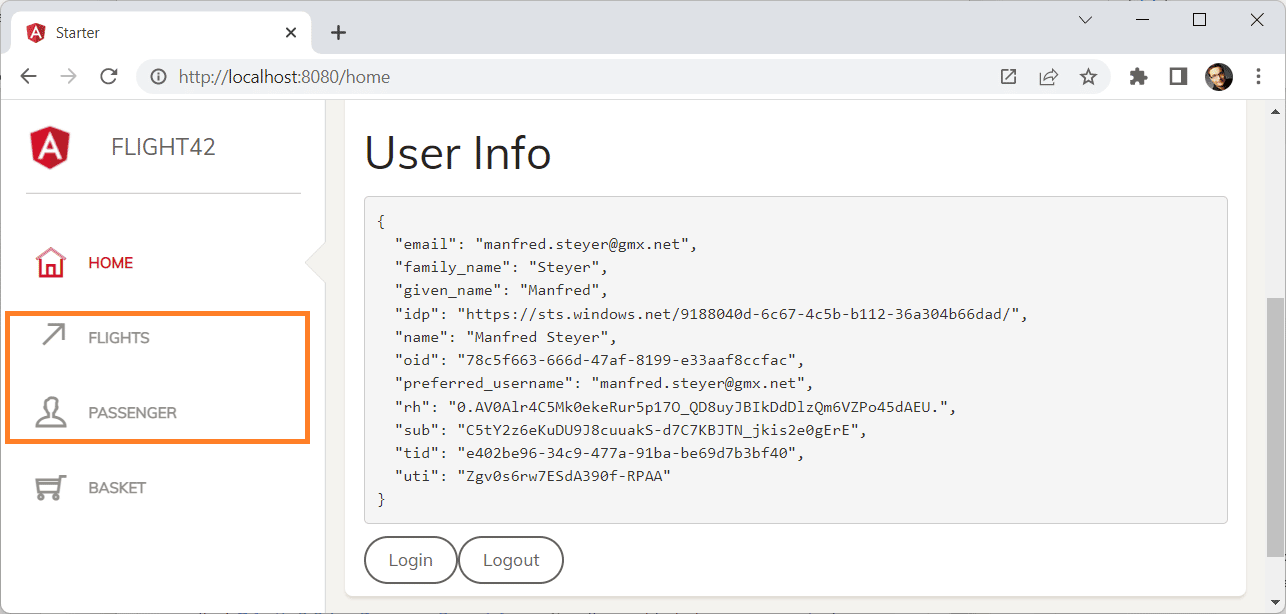
The access token is nowhere to be found in the browser. It stays tucked inside the server-side session. If you open your browser’s developer tools, you’ll only see an HTTP-only cookie that JavaScript cannot touch — so even an XSS attack can’t steal it.
Further Reading on Angular Security
Looking for more on Angular security topics? Our Angular Security Workshop, led by international security expert Dr. Philippe De Ryck, dives deeper. It’s 100% online, interactive, and mixes lectures, live demos, quizzes, and hands-on labs.

All Details: Angular Security Workshop
Wrap-Up
Authentication gateways offer the best of both worlds: server-side OAuth 2.0 and OpenID Connect defend against certain attacks more effectively than browser-side alternatives, all while keeping the flexibility of token-based security and established standards. Integrating existing identity providers and enabling SSO are just two examples of what becomes easier.
The SPA only receives an HTTP-only cookie, which JavaScript-based attacks cannot grab. Plus, protecting against XSRF becomes trivial: browsers support SameSite cookies, and Angular picks up the gateway’s XSRF tokens automatically.
What’s more, the SPA itself gets simpler. It can assume the gateway will handle authentication at the right time and can rely on endpoints for explicit login, logout, and user-info retrieval.
We pay for these benefits with some added complexity around hosting and scaling the gateway — and the requirement that all traffic must pass through it.
One issue remains, though: cross-site scripting. The difference here? With a gateway, an attacker has to route the attack through the user’s browser. Even if the HTTP cookie stays out of reach, a malicious script can still make HTTP requests to the gateway — the browser automatically includes the cookie, so the attacker effectively acts as the user.
The key mitigation: when the user closes the browser, the attack window closes. That’s not the case with the client-side token approach from the start of this series — there, an attacker with a stolen token could use it independently, long after the user is offline.