![18 Interview Questions answered by Angular Experts [Live Post] — Signals article by Daniel Glejzner on Angular In Depth](/assets/covers/2a2c0bd9a4.png "18 Interview Questions answered by Angular Experts [Live Post]")
Michał Grzegorczyk: Recently, Daniel posted 18 interview questions across LinkedIn, Twitter, and Discord. These questions were designed to distinguish truly senior Angular developers. Seizing the moment, we invited Angular Experts to weigh in on a selection of them.
Daniel Glejzner: Be sure to check back frequently—this post will be refreshed with additional expert answers over the coming days and weeks. I hope this provides useful insight into how much responses can differ in a technical interview; there's no single "correct" answer expected. Enjoy!
First, Let's Introduce the Experts!

Kevin Kreuzer
Trainer, consultant, streamer, content creator, and senior front-end engineer focusing on modern web technologies. He's also a Google Developer Expert for Angular & Web technologies.
- angularexperts.io
- https://twitter.com/kreuzercode
- Check out Kevin's latest Angular Signals Masterclass e-book here: https://angularexperts.io/products/ebook-signals

Rainer Hahnekamp
Software developer and architect with deep experience in enterprise applications. For over 15 years, he led teams at Mars, the well-known confectionery manufacturer. His community contributions earned him recognition as a Google Developer Expert for Angular.

Alex Inkin
Google Developer Expert for Angular, front-end developer, tech writer, musician, and open-source maintainer. Alex is among the original architects and maintainers of Taiga UI, playing a key role in its growth and adoption within the Angular ecosystem.

Tomas Trajan
Google Developer Expert for Angular & Web Technologies, working as a consultant and trainer. He empowers enterprise teams worldwide by implementing core features, structuring architecture, embedding best practices, transferring knowledge, and streamlining workflows.
- x.com/tomastrajan
- angularexperts.io
- Latest book by Tomas on Architecture!! https://angularexperts.io/products/ebook-angular-enterprise-architecture

Mateusz Łędzewicz
Principal Software Engineer focusing on Angular and frontend technologies, and organizer of @ngLodz. Currently serving as Principal Consultant and Trainer at Lowgular, he teaches Angular from the ground up and assists clients in boosting developer productivity. His mission is coaching developers on solid engineering habits and minimizing technical debt, sharing his comprehensive Angular expertise.

Erick Rodriguez
Lead Software Engineer at Doran Jones Inc., focusing on full-stack development. He has a strong affinity for Angular and enjoys working with the Nx Framework.

Eduard Krivanek
Software developer at Multitude IT Labs, primarily specializing in Angular with occasional work in NestJS/Firebase. He has been publishing technical articles, mainly about Angular, since September 2022, covering interesting challenges, patterns, and insights from his development journey.
Q1: If you had to pick only 5 libraries as dependencies for your Angular app, which ones would you pick?
A1: Kevin Kreuzer
Prettier is the one tool I rely on in every project. When Prettier is in the mix, I typically add something like Husky or lint-staged to execute formatting on all modified files with each commit.
For UI work, I generally reach for a component library such as Material or Taiga UI; alternatively, Tailwind fits the bill when pre-built components aren't necessary.
A2: Rainer Hahnekamp
@ngrx/store, date-fns, @playwright/test, @softarc/sheriff-core, angular-eslint
A3: Alex Inkin
Taiga Family covers everything I need 😄
A4: Erick Rodriguez
Angular itself ships with a wealth of built-in features. Managing HTTP calls, for instance, is handled via HttpClient, or I can intercept and tweak requests with an interceptor. Since my work leans heavily toward UI, I'd lean toward more styled components paired with DaisyUI, which saves a lot of time.
So, my choice would be exactly that: Angular Styled components combined with DaisyUI.
A5: Eduard Krivanek
Angular Material, Prettier, Ngxtension, Firebase, and AnalogJS (when SSR/SSG comes into play).
Q2: What's your go-to strategy for debugging Angular components?
A1: Kevin Kreuzer
For debugging Angular components, I rely on a mix of approaches that lets me isolate and fix issues efficiently:
- Console.log: Indeed, `console.log`. Dropping
console.log()at key points helps me check variable states and trace execution. It's a simple way to confirm data flows properly between components and services. - String Interpolation in Templates Putting string interpolation (e.g.,
{{ variable }}) directly in the template reveals variable values right in the UI. This also instantly shows whether change detection (CD) is running, since the values refresh on screen in real-time. - Angular DevTools for DI Errors: For trickier problems, especially around dependency injection (DI), I turn to the Angular DevTools extension. It offers a clear picture of the component tree, services, and DI tokens, making it easier to pinpoint and fix DI issues.
- Debugger in Browser DevTools with Sourcemaps: The browser's dev tools are my go-to for setting breakpoints and stepping through code. Sourcemaps are crucial here, connecting the compiled JavaScript back to the original TypeScript for clearer insight. This approach helps understand the execution flow and spot logical errors.
A2: Rainer Hahnekamp
I default to the Chrome DevTools debugger, and when things get tight, console.log comes to the rescue too 😊
A3: Alex Inkin
Just console.log 😊
A4: Erick Rodriguez
My preferred debugging method for Angular components follows this plan:
- Start with Angular Devtools to look at the component tree and observe data flow. If inspecting the tree isn't possible in my current environment, I switch to VS Code for debugging.
- VS Code is especially handy for tracing data within a component. I avoid adding "debugger" or forcing browser breakpoints because clients won't do that, yet VS Code gives me a more digestible view of what the browser holds. From there, I can explore details like data flow, component state, and the results from service calls.
A5: Eduard Krivanek
I usually kick off with console.log, but when the issue is more involved, like tracing data flow, I'll launch the VS Code debugger.
Q3: Have you ever created a custom RxJS operator? What problem did it solve?
A1: Kevin Kreuzer
Absolutely—I built a custom RxJS operator for a specific scenario involving a custom dropdown component. The goal was to let users filter listings by keystrokes while excluding keys that had other responsibilities, like Arrow Down moving selection. That operator was written to handle that logic.
export function onlyAlphaNumericKeys(src: Observable<KeyboardEvent>): Observable<KeyboardEvent> {
    return src.pipe(filter((keyboardEvent: KeyboardEvent) =>
    /[a-z0-9-_äöü]/i.test(keyboardEvent.key)));
}
A2: Rainer Hahnekamp
Yes, particularly for type predicates, since the built-in operators sometimes fell short there—though I'm unsure about the current TypeScript landscape. Additionally, error-tolerant variants of switchMap, concatMap, and similar, plus a debug operator that outputs values.
A3: Alex Inkin
Countless times. Most frequently, I've crafted operators for entering or leaving NgZone.
A4: Erick Rodriguez
I haven't gotten the chance to write a custom RxJS operator yet. As much as I enjoy RxJS, that specific scenario hasn't come up. That said, the standard operators solve plenty, for instance:
- Using "debounceTime" to limit excessive server calls from user input.
- Leveraging "switchMap" to abort an in-flight request when a new one begins.
- Employing "catchError" to manage request errors.
So far, building my own operator hasn't been necessary, but I'm eager for the day it is.
A5: Eduard Krivanek
Creating one is uncommon since RxJS's vast operator set covers most needs. However, I did fashion one called loadingStatus, which fulfilled a role akin to rxResource—it surfaced loading and error states during HTTP requests. I detail this in my write-up: Create Custom RxJS Operators.
Q4: What unusual obstacles did you run into while building and architecting Angular applications?
A1: Kevin Kreuzer
One of the more unusual obstacles involved circular dependencies in a sizable Angular application. As the app expanded, the web of connections between modules, components, and services became denser, leading to situations where two or more modules relied on each other either directly or indirectly. These circular dependencies frequently caused build failures or runtime errors that were tricky to diagnose. Additionally, the tight coupling among modules made the codebase harder to maintain and reason about.
A2: Rainer Hahnekamp
- Issues with SSR and asynchronous tasks
- Side effects leaking from Observable subscriptions that were never closed
- E2E test failures once hydration was enabled
- Confusing error messages stemming from outdated TypeScript settings
- Redux DevTools crashing due to deeply nested objects
- Change detection not firing for
window.navigator.online
A3: Alex Inkin
My work frequently centers on low-level UI components, so I wind up dealing with a pile of browser quirks, especially on Safari and iOS. I’d go so far as to say iOS is the single biggest headache in my job. If you own an iPhone and a website renders correctly on your device, keep in mind that some developer like me paid for it with permanently damaged nerve cells.
A4: Erick Rodriguez
Managing people often turns out to be one of the trickiest parts of developing Angular apps, since everyone has their own preferred approach. When I step in as a lead on a team, my first move is to put guardrails in place so the team doesn’t slip into chaotic coding habits.
Things like Architecture Decision Records (ADRs) are an effective way to keep the team in check: they spell out the rules, explain why those rules exist, and provide a clear rationale for particular patterns. Pull requests are then evaluated against those decisions, which keeps everyone aligned.
One more thing: I believe senior Angular developers ought to grasp core Software Architecture concepts, and I find it quite frustrating when seniors don’t realize their code isn’t just for the current project — it’s part of a broader ecosystem of interacting elements. Lacking that wider perspective hurts both the team and the project down the road.
A5: Eduard Krivanek
Browser API support can sometimes catch you off guard. We once shipped a feature that worked in every browser except Safari, and we only noticed after it went live, forcing us to scramble a quick patch. Ironically, Safari added support for that API a week later, so had we waited, we’d have been fine.
When it comes to Angular itself, scaling applications is always a hurdle. As a developer, you can’t predict where the project or business will stand in two or three years, so designing components and services that stay reusable and maintainable isn’t straightforward. You might accidentally introduce circular dependencies or watch components balloon past 2000 lines of code.
Q5: How do you keep API types consistent across the frontend, mobile app, and backend?
A1: Kevin Kreuzer
Depending on your setup and tech stack, there are several strategies, and I’ve encountered each of the following in practice. Every one has its upsides and drawbacks:
- Shared TypeScript Interfaces: By placing data models and interfaces in a shared package or library (such as an NPM package), both frontend and backend can import the same type definitions. This ensures that any changes to data structures ripple through every layer instantly.
- Swagger/OpenAPI Specifications: Leveraging Swagger to define API contracts makes it possible to auto-generate client SDKs and server stubs. Tools like Swagger Codegen can produce TypeScript clients for the frontend, which keeps everything aligned.
- Contract Testing: Executing contract tests verifies that backend services honor the API contracts that frontend and mobile apps expect. This surfaces mismatches early in the development cycle.
- tRPC: With tRPC, you get end-to-end type safety because types are shared directly between client and server in TypeScript projects. This removes the need to hand-write type definitions and keeps API contracts in lockstep. For more details, check out our blog post here: https://angularexperts.io/blog/angular-trpc
- Monorepo Architecture: Adopting a monorepo arrangement (like Nx or Lerna) lets all parts of the project — frontend, backend, and mobile — live in one repository. Shared code and types are then easy to manage and import wherever needed.
A2: Rainer Hahnekamp
I reach for OpenAPI whenever possible. If reliability is crucial, I layer Zod on top for runtime validation of those types.
A3: Alex Inkin
I use DI tokens that sniff the platform via the user agent, then branch CSS and JS based on what I detect.
A4: Erick Rodriguez
It’d be ideal to have a shared stack where types exist in a monorepo, but that scenario isn’t always available. If you’re fortunate enough to have OpenAPI, you can generate types for the frontend and mobile app straight from the specs, which saves a ton of time.
Without that, but with Swagger in place, things get harder since Swagger may not be as precise as OpenAPI, leaving you reliant on verbal agreements between backend and frontend teams. In that case, I’d document those decisions on the relevant ticket.
If you’re feeling adventurous, you might use Zod to validate the response and confirm it matches what you expect. That guarantees the response is correct, though the backend won’t have any visibility into what you’re doing.
Written contracts generally work out better in these situations. You won’t always get the ideal tool, but you can still make do with what you have.
A5: Eduard Krivanek
I’m a fan when the backend exposes types via Swagger or OpenAPI. With GraphQL, you can generate types too. In a monorepo or something like AnalogJS, you’d create a shared library for your type system. I’ve also seen positive reviews of tRPC, though I haven’t tried it myself.
Q6: What strategies do you use to maximize performance in large Angular components?
A1: Kevin Kreuzer
- OnPush Change Detection: Switching a component to
OnPushcuts down on how often change detection runs. Angular then only checks for changes when inputs shift or an event fires inside the component, which boosts efficiency. - Defer Loading with defer: Employing the
deferdirective to load heavy or non-critical template sections lazily. This postpones loading and initialization until it’s actually required. - Cleanup Subscriptions: Making sure every
Observablesubscription gets properly unsubscribed when the component is torn down. This avoids memory leaks and wasted computation. - Use Async Pipe: The
asyncpipe in templates automatically manages subscription and unsubscription, cutting down on boilerplate and potential leaks. - Using Signals: Adopting Signals clears up the subscription problem because RxJS interop functions like
toSignalhandle subscriptions automatically. - Avoid Expensive Computations in Templates: Shifting complex calculations out of templates and into component logic or using memoization to cache results.
- Optimize Loops and DOM Manipulations: Steering clear of deeply nested loops or massive iterations in templates. Using
trackByfunctions with*ngForhelps Angular render more efficiently. With the new@for, track is mandatory, which wasn’t true before.
A2: Rainer Hahnekamp
I steer clear of premature optimization. Prior to zoneless, I wouldn’t even reach for OnPush. If performance becomes a problem, I first try to pinpoint it. The Angular DevTools profiler reveals change detection cycles and their duration, and that’s where I start digging.
A3: Alex Inkin
Don’t build something slow to begin with.
A4: Erick Rodriguez
Keeping components as small as possible is my go-to principle. If a component feels oversized, it’s a telltale sign it’s handling too many responsibilities. My approach is to break it into smaller pieces and apply the "OnPush" strategy so Angular doesn’t re-check the whole tree on every change. With Nx, I might craft custom ESLint rules to cap component size. For instance, could I set a hard limit at 500 lines per component? A custom ESLint rule could enforce that.
By the way, there’s a fantastic piece on atomic composition that every Angular developer should read: https://atomicdesign.bradfrost.com/chapter-2/. It sums up the case for small, reusable components from a design angle.
A5: Eduard Krivanek
When an app feels sluggish, here’s what I check:
- Are we using the
trackkey in@forloops to streamline rendering? - Are we relying on pipes instead of calling functions directly in templates?
- Are we using pagination or virtual scrolling when rendering large data sets in the DOM?
- For code that doesn’t touch Angular’s APIs (like click or scroll event listeners), are we running it outside the Angular zone? Here’s an example: Simple User Event Tracker In Angular
- Are we lazy loading images, routes, modules, and components (via
defer)? - Are we unsubscribing from Observables?
Q7: Have you used TypeScript generics to manage complex interfaces in Angular? If so, what did you do?
A1: Kevin Kreuzer
Absolutely — TypeScript generics are a robust tool I’ve leaned on to build flexible, reusable code. A straightforward illustration would be a generic ApiService:
export class ApiService<T> {

  constructor(private http: HttpClient, private url: string) {}

  getAll(): Observable<T[]> {
    return this.http.get<T[]>(this.url);
  }

  getById(id: string): Observable<T> {
    return this.http.get<T>(`${this.url}/${id}`);
  }

  create(item: T): Observable<T> {
    return this.http.post<T>(this.url, item);
  }

  update(id: string, item: T): Observable<T> {
    return this.http.put<T>(`${this.url}/${id}`, item);
  }

  delete(id: string): Observable<void> {
    return this.http.delete<void>(`${this.url}/${id}`);
  }

}
You can even use single letters for TypeScript generics if your codebase leans that way. You can instantiate this service with different types, for instance:
const userService = new ApiService<User>(httpClient, '/api/users');

const productService = new ApiService<Product>(httpClient, '/api/products');
A2: Rainer Hahnekamp
I’ve put together some proof-of-concept work for the NgRx Signal Store and am currently contributing to the ngrx-toolkit, both of which lean heavily on advanced TypeScript features.
A3: Alex Inkin
I aim for generics over specific data models whenever I can, since my focus is on building flexible, reusable components.
A4: Erick Rodriguez
Getting generic types right doesn’t just boost code reusability — it also makes your code simpler to follow.
Take an HttpObservable that returns a value of an expected type. If a service hands back a list of items, you can use generics to define the list type and keep those definitions out of the component. When the subscription resolves, your generic type is automatically inferred, so you don’t have to cast or assert it.
Services should own the type logic for requests and responses to data services, as that discipline keeps your code clean and intuitive.
A5: Eduard Krivanek
When I first came across TypeScript, I figured it was just about interfaces. But discovering generics was a revelation about what’s possible. I now reach for generics as often as I can, building new types on top of existing ones to cut down on duplication and boost maintainability.
Q8: Is it acceptable to use ::ng-deep?
A1: Kevin Kreuzer
Yes, I’ll use ::ng-deep in specific cases, but I approach it carefully. ::ng-deep is a pseudo-selector that can style child components under encapsulation, effectively piercing Angular’s style boundaries.
A2: Rainer Hahnekamp
I do use it, but I try to sidestep it. When I need styles to reach subcomponents, I typically turn off view encapsulation and write CSS rules scoped to the component selector.
A3: Alex Inkin
Yes.
A4: Erick Rodriguez
I CAN, but these days it often boils down to a trade-off between Angular Material components and your requirements. Switching to a different UI library might change that calculus based on how it’s built. Personally, I’ve reached for it only in rare cases, and I do my best to avoid it so I don’t contaminate the design system.
A5: Eduard Krivanek
You can — I do use it — but it can backfire. When you’re overriding styles on your own components, you generally know what’s happening. But when you’re overwriting styles from an external library, things can break. For example, Angular Material’s move from v14 to v15 introduced MDC components, which shuffled numerous internal class names. If you were styling those classes with ::ng-deep, your tweaks likely fell apart.
Q9: What practices do you follow to keep SCSS reusable in large-scale Angular projects?
A1: Kevin Kreuzer
My approach to SCSS reusability centers around a few key techniques:
- Mixins: I define reusable style patterns using SCSS mixins.
- Functions: SCSS functions handle calculations and color adjustments.
- Variables: I set variables for colors, typography, spacing, and similar values. While SCSS variables are helpful, CSS variables often take precedence in my work due to their runtime flexibility and JavaScript-friendly nature.
- @extend : Placeholder selectors (
%) combined with@extendallow me to share common styles across rules. - Modular Layout: My SCSS files are organized into modules and partials that align with themes, features, or individual components.
- BEM Naming: I adopt the Block Element Modifier convention to keep class names clear and promote reusability.
A2: Rainer Hahnekamp
Honestly, I no longer write my own global SCSS mixins. Instead, I rely on tools like Tailwind, Angular Material, and PrimeNG, keeping any bespoke CSS scoped to the component itself.
A3: Alex Inkin
Angular's built-in style encapsulation means this isn't a concern for me; the framework handles it.
A4: Erick Rodriguez
Globals serve as an excellent mechanism for reuse across multiple systems when shared via a library, especially when a design system is established. These global styles can be overridden at the app level, allowing each application to retain both the shared keys and its own unique branding.
A5: Eduard Krivanek
I'm not a proponent of broad global styles. For me, the two viable paths are component-scoped SCSS to prevent unintended side effects, or a utility-first framework like Tailwind, which is my preference. The only global styles I approve of are foundational ones, such as color variables.
Q10: Have you made contributions to the Angular ecosystem or community? Can you describe them?
A1: Kevin Kreuzer
I have indeed been active in the Angular community, primarily through the development of various open-source projects:
- svg-to-ts: This utility converts SVG files into TypeScript modules, enabling developers to integrate SVGs in a type-safe manner without additional HTTP requests.
- pretty-html-log: A tool that formats HTML logging for better console readability, improving the debugging and inspection process for tests.
- ng-sortgrid: An Angular library that offers a drag-and-drop sortable grid, allowing users to reposition grid items easily.
- ng-parsel: A parsing library designed to help Angular apps interpret and manage intricate data structures.
- nx-release: A tool that simplifies the release workflow for Nx monorepos by automating versioning, changelog generation, and package publishing.
In total, I maintain over 20 open-source projects at the moment.
A2: Rainer Hahnekamp
My contributions happen primarily through video content on my YouTube channel and the ng-news weekly newsletter, which is available across multiple platforms.
Furthermore, I am:
- a trusted collaborator on the NgRx team
- the creator and lead developer of Sheriff, a tool that enforces module rules for TypeScript projects
- maintaining the ngrx-toolkit and have contributed to the Redux Devtools and Redux extensions
- currently exploring a deeper involvement with Native Federation, a MicroFrontends solution built on web standards like import maps
A3: Alex Inkin
I wear two hats: that of a technical writer and that of an open-source maintainer.
A4: Erick Rodriguez
For nearly four months, I've been an active member of the Angular Spaces community, and my method of giving back has been through writing articles. A special shout-out to our Discord community at Angular Spaces!
A5: Eduard Krivanek
I haven't contributed directly to Angular itself, perhaps in the future. What I have done is publish articles since September 2022, aiming for a monthly technical post. My writing focuses on topics I'm currently learning or real-world challenges I've encountered at work.
Q11: What process do you follow when refactoring an oversized Angular component?
A1: Kevin Kreuzer
My refactoring strategy for a large component is a methodical process aimed at boosting maintainability and performance:
- Deconstruct Responsibilities: I start by auditing the component to identify specific functions or job that can be pulled out.
- Build Child Components: The UI is broken into smaller, more focused child components that are also reusable.
- Extract Services: I move business logic, data fetching, and state management into dedicated services.
- Isolate View Logic: The component's role becomes purely presentational, with business logic delegated to services or a state management library like NgRx.
- Leverage Directives: I use structural directives such as
*ngIfand*ngFor, along with template references, to create parts of templates or directives that can be reused. - Streamline Templates: The template is cleaned up by stripping away unnecessary bindings and simplifying complex expressions.
A2: Rainer Hahnekamp
First and foremost, I ensure there are solid E2E tests in place. When making sweeping changes, they are my safest bet for not breaking the app. After that, I begin the process of splitting the application into feature and shared modules. With that structure in place, I then go into each feature module and further divide it by type: feature, ui, data, and model.
This provides a solid foundation for the next steps, which will naturally depend on the specific context of the refactor.
A3: Alex Inkin
My method is to first deconstruct it into small, independent pieces, then improve the code within that broken-down structure.
A4: Mateusz Łędzewicz
Dealing with an overgrown component is a recurring challenge in nearly every project I've worked on or advised. There isn't a one-size-fits-all solution, but we can employ some effective strategies. Let's begin with some practical measures.
Immediate Steps: Separating Layers
My mental model for any project includes three distinct layers: UI, Application Layer, and Data Layer. When a component feels overwhelming, it's often because these layers have been merged into a single file.
Here's my initial refactoring checklist:
- I transfer all data-related logic to data services.
- I shift all application logic, such as state and models, to application services.
- I restrict the component to handle only UI logic. In this role, it should:
- Retrieve data via the application layer, often using queries.
- Respond to user events by invoking commands in the application layer.
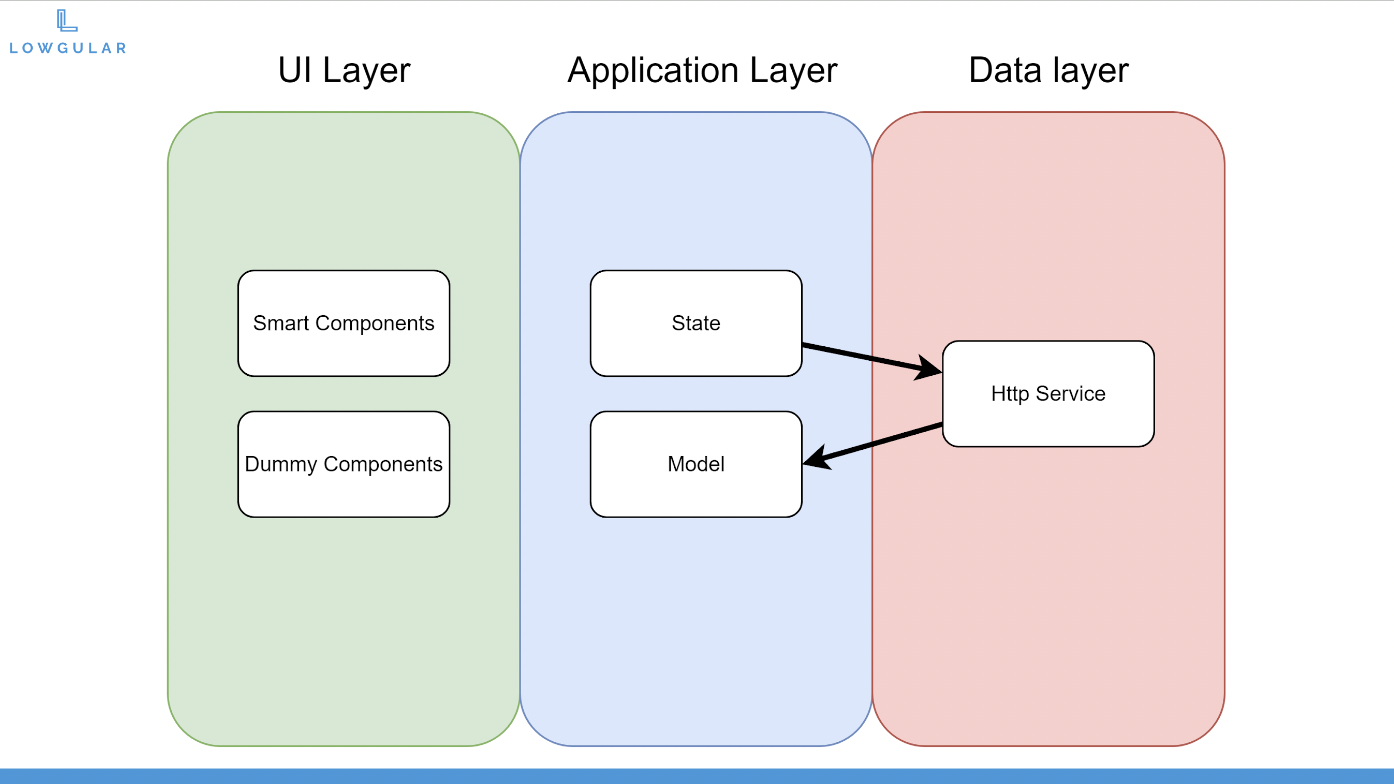
This strategy will definitely slim down your component, but it's only the initial phase.
Wider Scope: Focusing on Domains
Let's take a step back. While the layer separation is a solid start, another frequent problem in projects is the multi-domain component.
This issue stems from the common practice of equating a component with a "page." To build reusable and extensible code, it's better to break these pages down into smaller pieces that serve a single purpose and can be used across different routes. By aiming for small, single-purpose components, we achieve a more modular and maintainable structure. There is more to discuss on connecting these pieces, but I'd rather not make this explanation as "bloated" as the components we're discussing! 😄
Is a Component the Right Choice?
Here's another useful idea: Skip the component altogether. It might sound odd, but as Angular developers, we often gravitate towards components when another abstraction would be better. In certain situations, a directive is the more fitting choice.
Wrap-up
The question, while straightforward on the surface, actually highlights several key aspects of development craft. From separating concerns and embracing Domain-Driven Design (DDD) to splitting features and using the full power of the framework, there's significant depth here. The crucial starting point is always to keep your layers distinct and well-organized!
A5: Erick Rodriguez
As I mentioned before, large components are a major pain, both for the application's performance and for the developer's sanity. Who wants to sift through 3000 lines of tangled code? Not me. But when you're forced to tackle a giant component, I swear by atomic design principles. This discipline prevents me from writing bloated code in the future, since I should know better, and it also stops components from getting out of hand.
The beauty of this is that small components are trivial to test, and systems built from these small pieces remain manageable. If you stick to the atomic composition pattern and stay disciplined, you'll discover that refactoring monolithic components becomes much easier with practice.
A6: Eduard Krivanek
It's crucial to have a deep understanding of the project's purpose and be mindful of all edge cases. Having a suite of E2E tests to protect the app's core functionality is a prerequisite before you start.
During the refactoring, aim to divide the application's modules into smaller, more digestible chunks, and begin with the easiest ones. Prioritize clean presentational components and services, and only then move to addressing the bloated components. Keep in mind that a full refactor of a large application can take over a year, so having a clear plan aligned with your project manager is essential.
Q12: Can you tell us about the most challenging form you've ever had to build?
A1: Kevin Kreuzer
The most difficult form I've tackled was for a sophisticated layout builder. Users could use a GUI to create any grid layout they could imagine. Here's a basic sketch of it:
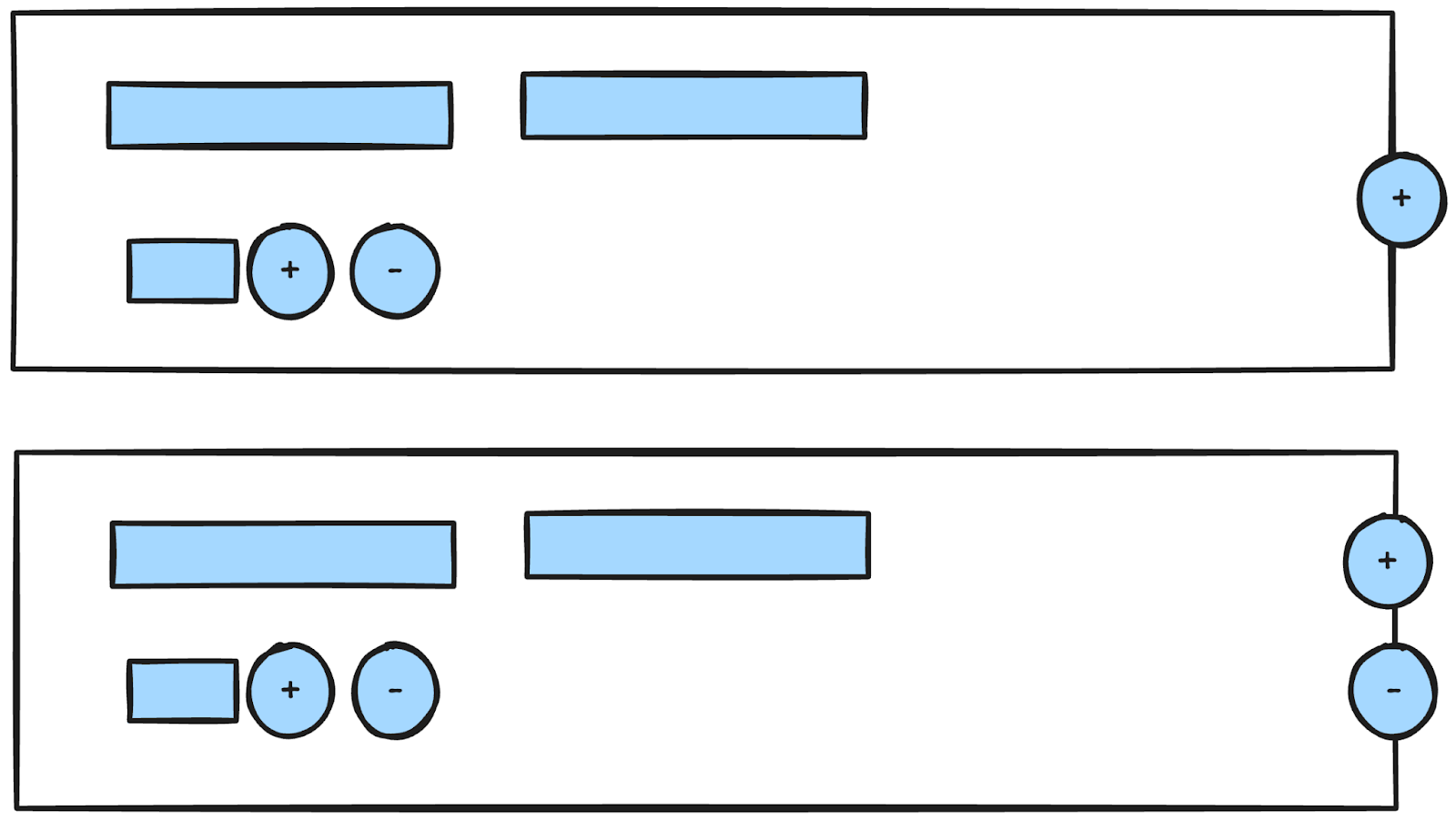
What made it so tough were these features:
- Dynamic Fields: It had to support adding, removing, and reordering fields in real-time.
- Conditional Logic: Some fields' visibility and validation rules were dependent on the values that users entered elsewhere in the form.
- Nested Form Groups: To manage data like lists and subforms, the form heavily used nested groups and form arrays.
A2: Rainer Hahnekamp
My most complex form wasn't particularly large, just a wizard with four steps. The real test was maintaining synchronicity between the front-end and back-end validation logic.
A3: Alex Inkin
I worked on a dynamic settings interface for a Bitcoin node service. The form’s structure was dictated by a spec object the backend provided.
A4: Erick Rodriguez
Dynamic forms are the rite of passage for every Angular developer. In my opinion, reactive forms are the best solution because they allow for on-the-fly registration and removal of fields, and the validation is much more programmatic than what template-driven forms offer. Specifically, the most complex I've handled were for medical billing, which involves a huge number of fields and requires that the response to one field dynamically creates a new set of inputs, complete with their own validations.
A5: Eduard Krivanek
I once built a feature for an application called GGFinance, which had an internal trading simulator. This tool let you configure a variety of parameters: the total number of rounds, round duration, stock symbols, their initial prices, potential market crashes, and the quantities of each symbol. You could also control the cadence at which players received money—think of the game Monopoly. A video of it is available here: GGFinance - Trading Simulator. The narration is in Slovak, but the entire visible page is one enormous form. The code is available on GitHub, as the project is no longer live.
Q13: What strategies do you use for validating complex forms?
A1: Rainer Hahnekamp
ngx-formly covers advanced validation scenarios quite well. There is also a library called vest that I have yet to explore. Alternatively, moving the FormGroup into a service or state management layer is a solid approach that covers most situations.
A2: Alex Inkin
My primary approach relies on validators within reactive forms, occasionally complemented by NG_VALIDATORS directives to apply validation declaratively in the template. This proves particularly useful for fields that depend on each other, such as a confirm-password check.
A3: Erick Rodriguez
For intricate forms, I consistently opt for the reactive form approach. To reduce the volume of programmatic validation within the main form component, I implement custom directives on the relevant inputs for standard validations. For instance, a directive can validate a date input and block form submission when the date is invalid.
A4: Eduard Krivanek
When building a custom input with ControlValueAccessor, I sometimes combine it with the NG_VALIDATORS interface to handle validation directly within the component itself.
For custom validation logic, such as verifying if a username is available during signup, I adhere to the guidelines in Angular's official documentation on creating custom validators.
Q14: Please explain the differences between Signals, Observables, and Promises, and when should each be used?
A1: Kevin Kreuzer
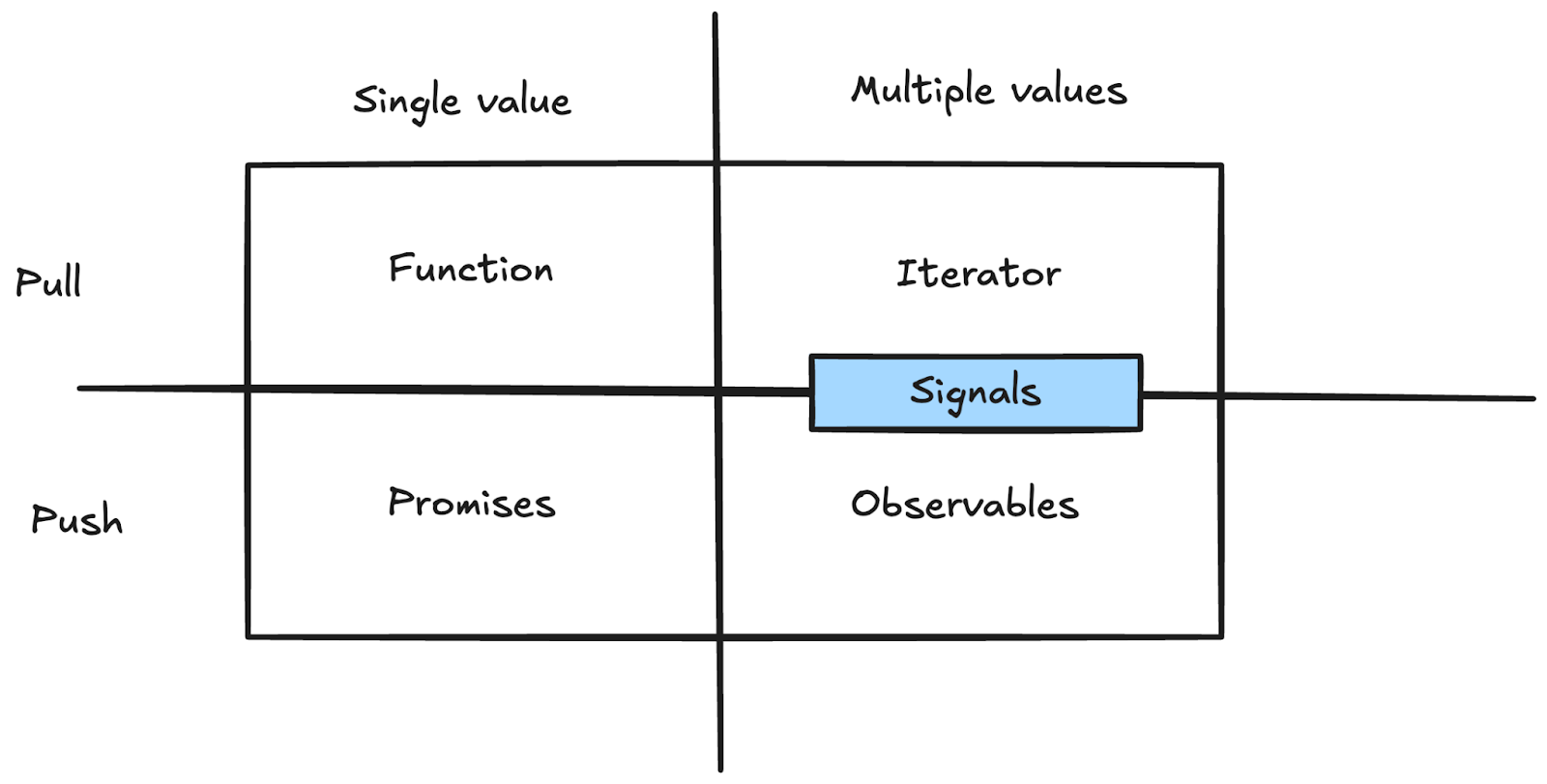
Since a Promise yields only one value, it is an ideal fit for tasks like HTTP requests where a single result is expected.
Observables, however, can emit one or multiple values, either synchronously or asynchronously. This makes them perfect for event-driven scenarios, such as monitoring a stream of user clicks.
Signals occupy an interesting middle ground between push and pull systems. They can emit multiple values and provide notifications when changes occur, but you—or Angular itself—must actively access them to retrieve their value. This makes them a hybrid of push and pull mechanisms.
I notice a lot of confusion about choosing between RxJs and Signals. A good rule of thumb is to use Signals when the core question is: "What is the current state?"
This means HTTP requests will never become Signals, because asking for an HTTP request's current value is pointless. Since a request produces either one value or an error, a Promise is the logical choice. Forms, on the other hand, are perfect candidates for Signals because querying their current state is a natural operation.
A2: Rainer Hahnekamp
I choose Signals whenever the context is the template. Since Signal Components are on the horizon, we can start preparing now. Generally, my first instinct is to use a Promise. However, as soon as I need to manage race conditions or leverage the extensive RxJs pipe operators, I switch to Observables.
In short: use RxJs for complex scenarios and Signals for simpler ones or when working directly in the template.
A3: Alex Inkin
Signals should be your go-to for everything possible. Use Promises for one-time asynchronous data, and reserve Observables for handling multiple asynchronous data events that resemble a stream.
A4: Erick Rodriguez
Signals have become a standard tool in Angular for managing events. They come in read-only and writable forms, and it's your job to determine the best use case for each. Observables are designed for streaming data in a reactive manner and can manage data that becomes available asynchronously. Promises, on the other hand, manage a single future result from an async operation. Both are invaluable for creating reactive components.
A5: Eduard Krivanek
My typical approach is to use Signals for state management and for any component property that appears in the template. Their ability to create derived values from existing signals is a major advantage. In my experience, Signals can solve about 85–90% of use cases. The remaining scenarios are where Observables excel, especially in building declarative, event-driven workflows. While Promises are fine for single, one-time async tasks like HTTP calls, they lack reactivity, so I usually convert them into Observables.
Q15: Have you ever created custom decorators? What was the purpose?
A1: Rainer Hahnekamp
No, I haven't. I also never wrote a custom annotation in Java. It's likely just not my preferred style.
A2: Alex Inkin
Yes, on several occasions. My most notable one was a memoization decorator that implemented a lazy getter pattern. For functions, it functioned similarly to a pipe, only recalculating the output when the arguments changed.
A3: Erick Rodriguez
Not yet. I haven't encountered a need to implement a custom decorator.
A4: Eduard Krivanek
In my article on the Deep Dive Into Angular Pipes Implementation, I built a decorator named @customMemoize(). Its goal was to let you call functions in templates by caching their inputs and outputs, effectively mimicking pipe behavior. That was more of an experimental proof-of-concept, and I wouldn't suggest calling functions in templates, but it highlighted the possibilities. I also created a @Confirm('message') decorator which, when applied to a method, would show a confirmation dialog and only run the method after the user clicked "confirm".
Q16: What types of state exist in your applications, and how do you manage them?
A1: Rainer Hahnekamp
I see a difference between local state, which I don't manage explicitly—like values in a single component—and UI or "entity/server" state. For entity or server state, my preference is the Signal Store. I run into UI state management less often since my apps are typically dominated by forms and grids, but when it does arise, I use the same state management approach.
A2: Alex Inkin
My work is mostly on low-level UI, so I rarely find myself involved in global state management. When I do, it's typically a simple BehaviorSubject.
A3: Erick Rodriguez
The traditional view separates global state, managed with a library like NgRx, and local component state managed with Subjects. That's been the standard approach to state management.
Q17: What is your preferred method for lazy-loading in Angular?
A1: Rainer Hahnekamp
I always lazy load my feature or domain groups. I don't, however, lazy load every component associated with a route.
A2: Alex Inkin
My primary method is lazy routing, which I sometimes extend to lazy-loaded dynamic components.
A3: Tomas Trajan
With the arrival of standalone APIs, we should shift our thinking towards lazy-loading features (be it views, pages, or even smaller feature segments). It's also crucial to minimize the number of different approaches we use in a project.
Take routing, for example. There are at least four ways to do it currently:
- A direct (eager) route to a component using the
componentproperty. This is eager and not directly relevant to lazy-loading, though the first component of a lazy feature can help. - A lazy route to a component using
loadComponent. - A lazy route to an NgModule using
loadChildren. - A lazy route to a routes-based feature (a
feature-x.routes.tsfile) usingloadChildren.
Given these options, the key is to select one and stay consistent. My recommendation is to always define a lazy route as a routes-based feature referenced with loadChildren. It's the most modern and flexible choice. Then, if that lazy feature has sub-navigation, you can employ loadComponent to lazy load other components within it.
This should be the standard practice even when a lazy feature begins with a single component, since requirements often change or expand. This method lets you scale to any level of complexity while maintaining uniform patterns across the codebase. The consistency reduces cognitive load for developers—everything looks and works the same way!
// app.routes.ts
export const routes: Routes = [
{
    path: 'dashboard',
    loadChildren: () => import('./features/dashboard/dahsboard.routes.ts').then(m => m.routes)
}
]
// dashboard.routes.ts (routes based lazy feature)
export const routes: Routes = [
{
    path: '',
    loadComponent: () => import('./dahsboard.component.ts').then(m => m.DashboardComponent)    children: [        // additional routes can come here (always display DashboardComponent + nested routes)    ]
},
// or here, replace dashboard component with the dashboard editor in the view (sibling views)
// which is easy to extend with in the future, eg
{
    path: 'editor',
    loadComponent: () => import('./dahsboard-editor.component.ts').then(m => m.DashboardEditorComponent)
},
// or even a larger sub-feature
{
    path: 'forecast', // forecast lazy sub feature added later
    loadChildren: () => import('./forecast/forecast.routes.ts').then(m => m.routes)
}
];
A4: Erick Rodriguez
For large applications with many parts, it's essential to structure your routing to enable lazy loading. This prevents the browser from downloading the entire app upfront; it only fetches components when they're needed. As a result, you avoid performance bottlenecks and keep the app responsive.
However, debugging lazy-loaded modules can be challenging. Pinpointing the exact source of an error becomes harder when components are loaded asynchronously and depend on external factors.
A5: Eduard Krivanek
I implement lazy loading for routes on every project. For templates with numerous moving parts, I also consider deploying dynamic components or the defer syntax.
Q18: What is your strategy for handling HTTP errors globally?
A1: Rainer Hahnekamp
I use an HttpInterceptor for HTTP errors and establish a global ErrorHandler as a safety net for any non-HTTP exceptions.
A2: Alex Inkin
My approach is to provide a custom ErrorHandler service.
A3: Tomas Trajan
My general philosophy now is to handle errors as close to their origin in the UI as possible, which I believe is the current UX best practice. You can achieve this via:
- component-based state management
- a dedicated component store
- a specific slice of the global state store that tracks the loading and error states for an entity, accessible locally using selectors
If, however, you genuinely need to centralize error handling (like for a global toast or notification), the standard Angular approach is to create a global HTTP interceptor that filters events by their HTTP status codes. When an error is caught and the API provides a unified error format, the interceptor can extract the metadata and trigger your local overlay or a UI component (like a toast from a third-party component library) to display the error to the user. This interceptor could also supply fallback data like an empty array to the target UI, which could then display an "empty state." While I prefer using an interceptor, you can also override the global error handler with a custom one, filter for specific error types, and perform similar global notification logic.
A4: Erick Rodriguez
Combining interceptors with a dedicated side UI service is an effective approach. For instance, when an error occurs, the interceptor can process it and then update the state of a UI service, which in turn triggers a toast message to be shown to the user.
A5: Eduard Krivanek
I'm not a proponent of wide-scale global error handling. Sentinel tools are useful for capturing all errors, but they require careful filtering since even a minor issue like a broken image link is reported as an error.
Instead, I favor handling errors near the component that makes the data request. Currently, the resource API is an excellent tool here, as it inherently provides loading and error states. If the data fetch fails, you can then display a notification to the user.
Conclusion
We extend our sincere thanks to all the experts who contributed their valuable time and insights. As is clear, each expert has their own unique approach and perspective, and we appreciate their contributions. We hope this provides valuable learning. What are your thoughts on these responses? Are you curious about other specific topics? We'd love to hear your questions in the comments 😎
Stay tuned for more insights!