AI-powered assistants can significantly enhance user experience while cutting down on support overhead. Yet, building them typically involves a mountain of repetitive plumbing—connecting to various LLMs, wiring up tool calling, and managing chat state.
Hashbrown aims to eliminate this boilerplate. Backed by two prominent figures in the Angular community, this open-source library ships with integrations for all major model providers, including Gemini (Google), GPT (OpenAI), Azure (Microsoft), and Llama (Meta).
In this piece, we'll walk through adding a chat assistant to an existing Angular application with Hashbrown.
📂 Source Code (🔀 see branch hashbrown)
The Demo App
Our example is the flight search application—a staple for demonstrating Angular capabilities. It comes with a chat panel that slides in from the right:

As the rendered chat history shows, the assistant can pull in extra data or fire off in-app actions as needed. The magic behind this is tool calling: the LLM asks the application to execute a specific function, and the app sends the result back.
Notice how the conversation history displays these tool calls as the model requested them, hiding the raw parameters {from: 'Graz', to: 'Hamburg'} associated with findFlights.
For developers, seeing a message like "Tool Call: findFlights" in the history is useful, but that jargon is likely to puzzle end users. Translating that into something friendlier—say, "Loading flights from Graz to Hamburg"—would be a meaningful improvement.
Hashbrown Setup
To get started, you'll need to install a few npm packages:
npm install @hashbrownai/{core,angular,google}The @hashbrown/angular package offers an Angular-specific wrapper around the framework-agnostic core. There's also a React binding available. For model access, @hashbrown/google provides connectivity to Google's Gemini. Hashbrown also comes with standalone packages for other model families (e.g., @hashbrown/openai).
Direct API access to LLMs requires a key, often tied to a paid plan. Google's Gemini, however, has a generous free tier perfect for experimentation. You can to quickly generate an API key in Google AI Studio.
You should never embed that key directly in your Angular client, or it will be publicly exposed. Instead, a thin backend service acts as a proxy between the frontend and the LLM:
// Taken from hasbrown.dev and adjusted for our example

import express from 'express';
import cors from 'cors';
import { Chat } from '@hashbrownai/core';
import { HashbrownGoogle } from '@hashbrownai/google';

const host = process.env['HOST'] ?? 'localhost';
const port = process.env['PORT'] ? Number(process.env['PORT']) : 3000;

const GOOGLE_API_KEY = process.env['GOOGLE_API_KEY'];
if (!GOOGLE_API_KEY) {
  throw new Error('GOOGLE_API_KEY is not set');
}

const app = express();

app.use(cors());
app.use(express.json());

app.post('/api/chat', async (req, res) => {
  const completionParams = req.body as Chat.Api.CompletionCreateParams;

  const response = HashbrownGoogle.stream.text({
    apiKey: GOOGLE_API_KEY,
    request: completionParams,
    transformRequestOptions: (options) => {

      options.model = 'gemini-2.5-flash';

      options.config = options.config || {};
      options.config.systemInstruction = `
      You are Flight42, an UI assistent that helps passengers with finding
          flights.

      - Voice: clear, helpful, and respectful.
      - Audience: passengers who want to find flights or have questions about
            booked flights.

      Rules:
      - Only search for flights via the configured tools
      - Never use additional web resources for answering requests
      - Do not propose search filters that are not covered by the provided tools
      - Do not propose any further actions
      - Provide enumerations as markdown lists
      `;

      return options;
    },
  });

  res.header('Content-Type', 'application/octet-stream');

  for await (const chunk of response) {
    res.write(chunk);
  }

  res.end();
});

app.listen(port, host, () => {
  console.log(`[ ready ] http://${host}:${port}`);
});
That backend implementation, largely cribbed from the Hashbrown docs, reads the key from the GOOGLE_API_KEY environment variable. On macOS/Linux, that's set like so:
export GOOGLE_API_KEY=abcde…On Windows, the syntax differs slightly:
set GOOGLE_API_KEY=abcde…The transformRequestOptions function is the secret sauce here—it lets the server augment or override the request options that the frontend sends. This matters because those options have direct cost implications. In our demo, the backend fixes the model to the budget-friendly, general-purpose gemini-2.5-flash and enforces a system prompt that locks the assistant into flight-search mode only. That way, users can't burn money on expensive LLM calls for unrelated asks.
Before being overwritten, the frontend's original values get parked in the model and systemInstructions variables. That setup enables a neat negotiation pattern—if a user explicitly requests more horsepower, the backend could selectively swap in a pricier model or relax the system instructions.
The Angular app points to this minimal server at bootstrap time via provideHashbrown:
import { provideHashbrown } from '@hashbrownai/angular';
[…]

bootstrapApplication(AppComponent, {
  providers: [
    provideHttpClient(),

    […]

    provideHashbrown({
      baseUrl: 'http://localhost:3000/api/chat',
      middleware: [
        (req) => {
          console.log('[Hashbrown Request]', req);
          return req;
        }
      ]
    }),
  ],
});
An optional middleware there logs every request to the server console. Beyond being informative, those logs are handy for debugging or just getting a sense of what's happening under the hood.
Chatting with Any LLM
Hashbrown ships with multiple implementations built on Angular's Resource API for communicating with LLMs. For our chat window, we'll grab chatResource:
@Component({ … })
export class AssistantChatComponent {

  […]
  message = signal('');

  chat = chatResource({
    model: 'gemini-2.5-flash',
    system: `
      You are Flight42, an UI assistent that helps passengers with
          finding flights.
          […]
    `,
    tools: [
      findFlightsTool,
      toggleFlightSelection,
      showBookedFlights,
      getBookedFlights,
      […]
    ],
  });

  submit() {
    const message = this.message();
    this.message.set('');
    this.chat.sendMessage({ role: 'user', content: message });
  }

  […]
}
The chatResource is stateless—it forwards the whole chat history to the model with each request, and that's intentional. It allows the LLM to keep the thread context alive, so when a user says "this flight" in reference to flight #4711 from earlier, it knows exactly which one is meant.
Beyond simple messaging, chatResource also handles tool calling. The frontend declares all available functions via the tools property (like findFlights for flight lookups), and the model decides when to invoke them. We'll dig into how those tools are implemented in the next section.
The value property holds the transcript that gets rendered on screen:
@for (message of chat.value(); track $index) {
<article class="msg assistant">
  <div class="avatar">{{ icons[message.role] }}</div>
  <div>
    <div class="bubble">
      {{ message.content }}

      @if (message.role === 'assistant') {
        @for(toolCall of message.toolCalls; track toolCall.toolCallId) {
          <div [title]="toolCall.args | json">
            Tool Call: {{ toolCall.name }}
          </div>
        }
      }
    </div>
  </div>
</article>
}
Each message carries a role field that identifies who's speaking—assistant marks LLM replies, while user indicates the person at the keyboard. LLM messages may also include tool-call requests, which the template displays as well. These requests reference the tool by name (e.g., findFlights) and include the exact arguments the model wants passed (e.g., {from: 'Graz', to: 'Hamburg'}).
A Closer Look: Angular Architecture Workshop (Remote, Interactive, Advanced)
Take your Angular skills to the next level and become an expert in building enterprise-scale, maintainable applications with our Angular Architecture workshop!

English Version | German Version
Defining Tools
Tools are plain objects that your application constructs using the createTool factory:
import { createTool } from '@hashbrownai/angular';
import { s } from '@hashbrownai/core';
[…]

export const findFlightsTool = createTool({
  name: 'findFlights',
  description: `
  Searches for flights and redirects the user to the result page where
      the found flights are shown.

  Remarks:
  - For the search parameters, airport codes are NOT used but the city
        name. First letter in upper case.
  `,
  schema: s.object('search parameters for flights', {
    from: s.string('airport of departure'),
    to: s.string('airport of destination'),
  }),
  handler: async (input) => {
    const store = inject(FlightBookingStore);
    const router = inject(Router);

    store.updateFilter({
      from: input.from,
      to: input.to,
    });

    router.navigate(['/flight-booking/flight-search']);
  },
});
Every tool name needs to be unique and follow the model's naming rules. A practical guideline: if it's a legal TypeScript variable name, it's probably fine here. The description text is what the LLM uses to decide whether this tool is relevant for the current task.
The schema lays out the argument shape the model must provide—in this case, an object with from and to search fields. As with other descriptions in the codebase, the model leans on the textual hints in the schema to understand what those fields mean.
For schemas, Hashbrown introduces its own mini-language called Skillet. It has a certain Zod-like feel but deliberately keeps the feature set minimal to guarantee broad, reliable support across LLMs. Future Hashbrown versions plan to include JSON Schema support to bridge to existing schema tools like Zod.
The handler function is where the real work happens: it receives the object that matches the declared schema, then forwards the request to the rest of the system—maybe the store, maybe the router. Occasionally a handler wants to send a value back to the model, as seen with getLoadedFlights:
export const getLoadedFlights = createTool({
  name: 'getLoadedFlights',
  description: `Returns the currently loaded/ displayed flights`,
  handler: () => {
    const store = inject(FlightBookingStore);
    return Promise.resolve(store.flightsValue());
  },
});
Hashbrown doesn't expect you to define a schema for a tool's return value—the model will accept whatever comes back. If you want the LLM to have some notion of the result structure, you can describe it as free text inside the description property.
Inside the Wire Format
Inspecting the payload that goes to the LLM offers a clear picture of how tool calling operates end-to-end:
{
    "model": "gpt-5-chat-latest",
    "system": "You are Flight42, an UI assistent [...]",
    "messages": [
        [...],
        {
            "role": "user",
            "content": "Ok, let's search for flights from Graz to Hamburg."
        },
        {
            "role": "assistant",
            "content": "",
            "toolCalls": [
                {
                    "id": "call_AeFJ3xsnNw29EoQVo7hR9Qtu",
                    "index": 0,
                    "type": "function",
                    "function": {
                        "name": "findFlights",
                        "arguments": "{\"from\":\"Graz\",\"to\":\"Hamburg\"}"
                    }
                }
            ]
        },
        {
            "role": "tool",
            "content": {
                "status": "fulfilled"
            },
            "toolCallId": "call_AeFJ3xsnNw29EoQVo7hR9Qtu",
            "toolName": "findFlights"
        },
        {
            "role": "assistant",
            "content": "Here are the available flights [...]",
            "toolCalls": []
        }
    ],
    "tools": [
        {
            "description": "Searches for flights [...]",
            "name": "findFlights",
            "parameters": {
                "$schema": "http://json-schema.org/draft-07/schema#",
                "type": "object",
                "properties": {
                    "from": {
                        "type": "string",
                        "description": "airport of departure"
                    },
                    "to": {
                        "type": "string",
                        "description": "airport of destination"
                    }
                },
                "required": [
                    "from",
                    "to"
                ],
                "additionalProperties": false,
                "description": "search parameters for flights"
            }
        },
        [...]
    ]
}
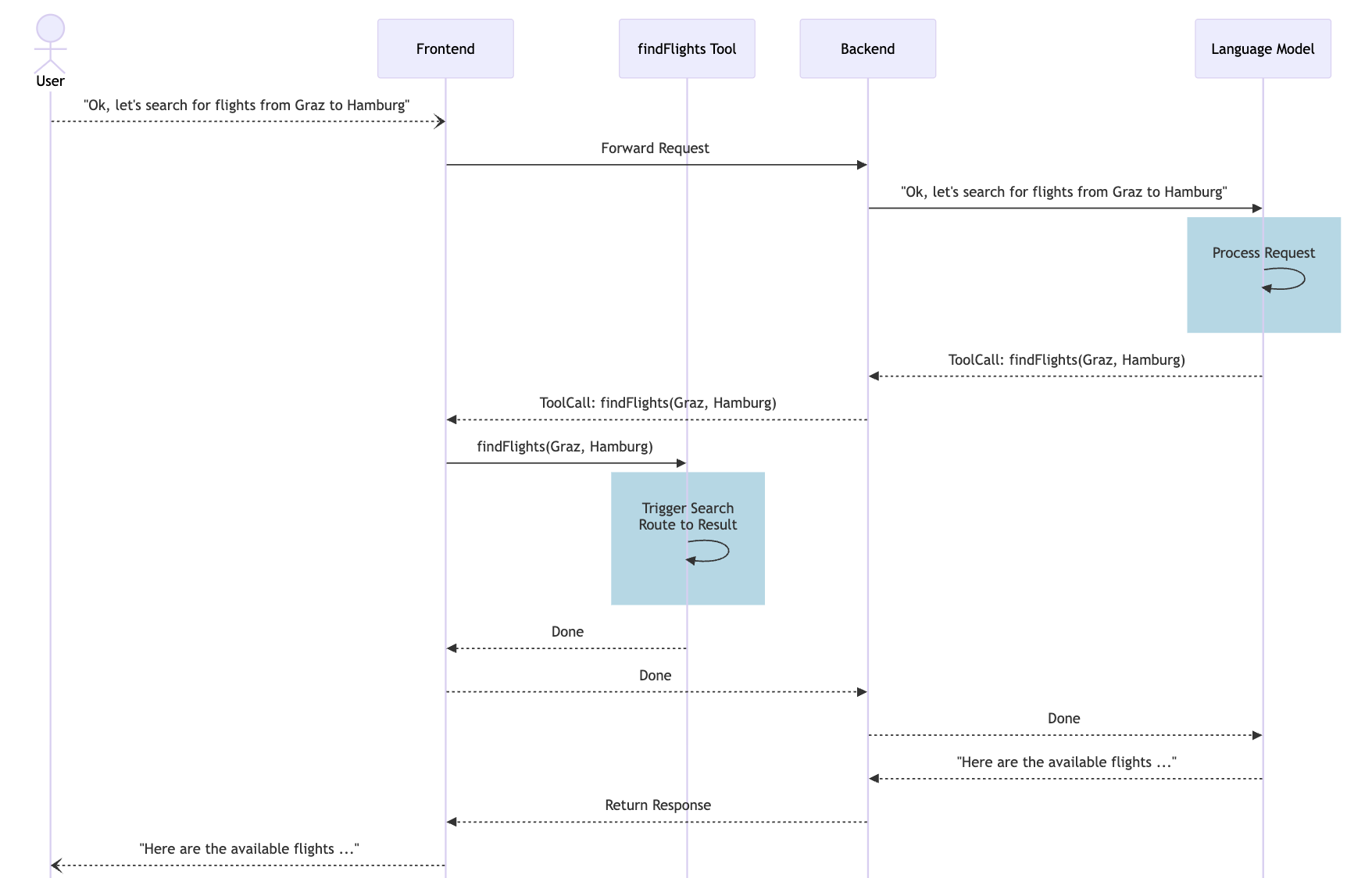
These messages correspond to the transcript shown below:
- Hashbrown forwards the user's textual query to the model, tagged as role
user. - The reply from the model, marked role
assistant, contains a request to run a specific tool, including the tool's name and its arguments. - Hashbrown then executes the tool, which in this case runs the search and updates the route.
- With a message in role
tool, Hashbrown confirms the tool call was performed; if the handler returned data, that result gets included here. - The conversation continues with another
assistantresponse from the model.
So the model knows what tools are available, they—along with their metadata—are appended in the tools section at the end of the request. That section carries the textual descriptions from the codebase as well as schema definitions for the expected arguments.
For a clearer mental model, the sequence diagram below visualizes the flow. It also accounts for the backend that gives the frontend access to the model in the first place:
In Closing
Hashbrown makes adding a chat-based AI assistant to your frontend remarkably straightforward. By handling the heavy-lifting like LLM connectivity and tool invocation, it lets you zero in on what actually matters for the product. Within a few steps, you get an assistant that can interpret user intent, trigger app logic, and reply with full context.
Real-world deployments come with a couple of caveats, though. For starters, LLMs are inherently non-deterministic—the same prompt can legitimately yield different output. Also, plan on iterating on your tool descriptions over time, testing them against typical sample queries to dial in reliable cooperation between the model and your app.