
Analog: A Fresh Full-Stack Framework Built on Angular
Analog represents a complete full-stack meta-framework designed for Angular. It first appeared in 2023, making it a recent addition to the ecosystem. Since the meta-framework concept itself is still taking shape, many Angular developers are exploring what this approach means for their projects. A natural question emerges: how can Analog benefit us? The framework offers several compelling features worth exploring.
Server-Side Rendering and Static Site Generation
Angular's built-in capabilities for static site generation and server-side rendering have historically been challenging to work with. While Angular Universal provides some relief, it doesn't tackle the underlying challenges. Its implementation is complex and lacks important capabilities like file-based routing, automatic TransferState, and ENV variable support — features readily available in competitor frameworks such as NextJs, SvelteKit, and NuxtJS. Analog steps in to address these shortcomings.
A common complaint with Angular's server-side rendering involves the flickering of text and images that users see when the client-side DOM replaces the server-side version. Angular 16 introduced hydration, which preserves server-rendered components while the client application initializes. Although this approach reduces the flicker, the solution remains incomplete.
How Analog Approaches This Challenge
Analog simplifies things by enabling SSR out of the box, with the option to disable it if needed. This removes implementation headaches. It also avoids the content flicker problem entirely. Beyond that, Analog introduces a fresh method for route rendering.
The / route gets re-rendered during the build process by default, which speeds up HTML file generation and delivers the main page more quickly. You can also designate other paths to specific pages and components. Route re-rendering works asynchronously, and toggling the static flag to true restricts re-rendering to static pages (SSG). The example below demonstrates how to configure four static page paths.
import { defineConfig } from 'vite';
import analog from '@analogjs/platform';

// https://vitejs.dev/config/
export default defineConfig(({ mode }) => ({
  plugins: [
    analog({
      static: true,
      prerender: {
        routes: async () => [
          '/',
          '/about',
          '/blog',
          '/blog/posts/2023-02-01-my-first-post',
        ],
      },
    }),
  ],
}));
SSR support doesn't stop there. Analog ships with plugins for multiple platforms, allowing Angular components to integrate with services like Astro. This framework lets developers create fast, interactive sites using both SSR and SSG approaches.
Routing Based on File Structure
Analog organizes routing through a file-based layout, where each file represents a route. New projects include a pages folder; inside it, files named with the .page.ts extension become routes. These files must be exported by default and are loaded lazily.
Each folder can support up to five distinct routing patterns:
indexed — identified by file names wrapped in parentheses: src/app/pages/(home).page.ts
This pattern strips the parenthesized segment from the URL. The home portion is ignored, resulting in a route path of /.
The same approach works with folders in parentheses:
src/
└── app/
    └── pages/
        └── (auth)/
            ├── login.page.ts
            └── signup.page.ts
In this scenario, the resulting paths are /login and /signup, rather than /auth/login and /auth/signup.
static — file names appear without round brackets
src/app/pages/home.page.ts produces the route `/home`
Two ways exist to define nested static routes, both resolving to /about/home:
src/app/pages/about/home.page.ts
src/app/pages/about.home.page.ts
dynamic — square brackets enclose the file name to create a parameterized path. This parameter is referred to as a slug param.
src/app/pages/products/[productId].page.ts creates the route /products/:productId
A dot-based syntax also works — src/app/pages/products.[productId].page.ts
By including withComponentInputBinding() in the appConfig providers, an Input decorator can retrieve a path parameter directly, given the parameter and Input carry matching names.
export const appConfig: ApplicationConfig = {
  providers: [
   	provideFileRouter(withComponentInputBinding()),
    ],
};

// src/app/pages/products/[productId].page.ts
@Component({
  standalone: true,
  template: `
    ID: {{ productId }}
  `,
})
export default class ProductDetailsPageComponent {
  @Input() productId: string;
}
layout — a parent file sharing its name with a child folder establishes the routing hierarchy
src/
└── app/
    └── pages/
        ├── products/
        │   ├── [productId].page.ts
        │   └── (products-list).page.ts
        └── products.page.ts
This setup places files within the products folder under the /products path.
The src/app/pages/products.page.ts file acts as the parent page, containing the router-outlet.
src/
└── app/
    └── pages/
        ├── (auth)/
        │   ├── login.page.ts
        │   └── signup.page.ts
        └── (auth).page.ts
Segment skipping also works here, with a router-outlet living in the src/app/pages/(auth).page.ts component.
catch-all — handles unknown paths (/**), useful for 404 pages. Use a spread operative inside square brackets — src/app/pages/[…page-not-found].page.ts
Integration with Vite/Vitest/Playwright
Vite serves a similar purpose to Webpack. However, Vite relies on esbuild for bundling, which proves far more efficient and considerably faster — a difference visible in the accompanying illustration.
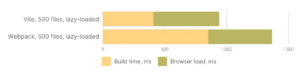
Vite further improves performance by automatically code-splitting, loading only necessary dependencies. For instance, a mat-table component is fetched when you navigate to its subpage, not during the initial app build.
ViTest provides a testing framework that's native to the Vite ecosystem. Configuration and plugins shared between the app and tests work seamlessly together, thanks to Vite's compatibility. ViTest supports common web tools and frameworks — including TypeScript, JSX, and various UI libraries — while enabling speedy unit tests. It plays well with Jest, incorporates logic from Cypress and WebdriverIO, and bolsters Web Test Runner alongside uvu. Language-agnostic, it adapts to various development setups.
Playwright offers a library suite for automated test creation. Microsoft has backed it since 2020. Its default Auto-waiting behavior ensures relevant page elements appear before actions. Selectors can target elements inside shadow DOM. It accommodates TypeScript, JavaScript, Python, .NET, and Java.
Markdown Content Handling
Analog excels in another area: incorporating Markdown files during rendering. These files can define routes and generate individual pages from their content.
Markdown is a styling-based markup language (HTML being another) designed for text files. It provides a simpler way to format content like headings or paragraphs without needing to know HTML or CSS.
Here's what a Markdown file might resemble:
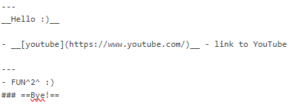

Any Markdown file in the src folder gets automatically fetched and rendered once routing is established.
Several steps make Markdown rendering with Analog possible:
- Configure the app.config.ts providers array to enable Markdown rendering by invoking provideContent() and withMarkdownRenderer().
import { ApplicationConfig } from '@angular/core'; import { provideContent, withMarkdownRenderer } from '@analogjs/content'; export const appConfig: ApplicationConfig = { providers: [ provideContent(withMarkdownRenderer()), ], }; - Save the file inside src/app/pages with an .md extension, like src/app/pages/example.md
- Extract and present the content in the template using the MarkdownComponent, the injectContent() function, and the <analog-markdown></analog-markdown> tag.
// /src/app/pages/blog/posts.[slug].page.ts
import { injectContent, MarkdownComponent } from '@analogjs/content';
import { AsyncPipe, NgIf } from '@angular/common';
import { Component } from '@angular/core';

export interface PostAttributes {
  title: string;
  slug: string;
  description: string;
  coverImage: string;
}

@Component({
  standalone: true,
  imports: [MarkdownComponent, AsyncPipe, NgIf],
  template: `
    <ng-container *ngIf="post$ | async as post">
      <h1>{{ post.attributes.title }}</h1>
      <analog-markdown [content]="post.content"></analog-markdown>
    </ng-container>
  `,
})
export default class BlogPostComponent {
  readonly post$ = injectContent<PostAttributes>();
}
The component determines the file location based on the routing definition, such as /src/app/pages/blog/posts.[slug].page.ts
Closing Thoughts
Analog packs a collection of modern capabilities that speed up and simplify site development. It fully leverages server-side rendering and static site generation, offers straightforward handling of Markdown, simplifies routing via files, streamlines test creation, and incorporates a state-of-the-art bundler. As Analog continues to mature, developers can expect it to reveal even more functionality beyond what's currently available.