Moving from webpack to Vite & esbuild: Understanding ESM, bundlers, and the shifting JavaScript landscape
In the era before browsers supported ECMAScript modules natively, there was no built-in way to write JavaScript in a modular fashion. This gap led to the creation of tools like webpack, which traverse the codebase, transform it, and combine modules into executable files for the browser. Without question, these bundlers dramatically improved the developer experience when they first appeared.
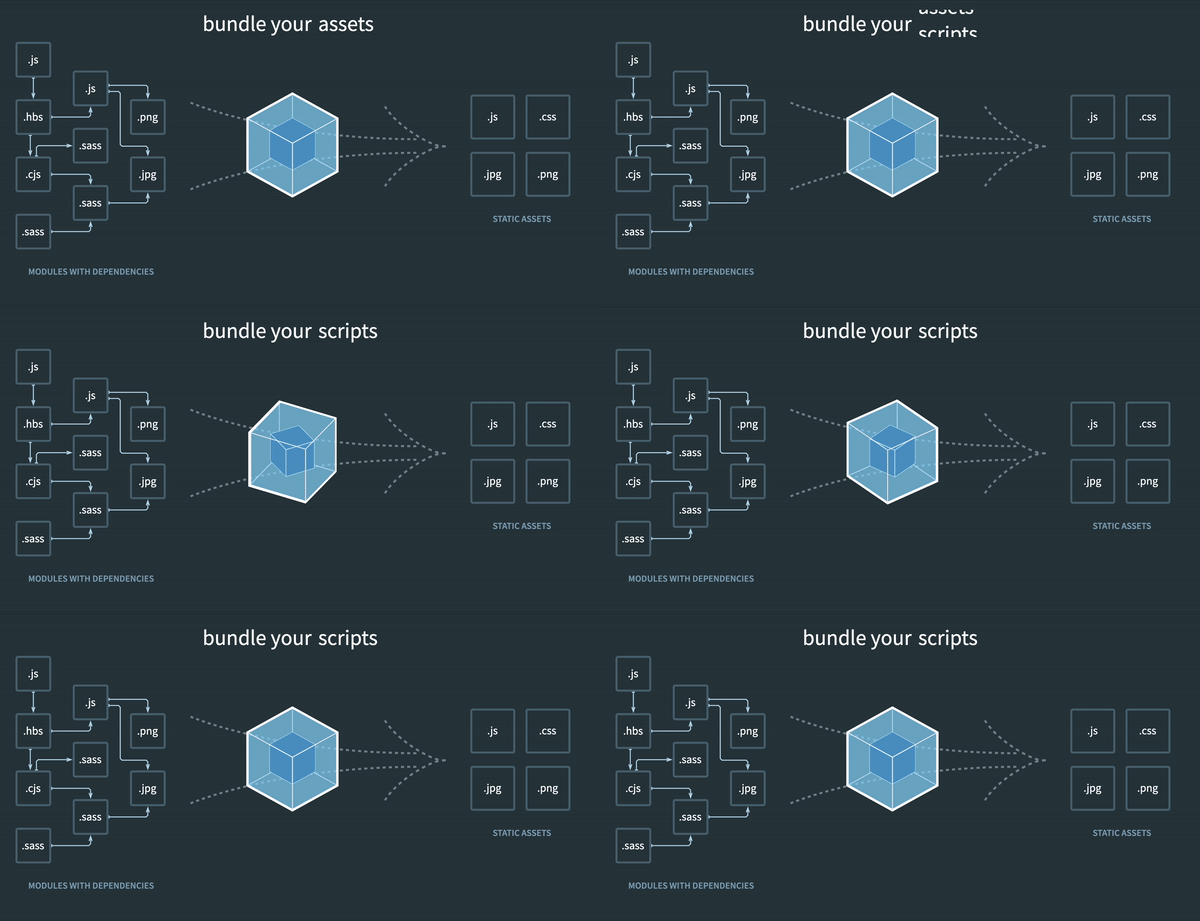
webpack – turning modularized dependencies into static assets
However, as applications have grown in sophistication, the volume of JavaScript we manage has expanded correspondingly. Large-scale projects routinely consist of thousands of modules. At that scale, JavaScript-based bundlers such as webpack start to hit their performance limits. Since JavaScript operates on a single thread, launching a dev server or recompiling after changes can take an extremely long time—often stretching into minutes.
The production build is similarly affected. Although native ESM support is now widespread, shipping un-bundled ES modules in production remains suboptimal due to the network overhead introduced by nested imports. To achieve the best load performance in a production environment, we combine bundling with tree-shaking, code splitting for lazy loading, and shared chunk extraction to improve caching. Regardless of application size, we still depend on rapid bundling.
How do we solve these problems? By taking advantage of the emergence of JavaScript tools written in languages that compile to native code, and pairing them with native ES module support in browsers for development. Specifically, the Angular team opted to use esbuild and Vite for the CLI's ng serve and ng build commands.
Let's examine these tools in detail and understand how Angular integrates them!
esbuild: Bundling JavaScript at Go-speed
esbuild's core mission is to usher in a new era of build tool performance while also providing a modern, approachable bundler. Many of the build tools we rely on for the web—and consequently for our own project builds—are tens to hundreds of times slower than they ought to be, as the following comparison suggests:
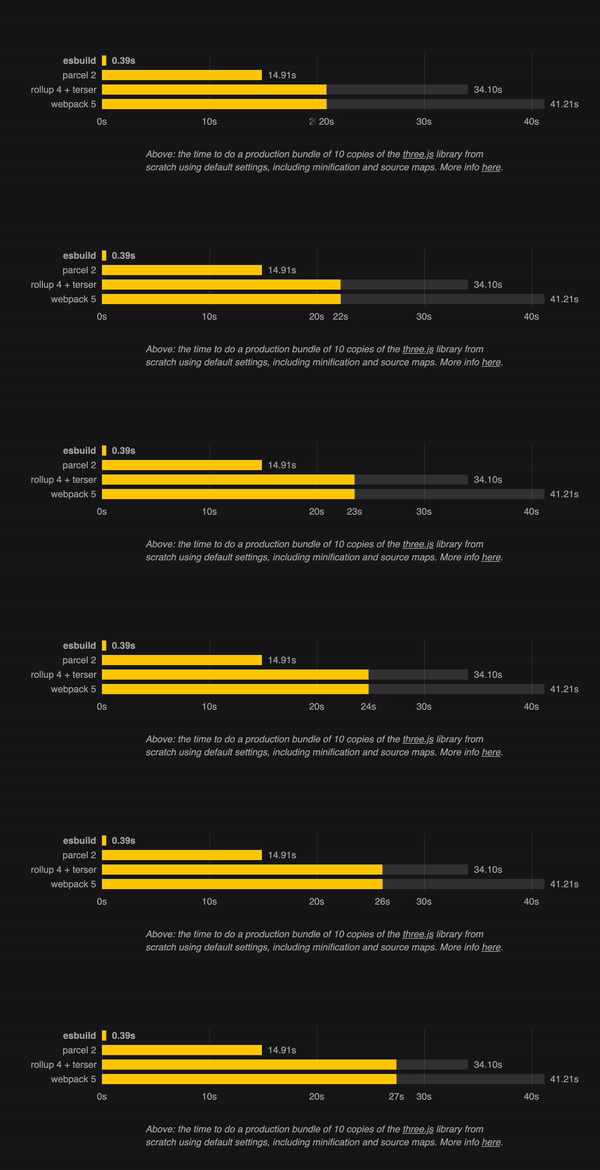
Why is esbuild so considerably faster? It is written in the Go programming language, which compiles straight down to native machine code. Most competing bundlers are written in JavaScript, meaning they run on NodeJS and must spend additional time parsing JavaScript source before doing any real work.
Furthermore, esbuild can handle parsing, printing, and source map generation concurrently. Whenever feasible, its algorithms are designed to take advantage of all available CPU cores. Because it is built in Go—a language built around parallelism—esbuild manages memory more effectively than any JavaScript-based tool. As you may recall, JavaScript is inherently restricted to a single call stack for execution. On the flip side, it is fair to note that esbuild lacks some capabilities that webpack offers. Its primary focus is speed.
If you're interested in finding out more about esbuild, I recommend this article.
Vite for Velocity: Streamlined application development
The second tool in play is Vite. The name comes from the French word for "quick," pronounced like "veet," and it's a build tool designed to deliver a swifter and leaner development workflow for contemporary web projects.
It consists of two primary components:
- A development server built on the idea of leveraging current browsers and their native ES module support.
- A build step that bundles your code with Rollup, preconfigured to emit highly optimized static assets for production use.
Fast & lean during development
Vite's dev server delivers source code directly over native ESM. It shifts some of the responsibility traditionally handled by a bundler to the browser, meaning Vite only needs to transform and send source files when the browser requests them. Code behind dynamic imports is processed only when it is actually required for the screen currently being viewed. Contrast this with an approach that demands the full application be parsed and bundled before even the first page can render.
You'll notice that we highlighted source code above. That's because Vite is clever about separating an application's modules into two categories: source code and dependencies.
Dependencies are typically shipped as plain JavaScript and rarely change, especially while the development server is running. Vite pre-bundles them using our new friend esbuild. This step ensures compatibility with CommonJS and UMD, since Vite must convert dependencies delivered in those formats into ESM first. It also boosts performance for dependencies that provide their own ESM builds as numerous individual files that reference each other: nested imports trigger a cascade of HTTP requests for internal dependencies, and the sheer number of requests causes network congestion in the browser, making page loads noticeably slower. The small upfront cost of fast esbuild pre-bundling is therefore entirely justified.
Intelligent & extensible during build
For the production build, Vite offers an opinionated experience with sensible defaults straight out of the box.
CSS code splitting, automatic preload directive generation, and optimized async chunk loading are all enabled by default, with no configuration required unless you deliberately choose to turn them off. Vite also provides a remarkably powerful Plugin API with full type support, making the whole process highly customizable. The build pipeline is constructed on top of Rollup, which is Vite's underlying JavaScript bundler. Yes, you read that correctly—Vite uses a JavaScript-based bundler for its build process, deliberately trading speed for extensibility in this phase. At least for now, as the Vite team has recently unveiled RollDown, an initiative aimed at creating a Rust-based (compile-to-native) version of Rollup that runs as quickly as esbuild.
Angular & esbuild & Vite – tools inside a closed process
Now that we have a clear picture of both esbuild and Vite, let's explore how the Angular team leverages these outstanding tools to elevate their development and build workflows.
Starting with the team's CLI philosophy will help clarify the subsequent decisions about what to use and when. The team does not want you to worry about the internal machinery of scaffolding, developing, upgrading, or translating applications. They view the CLI as a black box. For the user, each of these operations should be nothing more than a single command. This way, you can focus on building the application you need while Angular handles performance tuning and optimization of the development and build processes.
With that framework in mind, the team's choices become quite logical:
ng build with esbuild

For production builds, the Angular CLI relies on esbuild to bundle your application and write the resulting static assets to disk. One point I didn't raise earlier is that although esbuild does support plugins, those plugins come with added complexity because they cannot be chained together as easily as Rollup/Vite plugins can. That said, this isn't a problem given the "closed" nature of the Angular CLI's development/build pipeline. The CLI—written by a team of experts with deep knowledge of Angular internals—can orchestrate plugin usage and harness esbuild's outstanding speed to the fullest.
For example, in the current implementation, entry points are handed off to esbuild only after ngc and TypeScript have been invoked directly to perform type-checking and generate JavaScript for both client and server. Only afterwards do the entry points reach esbuild, which produces final bundles optimized according to annotations from Angular's build optimizer. The result is the smallest possible bundle sizes, all while being considerably faster than earlier solutions.
ng serve with Vite

As you might have guessed, this arrangement means Vite functions exclusively as the development server for the Angular CLI. It still benefits from the quick cold starts and dependency pre-bundling that Vite offers out of the box. Additionally, the CLI employs an internal plugin to ensure that requests for Angular source code are rendered correctly and that requests for static files are read from disk and returned appropriately. However, given the way Vite is currently integrated into the Angular CLI, you don't get access to Vite's extensive plugin ecosystem, which can be used to extend both development and production processes.
The team makes this trade-off deliberately to keep the experience as straightforward as possible for the majority of users. Angular believes in abstractions that provide the best defaults, making things easier for you. All you need to know are ng serve, ng build, and ng update.
What's the payoff for these high-level abstractions? Last year, Angular's build optimizer was replaced with a babel transform. All developers needed to adopt and benefit from that shift was to run ng update. It would probably take years for the millions of Angular developers to incorporate such changes manually if they had to adjust their own build pipelines. Thanks to the closed nature of the Angular CLI, simply updating to the new CLI version meant everyone's build improved automatically.
The diagrams above come from an excellent talk by Minko Gechev at ViteConf. Be sure to watch it here.
Analog & Vite – Angular as a Vite Plugin
But what if we went all in on Vite? What if we leaned into its capabilities and made the most of the tool's remarkably extensive plugin ecosystem? What if we had access to the vast array of community-built extensions that developers can leverage to craft their applications? What if Vite were more than just an "implementation detail," and instead, Angular itself became a Vite plugin?
Fortunately, thanks to the outstanding work of Brandon Roberts, we don't have to merely imagine what that would entail. He has created a community-built Vite plugin that allows us to spin up an Angular development server and also use Vite to compile Angular applications.
Brandon has essentially transformed Angular into a Vite plugin! Moreover, he went a step further and crafted the perfect demonstration of a Vite-driven Angular experience: the AnalogJs metaframework.
AnalogJs harnesses the power of Vite plugins not only to serve and build Angular applications but also to seamlessly integrate them with UnJs' robust Nitro server.
Collectively, AnalogJs, Nitro, and Vite enable Server Side Rendering, Static Site Generation, file-based routing, markdown support, and simple deployments to a wide range of cloud hosting platforms! This effectively shifts Angular from being primarily an enterprise SPA option to a state-of-the-art solution comparable to NextJs and Nuxt!
So, how does Analog utilize Vite to grant Angular these capabilities?
1. vite-plugin-angular – Angular as a Vite Plugin
Everything begins with vite-plugin-angular. Much like the "official" internal plugin used by the Angular team in its Vite-powered CLI dev server, it instructs Vite (with assistance from the Angular Compiler) on how to convert Angular source files into JavaScript. The key distinction is that this process occurs not only during development, but also enables us to tap into Vite's production build pipeline, granting us complete access to the entire plugin ecosystem.
2. vite-plugin-nitro – Expanding Vite based Angular with its own server
Once we have access to Vite plugins, we can use them in a potent manner: we enhance our standard Angular application with the vite-plugin-nitro. This plugin introduces a fully-fledged Nitro backend server to our app. Nitro is an open-source TypeScript framework designed for building ultra-fast web servers, ready to be deployed to NodeJs or edge environments of (nearly) every major cloud provider. Even better, our AnalogJs plugin manages all the internal configuration required to "teach" Nitro how to render Angular applications on the server side! This means that by combining vite-plugin-angular and vite-plugin-nitro, we can already construct full-stack Angular applications deployable to Netlify, Vercel, Cloudflare, AWS, and others in a matter of minutes.
3. File based routing – It just makes sense
AnalogJs, however, doesn't stop there. By leveraging Vite's ability to read and transform source files, the framework generates an Angular-compatible route configuration solely based on your directory structure and file names. Each file within your pages directory corresponds to a route in your application. This makes visualizing and managing your app more straightforward since the pages directory structure mirrors all existing routes. Manual route wiring is no longer needed! This works particularly well with Nitro, which employs a similar file-based routing concept for API routes!
4. You can write markdown? You can create Analog pages!
AnalogJs takes file-based routing a step further! The framework includes a content renderer that enables us to turn .md files into AnalogJs pages! Once again, by leveraging Vite's capabilities to read and transform source files, it even knows how to extract frontmatter meta-data that you've associated with your page. This makes AnalogJs an excellent choice for marketing pages or personal blogs! Expanding your AnalogJs applications becomes as straightforward as adding another Markdown file!
6. analog – One plugin to rule them all
All of this functionality is consolidated into a single, straightforward Vite plugin. This means that to access all these features, you simply need to add this to your vite.config.ts:
/// <reference types="vitest" />

import { defineConfig } from 'vite';
import analog from '@analogjs/platform';

// https://vitejs.dev/config/
export default defineConfig(({ mode }) => ({
...
  plugins: [analog()],
...
}));
Ready to explore AnalogJs, but unsure where to begin? The AnalogJs team has you covered there as well! Setting up your application is as simple as executing a single command:
npm create analog@latest
To Vite or not to Vite? That is the question.
As you can see, Vite is an incredibly powerful tool, and having access to its ecosystem enables us to build some impressive features that have the potential not just to improve but even completely reshape the Angular experience! Furthermore, AnalogJs' Vite integration makes it possible to use Angular in Qwik and Astro projects as well!
Nevertheless, it's also clear that developing and maintaining AnalogJs on top of Vite involves a significant amount of effort, all while ensuring compatibility with an Angular that might evolve in a totally different direction. Any internal improvements that the Angular team ships with its own builder are not automatically reflected in the Vite plugin and must be manually ported over (to the best of the community's abilities) after the fact. For Analog users, the expertise of those who work with Angular's internals daily isn't automatically incorporated when a new framework version is released.
These represent considerable trade-offs, which the Analog team deems significant enough to consider moving the Analog meta-framework onto the new, official, Vite, and esbuild-powered tooling while maintaining a separate vite-plugin-angular to bring Angular to Astro, Qwik, and the broader Vite ecosystem.
Brandon did an excellent job outlining both perspectives in greater detail in this RFC, and we invite you to read through it and share your feedback on what you think is the best option for you!
To Vite or not to Vite? That is the question.
Thank you & more to come
Thank you to @brandontroberts for his remarkable work with AnalogJs and his willingness to share his time and expertise in helping me create this article.
Thank you to Preston Lamb and Matthieu Riegler for their feedback and support!
As always, do you have any further questions or suggestions for blog posts? I hope this provides you with a solid understanding of what's new in Angular tooling and how AnalogJs leverages Vite. Finally, I hope this encourages you to read the RFC and join the conversation! We're eager to hear your thoughts. Also, please feel free to leave a comment or send me a message.
Lastly, if you found this article helpful, feel free to like and share it with others. If you enjoy my content, follow me on Twitter or Github.