
Let's dive into the utility functions available within the @angular/cdk/coercion package.
Angular stands out as a comprehensive framework, widely embraced for projects ranging from modest applications to large enterprise systems. A key factor behind this adoption is the extensive suite of APIs and tools it provides out-of-the-box, streamlining routine development tasks. The Angular core team, alongside community contributors, has excelled in keeping everything well-maintained and documented. Nevertheless, some community-driven patches remain undocumented. This article sheds light on one such practical and valuable set of helpers: Coercion.
Understanding Coercion?
Coercion refers to the implicit transformation of data into a target type.
There isn’t a universal or strict guideline for how coercion or implicit conversion should function—it often depends on the context. However, the team behind Angular and its active community have addressed this for common data types such as arrays, booleans, numbers, and more. They’ve curated a set of utilities located in the @angular/cdk/coercion namespace.
In the upcoming sections, we’ll examine these utilities closely. For demonstration, we’ll inject values via @Input properties into sample components and apply the coercion functions to those inputs. Keep in mind, though, that these functions are flexible and can be utilized in any part of your application as needed.
Essential note:
Angular Ivy introduces stricter type checking, which you can turn off using TypeScript configuration (tsconfig.json) options. The code samples we’ll cover are compatible with strict type checking enabled. For more details, refer to Angular’s Template type checking documentation here.
coerceArray
export function coerceArray(value: T | T[]): T[]
Takes a single value or an array and returns it as an array, converting the former into a single-element array
Let’s look at a component that accepts an array of strings and another array of a custom type, Person, through its @Input properties.
import { Component, Input } from '@angular/core';
import { Person } from './person.interface';

@Component({
  selector: 'array-coercion',
  template: `...`
})
export class ArrayCoercionComponent  {
  @Input() strings: Array<string>;
  @Input() persons: Array<Person>;
}
array-coercion.component.ts
export interface Person {
  name: string;
  age: number;
}
person.interface.ts
A typical usage scenario looks like this:
<!-- person1 & person2 are objects of type Person  -->
<array-coercion
  [strings]="['array item 1', 'array item 2']"
  [persons]="[person1, person2]"
></array-coercion>
app.component.html
Wouldn’t it be great if we could accept just one value and have everything function smoothly, errors-free, as shown here?
<!-- person1 is an object of type Person  -->
<array-coercion
  [strings]="'array item 1'"
  [persons]="person1"
></array-coercion>
app.component.html
Making this functional requires these modifications in the ArrayCoercionComponent.
import { Component, Input } from '@angular/core';
import { coerceArray } from '@angular/cdk/coercion'; // NEW IMPORT
import { Person } from './person.interface';

@Component({
  selector: 'array-coercion',
  template: `...`
})
export class ArrayCoercionComponent  {
  // In the following code, `@Input strings` will NOT work with strict type checking
  // But we'll make the `@Input persons` to work with strict type checking as well

  // Declare private properties to hold coerced arrays
  private _stringArray: Array<string>;
  private _personArray: Array<Person>;

  // We have to separate this getter and name it differently to be used in the template
  // This works in combination with the `@Input set persons` defined on line 36
  get coercedPersons(): Array<Person> {
    return this._personArray;
  }

  // Use setter to call coerceArray method and convert passed values to arrays
  @Input()
  get strings(): Array<string> {
    return this._stringArray;
  }
  set strings(val: Array<string>) {
    this._stringArray = coerceArray(val);
  }

  // Note that the val parameter excepts a non-array value as well
  // We have to do this for strict type checking to work properly
  // If we don't do this, following error will be thrown:
  // Type 'Person' is not assignable to type 'Person[]'.
  @Input()
  set persons(val: Person | Array<Person>) {
    this._personArray = coerceArray(val);
  }
}
The file under discussion is array-coercion.component.ts.
Q: When the input value is _null_ or _undefined_, what occurs?
A: The value is included in an array just like any other input, as demonstrated in the following console output:
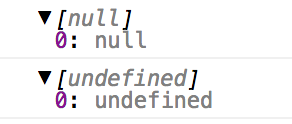
Here, the outcome remains an array—yet it holds just one element, which may be null or undefined. In my view, this API merits refinement along these lines:
- A value that is
nullorundefinedshould stay outside an array, enabling consumers to rely on a plain truthy/falsy test. - Any array entries that are
nullorundefinedought to be dropped, leaving a clean array that can be bound directly without extra truthy/falsy checks per item.
From the earlier demonstrations, it’s clear that with coerceArray, component users can supply either an array or a standalone value, all without triggering errors.
coerceBooleanProperty
function coerceBooleanProperty(value: any): boolean
Transforms any given value (often a string) into a boolean
Consider a component that accepts two boolean flags via @Input.
import { Component, Input } from '@angular/core';

@Component({
  selector: 'boolean-coercion',
  template: `...`
})
export class BooleanCoercionComponent  {
  @Input() flagOne: boolean;
  @Input() flagTwo: boolean;
}
boolean-coercion.component.ts
The component's intended usage matches the patterns shown below:
<!-- Bound with class properties -->
<boolean-coercion
  [flagOne]="booleanTrue"
  [flagTwo]="booleanFalse"
>
</boolean-coercion>

<!-- Bound with strings expressions -->
<boolean-coercion
  [flagOne]="'true'"
  [flagTwo]="'false'"
>
</boolean-coercion>
app.component.html
The typical usage pattern appears in these samples—yet since the values are booleans, it would be handy if we could also employ them in the following manner:
<!-- Input names only, Angular will set the value as empty string ('') -->
<!-- Supposed to be truthy -->
<boolean-coercion flagOne flagTwo></boolean-coercion>

<!-- Strings true/false, without expressions -->
<boolean-coercion flagOne="false" flagTwo="true"></boolean-coercion>

<!-- Random string values, without expressions -->
<boolean-coercion flagOne="random" flagTwo="random"></boolean-coercion>

<!-- Number, with or without expressions -->
<boolean-coercion [flagOne]="0" flagTwo="1"></boolean-coercion>

<!-- Some object, null or undefined value -->
<boolean-coercion [flagOne]="person1" [flagTwo]="nullValue"></boolean-coercion>
Here’s the template file: app.component.html.
We’ll now adjust our BooleanCoercionComponent so that it can also handle the usage patterns shown earlier.
import { Component, Input } from '@angular/core';
import { coerceBooleanProperty } from '@angular/cdk/coercion'; // NEW IMPORT

@Component({
  selector: 'boolean-coercion',
  template: `...`
})
export class BooleanCoercionComponent  {
  // In the following code, `@Input flagOne` will NOT work with strict type checking
  // But we'll make the `@Input flagTwo` to work with strict type checking as well

  // Declare private properties to hold coerced booleans
  private _flagOne: boolean;
  private _flagTwo: boolean;

  // We have to separate this getter and name it differently to be used in the template
  // This works in combination with the `@Input set flagTwo` defined on line 36
  get coercedFlagTwo(): boolean {
    return this._flagTwo;
  }

  // Use setter to call coerceBooleanProperty method and convert passed values to boolean
  @Input()
  get flagOne(): boolean {
    return this._flagOne;
  }
  set flagOne(val: boolean) {
    this._flagOne = coerceBooleanProperty(val);
  }

  // Note that the val parameter excepts value of type 'any'
  // We have to do this for strict type checking to work properly
  // If we don't do this, following (or similar) error will be thrown:
  // Type 'string' is not assignable to type 'boolean'.
  @Input()
  set flagTwo(val: any) {
    this._flagTwo = coerceBooleanProperty(val);
  }
}
boolean-coercion.component.ts
Note: Under strict type checking, we permit _any_ value, but the caveat is that passing an _object_ as input leads to its coercion into a boolean too. Consequently, consumers must exercise caution when supplying inputs to prevent unintended outcomes.
The coerceBooleanProperty utility proves incredibly useful by offering component users many different ways to provide boolean inputs.
coerceCssPixelValue
function coerceCssPixelValue(value: any): string
Coerces a value to a CSS pixel value
This scenario might occur infrequently, yet if you ever need to hand a CSS pixel value to a component—perhaps for inline styling or other logic—you might write code resembling this:
import { Component, Input } from '@angular/core';

@Component({
  selector: 'css-pixel-coercion',
  templateUrl: './css-pixel-coercion.component.html'
})
export class CssPixelCoercionComponent  {
  @Input() padding: string;
}
css-pixel-coercion.component.ts
<!-- Using Angular's Style Binding expression -->
<!-- The value of 'padding' will have 'px' appended to it -->
<!-- But it will be limited only to 'px' and won't allow 'em', 'rem' or '%' -->
<!-- Similarly if we do [style.padding.em], it will be limited to 'em' only -->
<div class="default" [style.padding.px]="padding">
  Hello Coercion, this div has {{ padding }} padding!
</div>

<!-- Using Angular's Style Binding expression -->
<!-- We don't use the unit expression, and leave it open for any value to be passed -->
<!-- We can do similar to above example using a custom conversion method -->
<!-- But again, we will limit to a certain unit, e.g. 'px' or 'em' -->
<div class="default" [style.padding]="padding">
  Hello Coercion, this div has {{ padding }} padding!
</div>
This is what you would put inside css-pixel-coercion.component.html.
Here’s how you’d actually use the component described above:
<!-- This will work if we have [style.padding.px] -->
<css-pixel-coercion [padding]="10"></css-pixel-coercion>

<!-- This will work if we have [style.padding] -->
<css-pixel-coercion [padding]="'10px'"></css-pixel-coercion>
app.component.html
This approach becomes far more user-friendly for our component's consumers — they could hand us a number, a pixel value, em, or anything expressed in a valid unit. In practice, we might see usage patterns that look like this:
<!-- This gets converted as 10px -->
<css-pixel-coercion [padding]="10"></css-pixel-coercion>

<!-- The following strings get bound as-is -->
<!-- The component users can pass in values with other units as well -->
<css-pixel-coercion [padding]="'10px'"></css-pixel-coercion>
<css-pixel-coercion [padding]="'1em'"></css-pixel-coercion>
<css-pixel-coercion [padding]="'1rem'"></css-pixel-coercion>
app.component.html
Now, let’s examine the implementation of our CssPixelCoercionComponent to achieve this behavior.
import { Component, Input } from '@angular/core';
import { coerceCssPixelValue } from '@angular/cdk/coercion'; // NEW IMPORT

@Component({
  selector: 'css-pixel-coercion',
  template: `...`
})
export class CssPixelCoercionComponent  {
  // In the following code, `@Input paddingX` will NOT work with strict type checking
  // But we'll make the `@Input paddingY` to work with strict type checking as well

  // Declare private properties to hold coerced booleans
  private _paddingX: string;
  private _paddingY: string;

  // We have to separate this getter and name it differently to be used in the template
  // This works in combination with the `@Input set paddingY` defined on line 36
  get coercedPaddingY(): string {
    return this._paddingY;
  }

  // Use setter to call coerceCssPixelValue method and convert passed values to pixel string
  @Input()
  get paddingX(): string {
    return this._paddingX;
  }
  set paddingX(val: string) {
    this._paddingX = coerceCssPixelValue(val);
  }

  // Note that the val parameter excepts value of type 'number | string'
  // We have to do this for strict type checking to work properly
  // If we don't do this, following error will be thrown:
  // Type 'number' is not assignable to type 'string'.
  @Input()
  set paddingY(val: number | string) { // [A] More details below
    this._paddingY = coerceCssPixelValue(val);
  }
}
Here is the file css-pixel-coercion.component.ts.
[A]: Earlier, we observed that coerceCssPixelValue accepts its parameter with the type any. Consequently, in our setter, we could have declared set paddingY(val: any) without any type restriction. Instead, we chose to limit the accepted types to solely number or string. This decision was driven by behavior: when null or undefined is provided, they turn into empty strings, and passing an object results in a stringified value like [object Object]px. Thus, by narrowing the allowed input types, we still permitted practical and meaningful values while excluding those problematic cases.
coerceElement
function coerceElement(elementOrRef: ElementRef | T): T
Coerces an ElementRef into an Element, unless it is already an Element
Occasionally, our component design will require accepting a native HTML element as one of its inputs, allowing us to attach custom behaviors or enhancements around that element. Consider a basic example of such a component:
import { Component, Input } from '@angular/core';

@Component({
  selector: 'element-coercion',
  template: `...`
})
export class ElementCoercionComponent  {
  @Input() elementOne: Element;
  @Input() elementTwo: Element;
}
In element-coercion.component.ts
When developing with Angular, the ElementRef wrapper sees constant usage, and there are times when we need our component to accept an ElementRef as an input. To enable that, the input definition can be modified like this:
import { Component, ElementRef, Input } from '@angular/core';

@Component({
  selector: 'element-coercion',
  template: `...`
})
export class ElementCoercionComponent  {
  @Input() elementOne: Element | ElementRef;
  @Input() elementTwo: Element | ElementRef;
}
element-coercion.component.ts
With this in place, both a raw HTMLElement and an ElementRef become acceptable inputs, as demonstrated below.
<!-- Assuming that 'htmlElement' is a class property that returns a native HTML element -->
<!-- Assuming that 'elementRef' is a class property that returns an instance of ElementRef -->
<element-coercion
  [elementOne]="htmlElement"
  [elementTwo]="elementRef"
></element-coercion>
Below is the markup for app.component.html.
Everything works as expected at this point. However, within ElementCoercionComponent, the requirement was limited to a native HTML element. To enforce this, the coerceElement helper comes into play—here’s how the component changes with it:
import { Component, ElementRef, Input } from '@angular/core';
import { coerceElement } from '@angular/cdk/coercion'; // NEW IMPORT

@Component({
  selector: 'element-coercion',
  template: ``
})
export class ElementCoercionComponent  {
  // In the following code, `@Input elementOne` will NOT work with strict type checking
  // But we'll make the `@Input elementTwo` to work with strict type checking as well

  // Declare private properties to hold coerced elements
  private _elementOne: Element;
  private _elementTwo: Element;

  // We have to separate this getter and name it differently to be used in the template
  // This works in combination with the `@Input set elementTwo` defined on line 36
  get coercedElementTwo(): Element {
    return this._elementTwo;
  }

  // Use setter to call coerceElement method and convert passed value to Element
  @Input()
  get elementOne(): Element {
    return this._elementOne;
  }
  set elementOne(val: Element) {
    this._elementOne = coerceElement(val);
  }

  // Note that the val parameter excepts value of type 'Element | ElementRef'
  // We have to do this for strict type checking to work properly
  @Input()
  set elementTwo(val: Element | ElementRef) {
    this._elementTwo = coerceElement(val);
  }
}
element-coercion.component.ts
Pretty neat, isn’t it?
coerceNumberProperty
function coerceNumberProperty(value: any, fallbackValue = 0): number
Transforms a value that comes from a data binding (usually a string) into a numeric type
It’s equally typical to feed inputs or parameters with numeric values. Imagine a component that expects two numbers as its inputs.
import { Component, Input } from '@angular/core';

@Component({
  selector: 'number-coercion',
  template: `...`
})
export class NumberCoercionComponent  {
  @Input() numberOne: number;
  @Input() numberTwo: number;
}
number-coercion.component.ts
Here’s how you might use such a component in practice:
<!-- Expression with a number value or a class property -->
<number-coercion [numberOne]="10" [numberTwo]="numericValue"></number-coercion>
app.component.html
Supporting this additional pattern would be a valuable enhancement:
<!-- Inline string value or an expression with a string value -->
<number-coercion numberOne="10" [numberTwo]="stringValue"></number-coercion>
app.component.html
Any null or undefined value passed to the input might trigger unexpected behavior or exceptions during execution. Now we’ll adjust NumberCoercionComponent so that once the input is consumed, it’s guaranteed to hold a valid numeric value.
import { Component, Input } from '@angular/core';
import { coerceNumberProperty } from '@angular/cdk/coercion'; // NEW IMPORT

@Component({
  selector: 'number-coercion',
  template: `...`
})
export class NumberCoercionComponent  {
  // In the following code, `@Input numberOne` will NOT work with strict type checking
  // But we'll make the `@Input numberTwo` to work with strict type checking as well

  // Declare private properties to hold coerced numbers
  private _numberOne: number;
  private _numberTwo: number;

  // We have to separate this getter and name it differently to be used in the template
  // This works in combination with the `@Input set numberTwo` defined on line 36
  get coercedNumberTwo(): number {
    return this._numberTwo;
  }

  // Use setter to call coerceNumberProperty method and convert passed value to number
  @Input()
  get numberOne(): number {
    return this._numberOne;
  }
  set numberOne(val: number) {
    this._numberOne = coerceNumberProperty(val);
  }

  // Note that the val parameter excepts value of type 'any'
  // We have to do this for strict type checking to work properly
  // 'coerceNumberProperty' method takes a second parameter
  // The second parameter is the fallback or default value
  @Input()
  set numberTwo(val: any) {
    this._numberTwo = coerceNumberProperty(val, 12);
  }
}
number-coercion.component.ts
And that's it!
Wrapping Up
Throughout this article, we explored how these tiny helpers enable our component inputs to accept data more flexibly and without errors.
While this utility set is limited, there's plenty of room for enhancement and expansion to serve the community better. I suggest diving into the source code for more details—check it out on GitHub.
We'd love to hear your feedback and ideas. Happy coding!