
How zone.js ties into Angular's change detection
The core mechanism behind Angular's change detection relies on a library called zone.js. Its purpose is to intercept asynchronous operations happening in your application and, upon completion, invoke the rendering function so the DOM gets updated accordingly.
This convenience, however, comes at a significant cost.
Unnecessary dirty checking, redundant render invocations, manual patching of third-party libraries, and various workarounds are merely the visible symptoms. In highly dynamic user interfaces, the overhead caused by zone.js can become a serious bottleneck.
The push pipe is the first in a collection of utilities available under @rx-angular/template. These tools aim to support fully reactive applications and also enable zone-less performance within applications that still run with zone.js.
This series focuses primarily on one of those tools — the push pipe.
We will dive into all the specifics later on, but here is a brief look at what it brings to the table.
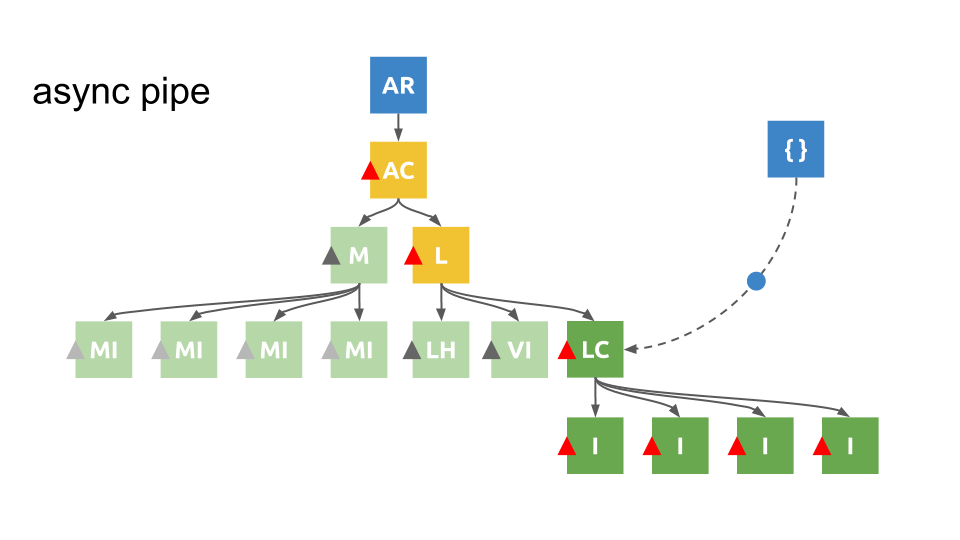
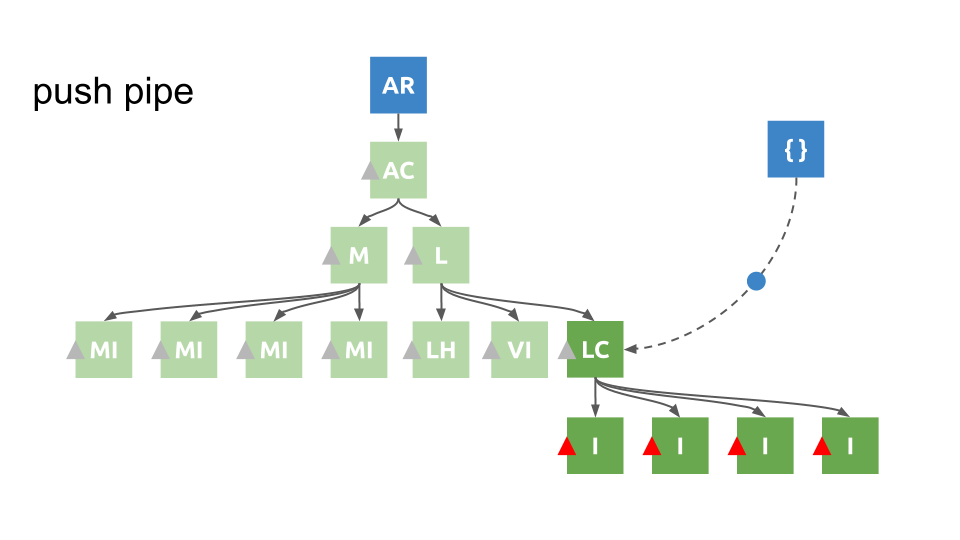
The push pipe renders Angular's component tree in a fundamentally different manner compared to the framework's default behavior.
When Angular detects a change, it marks the entire path from the root component down to the component where the change occurred as dirty. The framework then re-renders that entire path, along with all child components affected by the change.
The push pipe works locally instead. It fires change detection and rendering exclusively in the component where the change took place, as well as in the child components that are actually impacted.
The key point here is that this is achieved in a scalable and efficient manner, avoiding any unnecessary rendering calls.
Let's dig into the finer details and explore the tricks behind this powerful performance tool by first looking at how Angular implements these features natively.
Quick summary
This article is aimed more at technical understanding than at being a step-by-step guide. Keep that in mind while reading, or take some time to familiarize yourself with topics like Observables, Change Detection, Rendering, and zone.js.
What the push pipe introduces is a different approach to change detection — one that is local rather than global (which is what the async pipe does by default). It's built so that we can get zone-less performance even in applications that still run with zone.js.
Our journey started with Angular 2, working through some proof of concepts and identifying the various challenges we had to address.
Below, we go through the implementation details of the async pipe.
By carefully studying the original code, we refactor it into a more reactive style. This reduced the codebase to less than a third of its size, improved performance, and — most importantly — gave us a much more flexible and extensible foundation to build upon.
In the following article we'll look at how to handle the issues that come up when you want to work with locality in mind, and then we'll implement a simplified version of the push pipe.
A brief history of the push pipe
Back in 2015, when Angular switched from the watcher-based system of AngularJS to its new change detection mechanism, the introduction of ChangeDetectorRef#detectChanges opened the door to fresh ideas about manually detecting local changes.
(That was over five years ago)
This manual approach to detecting changes laid the groundwork for techniques that allow you to skip change detection runs across the whole component tree, avoid rendering parent components, and enable efficient rendering in large-scale applications.
Some of the people doing the early exploration in this area were Victor Savkin and Rob Wormald. Rob in particular gave talks on the subject and sketched out early prototypes of something he named the "push pipe" — a variation of the async pipe designed with locality in mind.
Victor did an excellent talk on the new change detection at ng-conf 2015, titled Change Detection Reinvented – Victor Savkin. Others picked it up from there, including a more recent talk by Rob at ng-up titled What's New and Coming in Angular – Rob Wormald where he again mentioned the async pipe and fresh possibilities for local change detection.
Over the years many others took a shot at the same idea.
Most arrived at a similar conclusion.
Sure, it's incredibly fast, but… it just doesn't scale… And it's really hard to make it work in a stable way…
One of the more recent attempts was by Sander Elias at ngVikings conf 2018. Take a moment to pause and hear what he concluded back then.
Creating a new way of doing change detection independent of zone.js requires a lot of thought to get it right in a way that is both scalable and performant.
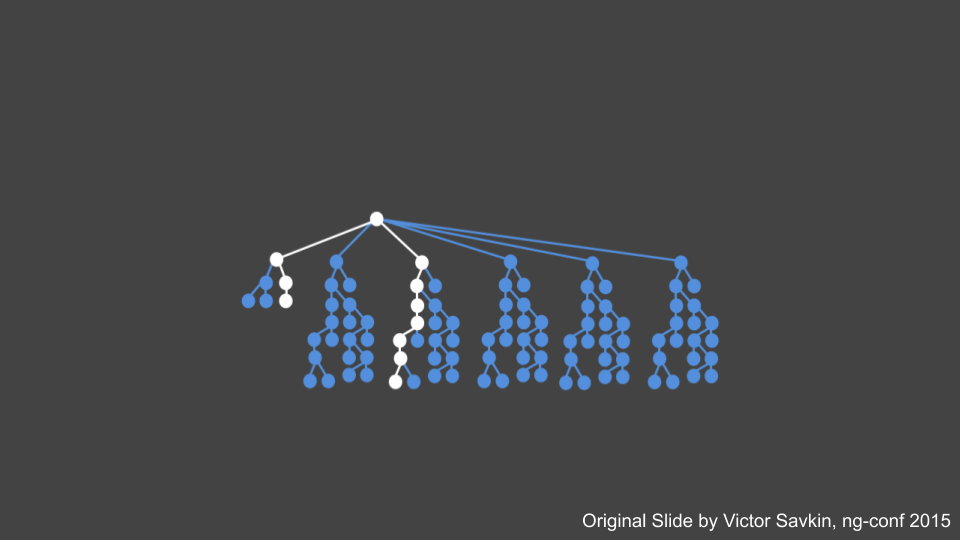
One of the initial problems with the current change detection was already pointed out by Victor back in 2015:
Modifying a leaf component triggers re-rendering and dirty checking along the whole affected path, all the way up to the root.
Another significant issue was the misuse of ChangeDetectorRef#detectChanges. If not handled properly, it easily leads to unnecessary rendering or dirty checking — even in small codebases, things can get out of hand early on. And then there was the tricky challenge of coordinating change detection runs across pipes, directives, and the component class itself, so they all work together in a consistent manner.
We're going to address that issue and understand how to put it into practice. ?
If you are too eager to wait, check out rxAngular and give it a spin.
How the async pipe works under the hood
We now have a rough sense of what needs to be done to enable local change detection. Let's first get a clear picture of how the async pipe is currently implemented, so we can better understand what we're working toward.
If we concentrate on the key pieces, we have an interface, some subscription logic, and an observable being passed in:
// https://github.com/angular/angular/blob/master/packages/common/src/pipes/async_pipe.ts#L70-L71
@Pipe({name: 'async', pure: false})
  export class AsyncPipe implements OnDestroy, PipeTransform {
  // ... Hidden for the sake of brevity
}
The PipeTransform interface requires a transform method to be defined:
export interface PipeTransform {
  transform(value: any, ...args: any[]): any;
}
Since the pipe is marked as impure via the @Pipe decorator, its transform method will run every time change detection happens, and whatever value it returns will be shown in the template.
One thing to keep in mind: this implementation triggers change detection even when the exact same value is passed in again.
transform(obj: Observable<any>|Promise<any>|null|undefined): any {
  // ... Hidden for the sake of brevity
  // https://github.com/angular/angular/blob/master/packages/common/src/pipes/async_pipe.ts#L94
  this._subscribe(obj);
  // ... Hidden for the sake of brevity
  // https://github.com/angular/angular/blob/master/packages/common/src/pipes/async_pipe.ts#L97
  return this._latestValue;
}
Now let's look at how _subscribe is built:
// https://github.com/angular/angular/blob/master/packages/common/src/pipes/async_pipe.ts#L113-L118
private _subscribe(obj: Observable<any>|Promise<any>|EventEmitter<any>): void {
  this._obj = obj;
  this._strategy = this._selectStrategy(obj);
  this._subscription = this._strategy.createSubscription(
  obj, (value: Object) => this._updateLatestValue(obj, value));
}
_subscribe accepts either a Promise or an Observable, and it picks the right strategy based on what was provided.
Inside those strategies, it calls _updateLatestValue, which updates _latestValue with the newest value that has arrived.
// https://github.com/angular/angular/blob/master/packages/common/src/pipes/async_pipe.ts#L140-L145
private _updateLatestValue(async: any, value: Object): void {
  if (async === this._obj) {
    this._latestValue = value;
    // ... Hidden for the sake of brevity
  }
}
To recap:
So, the async pipe basically takes a Promise or an Observable through its transform method.
It grabs the value — or, for observables, multiple values over time — and assigns each one to _lastValue.
At the end of each call to transform, the current _lastValue is returned.
Keeping that in mind, let's look again at another part of the file.
Because both Promises and Observables can deliver a value asynchronously, we need some way to let Angular know the value has arrived.
That's done in _updateLatestValue, which calls ChangeDetectorRef#markForCheck.
That call triggers a new round of template evaluation, which re-invokes transform.
During this second run, _lastValue now contains the result of the asynchronous operation, and that value comes back from transform.
The catch, though, is that transform gets called with the same Observable or Promise instance as before. If nothing else changed, that could lead to unexpected behavior.
To prevent that, the transform function includes checks to detect whether a new instance has been passed. These checks also take care of unsubscribing from the old object and starting to receive values from the new one.
And that's where undefined values and type validations are handled as well.
// https://github.com/angular/angular/blob/master/packages/common/src/pipes/async_pipe.ts#L91-L111
transform(obj: Observable<any>|Promise<any>|null|undefined): any {
if (!this._obj) {
  // ... Hidden for the sake of brevity
  return this._latestValue;
}
if (obj !== this._obj) {
  // ... Hidden for the sake of brevity
  return this._latestValue;
}
if (ɵlooseIdentical(this._latestValue, this._latestReturnedValue)) {
  // ... Hidden for the sake of brevity
  return this._latestValue;
}
  return this._latestValue;
}
In short:
The async pipe accepts a Promise or an Observable via its transform method.
It displays the most recent value from the given Promise or Observable. If a new Promise or Observable comes in, it switches to it and cleans up the subscription for the previous one.
The way the original source is written is quite imperative, and it doesn't really take advantage of what RxJS has to offer.
That comes from the Angular team's strict restrictions around using RxJS operators. They wanted to avoid relying on third‑party libraries as much as possible and also keep bundle size under control.
In this tweet, I demonstrated what the codebase might look like if we made use of RxJS operators:
Hey @Angular, I refactored the async pipe to propper #rxjs code.
You think it's PR-worthy?Attached original and refactored pic.twitter.com/wTWae88AN7
— Michael Rx Hladky (@Michael_Hladky) July 8, 2019
async pipe — imperative vs. reactive
The number of lines went from 84 down to 28, and the overall complexity dropped significantly.
On top of that, we now have the flexibility to add configuration options without much extra work.
@Pipe({name: 'async', pure: false})
export class AsyncPipe implements OnDestroy, PipeTransform {
value: any = null;
subscription;
observablesToSubscribeSubject = new Subject<Observable<any>>();
obs$ = this.observablesToSubscribeSubject
  .pipe(
    distinctUntilChanged(ɵlooseIdentical),
    switchAll(),
    distinctUntilChanged(),
    tap(v => { this.value = v; this.ref.markForCheck(); })
  );

constructor(private ref: ChangeDetectorRef) {
  this.subscription = this.obs$.subscribe();
}

ngOnDestroy(): void {
  this.subscription.unsubscribe();
}

transform(obj: Observable<any> | Promise<any> | null | undefined): any {
  this.observablesToSubscribeSubject.next(toObservable(obj));
  return WrappedValue.wrap(this.value);
  function toObservable(obj) {
    if (ɵisObservable(obj) || ɵisPromise(obj))
      return from(obj);
    else
      throwError(new Error('invalidPipeArgumentError'));
    }
  }
}
Most of the heavy lifting is handled by the distinctUntilChange operator. It also prevents the same value from being rendered more than once.
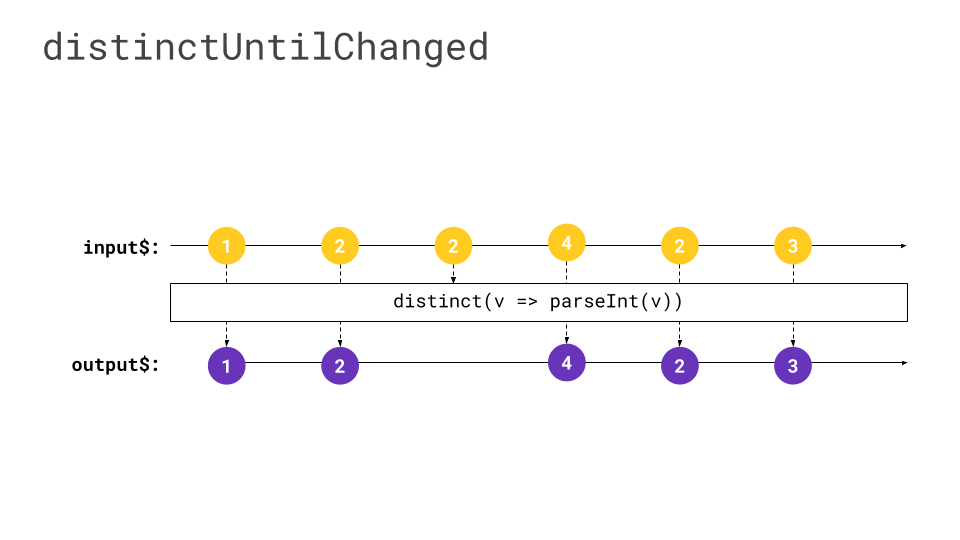
Where the switchAll operator comes in:
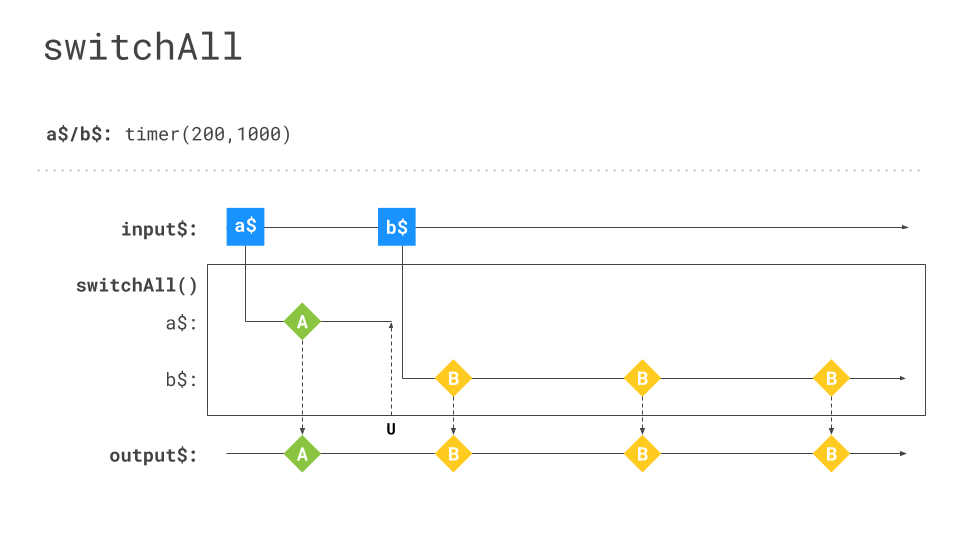
To get a first version of the push pipe working, all we need to do is change one single line.
We swap out markForCheck
tap(v => { this.value = v; this.ref.markForCheck(); })
for detectChanges
tap(v => { this.value = v; this.ref.detectChanges(); })
Voilà!
From here we're fully equipped to take on the tricky parts — scaling it properly and covering all the edge cases that come along! ?
Wrap-Up
Angular offers a built-in mechanism to directly connect observables to templates, causing the view to refresh whenever a fresh value is emitted by the supplied observable.
Through the earlier exploration of rendering and ChangeDetectorRef#markForCheck, we came to see that the existing approach to reflecting changes in the application has a notable downside in terms of performance, because of how inefficiently it handles rendering.
After shifting toward a more reactive pattern, we managed to streamline the code, gain greater adaptability for adding new features, and achieve a modest boost in rendering efficiency (avoiding duplicate renders for identical values).
Yet, we also discovered alternative strategies for triggering change detection in a more isolated fashion.
Still, making full use of this localized detection approach means tackling a variety of challenging issues along the way.
Now that we're well-versed in the underlying mechanics and have reworked the codebase to embrace reactivity, we can look ahead to exploring the push pipe and its potential design in the next installment.