Inside the push pipe implementation
The push pipe is built on a core idea: a fresh approach to change detection. When every value reaches the component through an Observable, we have precise knowledge about when a value changes — and that is exactly when we can trigger change detection. Even better, we can limit the trigger to only the parts of the application that actually need updating.
Angular’s ViewEngine offers two ways to render content:
– markForCheck
– detectChanges
With markForCheck, the related component gets flagged as dirty, and the next change detection run initiated by zone.js handles the rendering.
detectChanges, by contrast, executes change detection right away, regardless of whether zone.js is active.
In Ivy these map to:
– ɵdetectChanges
– ɵmarkDirty
Since the push pipe is meant to work as a direct substitute for the async pipe in Angular versions 8, 9 and 10, we only needed to make a minor adjustment in the pipe’s code.
Replacing
tap((v) => {
  this.value = v;
  this.ref.markForCheck();
});
with
tap((v) => {
  this.value = v;
  this.ref.detectChanges();
});
This alone is enough to run an Angular application without zone.js.
However, once you start using it and track the number of change detections, you will notice that a single change results in multiple render calls.
Consider this simplified illustration:
@Component({
  selector: 'app-display',
  template: ` {{ observable$ | push }} `,
})
export class DisplayComponent {
  observable$ = of(1, 2, 3);
}
The snippet above invokes change detection three times, even though a single run would have been sufficient.
That is a serious drawback — the application ends up slower than it would be with the original async pipe.
To solve this, our pipe needs intelligent coalescing logic.
Jia Li, the code owner and driving force behind zone.js, uncovered some notable findings. He observed that event bubbling across a click on a button triggers two separate calls within zone.js.
As a remedy, he supplied logic that folds multiple click events within the same event-loop tick: the calls are scheduled through the animation frame and executed just once per loop.
You can inspect the source here — coalescing over animation frame — and read a worthwhile article on the subject here: reduce-change-detection-cycles-with-event-coalescing-in-angular
Scheduling is a nuanced topic, and I will only scratch the surface here. If you want to go deeper, these resources are a good start:
– RxJS schedulers in depth
– RxJS Scheduling in v7
Let’s put together a minimal version of this logic as an RxJS operator tailored to our push pipe
export function coalesceWithPoc1<T>(
  durationSelector: Observable<any>
): MonoTypeOperatorFunction<T> {
  return (source) => {
    const o$ = new Observable<T>((subscriber) => {
      const rootSubscription = new Subscription();
      rootSubscription.add(
        source.subscribe(createInnerObserver(subscriber, rootSubscription))
      );
      return rootSubscription;
    });

    return o$;

    function createInnerObserver(
      outerObserver: Subscriber<T>,
      rootSubscription: Subscription
    ): Observer<T> {
      let actionSubscription: Unsubscribable;
      let latestValue: T | undefined;

      return {
        complete: () => {
          if (actionSubscription) {
            outerObserver.next(latestValue);
          }
          outerObserver.complete();
        },
        error: (error) => outerObserver.error(error),
        next: (value) => {
          latestValue = value;
          if (!actionSubscription) {
            actionSubscription = durationSelector.subscribe({
              next: () => {
                outerObserver.next(latestValue);
                actionSubscription = undefined;
              },
              complete: () => {
                if (actionSubscription) {
                  outerObserver.next(latestValue);
                  actionSubscription = undefined;
                }
              },
            });
            rootSubscription.add(actionSubscription);
          }
        },
      };
    }
  };
}
The key pieces here are the durationSelector parameter and the next callback.
durationSelector is an Observable that determines the execution context — or, when given an interval, the time span — in which coalescing should take place.
Inside the next function we subscribe to the durationSelector and pass the most recent value along to the outer observer:
next: (value) => {
  latestValue = value;
  if (!actionSubscription) {
    actionSubscription = durationSelector.subscribe({
    next: () => {
      outerObserver.next(latestValue);
      actionSubscription = undefined;
    },
    complete: () => {
      if (actionSubscription) {
        outerObserver.next(latestValue);
        actionSubscription = undefined;
      }
    },
  });
  rootSubscription.add(actionSubscription);
}
The push pipe can now use this!
RxJS in v7 ships a handy utility named animationframes.
animationframesis a creation function that emits anObservable<number>similar tointerval, except it fires on everyAnimationFrametick rather than viasetTimeout.
Pretty neat, isn’t it?
@Pipe({ name: 'push', pure: false })
export class PushPipe implements OnDestroy {
  requestAnimationFrameId = -1;
  value: any = null;
  subscription;
  observablesToSubscribeSubject = new Subject<Observable<any>>();
  obs$ = this.observablesToSubscribeSubject.pipe(
    distinctUntilChanged(ɵlooseIdentical),
    switchAll(),
    coalesceWith(animationframes),
    tap((v) => {
      this.value = v;
      this.ref.detectChanges();
    })
  );
}
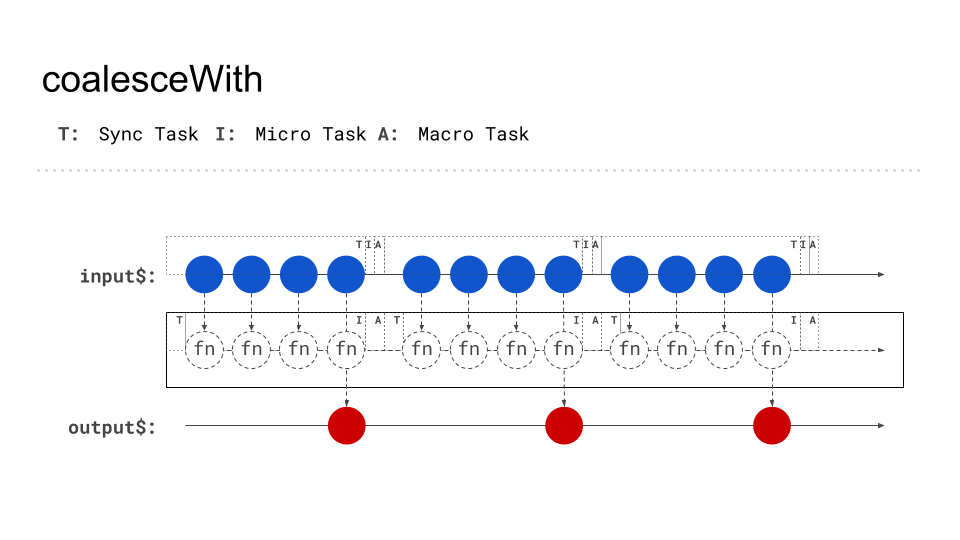
The coalesceWith operator takes animationframes as its durationSelector and forwards the latest emission once per animation frame.
Here is what the marble diagram looks like for the code above:
coalesceWith RxJS Operator
With that operator integrated, the push pipe comes together quite nicely.
For those who want a bit more technical depth, let’s take a closer look at scheduling.
Understanding scheduling
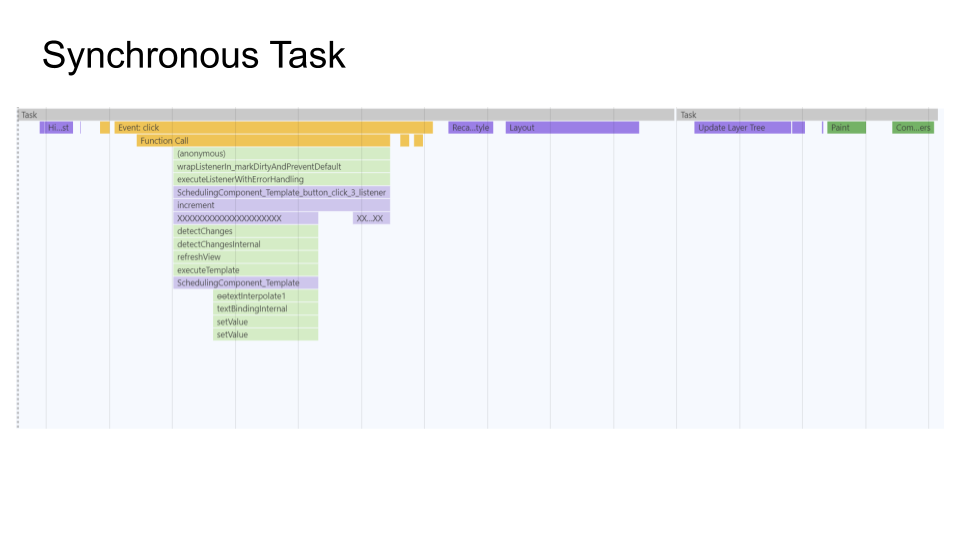
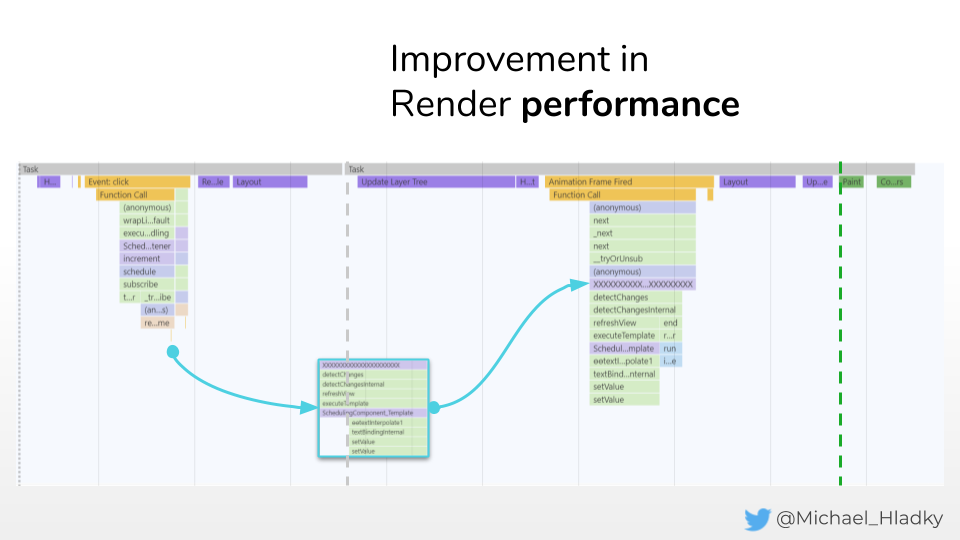
Scheduling simply means postponing the execution of work to a future point in time. A useful way to grasp this is by examining flame-charts of your code:
Here we can observe the execution of a straightforward function.
Synchrounous Task
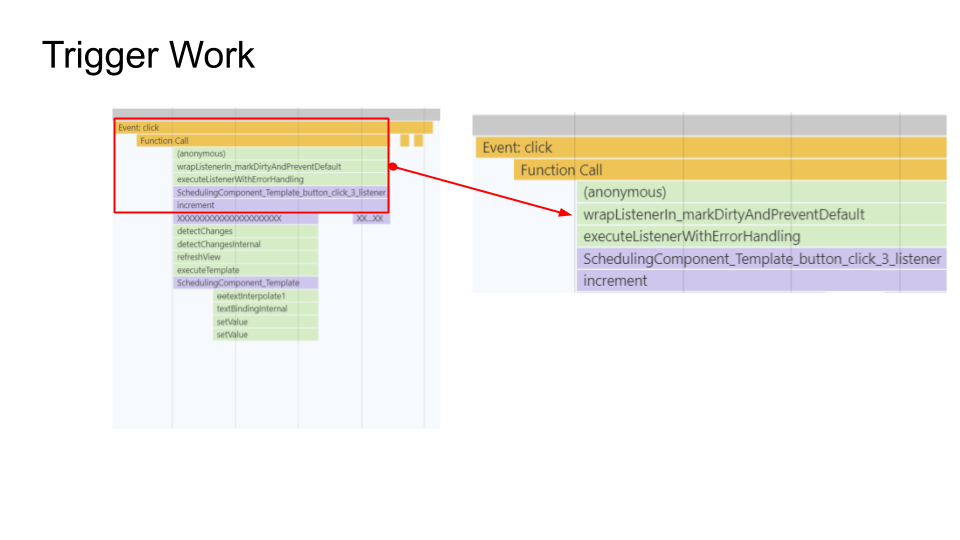
What triggers the work is the button click
Trigger scheduling work
The scheduled work ends up being a render call:
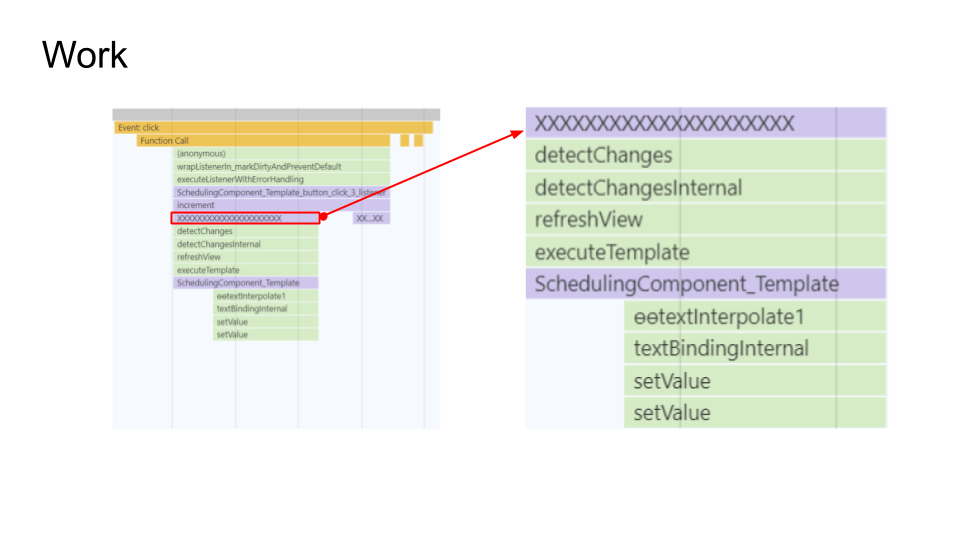
Scheduled Work
This call gets scheduled via an animationFrame and runs right before the paint event — marked by the green dashed line
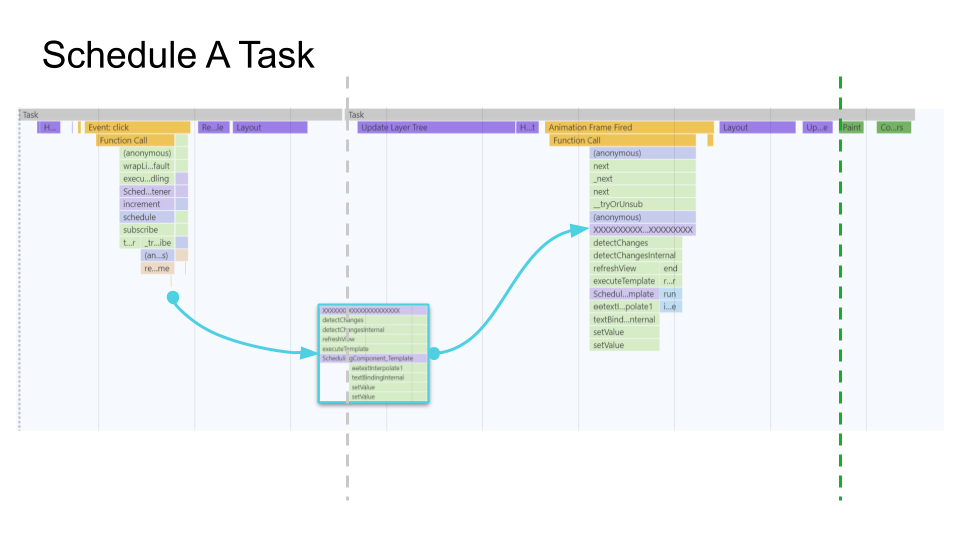
Schedule Work on AnimaionFrame
So the coalesceWith operator accepts a parameter that dictates which scheduling method we want to use for coalescing.
coalesceWith(durationSelector);
This means different scheduling approaches are available so we can prioritize work as needed.
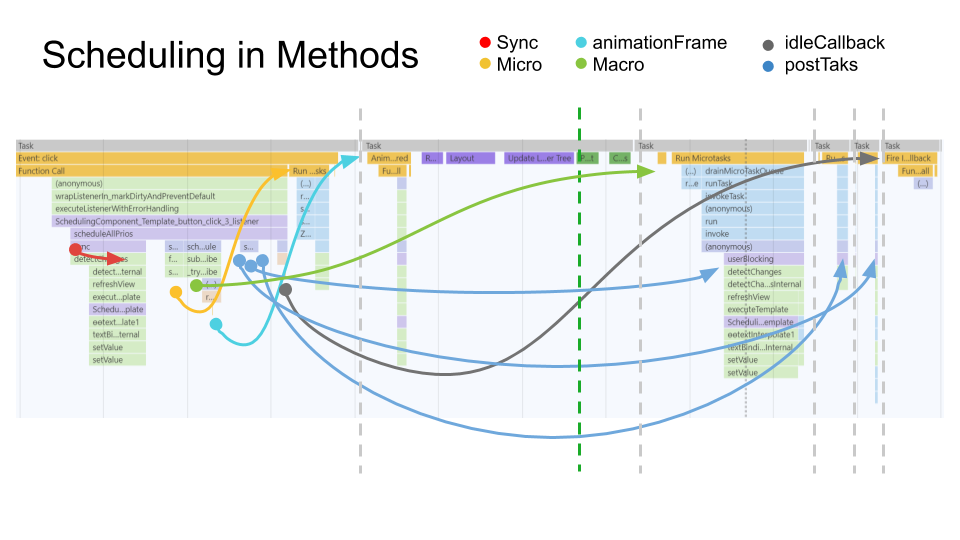
Scheduling Options
Coalescing over a microtask works like this
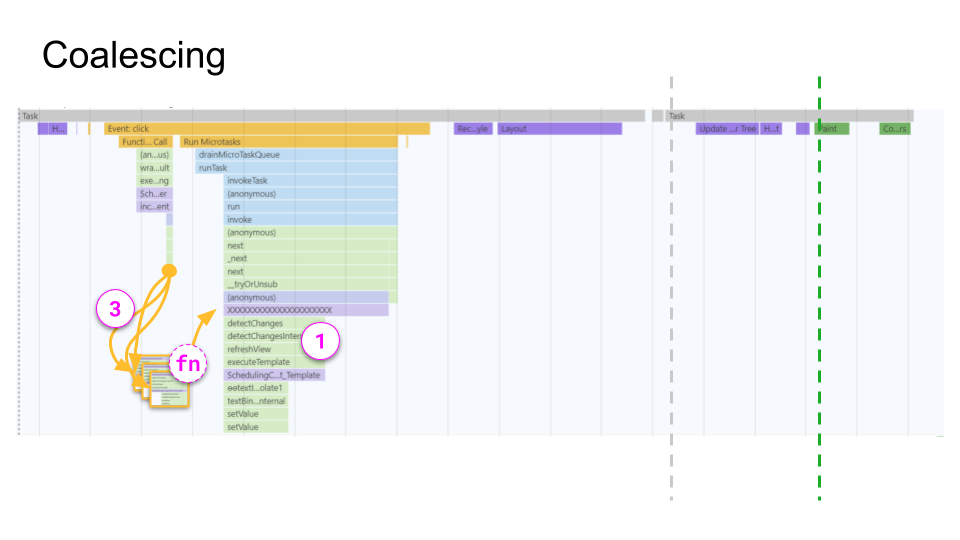
Coalesce on Micro Task
With this in place, we are almost done!
The push pipe existed inside my clients’ projects for quite some time before it was released as an OOS library. Along the way we encountered another tricky issue in our current implementation.
Applications still over-rendered because coalescing handled only multiple synchronous values in sequence; it did not account for several pipes coexisting inside a single component. Real-world usage showed this pattern is actually quite common.
A minimal example looks like this:
@Component({
  selector: 'app-display',
  template: `
    {{ id$ | push }}
    {{ firstName$ | push }}
    {{ lastName$ | push }}
  `,
})
export class DisplayComponent {
  id$ = of(42);
  firstName$ = of('John');
  lastName$ = of('Doe');
}
This setup triggers three re-renders because each pipe coalesces independently of the others.
That is still two renders too many.
To address this, we need a scope in which the coalescing happens.
const scope = { numCoalescing: 0 };

// ...

coalesceWith(durationSelector, scope);
A basic way to introduce scoping inside the operator would be:
const tryEmitLatestValue = () => {
  if (scope.numCoalescingSubscribers <= 1) {
    outerObserver.next(latestValue);
  }
};

// ...

next: (value) => {
  latestValue = value;
  if (!actionSubscription) {
    ++scope.numCoalescingSubscribers;
    actionSubscription = durationSelector.subscribe({
    next: () => {
      --scope.numCoalescingSubscribers;
      tryEmitLatestValue();
      actionSubscription = undefined;
    },
    complete: () => {
      if (actionSubscription) {
        tryEmitLatestValue();
        actionSubscription = undefined;
      }
    },
  });
  rootSubscription.add(actionSubscription);
}
You will find working examples here: stackblitz.com/coalesceWith
In an Angular application, the component offers a natural scope.
That approach is tricky, though — we would end up mutating the component’s scope, which risks hard-to-trace bugs.
A cleaner solution is a WeakMap.
A WeakMap can hold per-instance state — in our case, the subscriber count — using weak references. That gives us the ability to:
- track a set of properties for a component without altering its state
- prevent memory leaks, since references are indirect
The WeakMap implementation is available here: coalescing-manager.ts
With this in place we achieve exactly ONE RENDERING for the target component. That is the theoretically fastest way a component can render.
The core functionality is now complete!
Boosting rendering efficiency

Angular ChangeDetection – shrinking the component tree

Angular ChangeDetection – cutting down dirty checks and re-renders
Angular ChangeDetection – keeping the UI responsive
Check out the complete feature set of the production-ready pipe in the official repository:
Rx-Angular ?
Wrap-up
Although the push pipe concept has been around for a while, the current implementation is the first to genuinely unlock a fresh approach to change detection in Angular.
It puts rendering control in the developer's hands, making it possible to craft fully reactive, high-efficiency applications.
Complete implementation references:
– coalescing-manager.ts
– push-pipe.ts
Ready to npm i @rx-angular/template -S try it out?
Rx-Angular just hit beta! ?
—
A big shout-out to:
– Jia Li – ?@Jialipassion – the main obstacles around zone.js were only cleared thanks to his efforts.
– Lars Gyrup Brink Nielsen – ?@LayZeeDK – for possessing an encyclopedic knowledge of all things Ivy!
– Nicholas Jamieson – ?@ncjamieson – pointed me toward `WeakMaps` and assisted with the scheduling strategy.
– The outstanding core team at rx-angular for their reviews and support: Kajetan Świątek, Kirill Karnaukhov, Julian Jandl
—
Further reading
All example source code and related materials are available in the repository
– ? Rx-Angular – Push Pipe on GitHub.
– ? Event Coalescing in Angular
– ? Zone docs
@NetanelBasal
– ?reduce-change-detection-cycles-with-event-coalescing-in-angular
@Michael_Hladky
– ? New possibilities with Angular’s rendering and the push pipe – Part 1
– ? Angular Push Pipe Design Doc
– ? RxJS Scheduling in v7
– ? RxJS schedulers in depth
RxJS utilities referenced:
– of
– tap
– filter
– distinctUntilChanged
– switchAll
– Subscription
– Observable
– Subject