
Component hierarchy in Angular
In modern web applications built with a component-based approach, we achieve composition by embedding child components directly within parent templates.
This naturally leads to thinking of an Angular app as a collection of components organized into a tree.
Yet, underneath the Surface, Angular operates with a more fundamental abstraction known as a View.
A View represents the smallest unit of elements that are created and destroyed together.
Whether it's checking properties or updating the DOM, all of these operations are executed on views.
Therefore, it's more precise to say that Angular maintains a tree of views,
with the component concept being a higher-level representation of a view.
Core data structures for views
The blueprint for a View is defined by the
LView
interface. This LView houses all the necessary data required by the instructions that are invoked from a template.
Every component view and embedded view gets its own dedicated LView.
We typically call the views associated with components "component views" to differentiate them from embedded views, which are generated by
ViewContainerRef along with template references,
such as ng-template elements.
The relationship between views is maintained through specific fields on the LView:
export const PARENT = 3;
export const NEXT = 4;
export const CHILD_HEAD = 13;
export const CHILD_TAIL = 14;

export interface LView {
  [CHILD_HEAD]: LView | LContainer | null;
  [CHILD_TAIL]: LView | LContainer | null;
  [PARENT]: LView | LContainer | null;
  [NEXT]: LView | LContainer | null;
}
To navigate this tree of views, Angular relies on
traversal utilities.
Angular also employs a
TView
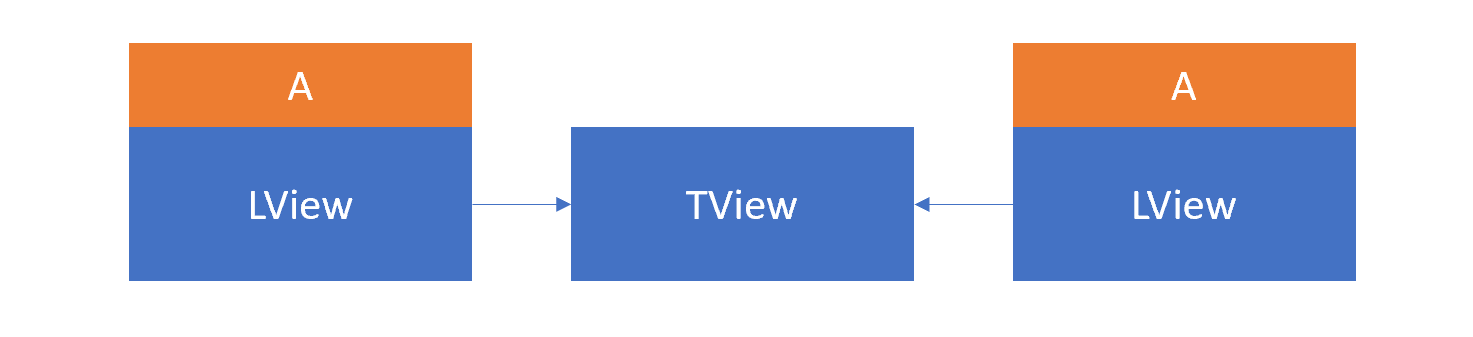
data structure which contains the static information for an LView. This TView is common across all LViews that belong to the same type.
What this means is that while each instance of a component possesses its own LView,
they all point to the same shared TView instance.
Angular distinguishes between several view types
in this manner:
export const enum TViewType {
  Root = 0,
  Component = 1,
  Embedded = 2,
}
The Component and Embedded types are pretty straightforward.
The Root type, however, is a particular kind of view used by Angular to bootstrap top-level components.
It works with an LView that takes an existing DOM node not managed by Angular and encapsulates it within an LView,
preparing it for the mounting of additional components.
There is a one-to-one correspondence between a view and a component, where each view is linked to a single component.
The view holds a
reference
to the component class instance through its CONTEXT property.
All processes such as property checks and DOM updates are carried out at the view level.
For a template that uses component A twice, the resulting data structure looks like this:
The change detection tree
Most applications feature a primary tree of component views that originates from the component you bootstrap in the index.html.
Aside from that, additional root views can be created through portals,
which are typically used for modals, tooltips, and similar elements.
These UI components must render outside the main tree's hierarchy, often to avoid being clipped by CSS properties like overflow:hidden.
The top-level elements of these trees are stored by Angular in the _views array of the
ApplicationRef.
These structures are known as change detection trees, as they are the ones traversed during a global change detection cycle.
The tick
method responsible for running change detection iterates through each tree in _views
and triggers the check for each individual view using the detectChanges method:
@Injectable({ providedIn: 'root' })
export class ApplicationRef {
  tick(): void {
    try {
      this._runningTick = true;
      for (let view of this._views) {
        view.detectChanges();
      }
      if (typeof ngDevMode === 'undefined' || ngDevMode) {
        for (let view of this._views) {
          view.checkNoChanges();
        }
      }
    } catch (e) { ... } finally { ... }
  }
}
Additionally, you’ll notice that tick also applies the checkNoChanges method to the same group of views.
Adding dynamic views to ApplicationRef
Angular provides the ability to render a component into a separate DOM element outside the typical change detection tree.
Since these views still require checking, the ApplicationRef exposes attachView() and detachView()
to include or exclude such standalone views from the change detection process.
In practice, this means those views are added to the _views list that gets processed during change detection.
Let’s look at a concrete scenario. Suppose we have a component M we want to instantiate dynamically
and place into the DOM outside the main Angular tree. Here’s the code:
@Component({
  selector: 'l-cmp',
  template: 'L',
})
export class L {
  constructor(moduleRef: NgModuleRef<any>, appRef: ApplicationRef) {
    const factory =
      moduleRef.componentFactoryResolver.resolveComponentFactory(M);

    let newNode = document.createElement('div');
    newNode.id = 'placeholder';
    document.body.prepend(newNode);

    const ref = factory.create(moduleRef.injector, [], newNode);
    appRef.attachView(ref.hostView);
  }
}

@Component({
  selector: 'm-cmp',
  template: '{{title}}',
})
export class M {
  title = 'I am the component that was created dynamically';
}
Inspect the resulting DOM structure in the app, and this is what appears:
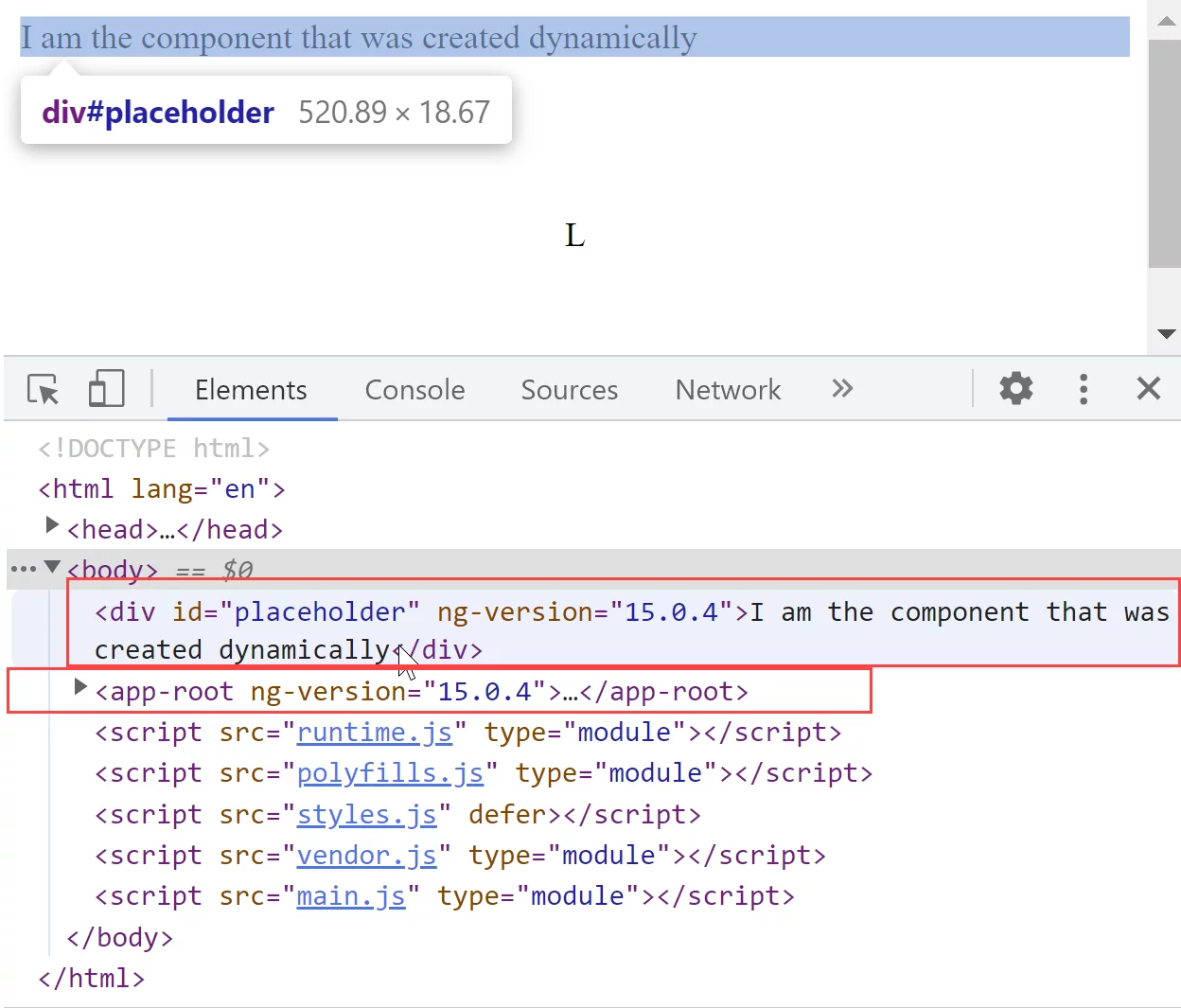
Examining the _views property, we see the following entries:
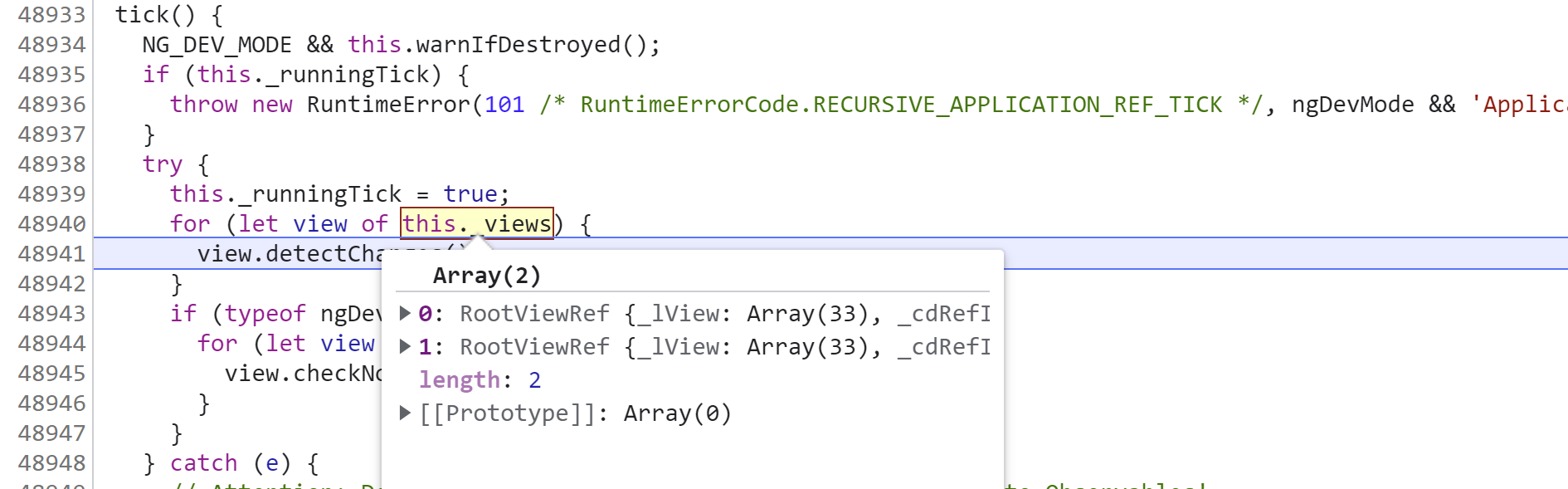
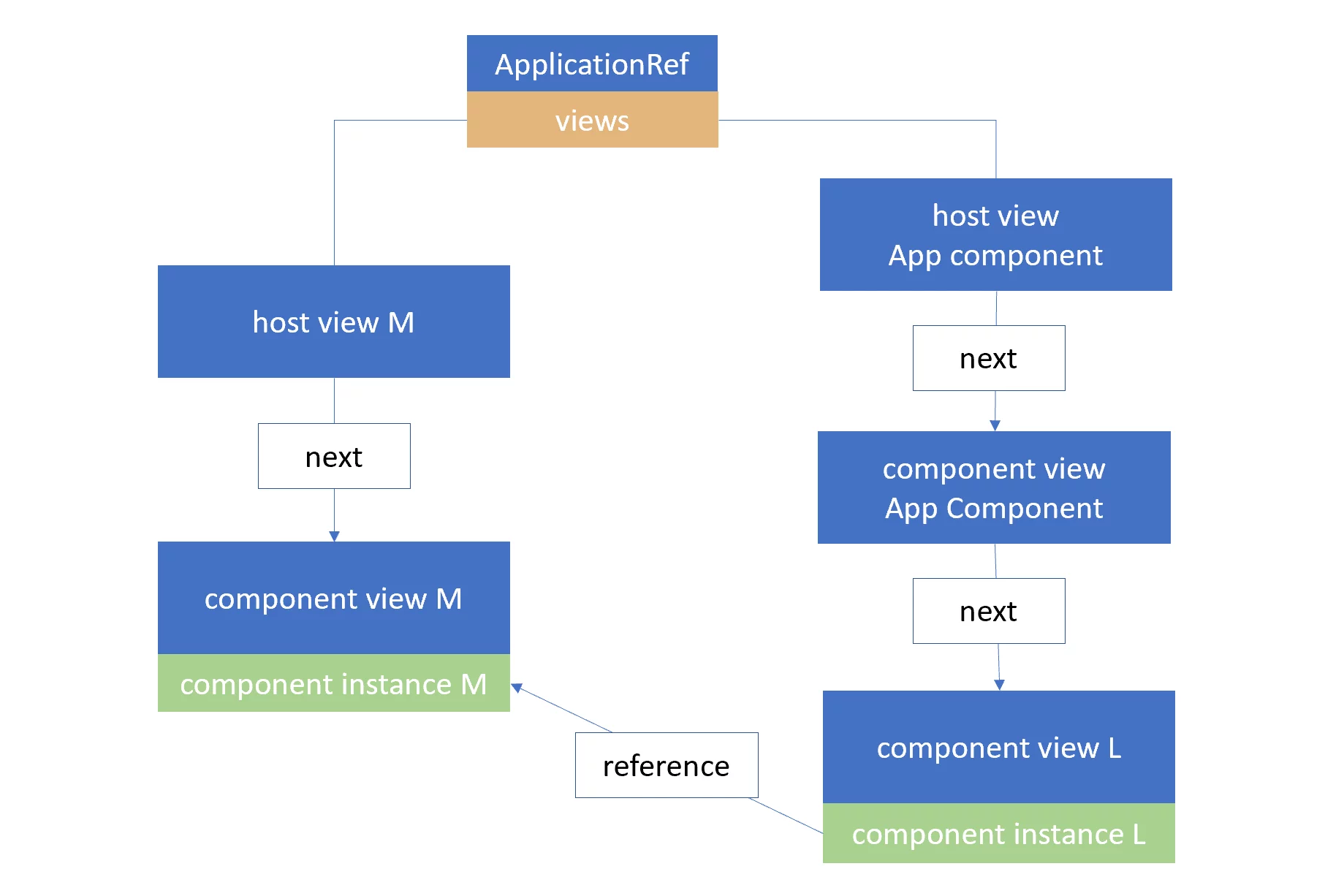
Using the console, we can identify what those RootViewRef instances actually correspond to:
const TVIEW = 1;
const CONTEXT = 8;
const CHILD_HEAD = 13;

const view_1 = appRef._views[0];
const view_2 = appRef._views[1];

view_1._lView[TVIEW].type // 0 - HostView
view_1._lView[CONTEXT].constructor.name // M

view_1._lView[CHILD_HEAD][TVIEW].type // 0 - HostView
view_1._lView[CHILD_HEAD][CONTEXT].constructor.name // M

view_2._lView[CONTEXT].constructor.name // AppComponent (RootView)
view_2._lView[TVIEW].type // 0 - HostView

view_2._lView[CHILD_HEAD][CONTEXT].constructor.name // AppComponent (ComponentView)
view_2._lView[CHILD_HEAD][TVIEW].type // 1 - ComponentView

view_2._lView[CHILD_HEAD][CHILD_HEAD][CONTEXT].constructor.name // L
The diagram below clarifies these connections:
Bootstrapping multiple root components
It's feasible to bootstrap more than one root component in the following way:
@NgModule({
  declarations: [AppComponent, AppRootAnother],
  imports: [BrowserModule],
  bootstrap: [AppComponent, AppRootAnother],
})
export class AppModule {}
This results in two root views and the associated HTML elements:
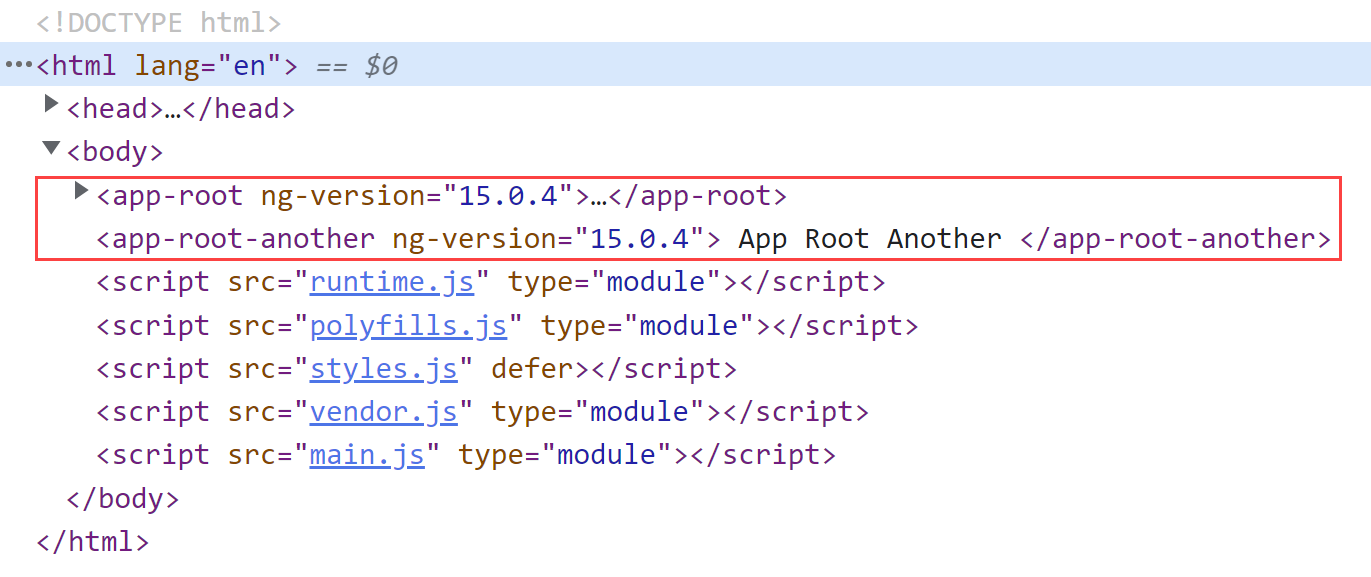
The key point to keep in mind is that your index.html must contain tags for both selectors:
<!DOCTYPE html>
<html lang="en">
  <head>
    <meta charset="utf-8" />
    <title>LearnAngular</title>
  </head>
  <body>
    <app-root></app-root>
    <app-root-another></app-root-another>
  </body>
</html>
With this configuration, Angular sets up two separate change detection trees.
Both are registered in ApplicationRef._views, and when ApplicationRef.tick() is invoked,
Angular will process change detection for both trees. This approach is similar to using
attachView.
Despite that, they remain within the same ApplicationRef, so they all use the injector configured for the AppModule.