
Angular's One-Way Data Binding: A Top-Down Approach
Angular adheres to a principle known as unidirectional data flow, moving from the top of the component tree to the bottom. This rule dictates that data travels from a parent component to its children, never in the reverse direction. When a parent's state changes, any updates are propagated downwards to child components through input bindings during the change detection process.
The primary method for inter-component communication is through bindings. For instance, a parent component A with a child component B might pass data down using an input binding like obj:
// parent component
@Component({
    template: `<b-component [prop]="value"></b-component>`
})
export class A {
    value = {name: 'initial'};
}

// child component
@Component({ ... })
export class B {
    @Input() prop;
}
A critical point to grasp is that Angular refreshes these bindings during its change detection cycle. Consequently, when change detection runs on the parent, Angular updates the prop input binding on the child component. This ensures that change detection traverses the component tree from the root downwards, checking every component in each pass.
If a child’s state changes and the parent needs to be aware of it, the child must communicate these changes upwards through events. Angular lacks an automatic mechanism for tracking and propagating child state changes back to the parent.
This top-down model is what we refer to as unidirectional data flow. It guarantees that the application state becomes consistent after a single change detection pass, offering greater predictability and efficiency than bidirectional or cyclic models. This design ensures that the data source for any view is always traceable to its parent component.
To illustrate why this is necessary, consider a scenario where properties of already-verified components are modified during an ongoing change detection run. This could cause template expressions to produce values that are out of sync with the previous render. To fix this, Angular might need to run another cycle. However, this could lead to further updates and potentially endless loops as the framework tries to reconcile the state with the rendered output. In essence, once Angular has checked a component's bindings, those property values cannot be altered until the next cycle begins.
How Angular Enforces This Rule
During development, Angular enforces this rule by performing an additional verification pass after the standard change detection sequence. This check compares the current values of component properties and template expressions against the values stored from the previous cycle. If any discrepancy is found, Angular throws the well-known ExpressionChangedAfterItHasBeenCheckedError error.
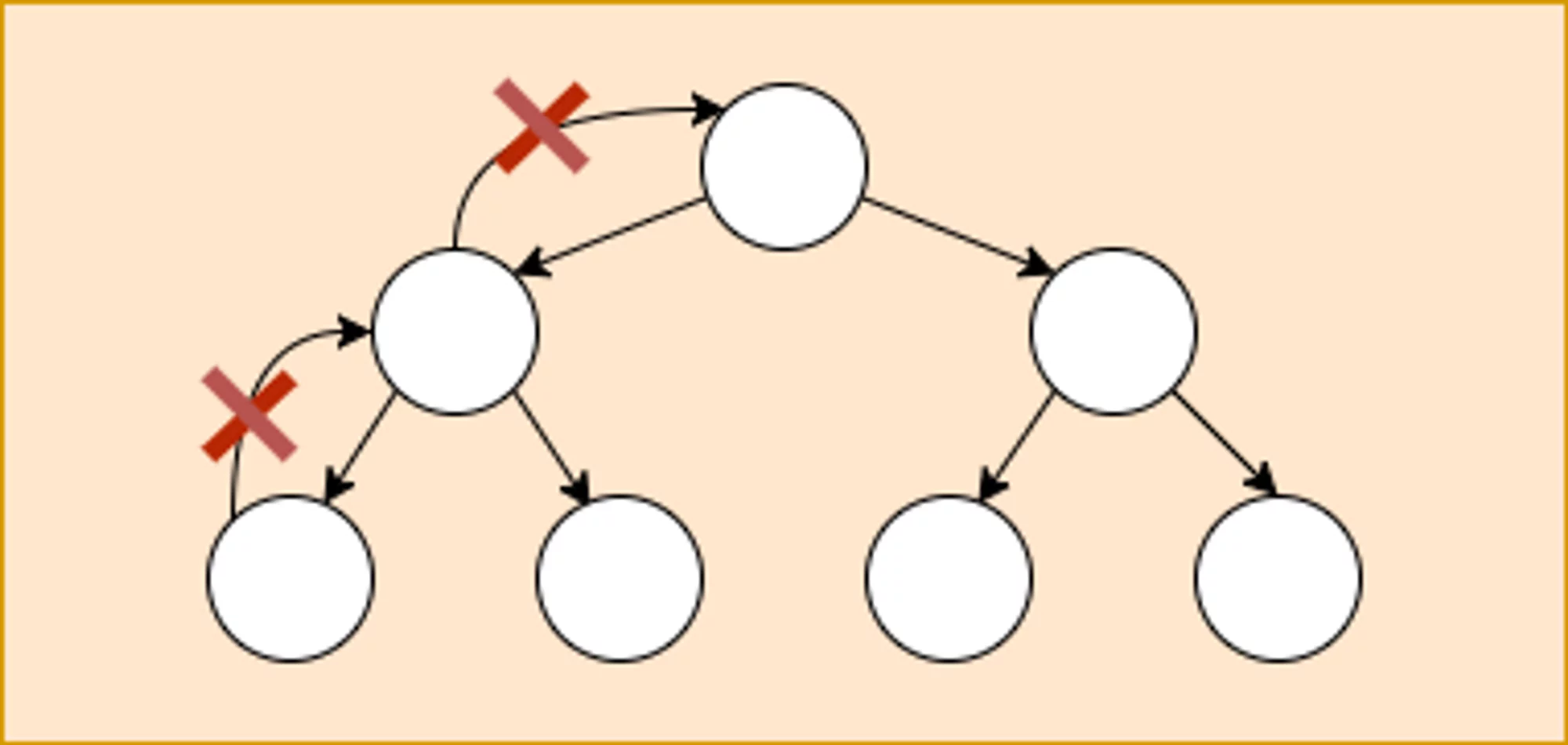
This error can be easily triggered by modifying a parent component's state from within a child's AfterViewChecked lifecycle hook. This is especially true if the change results in side effects, such as updating the DOM or changing child component inputs.
// parent component
@Component({
	selector: "a-cmp",
	template: `<b-cmp [prop]="value"></b-cmp>`,
})
export class A {
	value = { name: "initial" };
}

// child component
@Component({
	selector: "b-cmp",
	template: `{{ prop.name }}`,
})
export class B {
	@Input() prop;

	constructor(private parent: A) {}

	ngAfterViewChecked() {
		this.parent.value.name = "updated";
	}
}
You can see a live example of this on StackBlitz.
In production mode, the error is suppressed, but Angular will not attempt to correct the mismatch. This can result in a temporary state where the DOM or other components do not reflect the latest property values. The issue might resolve itself in the next change detection cycle, but if the property is updated again after the check, the inconsistency could persist. We will examine this error in depth when discussing change detection operations.
While Angular does not have a built-in way to update a parent from a child during change detection, developers can accidentally trigger such updates through other means, such as injecting a parent component reference, using a shared service, or emitting synchronous events.
Upward Communication: Child to Parent
Angular facilitates parent-child communication from the bottom up through output bindings, which are frequently referred to as component events. This works as follows:
// parent component
@Component({
    template: `
        <h1>Hello {{value.name}}</h1>
        <a-comp (updateObj)="value = $event"></a-comp>
    `
})
export class AppComponent {
    value = {name: 'initial'};

    constructor() {
        setTimeout(() => {
            console.log(this.value); // logs {name: 'updated'}
        }, 3000);
    }
}

// child component
@Component({...})
export class AComponent {
    @Output() updateObj = new EventEmitter();

    constructor() {
        setTimeout(() => {
            this.updateObj.emit({name: 'updated'});
        }, 2000);
    }
}
These events are typically emitted from handlers that respond to user interactions, network responses, or timer callbacks. Because these events occur prior to Angular’s change detection phase, they are a safe way to trigger parent state updates. In fact, these browser events are the most common triggers for change detection, serving as the signal that the application state might have changed and needs to be synchronized with the DOM.
However, if emitting an event causes changes to parent properties that are used in its template expressions, the event must be dispatched from outside the change detection lifecycle. Doing otherwise would modify a parent's properties mid-cycle, leading to the ExpressionChangedAfterItHasBeenCheckedError.
It is still permissible to emit an event synchronously from a handler that runs within the change detection loop, provided the parent’s reactive logic finishes updating its properties before Angular completes its check of that parent. A beneficial pattern is to handle these updates within the DoCheck hook, which executes on a child before Angular processes the parent’s property updates.
We will explore specific use cases of this pattern in later sections.
Data Flow and Global State Management
Many modern web apps, particularly those using NgRx or Redux, incorporate a distinct data flow model for state management. These libraries focus on the business data layer, separate from the UI layer of components and the DOM. It is, therefore, essential to differentiate between the unidirectional flow Angular enforces during change detection to guarantee view stability, and the one-way data flow that acts as the foundational architectural principle for these state management libraries. The former is a runtime mechanism for rendering, while the latter is a design paradigm for managing data.