
Overview
Angular is a feature-rich framework with a broad set of tools, and getting comfortable with it often means absorbing a lot of information—ranging from foundational topics like DI and routing to advanced concepts such as reactive streams.
Most developers eventually find their footing with the main pillars—dependency injection, change detection, routing—but even experienced engineers rarely dig into every facet the framework offers. Some capabilities stay under the radar, rarely covered or only partially understood.
This piece focuses on one such lesser-known feature: viewProviders. It’s not something you’ll reach for daily, but a solid grasp of how it behaves can sharpen your ability to manage component architecture and restrict service visibility. Let’s examine what distinguishes it and where it fits in real-world scenarios.
Understanding viewProviders
Providers in Angular act as recipes for constructing and supplying a dependency when requested.
With standard providers, a service is exposed to the component itself, its template, all nested child components, and also any content inserted via <ng-content>.
In contrast, viewProviders restrict the service’s reach to the component’s own view. This means the service is available only to the component and the elements defined in its template—not to projected content or child components from outside.
To put it simply: viewProviders let you confine a service to a component’s view, blocking it from spreading into projected or external contexts.
The distinction is subtle yet meaningful. It empowers you to isolate logic more effectively and avoid unintended service sharing, particularly in components designed for reuse or content projection.
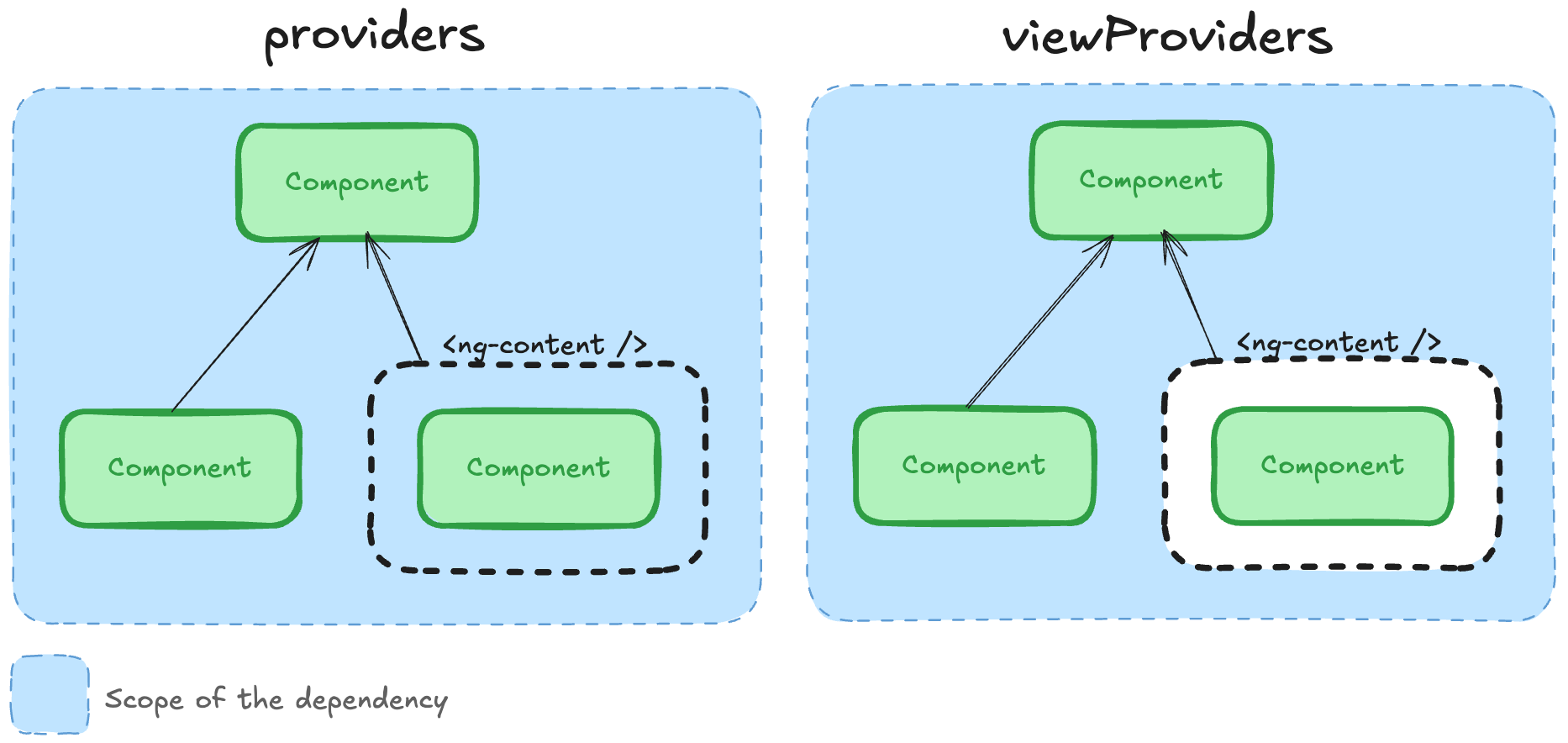
The diagram above highlights the scoping difference between providers and viewProviders. Providers make a service accessible to the component, its template, and projected content (<ng-content>). With viewProviders, the service is confined to the component’s own view—projected content remains outside its reach.
Practical Example: Card with Dynamic Content
Let’s move from theory to a concrete scenario.
Suppose you’re creating a CardComponent that includes a header, some internal functionality, and a dynamic body that can be supplied from outside. That body might contain forms, lists, buttons—whatever the parent needs.
At the same time, the CardComponent is meant to handle its own local state, perhaps through a CardStateService that tracks card-specific actions like expanding, collapsing, or other toggles. The key is that the projected body should not be able to rely on or alter that internal state.
Here’s an illustration of the implementation.
@Component({
  selector: 'app-card',
  template: `
  <article class="card">
    <header class="card-header" (click)="toggleCollapse()">
      <h2>{{ title() }}</h2>
    </header>
    @if (!isCollapsed()) {
      <div class="card-body">
        <ng-content />
      </div>
    }
  </article>
  `,
  styleUrl: './card.scss',
  viewProviders: [CardState]
})
export class Card {
  private readonly state = inject(CardState);

  title = input.required<string>();

  isCollapsed = this.state.isCollapsed;

  toggleCollapse = () => this.state.toggleCollapsed();
}
@Injectable()
export class CardState {
  private readonly _isCollapsed = signal(false);
  isCollapsed = this._isCollapsed.asReadonly();

  toggleCollapsed(): void {
    this._isCollapsed.update((isCollapsed) => !isCollapsed);
  }
}
Now, let’s see how the reusable card would be consumed.
<app-card title="Card">
  <app-feature-card-content></app-feature-card-content> <!-- This is projected -->
</app-card>
@Component({
  selector: 'app-feature-card-content',
  templateUrl: './feature-card-content.html',
  styleUrl: './feature-card-content.scss'
})
export class FeatureCardContent {
  // ❌ This will fail with ViewProviders — and that's a good thing
  private readonly state = inject(CardState);

  changeState(): void {
    this.state.toggleCollapsed();
  }
}
In this setup:
CardStateis limited toCard’s view.FeatureCardContent, injected through<ng-content>, cannot access the state service—even though it renders inside theCard.
This yields a clean separation: internal state stays private.
Why does this distinction matter?
Had we opted for providers instead of viewProviders, FeatureCardContent would be able to inject CardState. That could result in tight coupling, unanticipated state changes, or broken encapsulation—especially in larger, reusable UI collections.
Choosing viewProviders enforces a clear boundary, making the component more reliable and predictable.
Main Points to Remember
viewProvidersare a specialized Angular tool for narrowing a service’s scope to a component’s own view—excluding projected content (<ng-content>).- Reach for them when you need to hide internal logic, particularly in reusable or projection-heavy components.
- They guard against unintended dependency access from projected elements, lowering the risk of misuse or overly tight coupling.
Essentially, viewProviders give you precise control over where dependencies reside and who can reach them. It’s a modest feature with significant benefits—especially when isolation and clean component interfaces are priorities.
Final Thoughts
Appreciate you reading! If you’ve run into services leaking through projected content, or simply want finer-grained DI boundaries, give viewProviders a try in your next component. Any questions or comments? Join the discussion below 👇