Angular and Wiz
This year’s ng-conf, the biggest Angular conference worldwide, delivered a significant surprise: the reveal of a collaboration spanning over a year between two Google teams—the Angular Team and the Wiz Team. Jeremy Elbourn and Minko Gechev shared insights into what this partnership might bring.
What is Wiz?
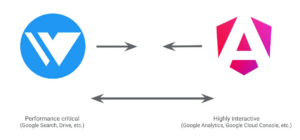
Wiz is an internal framework at Google, built for applications where performance is critical. Notable examples include Google Search, Google Photos, Google Payments, and YouTube. These platforms deal with massive traffic, and a large portion of their users are on slower connections. Wiz is designed to deliver highly optimized applications with relatively lower interactivity. Server-Side Rendering (SSR) is the core of Wiz’s approach—components are rendered using an optimized streaming solution. JavaScript needed for interaction is loaded only when the component actually becomes visible to the user.
Angular, on the other hand, is known for its focus on high interactivity and Developer Experience. Every new version continues to add features that optimize the final application. The control flow with the defer block might be one such feature—potentially stemming from this cooperation with the Wiz team.
Signals in Wiz
As part of this collaboration, both frameworks plan to adopt functionalities from each other, with the long-term goal of merging the two solutions. Wiz is also moving to an open-source model, which should accelerate development through community feedback and contributions. The first visible outcome of this partnership is the implementation of Angular signals in the mobile web version of YouTube. It might not be the go-to platform for watching cat videos, but every journey starts with a single step.
In the future, we can likely see Wiz-inspired features making their way back into Angular. The potential for optimal SSR is particularly intriguing. Rest assured, we’ll be covering these developments on wp.angular.love. In the meantime, I recommend reading the Angular blog post and watching the ng-conf Keynote.
Further signals integration
This is a feature many developers have been waiting for. Signals, which have been part of the framework since v16, are now powering more core mechanisms in this latest release. The signal-based inputs, queries, and models, previously available in Developer Preview, have now become stable in v18. These changes are another step toward Angular operating entirely in a zoneless mode.
input()
We now have access to the new input() function, which serves as an optimized alternative to the long-standing @Input() decorator.
Two types of inputs are available:
- Optional – This is the default behavior. Initial values can be defined for these inputs. If no value is defined, Angular will treat the input value as
undefined.
- Required – In this case, the parent must pass the input to the child. Initial values cannot be declared for required inputs.
@Component(...)
export class MyComponent {
  // default: undefined
  optionalInput = input<number>();

  // default: 5
  optionalInputWithDefaultValue = input<number>(5);


  // parent must pass value trough input
  requiredInput = input.required<number>();

  // ERROR - setting initial value to required input is not allowed
  requiredInputWithDefaultValue = input.required<number>(5);
}
In the template, they are used just like any other signal.
<p>{{ myInput() }}</p>Unlike the decorator, signal inputs are read-only. This means we cannot modify their values directly within the component. This provides an additional guarantee for proper data flow. However, there are many applications in the Angular ecosystem where inputs are modified at the component level. As such, replacing the decorator with signals may not always be a straightforward process.
If we need modified values from the inputs, we have a couple of options. We can use the model() function, described later in the article, or one of the methods mentioned below.
As we know, the new inputs are based on signals. Therefore, like other signals, we have the computed() and effect() functions at our disposal. Using the computed() function, for instance, we can derive a new signal from the input value.
@Component(...)
export class MyComponent {
  age = input(0);

  // wiek pomnożony przez 2
  ageMultiplied = computed(() => this.age() * 2);
}
We also have access to familiar attributes, just like with the @Input() decorator:
transform– This allows us to modify the value of the input. In the example below, every timeage()is accessed, the value passed will be multiplied by 2.
alias – This changes the public name of the input. The component declaring the input continues to use its original name internally. However, for the parent using MyComponent, the alias is what it sees.
@Component(...)
export class MyComponent {
  age = input(0, {
    transform: (value: number) => value * 2,
    alias: 'userAge'
  })
}
model()
In short, model() is like input(), but with added benefits. It can be used in the same way as an input, but it comes with additional functionalities.
First, the value in a signal created with model() can be changed freely using the set() function that we know from signals.
@Component(...)
export class MyComponent {
  myModel = model(false);        // ModelSignal<boolean>
  myOtherModel = model<string>() // ModelSignal<string | undefined>

  toggle(): void {
    // model w każdym momencie można zmienić za pomocą set()
    this.myModel.set(!this.myModel());
  }
}
Similar to input(), we can mark a model as required. We can also assign an alias. However, the model does not have access to the transform function.
@Component(...)
export class MyComponent {
  myModel = model.required<boolean>(); // ModelSignal<boolean>
}
By using model(), Angular establishes a two-way binding mechanism. As with previous solutions, we have access to the special [()] syntax, famously known as banana-in-a-box. The model also works with the input [] syntax. However, when we use it this way, two-way binding is disabled, but we still have an input that we can modify in the child component.
Additionally, Angular creates an output in the component where the model is declared. This output’s name is the model’s name with the Change suffix. For example, if the model is called name, the corresponding output will be named nameChange. The parent can listen to these events using the round bracket syntax ().
// child.component.ts
@Component(...)
export class ChildComponent {
  // W tym miejscu powstaje input, two-way binding i output o nazwie nameChange
  name = model('Marcin');
}

// parent.component.ts
@Component({
  ...,
  template: `
  <app-child
    (nameChange)="logValue($event)"  << Event
    [(name)]="nameFromParent"        << Two-way binding - banana-in-a-box
  ></app-child>`,
})
export class AppComponent {
  nameFromParent = 'Martin';

  logValue(value: string): void {
    console.log(value);
  }
}
It’s worth noting that two-way binding can be used with simple data types, as the example above shows, and also with signals. The parent in the example above could look like this, for instance:
// parent.component.ts
@Component({
  ...,
  template: `
  <app-child
    [(name)]="nameFromParent"        << Two-way binding - banana-in-a-box  ></app-child>`,
})
export class AppComponent {
  nameFromParent = signal('Martin'); // WritableSignal<string>
}
Signal queries
Queries—the mechanisms for creating references to components, directives, or DOM elements—have also been updated. Four new functions have been introduced.
viewChild()
The first function offers an alternative to the @ViewChild() decorator. It’s used to look for a single result within our component. Like input() and model(), the required option is also available here.
@Component({
  ...,
  template: `
    <div #el></div>
    <div #requiredDiv></div>
    <my-child />
`,
})
export class MyComponent {
  divEl = viewChild<ElementRef>('el'); // Signal<ElementRef|undefined>
  requiredDivEl = viewChild.required<ElementRef>('requiredDiv'); // Signal<ElementRef>

  cmp = viewChild(ChildComponent); // Signal<ChildComponent|undefined>
}
viewChildren()
The second function operates like viewChild(), but it searches for multiple elements and returns an array of results.
@Component({
  template: `
    <div #el></div>
    <div #el></div>
    <div #el></div>
`,
})
export class MyComponent {
  firstSelector = viewChildren<ElementRef>('el');
  // Signal<readonly ElementRef<any>[]>


  secondSelector = viewChildren<ElementRef<HTMLDivElement>>('el');
  // Signal<readonly ElementRef<HTMLDivElement>[]>
}
contentChild() and contentChildren()
The last two additions to Signal Queries are contentChild() and contentChildren(). They function like the other two, with the key difference being that they search the content projected into the ng-content element rather than the component’s own template.
// parent.component.ts
@Component({
  template: `<ng-content></ng-content>`, // Zwróćcie uwagę na tag ng-content
  standalone: true,
  selector: 'app-parent',
})
export class ParentComponent {
  content = contentChild(ChildComponent);
  // Signal<ChildComponent | undefined>

  contentElements = contentChildren(ChildComponent);
  // Signal<readonly ChildComponent[]>
}
output()
Outputs have also seen improvements. The output() function was introduced in version 17.3 and is currently in Developer Preview. When called, it returns an object of type OutputEmitterRef<T>. To emit a value to the parent, we invoke the emit() function.
@Component(...)
export class MyComponent {
  valueChanged = output<string>();

  onValueChanged(msg: string): void {
    // emit() działa tak samo. Jednak nie można już emitować undefined
    this.valueChanged.emit(msg);
  }
}
It is important to note that, unlike the new inputs, outputs are not based on signals. So why the change? One reason is to standardize the syntax with the new inputs. The new syntax for both concepts is less boilerplate and more readable.
@Component(...)
export class MyComponent {
  newInput = input<boolean>();  // InputSignal<boolean | undefined>
  newOutput = output<string>(); // OutputEmitterRef<string>
}
The second reason is type-safety with the new OutputEmitterRef<T> class. Previously, we used the EventEmitter<T> class, whose emit() function accepted an argument of type T | undefined. This becomes a non-issue now, as TypeScript will catch the error. This addresses a long-standing issue on GitHub.
@Component(...)
export class MyComponent {
  @Output() oldOutput = new EventEmitter<string>();
  newOutput = output<string>();

  onEvent(): void {
    this.oldOutput.emit(); // OK
    this.newOutput.emit(); // ERROR: Expected 1 arguments, but got 0.
  }
}
In the @angular/core/rxjs-interop package, two new helpers are available to make working with the new outputs easier:
outputFromObservable(): This lets us create an output from an Observable. It eliminates the need to manually set up subscriptions and emit values inside them, or worse, mark the Observable with@Outputand return it to the parent—which was never an officially supported approach. With this new helper, Angular automatically unsubscribes from the Observable when the component is destroyed.outputToObservable(): This does the reverse, converting our output into an Observable.
// child.component.ts
@Component({
  selector: 'app-child',
  ...
})
export class ChildComponent {
  active$ = new Observable<boolean>();
  activeChanged = outputFromObservable<boolean>(this.active$);
}

// parent.component.ts
@Component({
  selector: 'app-parent',
  template: `<app-child (activeChanged)="onActiveChanged($event)"></app-child>`,
  ...
})
export class ParentComponent {
  onActiveChanged(val: boolean): void {
    console.log(val);
  }
}
Fallback in ng-content
Another feature that has received much praise from the community is the fallback for the ng-content tag. As you know, this tag is used for Content Projection, which is content passed from the parent—this behavior remains unchanged. But now, when no content is passed, we can handle that situation by presenting a default.
@Component({
  selector: 'my-comp',
  template: `
    Tu będzie użyty fallback
    <ng-content select="header">Default header</ng-content>

    A tutaj footer z MyApp
    <ng-content select="footer">Default footer</ng-content>
  `
})
class MyComp {}

@Component({
  template: `
    <my-comp>
      <footer>New footer</footer>
    </my-comp>
  `
})
class MyApp {}
Angular is evolving quickly, and tracking how these changes affect DX, UX, performance, and application structure isn’t easy. That’s why we maintain a free guide that maps version updates to real-world benefits and developer needs. Check it out here, especially if you’re working across multiple versions or planning an upgrade.

New Observable in Forms
Reactive Forms, which use a model-driven approach to manage form behavior, have introduced a new Observable called events. It emits various types of form changes, effectively combining subscriptions to valueChanges and statusChanges. It also includes events that were not previously available in any form subscription.
ValueChangeEvent– Emitted when the value of an input changes.PristineChangeEvent– Emitted when thepristinestatus changes, which is the initial state.
TouchedChangeEvent– Emitted when the input is "touched".StatusChangeEvent– Emitted when the form becomesVALIDorINVALID.
As you can see, we can now listen for changes in the touched and pristine statuses, which was previously not possible.
Hybrid Change Detection
Angular's Change Detection has traditionally depended on Zone.js to react to browser events like setTimeout(), setInterval(), Promise.then(), and addEventListener(), triggering view updates as needed. That said, this model has its drawbacks—particularly when updates occur outside NgZone, making it tricky to run change detection at the right moment. Such scenarios can slow down an app and often push developers to manually call ngZone.runOutsideAngular().
Version 18 brings experimental support for running change detection without Zone.js altogether, marking a clear shift from the old setup. The goal here is to enhance both the developer experience (DX) and runtime performance, whether your project relies on NgZone or not. The zoneless approach works by letting components signal Angular directly when something has changed, eliminating the need for Zone.js as an intermediary.
Getting started with this experimental feature takes just two simple adjustments.
// main.ts
bootstrapApplication(AppComponent, {
  providers: [
    // ? Add this line to enable Zoneless Change Detection
    provideExperimentalZonelessChangeDetection(),
  ],
});
// angular.json
{
"projects": {
"app": {
"architect": {
"build": {
"options": {
"polyfills": [
"zone.js" // ? Remove this line
],
}
}
}
}
}If your components are built with ChangeDetectionStrategy.OnPush, AsyncPipe, or signals for rendering content, they should continue to function without any issues.
Even if you don't opt into the experimental provider, hybrid Change Detection is enabled by default starting in v18. In this hybrid mode, both NgZone and the new zoneless scheduler are in play. The advantage for developers is that Change Detection is guaranteed to be scheduled, even when updates happen outside NgZone. Should something go wrong, you can simply fall back to the established change detection mechanism.
// main.ts
bootstrapApplication(AppComponent, {
  providers: [
    provideZoneChangeDetection({ ignoreChangesOutsideZone: true }),
  ],
});
Stay tuned for more in-depth coverage of the new Change Detection in an upcoming post. In the meantime, check out Matthieu Riegler's article for additional context.
Additional updates in Angular 18
- TypeScript 5.4 is now the minimum supported version.
- The Control Flow syntax has graduated from Developer Preview and is now stable.
- Modules like HttpClientModule are now deprecated; the recommended approach is to use provideHttpClient() instead.