Signals as reactive primitives
Creating sophisticated user interfaces is inherently challenging. In contemporary web applications, the UI state is seldom composed of isolated, straightforward values. Instead, it frequently consists of intricate derived state that relies on a layered hierarchy of other values or computed states. Handling this state demands significant effort from developers, who must store, compute, invalidate, and synchronize these values.
Throughout the years, numerous frameworks and programming primitives have emerged in web development to ease this burden. A common thread connecting most of these is reactive programming, which provides the necessary infrastructure for managing application state. This allows developers to focus on business logic rather than the repetitive chores associated with state management.
The latest addition to this landscape is signals, a "reactive" primitive that represents a value that changes over time and can alert interested consumers upon such changes. These consumers can then trigger recomputations or execute various side effects, such as creating or destroying components, initiating network requests, updating the DOM, and so on.
Different frameworks offer their own implementations of signals. There's even a current initiative to standardize signals:
… this effort focuses on aligning the JavaScript ecosystem. Several framework authors are collaborating here on a common model which could back their reactivity core. The current draft is based on design input from the authors/maintainers of Angular, Bubble, Ember, FAST, MobX, Preact, Qwik, RxJS, Solid, Starbeam, Svelte, Vue, Wiz, and more…
Angular's implementation of signals closely mirrors the one outlined in the proposal, so this article will occasionally draw parallels between the two.
Signals as primitives
A signal embodies a data cell whose value can change over time. Signals come in two flavors: "state" signals, which hold a value set manually, and "computed" signals, which behave like formulas derived from other signals.
Computed signals operate by automatically noting which other signals are accessed during their evaluation. When a computed signal is accessed, it verifies whether any of its previously recorded dependencies have shifted, and if so, it evaluates itself anew.
For instance, consider a state signal counter and a computed signal isEven. We initialize counter to 0 and then modify it to 1. The computed signal isEven responds to these updates, yielding different results before and after the counter signal changes:
import { computed, signal } from '@angular/core';

// state/writable signal
const counter = signal(0);

// computed signal
const isEven = computed(() => (counter() & 1) == 0);

counter() // 0
isEven() // true

counter.set(1)

counter() // 1
isEven() // false
Observe that in the code above, the isEven signal doesn't explicitly subscribe to the source counter signal. Rather, it just invokes the source signal with counter() inside its computed function. This is enough to link the two signals. Consequently, whenever the counter source signal receives a new value, the derived signal updates itself automatically.
Both state and computed signals act as value producers, meaning they generate values and have the capacity to broadcast change notifications.
A state signal alters its value when explicitly updated via its API, whereas a computed signal produces a new value on its own whenever any dependencies used in its callback undergo change.
Computed signals can also function as consumers, as they may rely on a set of producers. In other reactive systems, such as Rx, consumers are often referred to as sinks.
A change in a producer signal's value does not instantly refresh the values of downstream consumers, like computed signals. Instead, when a computed signal is read, it checks if any previously tracked dependencies have been altered and recalculates itself if needed.
This design makes computed signals lazy, or pull-based; they only evaluate upon access, even if the underlying state shifted earlier. In the earlier example, the computed signal computes its value only when we invoke isEven(), even though the counter dependency was updated earlier when we called counter.set().
Alongside standard writable and computed signals, there is the notion of watchers (effects). Unlike the pull-based evaluation of computed signals, a change to a producer signal triggers an immediate notification to a watcher, synchronously invoking its callback and effectively "pushing" the notification. Frameworks often wrap watchers into effects exposed to users; these effects defer notifying user code through scheduling.
Everything involving signals runs synchronously, in contrast to Promises:
- Updating a signal is synchronous, and any computed signal that depends on it will immediately reflect the new value upon the next read. There's no server-side batching for this mutation.
- Reading a computed signal is synchronous — its value is always readily available.
- Watchers get notified synchronously, but effects wrapping those watchers can choose to batch operations and delay notification via scheduling.
Under the hood, the signal implementation relies on several key concepts that this article will unpack: reactive context, dependency graph, and effects (watchers). Let's begin with the reactive context.
Imagine a stack frame (execution frame) that defines the environment in which JavaScript code runs. It specifies which objects or variables are accessible within a function. One could say those accessible objects form the context. For instance, a function executing in a web worker context lacks access to the global document object.
The reactive context defines an active consumer object that relies on producers and is made available to their accessor functions whenever a value is read. Take a consumer isEven that depends on the counter producer (consuming its value). That dependency is established by reading counter inside the computed callback:
isEvent = computed(() => (counter() & 1) === 0)When the computed callback executes, it will automatically invoke the accessor of the counter signal to fetch its value. We can say the counter signal runs within the reactive context of the isEven consumer in that scenario. Thus, a producer operates within a reactive context when there's an active consumer depending on its value.
To enable this reactive context mechanism, whenever a consumer's value is accessed — just before it's recomputed (before the computed callback runs) — we designate that consumer as the active one. This is done by storing the consumer object in a global variable and keeping it set while the callback executes. This global variable is then accessible to all producers queried during the computed callback's execution, defining the reactive context for all producers that the consumer relies on.
Angular employs precisely this strategy. When a computed callback executes, it first designates the current node as the active consumer in producerRecomputeValue:
function producerRecomputeValue(node: ComputedNode<unknown>): void {
  ...
  const prevConsumer = consumerBeforeComputation(node);
  let newValue: unknown;
  try {
    newValue = node.computation();
  } catch (err) {...} finally {...}

function consumerBeforeComputation(node: ReactiveNode | null) {
  node && (node.nextProducerIndex = 0);
  return setActiveConsumer(node);
}
Angular arrives there through producerUpdateValueVersion within the createComputed factory function:
function createComputed<T>(computation: () => T): ComputedGetter<T> {
  ...
  const computed = () => {
    producerUpdateValueVersion(node);
    ...
  };
}

function producerUpdateValueVersion(node: ReactiveNode): void {
  ...
  node.producerRecomputeValue(node);
  ...
}
This callstack clearly illustrates the implementation flow:
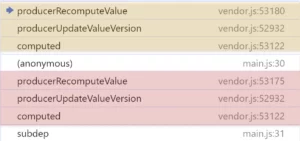
Because of that, while the computed’s callback is being executed, every producer that’s queried during the time of that consumer being active, will know that they are executed in the reactive context. All producers executed in the reactive context of a particular consumer are added as the dependencies of the consumer. This makes up a reactive graph.
Most of the pre-existing functionality in Angular is executed in a non-reactive context. You can observe that by simply searching for the usage of setActiveConsumer with null value:
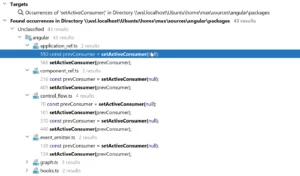
Angular clears the reactive context in certain situations, such as prior to running lifecycle hooks:
/**
 * Executes a single lifecycle hook, making sure that:
 * - it is called in the non-reactive context;
 * - profiling data are registered.
 */
function callHookInternal(directive: any, hook: () => void) {
  profiler(ProfilerEvent.LifecycleHookStart, directive, hook);
  const prevConsumer = setActiveConsumer(null);
  try {
    hook.call(directive);
  } finally {
    setActiveConsumer(prevConsumer);
    profiler(ProfilerEvent.LifecycleHookEnd, directive, hook);
  }
}
Angular template functions (component views) and effects are executed within reactive contexts.
Reactive Graph Structure
The reactive graph emerges from the interplay between consumers and producers. By implementing reactive context through value accessors, signal dependencies are tracked automatically and implicitly. Developers never need to declare dependency arrays, and a given context's dependency set can shift between executions.
When a producer executes, it registers itself as a dependency of the currently active consumer—the consumer that establishes the reactive context. This registration occurs within the producerAccessed function:
export function producerAccessed(node: ReactiveNode): void {
  ...
  // This producer is the `idx`th dependency of `activeConsumer`.
    const idx = activeConsumer.nextProducerIndex++;
    if (activeConsumer.producerNode[idx] !== node) {
      // We're a new dependency of the consumer (at `idx`).
      activeConsumer.producerNode[idx] = node;
      // If the active consumer is live, then add it as a live consumer. If not, then use 0 as a
      // placeholder value.
      activeConsumer.producerIndexOfThis[idx] = consumerIsLive(activeConsumer)
        ? producerAddLiveConsumer(node, activeConsumer, idx)
        : 0;
    }
Both producers and consumers take part in this reactive graph. The graph is bidirectional, though the dependency direction tracked differs for each side.
Consumers store their producers in the producerNode property, establishing edges from consumers to producers:
interface ConsumerNode extends ReactiveNode {
  producerNode: NonNullable<ReactiveNode['producerNode']>;
  producerIndexOfThis: NonNullable<ReactiveNode['producerIndexOfThis']>;
  producerLastReadVersion: NonNullable<ReactiveNode['producerLastReadVersion']>;
Certain consumers are additionally registered as "live" consumers, creating edges in the opposite direction, from producer to consumer. These reverse edges carry change notifications when a producer's value gets updated:
interface ProducerNode extends ReactiveNode {
  liveConsumerNode: NonNullable<ReactiveNode['liveConsumerNode']>;
  liveConsumerIndexOfThis: NonNullable<ReactiveNode['liveConsumerIndexOfThis']>;
}
Consumers always maintain a record of their producers. Producers only track those consumers deemed "live." A consumer qualifies as live when its consumerIsAlwaysLive property is set to true, or when it's a producer that a live consumer depends upon.
Within Angular, two node types are designated as live consumers:
The definitions appear below:
const WATCH_NODE: Partial<WatchNode> = /* @__PURE__ */ (() => {
  return {
    ...REACTIVE_NODE,
    consumerIsAlwaysLive: true,
    consumerAllowSignalWrites: false,
    consumerMarkedDirty: (node: WatchNode) => {
      if (node.schedule !== null) {
        node.schedule(node.ref);
      }
    },
    hasRun: false,
    cleanupFn: NOOP_CLEANUP_FN,
  };
})();

const REACTIVE_LVIEW_CONSUMER_NODE: Omit<ReactiveLViewConsumer, 'lView'> = {
  ...REACTIVE_NODE,
  consumerIsAlwaysLive: true,
  consumerMarkedDirty: (node: ReactiveLViewConsumer) => {
    markAncestorsForTraversal(node.lView!);
  },
  consumerOnSignalRead(this: ReactiveLViewConsumer): void {
    this.lView![REACTIVE_TEMPLATE_CONSUMER] = this;
  },
};
Under specific circumstances, computed signals transition into live consumers—for instance, when referenced inside an effect callback.
Consider the following setup:
import { ChangeDetectorRef, Component, computed, effect, signal } from '@angular/core';
import { SIGNAL } from '@angular/core/primitives/signals';

@Component({
  standalone: true,
  selector: 'app-root',
  template: 'Angular Love',
  styles: []
})
export class AppComponent {
  constructor(private cdRef: ChangeDetectorRef) {
    const a = signal(0);

    const b = computed(() => a() + 'b');
    const c = computed(() => a() + 'c');
    const d = computed(() => b() + c() + 'd');

    const nodes = [a[SIGNAL], b[SIGNAL], c[SIGNAL], d[SIGNAL]] as any[];

    d();

    const A = 0, B = 1, C = 2, D = 3;

    const depBToA = nodes[B].producerNode[0] === nodes[A];
    const depCToA = nodes[C].producerNode[0] === nodes[A];
    const depDToB = nodes[D].producerNode[0] === nodes[B];
    const depDToC = nodes[D].producerNode[1] === nodes[C];

    console.log(depBToA, depCToA, depDToB, depDToC);

    const e = effect(() => b()) as any;

    // need to wait for change detection to notify the effect
    setTimeout(() => {
      // effect depends on B
      const depEToB = e.watcher[SIGNAL].producerNode[0] === nodes[B];

      // live consumers link from producer A to B,
      // and from B to E, because E (effect) is a live consumer
      const depLiveAToB = nodes[A].liveConsumerNode[0] === nodes[B];
      const depLiveBToE = nodes[B].liveConsumerNode[0] === e.watcher[SIGNAL];

      console.log(depLiveAToB, depLiveBToE, depEToB);
    });
  }
}
This produces the reactive graph shown here:
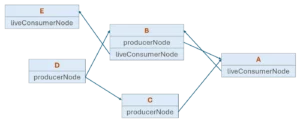
The reactive context mechanism built on the active consumer enables dynamic dependency tracking. Once a consumer becomes active, the set of producers evaluated is decided at runtime based on the sequence of producer calls. The dependency list for an ActiveConsumer can be reshuffled on each access to a producer within that consumer's reactive context.
To support this, consumer dependencies are stored in the producerNode array:
interface ConsumerNode extends ReactiveNode {
  producerNode: NonNullable<ReactiveNode['producerNode']>;
  producerIndexOfThis: NonNullable<ReactiveNode['producerIndexOfThis']>;
  producerLastReadVersion: NonNullable<ReactiveNode['producerLastReadVersion']>;
When a consumer's computation runs again, an index pointer producerIndexOfThis into this array resets to 0. Each dependency read is then checked against the dependency at the pointer's current position from the previous run. If a mismatch appears, dependencies have shifted, and the stale one gets replaced by the new dependency. Once the computation finishes, any leftover unmatched dependencies are removed.
Consequently, if a dependency only gets used on one code path and the prior execution followed a different branch, modifying that temporarily unused value won't trigger recalculations—even when pulled. Different signal sets may be accessed from one execution to the next.
Take this dynamic computed signal that selects between dataA and dataB based on the useA signal:
const dynamic = computed(() => useA() ? dataA() : dataB());It holds a dependency set of either [useA, dataA] or [useA, dataB] at any given moment—it can never depend on both dataA and dataB simultaneously.
This snippet—mirroring this Angular test case—demonstrates the behavior clearly:
import { computed, signal } from '@angular/core';
import { SIGNAL} from '@angular/core/primitives/signals';

const states = Array.from('abcdefgh').map((s) => signal(s));
const sources = signal(states);

const vComputed = computed(() => {
  let str = '';
  for (const state of sources()) str += state();
  return str;
});

const n = vComputed[SIGNAL] as any;
expectEqual(vComputed(), 'abcdefgh');
expectEqualArrayElements(n.producerNode.slice(1), states.map(s => s[SIGNAL]));

sources.set(states.slice(0, 5));
expectEqual(vComputed(), 'abcde');
expectEqualArrayElements(n.producerNode.slice(1), states.slice(0, 5).map(s => s[SIGNAL]));

sources.set(states.slice(3));
expectEqual(vComputed(), 'defgh');
expectEqualArrayElements(n.producerNode.slice(1), states.slice(3).map(s => s[SIGNAL]));

function expectEqual(v1, v2): any {
  if (v1 !== v2) throw new Error(`Expected ${v1} to equal ${v2}`);
}
function expectEqualArrayElements(v1, v2): any {
  if (v1.length !== v2.length) throw new Error(`Expected ${v1} to equal ${v2}`);
  for (let i = 0; i < v1.length; i++) {
    if (v1[i] !== v2[i]) throw new Error(`Expected ${v1} to equal ${v2}`);
  }
}
Notice there's no single root vertex in the graph. Each consumer maintains its own list of producer dependencies, which may themselves have dependencies (as with computed signals). So every consumer, when accessed, effectively becomes the root vertex of its own graph.
Two-Phase Update Model
Earlier push-based reactivity approaches suffered from redundant computation. When a state signal changes, an eager computed signal runs immediately and may push an update to the UI—but that UI write could be premature if the source signal will change again before the next frame renders.
For a graph like the one below, this problem leads to inadvertently evaluating A -> B -> D and C, then re-evaluating D because C changed. That double evaluation of D wastes cycles and can produce visible artifacts for users.
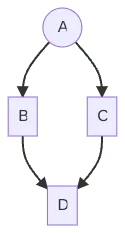
This scenario is known as the diamond problem.
In some cases, users even saw inaccurate intermediate values exposed due to such glitches. Signals sidestep this dynamic by being pull-based (lazy) rather than push-based: when the framework schedules UI rendering, it pulls the necessary updates, eliminating wasted effort in both computation and DOM writing.
Examine this example:
const a = signal(0);

const b = computed(() => a() + 'b');
const c = computed(() => a() + 'c');
const d = computed(() => b() + c() + 'd');

// run the computed callback to set up dependencies
d();

// update the signal at the top of the graph
setTimeout(() => a.set(1), 2000);
After a updates, no propagation occurs. Only the node's value and version change:
function signalSetFn(node, newValue) {
  ...
  if (!node.equal(node.value, newValue)) {
    node.value = newValue;
    signalValueChanged(node);
  }
}

function signalValueChanged(node) {
  node.version++;
  ...
}
When we later retrieve d(), the signals implementation checks dependencies upward from d via consumerPollProducersForChange to decide whether a recompute is warranted.
For efficiency, every reactive node stores the version of its dependency. Detecting a change only requires comparing the recorded producer version against the actual current version:
interface ConsumerNode extends ReactiveNode {
...
producerLastReadVersion: NonNullable<ReactiveNode['producerLastReadVersion']>;
}

function consumerPollProducersForChange(node) {
...
// Poll producers for change.
for (let i = 0; i < node.producerNode.length; i++) {
const producer = node.producerNode[i];
const seenVersion = node.producerLastReadVersion[i];
// First check the versions. A mismatch means that the producer's value is known to have
// changed since the last time we read it.
if (seenVersion !== producer.version) {
return true;
}
If these values differ, the producer changed, prompting the implementation to recompute the computed callback via producerRecomputeValue:
export function producerUpdateValueVersion(node: ReactiveNode): void {
  ...

  if (!node.producerMustRecompute(node) && !consumerPollProducersForChange(node)) {
    // None of our producers report a change since the last time they were read, so no
    // recomputation of our value is necessary, and we can consider ourselves clean.
    node.dirty = false;
    node.lastCleanEpoch = epoch;
    return;
  }

  node.producerRecomputeValue(node);

  // After recomputing the value, we're no longer dirty.
  node.dirty = false;
  node.lastCleanEpoch = epoch;
}
This repeats the process for C's own dependencies, eventually reaching node A. The branch D->C->A gets evaluated first; since D also relies on producer B, that branch is recomputed before D is calculated. Thus, D never gets computed twice.
Occasionally, though, you'll want certain consumers notified eagerly. These are the "live" consumers mentioned earlier. Update notifications propagate through the graph immediately when a producer's value changes, alerting all live consumers that depend on it.
Some of those consumers are derived values—hence also producers—so they invalidate their cached results and forward the notification to their own live consumers, continuing the chain. Eventually, effects receive the notification and schedule themselves for re-execution.
Critically, during this notification phase, no side effects run and no recomputation of intermediate or derived values occurs—only cache invalidation. This ensures the notification reaches every affected node without exposing intermediate or glitchy states.
After this change propagation finishes (synchronously), the lazy evaluation from earlier can follow if needed.
To observe the notification phase in practice, let's introduce a live consumer—a watcher—into our setup. When a changes, the update ripples to dependent live consumers:
import { computed, signal } from '@angular/core';
import { createWatch } from '@angular/core/primitives/signals';

const a = signal(0);
const b = computed(() => a() + 'b');
const c = computed(() => a() + 'c');
const d = computed(() => b() + c() + 'd');

setTimeout(() => a.set(1), 3000);

// watcher will setup a dependency on `d`
const watcher = createWatch(
  () => console.log(d()),
  () => setTimeout(watcher.run, 1000),
  false
);

watcher.notify();
The moment we call a.set(1), we see live consumers getting notified:
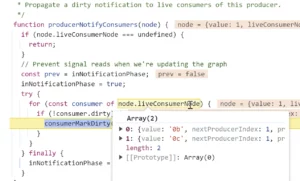
Nodes b and c are live consumers of node a, so during the update for a, Angular iterates over node.liveConsumerNode and alerts those nodes to the change.
Yet, as mentioned, nothing substantive occurs here. The node merely gets flagged as dirty and passes the notification along to its live consumers through producerNotifyConsumers:
function consumerMarkDirty(node) {
  node.dirty = true;
  producerNotifyConsumers(node);
  node.consumerMarkedDirty?.(node);
}
This chain eventually reaches the watcher (effect) depending on d. Unlike regular reactive nodes, the watch node implements scheduling within its consumerMarkedDirty method:
const WATCH_NODE: Partial<WatchNode> = (() => {
  return {
    ...REACTIVE_NODE,
    consumerIsAlwaysLive: true,
    consumerAllowSignalWrites: false,
    consumerMarkedDirty: (node: WatchNode) => {
      if (node.schedule !== null) {
        node.schedule(node.ref);
      }
    },
    hasRun: false,
    cleanupFn: NOOP_CLEANUP_FN,
  };
})();
At this point, the notification phase and graph traversal conclude.
This two-stage approach is sometimes labeled the "push/pull" algorithm: "dirtiness" gets pushed eagerly through the graph when a source signal mutates, but recalculation proceeds lazily—only when values are pulled via signal reads.
Change Detection Integration
Angular leverages the live consumer mechanism to weave signal-based notifications into change detection. Component templates compile down to template expressions (plain JavaScript) executed within the reactive context of that component's view. In this context, accessing a signal returns its value while also registering the signal as a dependency of the component's view.
Since template expressions act as live consumers, Angular establishes a link from the producer to the template expression node. The moment the producer's value updates, it notifies the template node immediately and synchronously. On notification, Angular flags the component and all its ancestors for checking.
As covered in my earlier writing, each component template maps internally to an LView object. Here's what that looks like for a component:
@Component({...})
export class AppComponent {
  value = signal(0);
}
Once compiled, it becomes a standard JavaScript function AppComponent_Template that executes during the component's change detection pass:
this.ɵcmp = defineComponent({
  type: AppComponent,
  ...
  template: function AppComponent_Template(rf, ctx) {
    if (rf & 1) {
      ɵɵtext(0);
    }
    if (rf & 2) {
      ɵɵtextInterpolate1("", ctx.value(), "\n");
    }
  },
});
When Angular introduced signals into its change detection implementation, it wrapped every component view (template function) in a ReactiveLViewConsumer node:
export interface ReactiveLViewConsumer extends ReactiveNode {
  lView: LView | null;
}
The interface is realized by the REACTIVE_LVIEW_CONSUMER_NODE node:
const REACTIVE_LVIEW_CONSUMER_NODE: Omit<ReactiveLViewConsumer, 'lView'> = {
  ...REACTIVE_NODE,
  consumerIsAlwaysLive: true,
  consumerMarkedDirty: (node: ReactiveLViewConsumer) => {
    markAncestorsForTraversal(node.lView!);
  },
  consumerOnSignalRead(this: ReactiveLViewConsumer): void {
    this.lView![REACTIVE_TEMPLATE_CONSUMER] = this;
  },
};
Conceptually, each view gets its own ReactiveLViewConsumer consumer node, which defines the reactive context for every signal accessed inside the template function.
In our case, whenever the template function executes as part of change detection, the ctx.value() producer runs within the template function node's context—which acts as the ActiveConsumer:
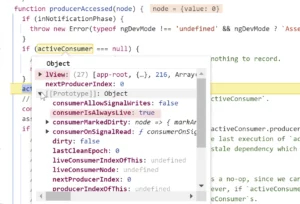
This registers the template expression node (consumer) as a live dependency of the producer value():
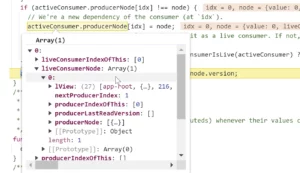
This dependency ensures that once the value of the producer counter changes, it will immediately notify the consumer node (template expression).
Live consumers implement consumerMarkDirty method that’s called synchronously by the producer when its value changes:
/**
 * Propagate a dirty notification to live consumers of this producer.
 */
function producerNotifyConsumers(node: ReactiveNode): void {
  ...
  try {
    for (const consumer of node.liveConsumerNode) {
      if (!consumer.dirty) {
        consumerMarkDirty(consumer);
      }
    }
  } finally {
    inNotificationPhase = prev;
  }
}

function consumerMarkDirty(node: ReactiveNode): void {
  node.dirty = true;
  producerNotifyConsumers(node);
  node.consumerMarkedDirty?.(node);
}
Within consumerMarkedDirty, the template expression node flags ancestors for refresh using markAncestorsForTraversal, much like markForCheck() handled it previously:
const REACTIVE_LVIEW_CONSUMER_NODE: Omit<ReactiveLViewConsumer, 'lView'> = {
  ...
  consumerMarkedDirty: (node: ReactiveLViewConsumer) => {
    markAncestorsForTraversal(node.lView!);
  },
};

function markAncestorsForTraversal(lView: LView) {
  let parent = getLViewParent(lView);
  while (parent !== null) {
    ...
    parent[FLAGS] |= LViewFlags.HasChildViewsToRefresh;
    parent = getLViewParent(parent);
  }
}
The remaining question: when does Angular designate the current LView consumer node as the ActiveConsumer? This occurs inside the refreshView function, familiar from my earlier articles.
This function executes change detection for each LView and handles standard operations: running the template function, executing hooks, refreshing queries, and setting host bindings. Essentially, a dedicated block handling reactivity was inserted before Angular executes all those operations.
Here's the implementation:
function refreshView<T>(tView, lView, templateFn, context) {
  ...

  // Start component reactive context
  enterView(lView);
  let returnConsumerToPool = true;
  let prevConsumer: ReactiveNode | null = null;
  let currentConsumer: ReactiveLViewConsumer | null = null;
  if (!isInCheckNoChangesPass) {
    if (viewShouldHaveReactiveConsumer(tView)) {
      currentConsumer = getOrBorrowReactiveLViewConsumer(lView);
      prevConsumer = consumerBeforeComputation(currentConsumer);
    } else {... }

    ...

    try {
      ...
      if (templateFn !== null) {
        executeTemplate(tView, lView, templateFn, RenderFlags.Update, context);
      }
  }
Since this code precedes Angular's execution of the component's template function in executeTemplate, by the time signal accessors in a template run, a reactive context is already established.
Understanding effects and watchers
An effect is a purpose-built construct for executing side-effectful operations that depend on application state. It acts as an active consumer, defined through a callback that runs within a reactive context. The signal dependencies of that callback are tracked, and whenever any of those dependencies emit a new value, the effect is triggered.
In typical application code, effects are seldom required, but they prove valuable in certain scenarios. The Angular documentation highlights these examples:
- Persisting data or synchronizing it with
window.localStorage - Implementing custom DOM behaviors beyond template capabilities, such as rendering directly to a
<canvas>element
Angular does not rely on effects within the change detection system to refresh component views. That responsibility falls to the live consumer mechanism, as detailed in the earlier section on change detection.
Although the signal algorithm remains standardized across implementations, the exact behavior of effects is left undefined and differs from one framework to another. This stems from the intricate nature of effect scheduling, which often ties into framework rendering cycles and other high-level, framework-specific states or strategies that are inaccessible from JavaScript.
Nevertheless, the signals proposal offers a set of foundational primitives—most notably the watch API—that framework authors can leverage to craft their own effects. The Watcher interface enables the monitoring of a reactive function, delivering notifications when that function’s dependencies shift.
Within Angular, effect serves as a wrapper around watcher. We’ll first examine how watchers function, then see how they underpin the effect primitive.
To start, we’ll bring in the watcher from Angular’s primitives and employ it to set up a notification system:
import { createWatch } from '@angular/core/primitives/signals';

const counter = signal(0);

const watcher = createWatch(
  // run the user provided callback and set up tracking
  // this will be executed 2 times
  // 1st after `watcher.notify()` and 2nd time after `this.counter.set(1)`
  () => counter(),
  // this is called by the `notify` method
  // or by the consumer itself through through consumerMarkDirty method,
  // schedules the user provided callback to run in 1000ms
  () => setTimeout(watcher.run, 1000),
  false
);

// mark the watcher as dirty (stale) to force the user provided callback
// to run and set up tracking for the `counter` signal
// `notify` method will call `consumerMarkDirty` under the hood
watcher.notify();

// when the value changes, consumerMarkDirty is executed
// which schedules the user provided callback to run
setTimeout(() => this.counter.set(1), 3000);
When watcher.notify() is invoked, Angular synchronously calls the consumerMarkDirty method on the watcher node. However, the user-defined notification callback isn’t executed immediately upon notification. Instead, it’s queued to run later via watcher.run. The watch function simply triggers this scheduling operation when it receives the “markDirty” signal.
Here’s a live demonstration:
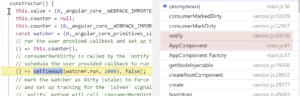
Executing this.counter.set(1) initiates the same sequence of calls, culminating in the scheduling of the user-provided callback.
To construct the effect() function, Angular encloses the watcher within the EffectHandle class:
export function effect(effectFn,options): EffectRef {
  const handle = new EffectHandle();
  ...
  return handle;
}

class EffectHandle implements EffectRef, SchedulableEffect {
  unregisterOnDestroy: (() => void) | undefined;
  readonly watcher: Watch;

  constructor(...) {
    this.watcher = createWatch(
      (onCleanup) => this.runEffect(onCleanup),
      () => this.schedule(),
      allowSignalWrites,
    );
    this.unregisterOnDestroy = destroyRef?.onDestroy(() => this.destroy());
  }
As evident, the EffectHandle class handles the watcher setup. In our prior watcher-based example, switching to the effect function dramatically streamlines the configuration:
import { Component, effect, signal } from '@angular/core';

@Component({...})
export class AppComponent {
  counter = null;

  constructor() {
    this.counter = signal(0);

    // this will be executed 2 times
    effect(() => this.counter());

    setTimeout(() => this.counter.set(1), 3000);
  }
}
Using the effect function directly requires only a single callback. This callback is the user-defined function that establishes dependencies, and Angular schedules it for execution whenever those dependencies change.
The scheduler currently employed by Angular effects is ZoneAwareEffectScheduler, which processes updates within the microtask queue following the change detection cycle:
export class ZoneAwareEffectScheduler implements EffectScheduler {
  private queuedEffectCount = 0;
  private queues = new Map<Zone | null, Set<SchedulableEffect>>();
  private readonly pendingTasks = inject(PendingTasks);
  private taskId: number | null = null;

  scheduleEffect(handle: SchedulableEffect): void {
      this.enqueue(handle);
      if (this.taskId === null) {
        const taskId = (this.taskId = this.pendingTasks.add());
        queueMicrotask(() => {
          this.flush();
          this.pendingTasks.remove(taskId);
          this.taskId = null;
        });
      }
    }
One notable quirk Angular must handle is effect “initialization.” As seen in the watcher implementation, tracking needs a manual kickoff via a single watcher.notify() call. Angular duplicates this behavior, executing it during the initial change detection pass.
Here’s how that plays out.
When the effect function is invoked within a component’s injection context, Angular appends the notification callback to the component’s view object at LView[EFFECTS_TO_SCHEDULE]:
export function effect(
  effectFn: (onCleanup: EffectCleanupRegisterFn) => void,
  options?: CreateEffectOptions,
): EffectRef {
  ...
  const handle = new EffectHandle();

  // Effects need to be marked dirty manually to trigger their initial run. The timing of this
  // marking matters, because the effects may read signals that track component inputs, which are
  // only available after those components have had their first update pass.
  // ...
  const cdr = injector.get(ChangeDetectorRef, null, {optional: true}) as ViewRef<unknown> | null;
  if (!cdr || !(cdr._lView[FLAGS] & LViewFlags.FirstLViewPass)) {
    // This effect is either not running in a view injector, or the view has already
    // undergone its first change detection pass, which is necessary for any required inputs to be
    // set.
    handle.watcher.notify();
  } else {
    // Delay the initialization of the effect until the view is fully initialized.
    (cdr._lView[EFFECTS_TO_SCHEDULE] ??= []).push(handle.watcher.notify);
  }

  return handle;
}
Callbacks registered this way run once during the first change detection cycle for that component’s view, specifically inside the refreshView function:
export function refreshView<T>(tView,lView,templateFn,context) {
   ...

   // Schedule any effects that are waiting on the update pass of this view.
    if (lView[EFFECTS_TO_SCHEDULE]) {
      for (const notifyEffect of lView[EFFECTS_TO_SCHEDULE]) {
        notifyEffect();
      }

      // Once they've been run, we can drop the array.
      lView[EFFECTS_TO_SCHEDULE] = null;
    }
}
Invoking notifyEffect triggers the consumerMarkDirty notification callback on the underlying watcher. This, in turn, schedules the effect (the user callback) to run using the existing scheduler—post-change detection:

And that completes the narrative 🙂