
Understanding Change Detection
Every application needs to translate its internal state into something visible on screen. In web development, this means converting data structures such as objects and arrays into a DOM representation with images, buttons, and other visual elements. Frameworks handle the synchronization between the application's internal state and the platform, and they do so with remarkable efficiency.
This synchronization process goes by different names depending on the framework – change detection in Angular, reconciliation in React – but the fundamental operations remain consistent. Change detection ranks among the most critical components of any architecture because it directly handles updates to the platform model (DOM) that produces visible output. It also has a substantial impact on application performance. In this discussion, I'll use "rendering" and "change detection" interchangeably.
We define the connection between UI and application state using expressions in templates. The templates below establish that the DOM property className depends on the component's rating property. When the rating changes, the expression requires re-evaluation. If change is detected, the className property receives an update.
<div [className]="'fa-star ' + (rating > value ? 'fas' : 'far')"></div>
During template analysis, the Angular compiler identifies component properties linked to DOM elements and creates a binding for each association. A binding defines the relationship between a component property (typically wrapped in an expression) and a DOM element property. The change detection mechanism runs instructions that process these bindings. Those instructions verify whether the expression's value with a component property has changed and apply DOM updates when necessary.
The core work of change detection in Angular involves processing bindings that perform dirty checks and update relevant DOM parts. Additional operations receive detailed treatment in the Operations chapter. For now, let's examine how Angular handles DOM updates.
How Angular Updates the DOM
This interactive widget lets users click any star to set a new rating:

Here's one possible implementation:
@Component({
	selector: "rating-widget-cmp",
	template: `
		<ul class="rating">
			<li
				*ngFor="let value of values"
				[className]="'fa-star ' + (rating > value ? 'fas' : 'far')"
				(click)="onRatingClick(value)"
			>
				{{ value }}
			</li>
		</ul>
	`,
})
export class RatingWidgetComponent {
	values = [0, 1, 2, 3, 4];
	rating = 2;

	onRatingClick(v: number) {
		this.rating = v + 1;
	}
}
The template's rating property connects to the className property through this expression:
[className]="'fa-star ' + (rating > value ? 'fas' : 'far')"
For this template section, the compiler produces instructions that establish the binding, perform dirty checks, and update the DOM. The generated code appears below:
if (changeDetectionPhase) {
    property("className", "fa-star " + (ctx.rating > 0 ? "fas" : "far"));
    ...
}
The property instruction (prefixed with ɵɵ in source code) checks whether the expression's value has changed. If so, it marks the binding as dirty and updates the value. Angular creates the binding for className with a current value of 'fa-star far'. When the component's rating property changes, Angular runs change detection and processes the instructions.
The property instruction, shown in simplified form, looks like this:
export function property(propName, value, ...) {
  const lView = getLView();
  const bindingIndex = nextBindingIndex();

  if (bindingUpdated(lView, bindingIndex, value)) {
    const tView = getTView();
    const tNode = getSelectedTNode();
    elementPropertyInternal(tView, tNode, lView, propName, value, ...);
  }

  return property;
}
First, we obtain a reference to the LView, the container for Angular components and related data. Using nextBindingIndex, we locate the index in the LView that stores binding information for the propName. In this case, that's the className property.
The bindingUpdated function evaluates the expression and compares it with the binding's remembered previous value. This comparison is where "dirty checking" gets its name. If a change exists, it updates the current value and returns true:
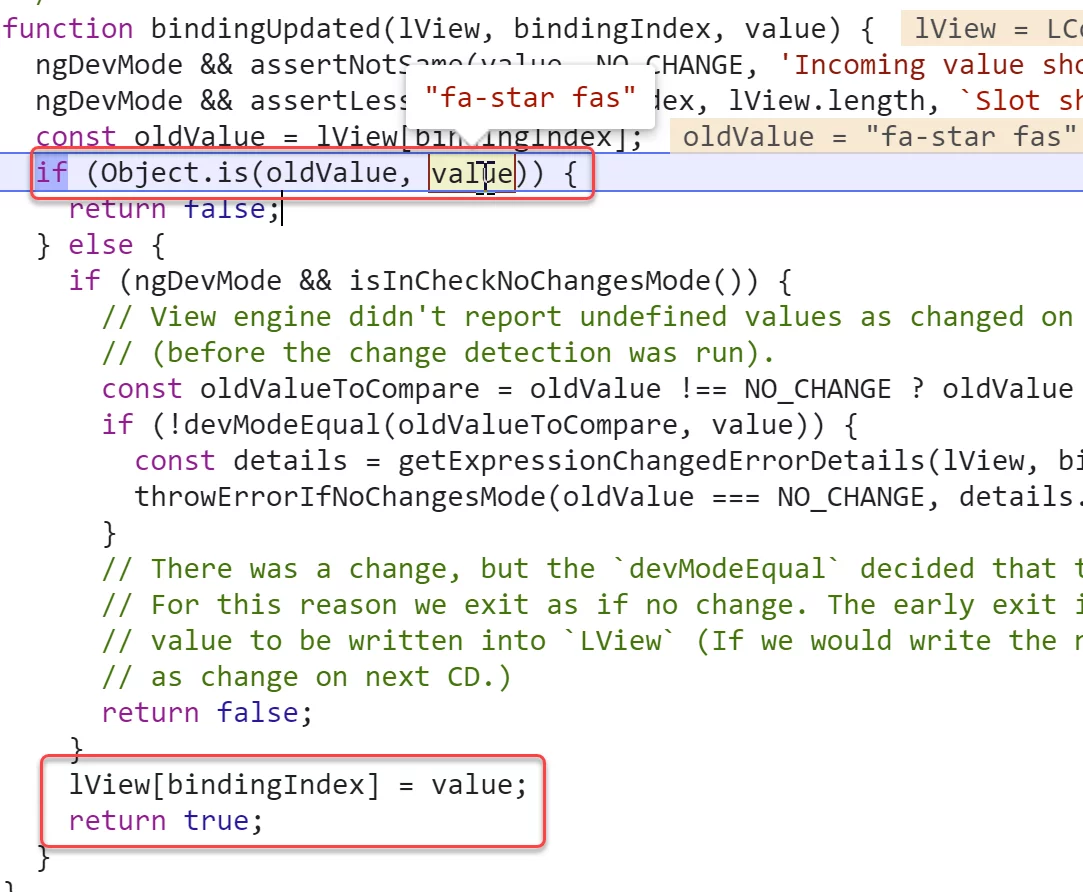
When the expression changes, Angular invokes the elementPropertyInternal function to apply the new value to the DOM. In our example, it updates the list item's className property.
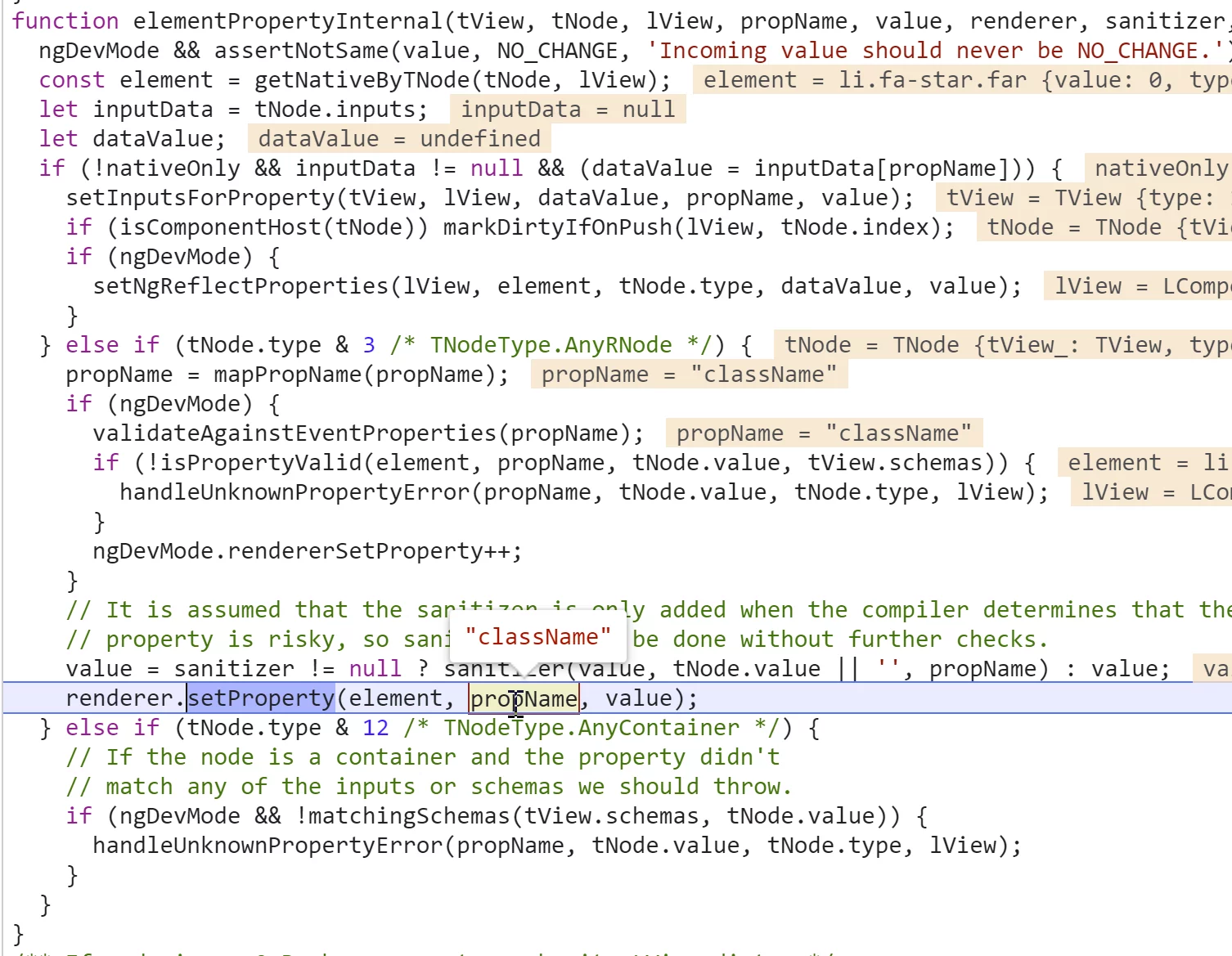
The property function returns itself, enabling chaining:
property("name", ctx.name)("title", ctx.title);
That covers the basics. We'll examine other instructions in detail in the "Inside rendering engine" section.
What Triggers Change Detection
A full understanding of change detection requires knowing when Angular executes the binding-processing instructions.
Two approaches can start change detection. The first is manual initiation – explicitly telling the framework that a change has happened or might happen, so it should run change detection. The second is automatic external triggering – relying on an external mechanism to recognize when changes might occur and run change detection accordingly.
Angular supports both paths. You can run change detection manually using the Change Detector service via this method:
export class RatingWidgetComponent {
	values = [0, 1, 2, 3, 4];
	rating = 2;

	constructor(private changeDetector: ChangeDetectorRef) {}

	onRatingClick(v: number) {
		this.rating = v + 1;
		this.changeDetector.detectChanges();
	}
}
Alternatively, you can let the framework handle triggering automatically. You simply update a property on the component:
export class RatingWidgetComponent {
	values = [0, 1, 2, 3, 4];
	rating = 2;

	onRatingClick(v: number) {
		this.rating = v + 1;
	}
}
Angular needs a way to recognize property updates and decide when to run change detection. Enter zone.js, a library that patches browser asynchronous events and notifies Angular when certain events occur. Just as with UI events, Angular waits for application code to finish executing and then triggers change detection automatically. The section on zones provides an in-depth look at zone.js.
The Order of Checks
Angular performs change detection for each component in depth-first order. For the component tree shown below, the check sequence would be A, K, L, J, O, C and so on:
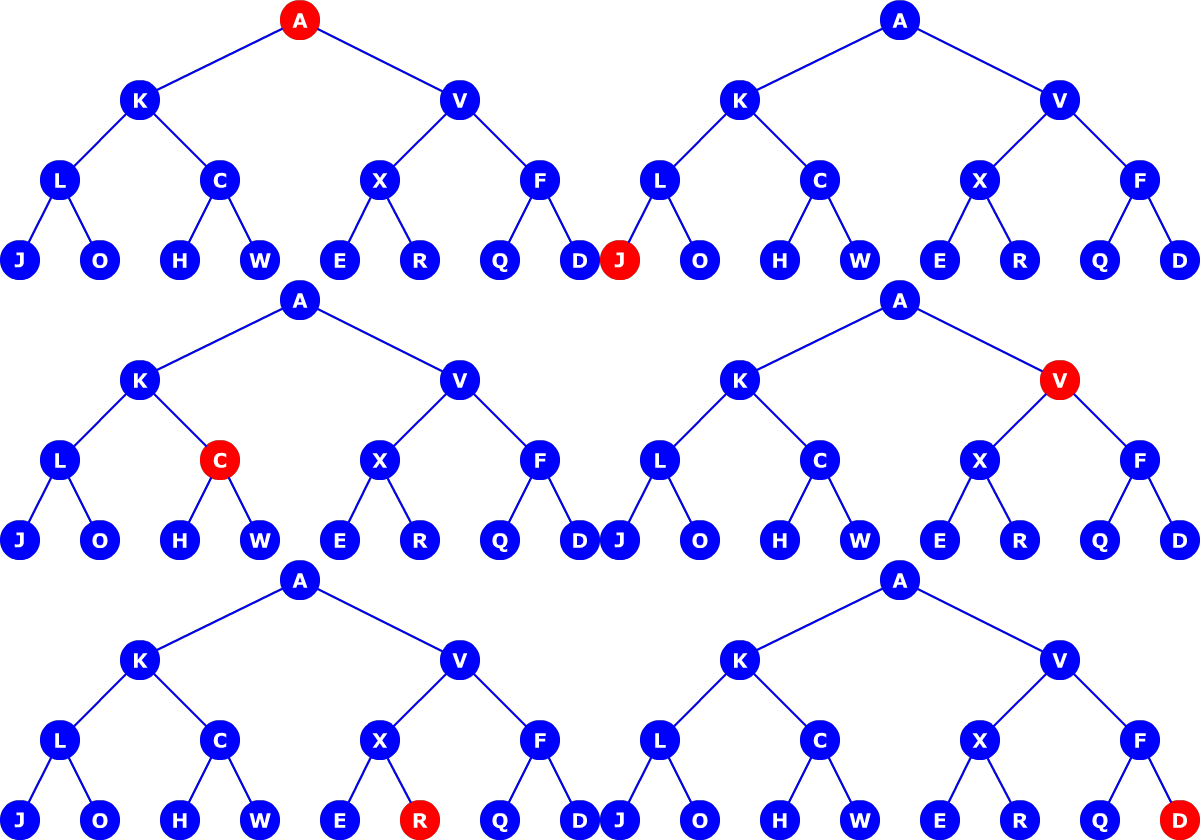
Because a component check includes multiple operations, the order of execution can yield slightly different results. For instance, DOM and binding updates happen in proper depth-first order. Here I use the logRender function to trace when Angular updates templates and evaluates template expressions:
@Component({
	selector: "a-cmp",
	template: `{{ logRender() }}`,
})
export class A {
	logRender() {
		console.log("A");
	}
}
Check the live example here.
But when I add logging inside the ngDoCheck hook like this:
@Component({
	selector: "a-cmp",
	template: `A`,
})
export class A {
	ngDoCheck() {
		console.log("A");
	}
}
This is the observed order:
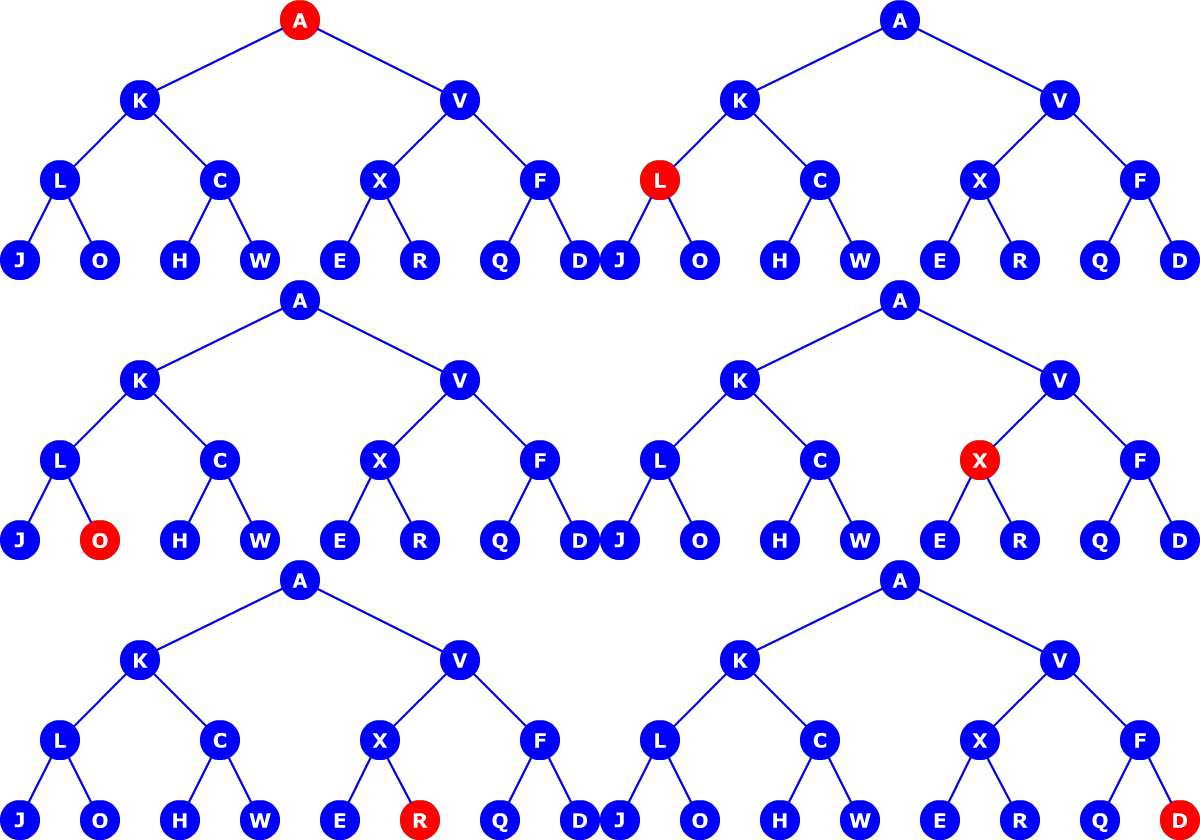
Angular checks A, then K, then V, L, then C, and so on. See the running example here.
This sequence is neither strictly depth-first nor properly breadth-first. A conventional breadth-first algorithm would check all siblings at the same level. In the diagram above, the algorithm does check L and C as siblings, but instead of checking X and F next, it descends to J and O.