
As Angular 19 approaches, it introduces a new API called resource (see the pull request). For a comprehensive look, Enea Jahollari wrote an excellent piece on this API in "Everything you need to know about the resource API".
Although the resource API ships with version 19, a significant number of projects remain on Angular 12–15, based on npm download statistics. Given that these older versions rely heavily on Observables, this article explores building a custom wrapper similar to rxResource, but designed to work with Observables instead of signals.
Overview of the Demo Application
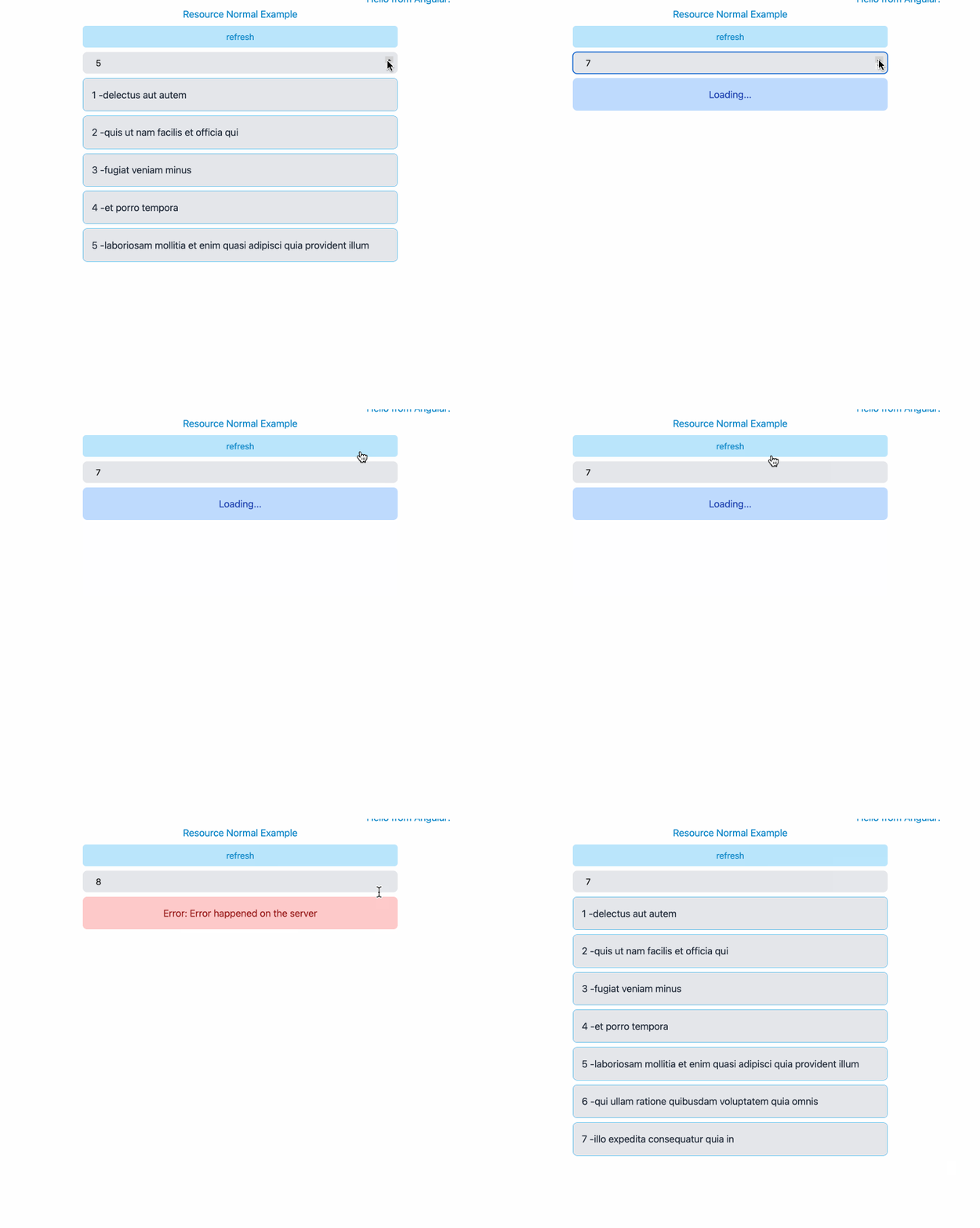
Below is a straightforward application for demonstrating the core features of the rxResource API. The target functionality includes the following:
- Loading more items as the user increments the counter
- Showing a loading indicator while data is fetched
- Displaying an error state when the HTTP request fails
- Adding a refresh button to trigger data reload
- Enabling item removal from the UI by clicking on a displayed item
@Component({
  selector: 'app-resource-normal-example',
  standalone: true,
  imports: [FormsModule],
  template: `
    <div class="grid gap-y-2">
      <h1>Resource Normal Example</h1>

      <button (click)="todosResource.reload()">
        refresh
      </button>

      <input type="number" [(ngModel)]="limitControl"/>

      <!-- loading state -->
      @if (todosResource.isLoading()) {
        <div class="g-loading">Loading...</div>
      }

      <!-- error state -->
      @else if (todosResource.error()) {
        <div class="g-error">
          {{ todosResource.error() }}
        </div>
      }

      <!-- display data -->
      @else if (todosResource.hasValue()) {
        @for (item of todosResource.value() ?? []; track $index) {
          <div class="g-item" (click)="onRemove(item)">
            {{ item.id }} -{{ item.title }}
          </div>
        }
      }
    </div>
  `,
})
export class ResourceNormalExample {
  private http = inject(HttpClient);
  limitControl = signal<number>(5);

  todosResource = rxResource({
    request: this.limitControl,
    loader: ({ request: limit }) => {
      return this.http.get<Todo[]>(
        `https://jsonplaceholder.typicode.com/todos?_limit=${limit}`
      ).pipe(
        map((res) => {
          if (limit === 8) {
            throw new Error('Error happened on the server');
          }
          return res;
        }),
        delay(1000),
      );
    },
  });

  onRemove(todo: Todo) {
    this.todosResource.update(
      (d) => d?.filter((item) => item.id !== todo.id)
    );
  }
}
In essence, whenever the limitControl signal changes, the loader portion of the rxResource is re-executed. The loader accepts the limit as a parameter and issues an HTTP request. A delay is introduced to emulate network latency so the loading state remains visible. If the limit is set to 8, the request deliberately throws an error to showcase the error state.
Clicking any individual todo item removes it from the todosResource, and a refresh button forces the todo list to be fetched anew.
Building a Custom rxResource
This section is split into two parts. Initially, a basic rxResourceCustomBasic function is created, which returns request status (loading, loaded, or error) along with the fetched data. Subsequently, a more sophisticated version is developed to support manual refresh, data updates, and setting new values.
Defining Type Structures
The first step is to define the types corresponding to the data, error, and loading state. A possible definition is shown below:
// this is the primary type we will be working with
type RxResourceCustomResult<T> = {
  /**
   * states:
   * - `loading` - the resource is loading
   * - `loaded` - the resource has been loaded
   * - `error` - an error occurred while loading the resource
   * - `local` - the resource has been set/modified locally
   */
  state: 'loading' | 'loaded' | 'error' | 'local';
  isLoading: boolean;
  data: T | null;
  error?: unknown;
};

// in theory you could also go with the one below, but
// its usage were a bit different from what Angular's rxResource has
type RxResourceCustomResult<T> = {
  state: 'loading'
} | {
  state: 'local'
} | {
  state: 'loaded',
  data: T | null;
} | {
  state: 'error',
  error: unknown;
}
Function Scaffolding
To establish a skeleton that mirrors Angular's rxResource structure, the following generic pattern can be used:
export const rxResourceCustomBasic = (data: {
  request: any[];
  loader: (values: any) => Observable<any>;
}): Observable<RxResourceCustomResult<any>> => {
	// todo ....
  return of({} as RxResourceCustomResult<any>);
}
Here, request accepts an array of observable dependencies. The main syntactic difference from rxResource is that an array is expected, whereas rxResource uses the form request: () => ({limit: this.limitControl}).
The loader is also a closure supplied by the user, which receives the values emitted from the request observables and returns an observable — typically an HTTP request.
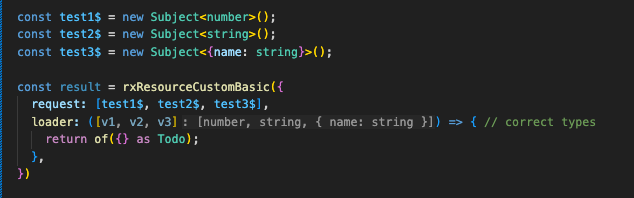
Given that the initial types are generic any, TypeScript does not infer that the value within the loader array should be numeric. This can be refined as follows:
// extract the value from an observable
type ObservableValue<T> = T extends Observable<infer U> ? U : never;

export const rxResourceCustomBasic = <
	T,
	TLoader extends Observable<unknown>[]
>(data: {
  request: [...TLoader];
  loader: (values: {
    [K in keyof TLoader]: ObservableValue<TLoader[K]>;
  }) => Observable<T>;
}): Observable<RxResourceCustomResult<T>> => {

  return of({ } as RxResourceCustomResult<any>);
}
Generics are introduced to add type safety: the T parameter in rxResourceCustomBasic signifies the shape of the API response data, while TLoader extends Observable<unknown>[] defines the array of observable dependencies to which the custom resource subscribes. The full generic structure is not exhaustively explained here; for a deeper dive, the Github example is a useful resource.
Once the types are in place, using rxResourceCustomBasic will produce correct type inference; for instance, the loader will have exactly three parameters, each with its specific type.
Basic Custom rxResource Implementation
With the type definitions settled, the basic version can be constructed. This implementation includes state, data, and error properties.
export const rxResourceCustomBasic = <
  T,
  TLoader extends Observable<unknown>[]
>(data: {
  request: [...TLoader];
  loader: (values: {
    [K in keyof TLoader]: ObservableValue<TLoader[K]>;
  }) => Observable<T>;
}): Observable<RxResourceCustomResult<T>> => {
  // listen to all the requests observables
  return combineLatest(data.request).pipe(
    switchMap((values) =>
      // execute the loader function provided by the user
      data
        .loader(
          values as {
            [K in keyof TLoader]: ObservableValue<TLoader[K]>;
          },
        )
        .pipe(
          switchMap((result) =>
            of({
              state: 'loaded' as const,
              data: result,
            }),
          ),
          // setup loading state
          startWith({
            state: 'loading' as const,
            data: null,
          }),
          // handle error state
          catchError((error) =>
            of({
              state: 'error' as const,
              error,
              data: null,
            }),
          ),

          // map the result to the expected type
          map(
            (result) =>
              ({
                ...result,
                isLoading: result.state === 'loading',
              }) satisfies RxResourceCustomResult<T>,
          ),
        ),
    ),
    // share the observable
    shareReplay(1),
  );
};
- The
combineLatestoperator listens for emissions from the array of observables indata.request, triggering a re-run of the logic whenever any source fires. - Casting with
value as ....is used because TypeScript infersvalueasunknown[]; this is a pragmatic workaround. - The invocation
data.loader(values)passes the arguments gathered from therequestsection into the user-providedloaderfunction. - By incorporating the rxjs
startWithoperator, the observable begins in theloadingstate. Also, whenever an observable emits, the state is reset toloadingbefore processing the new data. - The
catchErroroperator intercepts and handles errors, injecting the error state into the stream. For an explanation of whycatchErroris positioned where it is, see the article "Angular Rxjs - CatchError Position Matter!". - Finally, the
shareReplay()operator turns the observable into a hot stream, broadcasting the latest value to all active subscribers.
Advanced Custom rxResource
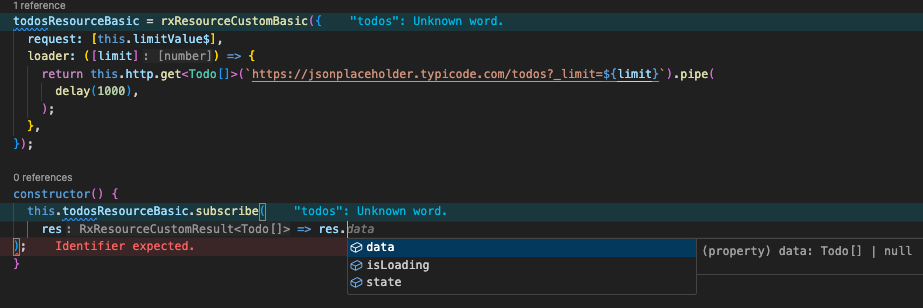
While the basic implementation works, it has a few shortcomings. Most notably, rxResourceCustomBasic returns an observable, requiring us to subscribe every time we want the current value. Furthermore, it lacks the helpful methods from Angular's rxResource, including reload(), update(), and set(). To address these, a more advanced variant is needed.
export type RxResourceCustom<T> = {
  /**
   * Trigger a reload of the resource
   */
  reload: () => void;
  /**
   * @returns the current result of the resource
   */
  value: () => T | null;
  /**
   * @param updateFn - function to update the current data
   */
  update: (updateFn: (current: T) => T) => void;
  /**
   * @param data - set the data of the resource
   */
  set: (data: T) => void;
  /**
   * Observable of the resource state
   */
  result$: Observable<RxResourceCustomResult<T>>;
};

export const rxResourceCustom = <
  T,
  TLoader extends Observable<unknown>[]
>(data: {
  request: [...TLoader];
  loader: (values: {
    [K in keyof TLoader]: ObservableValue<TLoader[K]>;
  }) => Observable<T>;
}): RxResourceCustom<T> => {
  // Subject to trigger reloads
  const reloadTrigger$ = new Subject<void>();

  // hold the latest result of type `T | null`
  const resultState$ = new BehaviorSubject<{
    state: RxResourceCustomResult<T>['state'];
    data: T | null;
  }>({
    state: 'loading' as const,
    data: null,
  });

  const result$ = reloadTrigger$.pipe(
    startWith(null),
    // listen to all the requests observables
    combineLatestWith(...data.request),
    // prevent request cancellation
    exhaustMap(([_, ...values]) =>
      // execute the loader function provided by the user
      data
        .loader(
          values as {
            [K in keyof TLoader]: ObservableValue<TLoader[K]>;
          },
        )
        .pipe(
          switchMap((result) =>
            of({
              state: 'loaded' as const,
              data: result,
            }),
          ),

          // setup loading state
          startWith({
            state: 'loading' as const,
            data: null,
          }),

          // handle error state
          catchError((error) =>
            of({
              state: 'error' as const,
              error,
              data: null,
            }),
          ),
        ),
    ),
  );

  // subscribe to the result and update the state
  result$.pipe(takeUntilDestroyed()).subscribe(
    (state) => resultState$.next(state)
  );

  return {
    result$: resultState$.asObservable().pipe(
      map((state) => ({
        ...state,
        isLoading: state.state === 'loading',
      })),
    ),
    reload: () => reloadTrigger$.next(),
    value: () => resultState$.value.data,
    update: (updateFn: (current: T) => T) => {
      const current = resultState$.value;
      if (current?.data) {
        resultState$.next({
          state: 'local',
          data: updateFn(current.data),
        });
      }
    },
    set: (data) => {
      resultState$.next({
        state: 'local',
        data: data,
      });
    },
  };
};
When the user invokes reload(), the reloadTrigger$ subject emits, causing the logic in the request parameter to be executed anew.
The exhaustMap operator plays a key role here, ensuring that repeated calls to reload() are ignored until the currently running request completes.
With the combineLatestWith operator, the function remains subscribed to the observable dependencies from request; any new emission from those sources triggers a re-run of the loader logic.
The resultState$ BehaviorSubject is responsible for holding the most recent state of the loader, allowing the function to return the current value and also support in-place modifications of the cached result.
One notable difference from the basic example is the replacement of shareReplay(1) with takeUntilDestroyed(). This operator ensures that all subscriptions are automatically cleaned up when the enclosing component is destroyed, preventing memory leaks.
Note: The takeUntilDestroyed operator was introduced in Angular version 16. Therefore, to use this advanced example, your project must be on Angular 16 or later.
Putting the Custom rxResource to Use
With the custom rxResourceCustom ready, it can be used in a component as follows:
@Component({
  selector: 'app-resource-custom-example',
  standalone: true,
  imports: [ReactiveFormsModule, AsyncPipe],
  template: `
    <div class="grid gap-y-2">
      <h1>Resource Custom Example</h1>

      <button (click)="todosResource.reload()">refresh</button>

      <input type="number" [formControl]="limitControl" />

      @if (todosResource.result$ | async; as data) {
        <!-- loading state -->
        @if (data.isLoading) {
          <div class="g-loading">Loading...</div>
        }

        <!-- error state -->
        @else if (data.error) {
          <div class="g-error">
            {{ data.error }}
          </div>
        }

        <!-- display data -->
        @for (item of data.data; track $index) {
          <div class="g-item" (click)="onRemove(item)">
	          {{ item.id }} - {{ item.title }}
	      </div>
        }
      }
    </div>
  `,
  styles: [],
  changeDetection: ChangeDetectionStrategy.OnPush,
})
export class ResourceCustomExampleComponent {
  private http = inject(HttpClient);
  limitControl = new FormControl<number>(5, { nonNullable: true });

  private limitValue$ = this.limitControl.valueChanges.pipe(
		startWith(this.limitControl.value)
	);

  todosResource = rxResourceCustom({
    request: [this.limitValue$],
    loader: ([limit]) => {
      return this.http.get<Todo[]>(
	      `https://jsonplaceholder.typicode.com/todos?_limit=${limit}`
	     ).pipe(
        map((res) => {
          if (limit === 8) {
            throw new Error('Error happened on the server');
          }
          return res;
        }),
        delay(1000),
      );
    },
  });

  onRemove(todo: Todo) {
    this.todosResource.update(
	    (d) => d?.filter((item) => item.id !== todo.id)
	  );
  }

	constructor(){
	// log the current value
    console.log(this.todosResource.value());
  }
 }
Final Demonstration
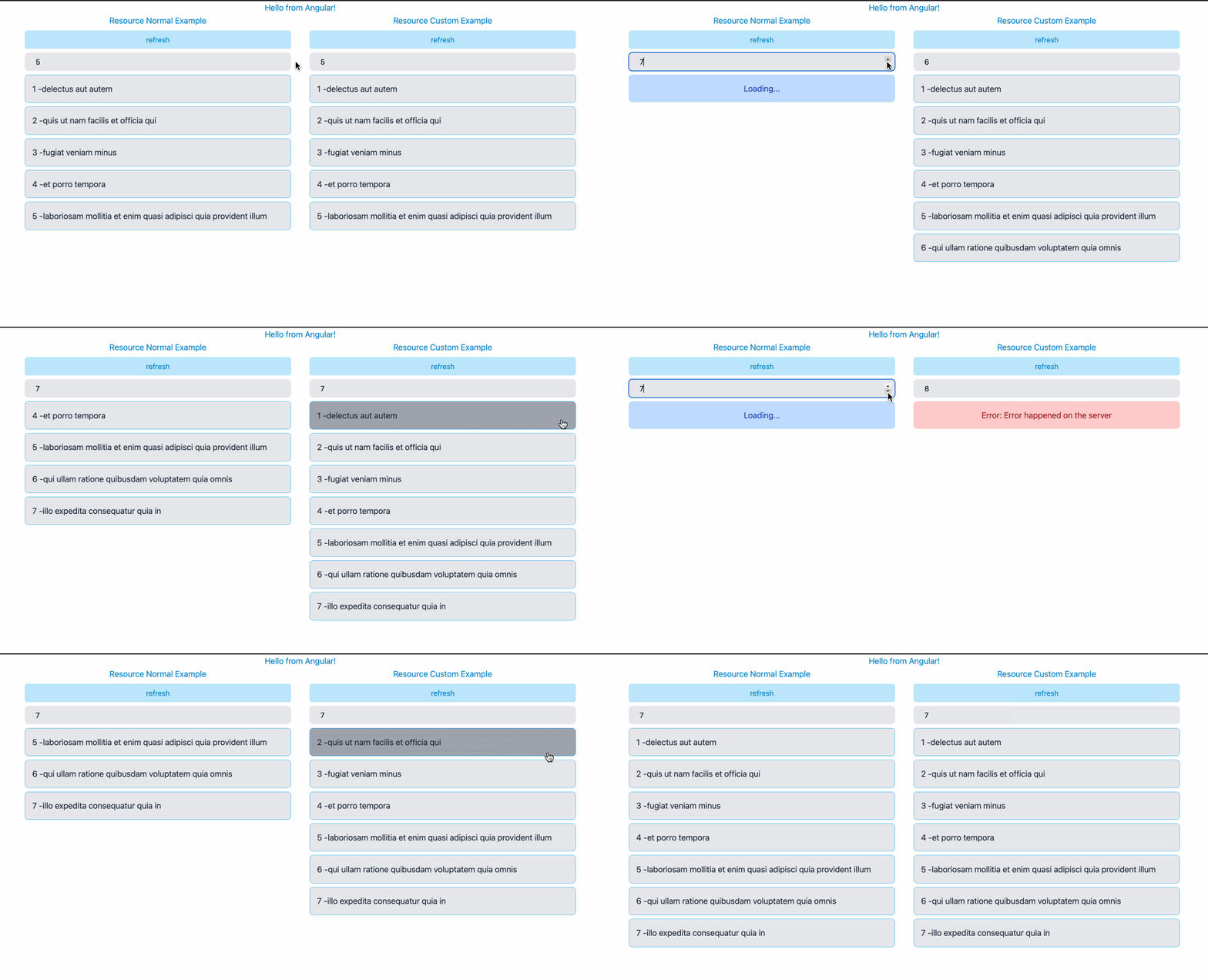
The side-by-side comparison below shows Angular's built-in rxResource on the left and the custom Observable-based rxResource on the right.
I hope you found this walkthrough useful and learned how to bridge the gap between signals and Observables. If you would like to experiment with this code, the full source is available in the Github repository. Feel free to get in touch on LinkedIn or explore more articles on dev.to.