
The first installment of this series established the overarching guardrail: architecture rules are documented, injected into the coding agent's context via rules and skills, validated with Sheriff, and fed back as deterministic signals through stop hooks.
That completes the feedback loop for domain and layer boundaries. However, feature slicing introduces additional rules within a feature—for instance, between smart and dumb components, stores, and data-access services.
This second part addresses exactly that gap. We extend the setup with tsarch, a tool for TypeScript projects inspired by the well-known ArchUnit library. This turns naming and access conventions into executable architecture rules—checked as unit tests and integrated into the same agent feedback loop that carried Sheriff in part one.
Where layers reach their limits, naming conventions take over: tsarch checks them deterministically and turns an architecture violation into machine-readable feedback the coding agent can act on.
📂 Source Code (Branch: ai-arc)
Architecture Rules via Building Blocks Beyond Layers
In the first part, Sheriff steered communication between modules: domains represent business boundaries, layers technical ones. Yet not every technical constraint maps cleanly onto layers—especially when feature slicing allows a feature to own its dumb components, data-access services, and stores. These building blocks live together inside the feature folder rather than being split across separate layers.
That is why we additionally constrain by building blocks here. What matters is no longer only which layer a block sits in, but what kind of block it is—and which blocks are allowed to depend on each other:
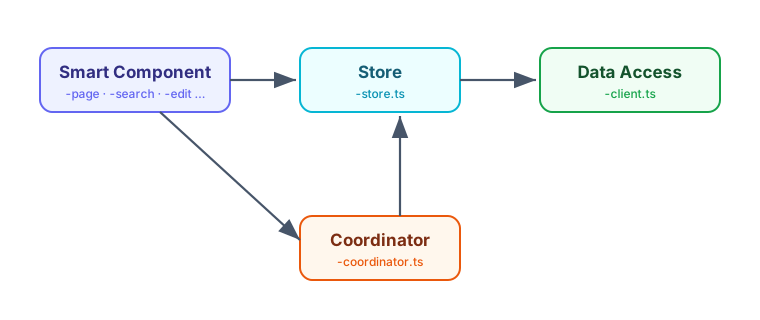
The central rule for our example project is: a smart component accesses a store, and only the store accesses the data-access client. Smart components must not reach the client directly, and stores must not depend on other stores.
Particularly when lightweight stores are in play, a coordinator is often needed: it stores no data itself but, for a given use case, provides state from different stores—possibly across layers—and combines them via computed signals. This use-case orchestration is the coordinator's job, and from the component's perspective it looks like a "real" store. In this way we avoid store-to-store dependencies and thus cycles, without sacrificing the convenience of a bundled view over multiple stores.
One deliberate exception applies to dumb components: they may only access stores located in the same folder or in child folders. In that case we assume local state management, which is purely an implementation detail of the dumb component. Apart from that, dumb components must not access the other building blocks described here.
Detecting Building Blocks via File Suffixes
We identify individual building blocks by file suffixes. This aligns well with current Angular team conventions as implemented by the CLI: components, services, and directives no longer receive standard suffixes. Not because suffixes are bad, but because generic ones like Component or Service provide too little value. The Angular team has, however, explicitly stated that you may assign your own, semantically stronger suffixes—and that is precisely what we do here.
For our demo project, I settled on the following suffixes:
- Smart components carry a descriptive use-case suffix:
-page,-search,-edit,-detail, or-overview—for instanceflight-search.tswith classFlightSearchorluggage-overview.tswithLuggageOverview. - Stores end with
-store.ts—e.g.,flight-search-store.tswithFlightSearchStoreorpassenger-detail-store.tswithPassengerDetailStore. - Store coordinators end with
-coordinator.ts—e.g.,summary-coordinator.tswithSummaryCoordinator. - Data-access clients end with
-client.ts—e.g.,flight-client.tswithFlightClientorairport-client.tswithAirportClient. - Dumb components are recognized by the suffixes
-cardand-pane, or by residing in auifolder—e.g.,flight-card.ts.
The authoritative, executable definition of these conventions lives in the tsarch unit test itself, which we will examine closely shortly. There, the suffixes appear as regular expressions and are therefore unambiguous—for both humans and coding agents.
Setting Up tsarch
tsarch parses the TypeScript project through the compiler API and lets you verify dependencies between files using readable, sentence-like rules. We install the npm package as a dev dependency:
npm install -D tsarchFor tsarch to know which files belong to the project, it needs a tsconfig. Since tsarch reads it directly and does not resolve extends, we must—unfortunately—provide a small, dedicated tsconfig.arch.json containing exactly what tsarch needs: the relevant compiler options (such as target, module, moduleResolution, and experimentalDecorators for Angular's decorators) plus literal include and exclude paths:
{
  "compilerOptions": {
    "target": "ES2022",
    "module": "esnext",
    "moduleResolution": "bundler",
    "experimentalDecorators": true,
  },
  "include": ["src/**/*.ts"],
  "exclude": ["src/**/*.spec.ts", "src/app/testing/**", "node_modules"]
}
Admittedly, this duplication of the tsconfig is not pretty—I hope a future pull request to tsarch will add support for resolving extends. Until then, a small dedicated file is a reasonable price to pay.
The architecture rules themselves are ordinary tests. They do not run in the browser-based ng test environment, however, but with Vitest in a Node environment, because tsarch analyzes the TypeScript project via the compiler and the file system. The configuration for that is straightforward:
import { defineConfig } from 'vitest/config';

export default defineConfig({
  test: {
    globals: true,
    environment: 'node',
    include: ['arch/**/*.spec.ts'],
    testTimeout: 60_000,
    hookTimeout: 60_000,
  },
});
Finally, we add a script to package.json that launches these architecture tests:
"test:arch": "vitest run --config vitest.arch.config.ts"With that, the scaffolding is in place. The actual rules live in arch/access-rules.spec.ts and rely on helper functions from arch/utils.ts. We will walk through both, rule by rule, in the following sections.
Restricting Access to Data Access
In our architecture, only stores—and the ai layer—are allowed to access data-access services or clients. All other building blocks, particularly smart and dumb components, must go through a store. We deliberately exempt the ai layer because, at runtime, it orchestrates the application in cooperation with an agent.
The header of the spec file with suffix constants and the first rule appears in the snippet below. The remaining it blocks are replaced by an ellipsis and follow in the next sections:
import { filesOfProject } from 'tsarch';
import { describe, expect, it } from 'vitest';

import {
  anyFileExcept,
  formatDependency,
  isLocalAccess,
  toDependency,
} from './utils';

const TS_CONFIG = 'tsconfig.arch.json';

const STORE = String.raw`-store\.ts$`;
const CLIENT = String.raw`-client\.ts$`;
const SMART = String.raw`-(page|search|edit|detail|overview)\.ts$`;
const DUMB = String.raw`(-(card|pane)\.ts$|/ui(-[^/]+)?/)`;
const AI_LAYER = String.raw`/ai/`;
const COORDINATOR = String.raw`-coordinator\.ts$`;

describe('architecture: suffix-based access rules', () => {
  it('only stores may access data access (clients)', async () => {
    const rule = filesOfProject(TS_CONFIG)
      .matchingPattern(anyFileExcept(STORE, AI_LAYER))
      .shouldNot()
      .dependOnFiles()
      .matchingPattern(CLIENT);

    const violations = await rule.check();
    expect(violations.map(toDependency).map(formatDependency)).toEqual([]);
  });

  // …
});
We define the suffixes as regular expressions and use String.raw for that purpose. This template tag returns the string without interpreting escape sequences like \.—a \ thus remains an actual backslash and is not turned into a line break or anything similar. This saves us from double-escaping (\\. instead of \.) and keeps the regular expressions readable.
The rule reads almost like a sentence: take all files in the project that are neither a store nor part of the ai layer (anyFileExcept(STORE, AI_LAYER)) and ensure they do not depend on files ending in -client.ts. rule.check() returns a list of violations; if there are none, the expected list is empty and the test passes. If the rule fires, formatDependency shows us exactly which file illegally accesses which client.
The helper functions from utils.ts used in the first it make the rule readable. anyFileExcept builds a pattern from the given suffixes that selects precisely those files that are none of the listed kinds. Technically, each kind is turned into a negative lookahead ((?!...), i.e., "must not occur"):
export function anyFileExcept(...kinds: string[]): string {
  return String.raw`^${kinds.map((kind) => `(?!.*${kind})`).join('')}.*\.ts$`;
}
anyFileExcept(STORE, AI_LAYER) thus generates a pattern that matches every .ts file that is neither a store nor located in the ai layer. In this way we express "everything except …" declaratively without enumerating every permitted case individually.
A concrete example makes this tangible: anyFileExcept(STORE, AI_LAYER) places a negative lookahead before the actual pattern for each positive pattern passed in, producing something like
^(?!.*-store\.ts$)(?!.*/ai/).*\.ts$Read aloud, that means: match every path ending in .ts, provided it neither ends with -store.ts anywhere nor contains /ai/. A file like flight-search.ts thus matches, while flight-search-store.ts and anything under /ai/ are excluded.
toDependency and formatDependency prepare the matches for well-readable output. toDependency extracts source and target file from a tsarch violation, and formatDependency formats them as source -> target:
export function toDependency(violation: unknown): Dependency {
  const { dependency } = violation as {
    dependency: { sourceLabel: string; targetLabel: string };
  };
  return { source: dependency.sourceLabel, target: dependency.targetLabel };
}

export function formatDependency(dependency: Dependency): string {
  return `${dependency.source} -> ${dependency.target}`;
}
This precise output is precisely what matters later: it serves not only as feedback for developers but also as a deterministic signal the coding agent can use to fix a violation in a targeted manner.
Modern Angular
More on signal forms and modern Angular architecture can be found in my new eBook Modern Angular. It covers signals, architecture, testing, AI assistants, and practical solutions for modern business applications.

Restricting Access to Stores
Only smart components—and again the ai layer—get access to stores. However, there is the aforementioned exception: dumb components may access stores in the same folder or in child folders. In that case, we assume local state management, which is an implementation detail of the dumb component. Coordinators are also exempt, because their very purpose is to combine multiple stores.
The corresponding it block implements this blend of general rule and local exception:
it('only smart components may access a store (locality and ai excepted)', async () => {
  // Coordinators are a dedicated service layer that may combine several stores.
  const rule = filesOfProject(TS_CONFIG)
    .matchingPattern(anyFileExcept(SMART, AI_LAYER, STORE, COORDINATOR))
    .shouldNot()
    .dependOnFiles()
    .matchingPattern(STORE);

  // Exception: when the store is co-located (same or child folder)
  const violations = (await rule.check())
    .map(toDependency)
    .filter(({ source, target }) => !isLocalAccess(source, target));

  expect(violations.map(formatDependency)).toEqual([]);
});
The basic rule selects all files except smart components, the ai layer, stores, and coordinators, and forbids them from accessing stores. The local exception cannot be expressed through a pattern alone—it depends on the relative location of two files. Therefore, we filter the found violations afterward and let through all those where the store lies locally relative to the accessing file.
This check is performed by the helper function isLocalAccess. It returns true when the target file resides in the same folder as the source or in a child folder thereof:
export function isLocalAccess(source: string, target: string): boolean {
  const sourceFolder = posix.dirname(source);
  const targetFolder = posix.dirname(target);
  return (
    targetFolder === sourceFolder || targetFolder.startsWith(`${sourceFolder}/`)
  );
}
In this way, feature-local state management remains a permitted implementation detail, while cross-domain or cross-feature access to foreign stores stays reserved for smart components.
Restricting Cross-Store Dependencies
This rule might raise a few eyebrows, but in my setup I've chosen to forbid stores from accessing one another directly — chiefly to keep dependency cycles out of the picture. When a use case needs data from multiple stores, it can either go through a coordinator (as described above) or rely on eventing between stores. Eventing gives you looser coupling, while the coordinator keeps things simpler.
The third it block states this constraint plainly, with no exceptions carved out:
it('stores must not access other stores', async () => {
  // Combining several stores is the job of a coordinator, not of a store.
  const rule = filesOfProject(TS_CONFIG)
    .matchingPattern(STORE)
    .shouldNot()
    .dependOnFiles()
    .matchingPattern(STORE);

  const violations = await rule.check();
  expect(violations.map(toDependency).map(formatDependency)).toEqual([]);
});
Any file whose name ends in -store.ts is not allowed to depend on another -store.ts file. If a store genuinely requires state held by a peer, that's a clear signal to introduce a coordinator — and this rule is what points us in exactly that direction.
Keeping Dumb Components Off Smart Components
Dumb components are meant to be reusable, presentation-focused building blocks. They should remain oblivious to the use cases they're plugged into — and certainly never reach upward to the smart components that orchestrate those use cases. If they did, their reusability would evaporate and cycles would start creeping in.
The fourth it enforces this constraint:
it('dumb components must not access smart components', async () => {
  const rule = filesOfProject(TS_CONFIG)
    .matchingPattern(DUMB)
    .shouldNot()
    .dependOnFiles()
    .matchingPattern(SMART);

  const violations = await rule.check();
  expect(violations.map(toDependency).map(formatDependency)).toEqual([]);
});
The DUMB pattern covers both the -card and -pane suffixes and anything living inside a ui folder; the SMART pattern matches the use-case suffixes -page, -search, -edit, -detail and -overview. The dependency direction stays clean as a result: smart components may consume dumb components, but never the other way around.
Wiring tsarch into the Coding Agent
Documented rules alone are not sufficient — just as with Sheriff in the first part, we integrate tsarch as a deterministic safety net via a stop hook. To do that, we fold the architecture tests into the same quality checks the hook executes on every iteration. Those checks live in the scripts/ci-checks.mjs script introduced in the first part, which separates the fast checks from the slower ones. tsarch slots into the fast tier, right next to lint (including Sheriff):
[...]

const fastSteps = [
  'npx ng lint flights',
  'npm run test:arch'
];

[...]
That way npm run test:arch — and with it every tsarch rule — becomes a fixed part of the same loop that already carries lint (including Sheriff). The pricier steps such as browser tests and the build remain reserved for full pipeline runs, while the stop hook deliberately fires only the quick checks. When an architecture rule trips, the agent loops back and receives the concrete source -> target message as input, which it uses to correct itself.
Registering the hook for Claude Code follows the usual path via .claude/settings.json:
{
  "hooks": {
    "Stop": [
      {
        "matcher": "",
        "hooks": [
          {
            "type": "command",
            "command": "node scripts/hooks/claude-stop-hook.mjs",
            "timeout": 600
          }
        ]
      }
    ]
  }
}
How to set up the same mechanism for Cursor AI, Codex, Google's Antigravity and other coding agents — including a shared source of truth and small sync scripts — is covered in depth in the first part of this series. The tsarch rules fit into that model seamlessly, since they're invoked through the same ci-checks.
Keeping Rules and Architecture Docs in Sync
Useful as the stop hook is, the best violation is the one that never happens. That's why the same rules belong not only in the tsarch test, but also in the architecture documents that the coding agents' rules pick up. In docs/architecture-boundaries.md we've recorded that only stores (and the ai-layer) may touch data-access services directly, and in docs/architecture-state-management.md that stores must not depend on each other — instead a coordinator handles the combination.
Once these constraints are spelled out in the docs and flagged as architecture-relevant in the rules, the agent reads them before making any change and sidesteps the violation proactively. Ideally, the stop hook never needs to fire — it serves as the final safety net in case the agent overlooks a constraint anyway.
Test Drive: Stop Hook Against a Risky Rename Prompt
To see how well this interplay works, let's throw a deliberately tricky prompt at it:
Rename the SummaryCoordinator to SummaryStore.That rename would turn a coordinator into a store, at least by name — and violate our rules, because a "store" with a -store.ts suffix would no longer be allowed to combine multiple stores. Given the docs described those constraints and the rules pointed out that the docs contain architecture-relevant suffix information, the coding agents under test opted to read the docs — and informed the user about a likely upcoming architecture violation:
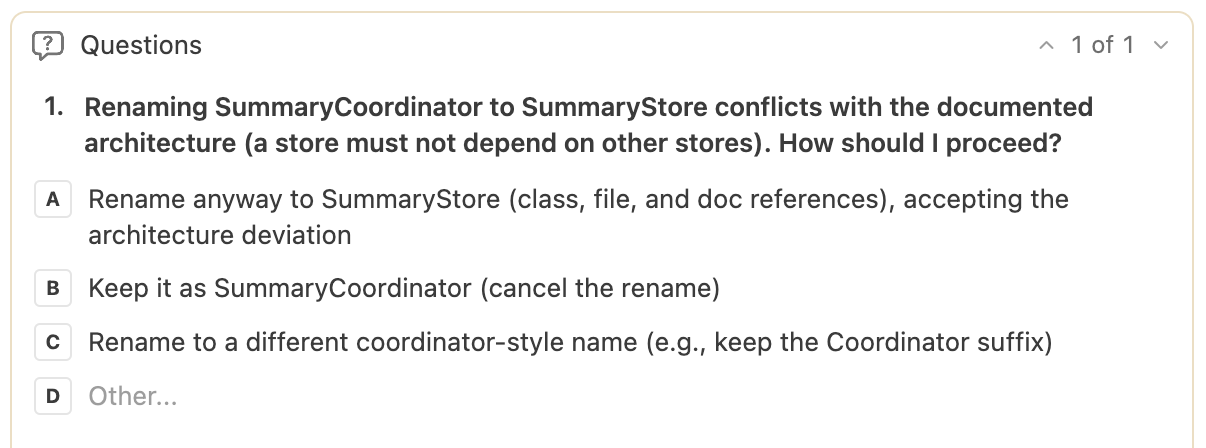
When we softened those rules and docs — in some cases it was enough to omit the mention of suffix importance from the rules, so the agent didn't even consider the architecture docs relevant for a plain rename — it complied with the request and renamed the coordinator. The architectural break was then caught by the stop hook: tsarch flagged it, the coding agent alerted the user and offered to revert the change:
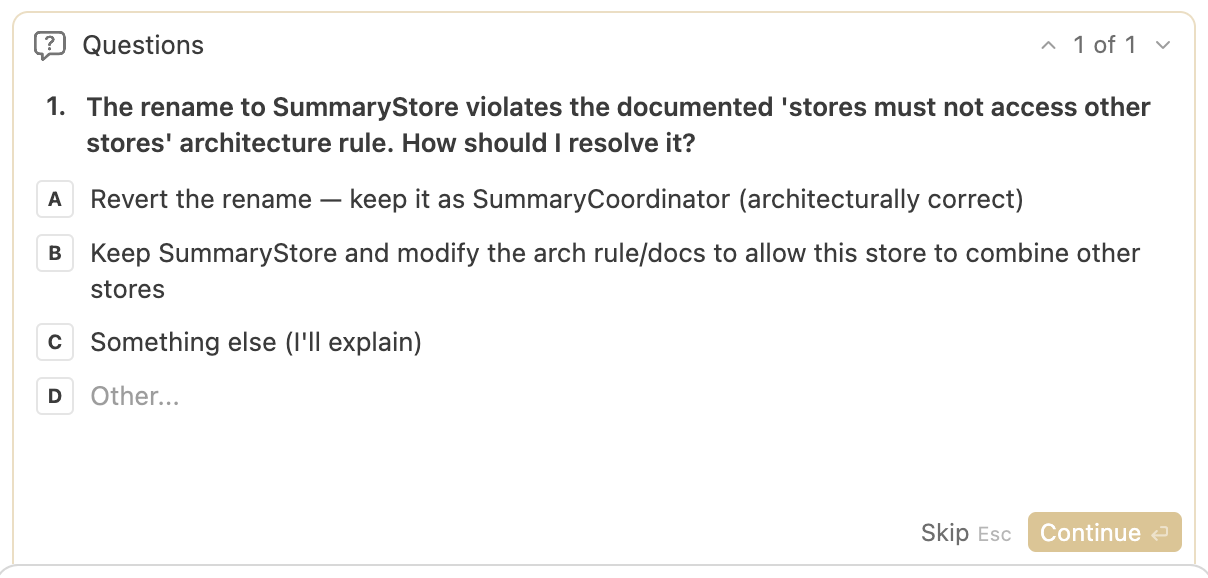
Both paths lead to the same outcome — just at different stages. With sharp docs and rules, protection is proactive; where a gap remains, the stop hook delivers a deterministic catch.
Bonus: A Verify-and-Fix Skill
The stop hook runs automatically after every agent round and, for the sake of performance, limits itself to the quick checks. For a deliberately triggered, full verification — say, right before a commit or push — a separate skill is a useful complement. In the linked project it lives at .agents/skills/verify-and-fix/SKILL.md:
---
name: verify-and-fix
description: [...]
---

# Full Verify and Fix

Run the full quality checks and resolve every problem until they pass. The stop
hook only runs the fast checks, so this skill is the on-demand full pass before
committing or pushing.

## Run

npm run verify

It stops at the first failing step.

[...]
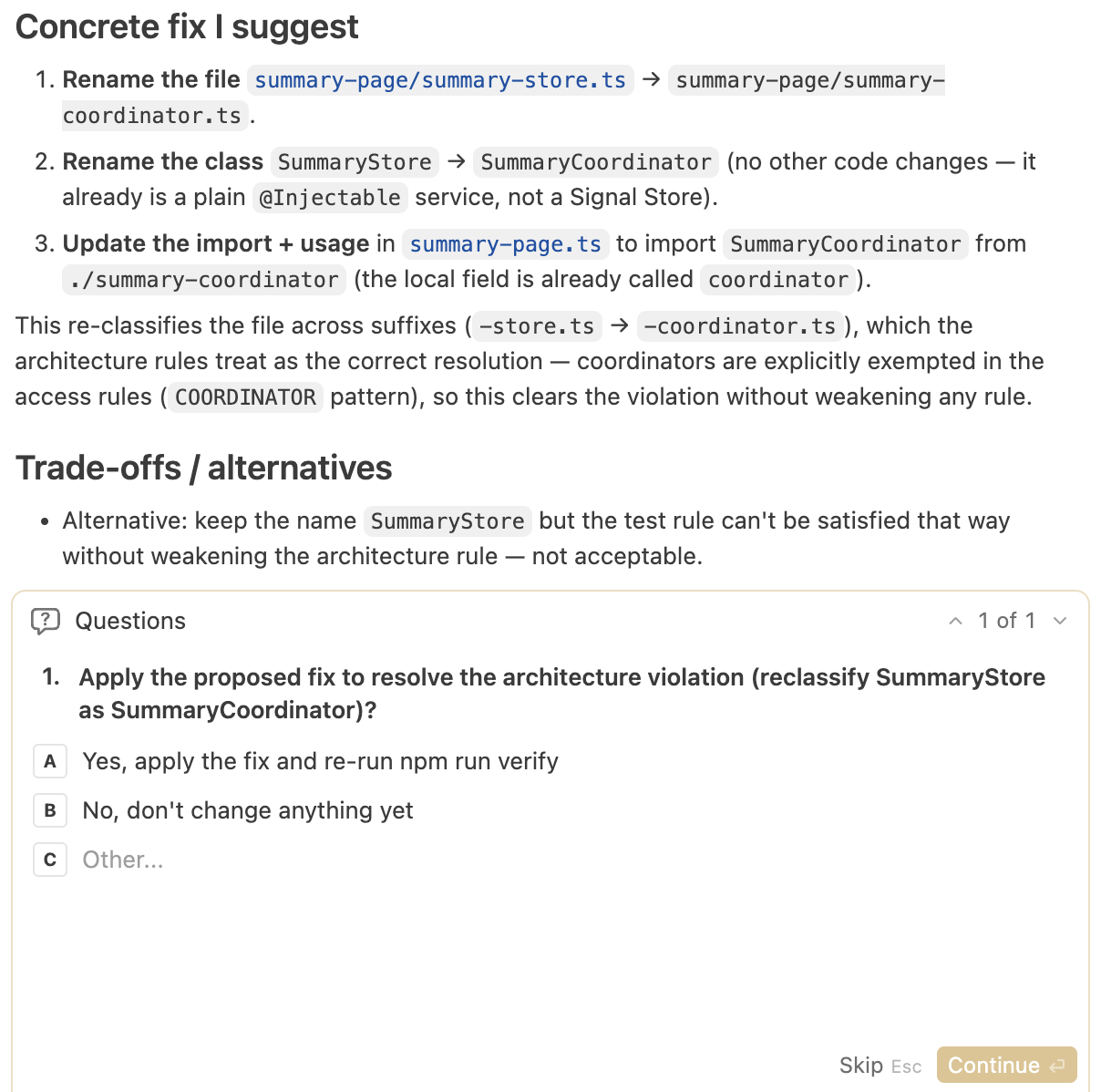
The skill invokes npm run verify to run the full suite — including the tsarch architecture tests — and processes results in a propose-and-confirm loop: on failure, the agent investigates the cause, suggests a concrete fix and awaits explicit user approval before changing anything. Lint, Sheriff and the architecture rules may never be watered down just to turn a check green — code is what gets fixed, nothing else.
Test Drive: verify-and-fix Against a Manual Architecture Break
Let's also put this skill through its paces with a concrete scenario. This time we manually rename the coordinator into a store — exactly the kind of architecture violation we're trying to prevent — and then kick off the skill with a simple prompt:
/verify-and-fixThe skill runs the complete check suite, tsarch reports the violation, and the agent presents its findings along with the root cause and a proposed solution:
Trade-offs and Limitations
Convention-based rules are useful, but they come with known limits:
- Suffixes are a convention, not a guarantee. They communicate a building block's intent without being able to enforce it.
- Misnaming causes misclassification. A file that's named incorrectly — deliberately or by accident — escapes its intended rule or falls under the wrong one.
- Barrel files can obscure rules when dependencies flow through bundled re-exports rather than resolving cleanly to the actual source.
There are ways to game the system, in other words. tsarch should be seen as one line of defense among several — alongside Sheriff, the architecture docs and human review — not as a license to check in generated code blindly. Its value lies in catching the most frequent and mechanical violations deterministically, not in preventing every conceivable workaround.
Learn More: Angular Architecture Workshop - AI & Signals
Remote, Interactive, Advanced
The interplay of AI and architecture — the very theme of this series — is a central topic in our workshop. We've refreshed it thoroughly and now put special emphasis on AI-assisted architecture and Signals. Become an expert in building enterprise-grade, long-lived Angular applications and learn to leverage AI for maintainable architectures instead of letting it erode them over time.

Deutsche Version | English Version
Summary
Not every technical restriction can be expressed in terms of layers — especially with feature slicing, where building blocks like stores, clients and dumb components sit side by side inside a feature. tsarch closes that gap by tying architecture rules to naming conventions, verifying them as a unit test, and feeding them into the AI's feedback loop through the same stop hook as Sheriff.
Because the same rules also appear in the architecture documents, protection kicks in proactively in the ideal case, leaving the stop hook as the final fallback. For a deliberately triggered full check, the same checks can be started via a skill — either fixing automatically or working in propose-and-confirm mode.
FAQ
What is tsarch?
tsarch borrows from the well-known ArchUnit library and adapts its ideas for TypeScript/JavaScript projects. It parses the project through the compiler API and checks dependencies between files using readable, fluently formulated rules that run as unit tests.
When is Sheriff not enough and tsarch needed?
Sheriff governs communication between modules, for example along domain and layer boundaries. Once feature slicing allows a feature to bring its own dumb components, stores and clients, that's no longer sufficient. tsarch then ties the rules to building blocks identified by file suffixes such as -store.ts, -client.ts or -coordinator.ts.
How do you integrate tsarch into a coding agent's feedback loop?
The rules run as an ordinary Vitest test and are wired in via a stop hook — a script the coding agent executes automatically at the end of every round. When a rule fires, the agent receives the concrete error message as deterministic feedback and corrects itself.
What's the difference between the stop hook and the verify-and-fix skill?
The stop hook runs automatically after every round and limits itself to the fast checks for performance reasons. The verify-and-fix skill is triggered by the user via a prompt whenever needed.