The Challenge of Showing Loading Feedback
Since Signals became part of Angular, moving away from complex RxJS pipelines felt like the natural evolution. And many of us did — at least to some degree. But there was always one capability we didn't want to give up: preserving the previous value when the reactive source updates — giving you finer command over loading and placeholder views, while preventing needless UI flickering.
This article explores how to manage loading and error states with the Angular Resource API — while preserving the existing data in both scenarios.
Loading Indicator – The Core Issue
When displaying a table of results, we usually have a search field that narrows down what's shown.
While the HTTP request is pending, we show a skeleton placeholder to the user. Although this approach works, certain UX recommendations suggest using a loading spinner instead — updating the results only after the new data arrives.
Let's examine how each method appears in practice.
Note: We'll compare both options — though to be transparent, this piece isn't meant to resolve UX debates, only to demonstrate the available tools.
Using a skeleton loader
Here's how the results appear when a new search is applied. A skeleton loader is shown.

Using a loading spinner
This is the target behavior
Here's the view when a fresh search is submitted. The existing results stay visible while a loading indicator appears. The new results are then displayed once the API answers.

Now focus on the preferred outcome — the loading indicator. How can we reach this with the Resource API when that API behaves as follows:
During an active request
{
   "value": null,
   "status": "loading",
   "error": null,
   "isLoading": true
}
After a request completes
{
  "value": T,
  "status": "resolved",
  "error": null,
  "isLoading": false
}
Examining the response while the request is pending, we see the previous results are lost since value is null. And yes, fortunately we have resource snapshots — and that's precisely what we'll leverage.

Understanding Resource Snapshots
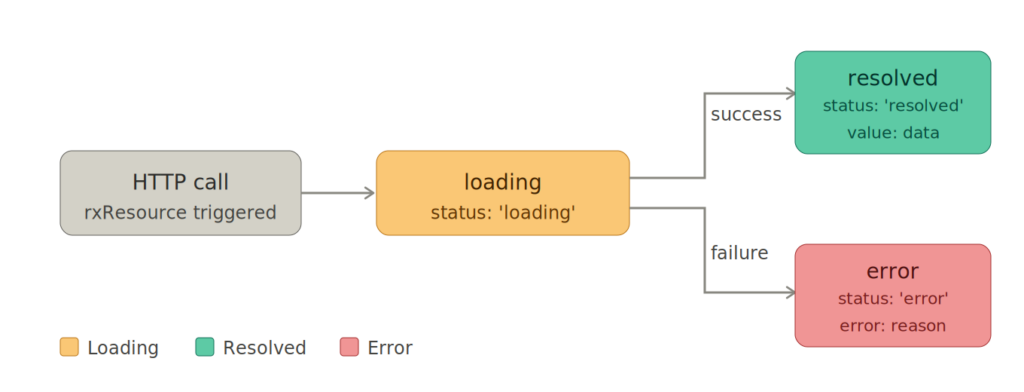
A ResourceSnapshot serves as a representation for every resource state. Each snapshot carries the properties value, status, and error.
When we fire an HTTP request, we first receive a snapshot with { status: 'loading' }; once it finishes, a snapshot with { value: T, status: 'resolved' } appears. If something fails, we get { error: error_object, status: 'error' }.
To see how we gain access to the snapshot, consider this example:
 productsResource = rxResource({
   params: () => this.searchTerm(),
   stream: ({ params }) => this.productsService.getProducts(params),
 });
Accessing the snapshot is done like this:
resourceSnapshot = productsResource.snapshot;
The snapshot is typed as ResourceSnapshot<T> and takes the following form:
type ResourceSnapshot<T> = {
    readonly status: 'idle';
    readonly value: T;
} | {
    readonly status: 'loading' | 'reloading';
    readonly value: T;
} | {
    readonly status: 'resolved' | 'local';
    readonly value: T;
} | {
    readonly status: 'error';
    readonly error: Error;
};
However, the snapshot can't be used directly in the UI — it's not a Resource. We must convert it back into a resource through the resourceFromSnapshots function.
import {  resourceFromSnapshots } from '@angular/core';

productsResource = resourceFromSnapshots(resourceSnapshot);
Now that the snapshot concept is clear, let's put it into practice.
Retaining Values During Loading
Wait — when isLoading is true, the value becomes undefined. So how do we preserve the old data? The answer lies in linkedSignal.
Take a look at the example straight from the angular.dev docs:
import {linkedSignal, resourceFromSnapshots, Resource, ResourceSnapshot} from '@angular/core';

function withPreviousValue<T>(input: Resource<T>): Resource<T> {
  const derived = linkedSignal<ResourceSnapshot<T>, ResourceSnapshot<T>>({
    source: input.snapshot,
    computation: (snap, previous) => {
      if (snap.status === 'loading' && previous && previous.value.status !== 'error') {
        return {status: 'loading' as const, value: previous.value.value};
      }
      return snap;
    },
  });
  return resourceFromSnapshots(derived);
}
@Component({
  /*... */
})
export class AwesomeProfile {
  userId = input.required<number>();
  user = withPreviousValue(httpResource(() => `/user/${this.userId()}`));
}
Let's break down withPreviousValue and see what it accomplishes.
function withPreviousValue<T>(input: Resource<T>): Resource<T> {
  const derived = linkedSignal<ResourceSnapshot<T>, ResourceSnapshot<T>>({
    // ...
  });
  return resourceFromSnapshots(derived);
}
This function takes a resource, derives a fresh snapshot based on certain logic, and transforms it back into a resource using resourceFromSnapshots.
Let's unpack the logic to see the details:
import {linkedSignal, resourceFromSnapshots, Resource, ResourceSnapshot} from '@angular/core';
function withPreviousValue<T>(input: Resource<T>): Resource<T> {
  const derived = linkedSignal<ResourceSnapshot<T>, ResourceSnapshot<T>>({
    source: input.snapshot,
    computation: (snap, previous) => {
      if (snap.status === 'loading' && previous && previous.value.status !== 'error') {
        return {status: 'loading' as const, value: previous.value.value};
      }
      return snap;
    },
  });
  return resourceFromSnapshots(derived);
}
The key lies in the computation function of the linkedSignal, which manages the resource's current active state and its previous state.
When the current status is loading and a previous value exists, it returns the loading status while keeping the previous value intact. And that's it — precisely our goal, isn't it?
All that remains is to apply the function:
@Component({
  /*... */
})
export class ProductResultsComponent {
 private _productsResource = rxResource({
   params: () => this.searchTerm(),
   stream: ({ params }) => this.productsService.getProducts(params),
 });
 productsResource = withPreviousValue(this._productsResource);
}
Done! Snapshots offer great power — and we're only beginning. Let's move on to the error scenario.

Showing Error Feedback While Keeping Data
Suppose we already have results in the grid and apply a new search that fails. How should we manage this? Should we discard the visible results, or keep the data while showing an error notification? Let's go with the latter.

Adding another condition seems simple enough. But there's a hurdle. The issue is that we can't merge status: 'error' with a value — the Resource API doesn't allow it.
type ResourceSnapshot<T> = {
    readonly status: 'idle';
    readonly value: T;
} | {
    readonly status: 'loading' | 'reloading';
    readonly value: T;
} | {
    readonly status: 'resolved' | 'local';
    readonly value: T;
} | {
    readonly status: 'error'; // <-- this is the type of our interest
    readonly error: Error;
};
Yet this is merely a TypeScript type — we can extend it and define our own. Let's attempt that route:
export type CustomResourceSnapshot<T> =
  | ResourceSnapshot<T>
  | {
      readonly status: 'error';
      readonly value: T;
      readonly error: Error;
    };
This approach will fail though — the Resource API throws when you attempt to read value in an error state, as this snippet from the Angular source shows:
// snippet from angular source code
  readonly value = computed(() => {
    if (this.state.status === 'error') {
      throw new ResourceValueError(this.state.error);
    }
    return this.state.value;
  });
ref: https://github.com/angular/angular/blob/main/packages/core/src/resource/from_snapshots.ts#L32
The Resource API handles mapping the HTTP response to a valid representation. To display an error banner while preserving the data, we need a custom function that kicks off a Resource and oversees its statuses — while adding a custom error flag separately.
export function resilientResource<T>(
  source: Resource<T>,
  options: {
    keepValueOnError?: boolean;
  } = {},
): ResilientResourceRef<T> {
  const hasError = signal(false); // <-- this is the flag of our interest

  const withValueOnError = (
    current: ResourceSnapshot<T>,
    previous: ResourceSnapshot<T> | undefined,
  ): ResourceSnapshot<T> => {
    if (current.status === 'error' && previous && previous.status !== 'error') {
      untracked(() => hasError.set(true)); // <-- set the error flag
      return { status: 'resolved', value: previous.value };
    }
    return current;
  };

  const handlers = [
    ...(options.keepValueOnError ? [withValueOnError] : []),
  ];

  const derivedSnapshot = linkedSignal<
    ResourceSnapshot<T>,
    ResourceSnapshot<T>
  >({
    source: source.snapshot,
    computation: (current, previous) =>
      handlers.reduce((acc, handler) => handler(acc, previous?.value), current),
  });

  const derived = resourceFromSnapshots(derivedSnapshot);

  return {
    value: computed(() => derived.value()),
    isLoading: computed(() => derived.isLoading()),
    error: computed(() => derived.error()),
    hasError: computed(() => hasError()), // <-- this is the custom error flag
  };
}
Here's how we use it within our component:
 protected readonly productsResource = resilientResource(
    this._productsResource,
    {
      keepValueOnError: true,
    },
);
And since we're manually tracking the error state, we can employ the hasError() flag in the template:
@if (productsResource.hasError()) {
    <mat-toolbar color="warn" class="error-banner">
      <span
        >Something went wrong with your last search. Please refine and try
        again.</span
      >
    </mat-toolbar>
  }
Excellent! With this custom function, we can now show an error banner while keeping the data displayed.
What about combining both handlers — the loading indicator plus the error banner — into a single utility?
Let's merge everything:
export function resilientResource<T>(
  source: Resource<T>,
  options: {
    keepValueWhileLoading?: boolean;
    keepValueOnError?: boolean;
  } = {},
): ResilientResourceRef<T> {
  const hasError = signal(false); // <-- this is the flag of our interest

  const withValueWhileLoading = (
    current: ResourceSnapshot<T>,
    previous: ResourceSnapshot<T> | undefined,
  ): ResourceSnapshot<T> => {
    untracked(() => hasError.set(false)); // <-- reset the error flag
    if (
      current.status === 'loading' &&
      previous &&
      previous.status !== 'error'
    ) {
      return { status: 'loading', value: previous.value };
    }
    return current;
  };

  const withValueOnError = (
    current: ResourceSnapshot<T>,
    previous: ResourceSnapshot<T> | undefined,
  ): ResourceSnapshot<T> => {
    if (current.status === 'error' && previous && previous.status !== 'error') {
      untracked(() => hasError.set(true)); // <-- set the error flag
      return { status: 'resolved', value: previous.value };
    }
    return current;
  };

  const handlers = [
    ...(options.keepValueWhileLoading ? [withValueWhileLoading] : []),
    ...(options.keepValueOnError ? [withValueOnError] : []),
  ];

  const derivedSnapshot = linkedSignal<
    ResourceSnapshot<T>,
    ResourceSnapshot<T>
  >({
    source: source.snapshot,
    computation: (current, previous) =>
      handlers.reduce((acc, handler) => handler(acc, previous?.value), current),
  });

  const derived = resourceFromSnapshots(derivedSnapshot);

  return {
    value: computed(() => derived.value()),
    isLoading: computed(() => derived.isLoading()),
    error: computed(() => derived.error()),
    hasError: computed(() => hasError()),
  };
}
We can now keep the value during loading, retain it on error, or simply opt for a basic resource with default behavior.
With resilientResource at your disposal, you gain fine-grained command over how your UI responds across every resource state — without sacrificing the simplicity that Signals brought.

Source Code
To see it working live, check out the repository branch here.
To run it locally, first clone the branch:
git clone -b 84/resource-snapshot-loading-error https://github.com/profanis/codeShotsWithProfanis.git
Next:
- launch the web server:
npm start - launch the Node.js server:
node server/index.js
Thank you for reading!