The syntax
To unpack the syntax, let’s walk through a straightforward illustration.
Picture a collection of items where we want to compute how many there are.
listOfItems = signal(['item1', 'item2', 'item3']);

countOfItems = linkedSignal(() => this.listOfItems().length);

// countOfItems = computed(() => this.listOfItems().length);
The structure parallels the computed approach, where the state is computed from the originating signal. As highlighted at the start, the key distinction is that linkedSignal lets us adjust the derived value directly:
changeTheCountOfItems() {
    this.countOfItems.set(0)
}
Now, let’s repeat the same exercise with an alternative syntax:
countOfItems = linkedSignal({
    source: this.listOfItems,
    computation: (items) => items.length,
});
With this variant, the source parameter takes a signal reference, and whenever that signal’s value shifts, the computation function gets triggered.
Regardless of the syntax chosen, if listOfitems holds 3 entries, then countOfItems yields 3. Should we append another element via this.listOfItems.update((items) => […items, ’item4′]), the countOfItems value will then dynamically reflect 4.
At first glance, it appears that both implementations achieve identical outcomes, with the shorter form being mere syntactic convenience. That assumption, however, is incorrect. By the time we finish, you’ll encounter scenarios that reveal the nuanced differences between these two notations.
Use Case – Signal Input
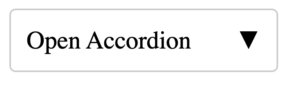
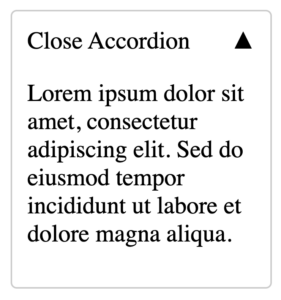
The input signals are read-only, yet situations arise where we must alter their value. Consider a compact accordion component that toggles its state with a click.
Close State
Open State
Code – Accordion Component
@Component({
  selector: 'app-accordion',
  template: `
    <div class="accordion">
      <div
        (click)="toggle()"
        [class.chevron-down]="!isOpen()"
        [class.chevron-up]="isOpen()"
      >
        {{ isOpen() ? 'Close' : 'Open' }} Accordion
      </div>
      @if (isOpen()) {
        <div class="content">
          <p>
            Lorem ipsum dolor sit amet, consectetur adipiscing elit. Sed do
            eiusmod tempor incididunt ut labore et dolore magna aliqua.
          </p>
        </div>
      }
    </div>
  `,
  styles: `
   // I omitted the styles for brevity
  `,
  changeDetection: ChangeDetectionStrategy.OnPush,
})
export class AccordionComponent {
  isOpen = signal(false);

  toggle() {
    this.isOpen.set(!this.isOpen());
  }
}
To manage the open/close behavior, we maintain the state in a writable-signal called isOpen. While this functions correctly, how do we enable consumers to determine the initial state (open or closed)?
One consumer may prefer accordions to default to an open state, whereas another might expect them to start closed.
To give consumers control, we’d convert isOpen into a signal input. However, signal inputs are non-writable, which prevents us from updating the state directly in the HTML template. This is precisely where a combination of a signal input and a linkedSignal becomes necessary.
Code – Accordion Component with linkedSignal
export class AccordionComponent {
 readonly isOpen = input(false);

 state = linkedSignal(() => this.isOpen());

 toggle() {
   this.state.set(!this.state());
 }
}
Breaking down the code:
- we’re turning isOpen into a signal input
- we form a writable-signal state that draws its value from the isOpen signal input
- we toggle the state signal and employ state, rather than isOpen, within the HTML template
Final HTML template
<div class="accordion">
  <div
    (click)="toggle()"
    [class.chevron-down]="!state()"
    [class.chevron-up]="state()"
  >
    {{ state() ? 'Close' : 'Open' }} Accordion
  </div>
  @if (state()) {
    <div class="content">
      <p>
        Lorem ipsum dolor sit amet, consectetur adipiscing elit. Sed do
        eiusmod tempor incididunt ut labore et dolore magna aliqua.
      </p>
    </div>
  }
</div>
This adjustment keeps the original value intact while ensuring everything stays properly synchronized.
Use Case – Conditional Derived State
Let’s explore another basic example involving a drop-down list whose items may mutate at runtime, perhaps fed by an HTTP request or another data source.
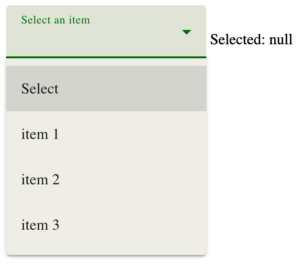
In the illustration above, nothing is selected, which is why Selected holds the value null.
Upon making a selection, we’d anticipate the following outcome:
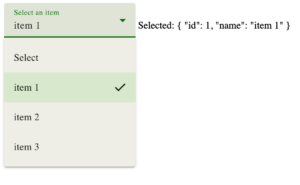
Now, let’s examine the code and gradually introduce refinements.
component.html
<mat-form-field appearance="fill">
  <mat-label>Select an item</mat-label>
  <mat-select [(value)]="selectedItem">
    <mat-option [value]="null">Select</mat-option>
    @for (item of listOfItems(); track $index) {
      <mat-option [value]="item">
        {{ item.name }}
      </mat-option>
    }
  </mat-select>
</mat-form-field>

Selected: {{ selectedItem() | json }}
component.ts
selectedItem = signal<Item | null>(null);

listOfItems: WritableSignal<Item[]> = signal([
  { id: 1, name: 'item 1' },
  { id: 2, name: 'item 2' },
  { id: 3, name: 'item 3' },
]);
The logic is simple: the selectedItem signal monitors the current selection, while the listOfItems signal array serves as our data source.
Suppose the data source gets refreshed dynamically, say via an HTTP response, and we want to reset the selectedItem state when the new payload no longer includes the chosen item. In all other situations, we retain the existing state.
We’ll add two methods to simulate the HTTP behavior.
changeTheItemsIncludingTheDefaultOnes() {
  this.listOfItems.set([
    { id: 1, name: 'item 1' },
    { id: 2, name: 'item 2' },
    { id: 3, name: 'item 3' },
    { id: 4, name: 'item 4' }, // introduced item
    { id: 5, name: 'item 5' }, // introduced item
  ]);
}

changeTheItemsExcludingTheDefaultOnes() {
  this.listOfItems.set([
    { id: 4, name: 'item 4' },
    { id: 5, name: 'item 5' },
  ]);
}
These methods are pretty clear. The first appends two additional items while keeping the existing ones; the second introduces only fresh items.
Let’s test it out!
# 1st example:
Pick an item from the select menu, then trigger changeTheItemsIncludingTheDefaultOnes.
Here, our expectation is that item 1 stays chosen, given that the updated source still contains it.
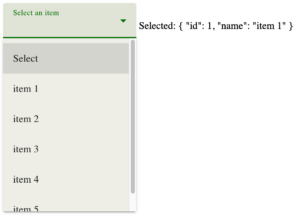
As observed, the result diverges from what we wanted ❌
While the selected state exists, the menu itself shows no selection. This discrepancy arises because the menu matches selected items by object reference, and the new items are entirely fresh objects.
# 2nd example:
Choose an item, then call changeTheItemsExcludingTheDefaultOnes.
In this instance, because the refreshed data omits the chosen item, we aim to both remove it from the menu and clear the selected state.
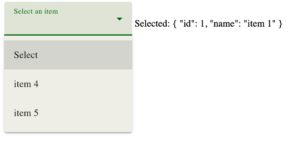
Once more, the outcome isn’t what we expected ❌
The chosen item vanishes from the menu, yet the selected state persists.
The Problem
In both cases, the root cause is mismanagement of the selectedItem.
The Solution
The remedy, naturally, is to manage selectedItem correctly 🙂
 // selectedItem = signal<Item | null>(null);

  selectedItem = linkedSignal<Item[], Item | null>({
    source: this.listOfItems,
    computation: (items, previous) => {
      return items.find((item) => item.id === previous?.value?.id) || null;
    },
  });
The crucial piece lives in the computation function. Whenever listOfItems receives a fresh value, computation runs with two arguments: the first is the raw data from the signal source, and the second represents the state of previously selected values.
linkedSignal with multiple sources
You may be curious whether linkedSignal can work with several signal sources. The quick answer is “Yes.” Here’s what the API signature looks like:
export declare function linkedSignal<S, D>(options: {
    source: () => S;
    computation: (source: NoInfer<S>, previous?: {
        source: NoInfer<S>;
        value: NoInfer<D>;
    }) => D;
    equal?: ValueEqualityFn<NoInfer<D>>;
}): WritableSignal<D>;
The source: () => S denotes a function that yields the type S. This implies we can supply as many sources as needed.
While I don’t have a polished demo handy, we can sketch out hypothetical needs. Imagine two signal sources, each producing a number. We want to have a linkedSignal return the combined total of those numbers.
Granted, it’s not the most realistic example, and it’s certainly not something for production. Still, it’s sufficient for experimentation.
signalSourceOne = signal(1);
signalSourceTwo = signal(2);

singleFromMultiple = linkedSignal<
  { sourceOne: number; sourceTwo: number }, // type of the source
  number // type of the return value
>({
  source: () => ({
    sourceOne: this.signalSourceOne(),
    sourceTwo: this.signalSourceTwo(),
  }),
  computation: (data) => {
    return data.sourceOne + data.sourceTwo;
  },
});
The linkedSignal takes two generic types: the source first, then the return value. In this case, the source is the object {sourceOne: number, sourceTwo: number}, and since we output the sum of both, the return type is number.
Within the source function, we hand back an object where each key captures the signal’s current value (mind the parentheses). If this feels confusing, consider how we might rewrite the earlier selectedItem example with this same pattern:
selectedItem = linkedSignal<Item[], Item | null>({
  source: () => this.listOfItems(), // we return a function
  computation: (items, previous) => {
    return items.find((item) => item.id === previous?.value?.id) || null;
  },
});
As of this writing, the feature sits in developer preview, but that shouldn’t discourage you from experimenting with it.
Thank you for reading!