
Ivy's new dynamic capabilities
The Ivy engine has introduced, and continues to bring, a substantial set of new features. The ability to load modules asynchronously—and, crucially, components themselves—is something that has long been a feature in other frameworks. In Vue, for instance, this can be achieved with a single line of code:
Vue.component('lazy', () => import('./lazy.component'));
Previously, lazy-loading a non-routable module was possible, but it was cumbersome. You could add the module to the lazyModules array in the Angular configuration and then swap out the NgModuleFactoryLoader token with SystemJsNgModuleLoader. However, this approach was never considered a best practice and demanded constant attention to keep the lazyModules list in sync.
With Ivy, this capability is finally available. The current API is still marked as private and exposed with a theta symbol, but that's hardly a deterrent. Some private functions, such as directiveInject, have already been discussed in various articles.
The function we'll focus on for managing asynchronous modules is createInjector.
Runtime injectors and the new Ivy API
Ivy introduces a new runtime function, createInjector, for creating injectors. This function takes the module's constructor as its first argument and a reference to the parent injector. The parent reference is optional, but it's essential to pass it if you want to link your asynchronous module into the existing DI hierarchy. Here's its signature:
function createInjector(
  defType: any,
  parent?: Injector | null,
  additionalProviders?: StaticProvider[] | null,
  name?: string
): Injector;
The createInjector function returns an instance of the R3Injector. Ivy's ability to handle asynchronous modules stems from the fact that modules are no longer compiled into a separate NgModuleDefinition. Instead, all the necessary information is stored directly in the static properties ngModuleDef and ngInjectorDef. Consider this code:
@NgModule({
  imports: [BrowserModule],
  declarations: [AppComponent],
  bootstrap: [AppComponent]
})
export class AppModule {}
This gets compiled to:
export class AppModule {
  public static ngModuleDef = defineNgModule({
    type: AppModule,
    imports: [BrowserModule],
    declarations: [AppComponent],
    bootstrap: [AppComponent]
  });

  public static ngInjectorDef = defineInjector({
    factory: () => new AppModule(),
    imports: [BrowserModule]
  });
}
defineInjector returns an InjectorDef, which Angular uses to set up an injector at runtime. When Angular instantiates any class, it calls the ngInjectorDef.factory function. If our AppModule had any dependencies, like:
@NgModule({
  imports: [BrowserModule],
  declarations: [AppComponent],
  bootstrap: [AppComponent]
})
export class AppModule {
  constructor(resolver: ComponentFactoryResolver) {}
}
the Ivy compiler would then generate an inject function to resolve those dependencies within the current injection context. This context is the active injector and is managed through an implicit global cursor. Ivy's instructions write a new value to this cursor and then move it. This global variable, _currentInjector, is used throughout Angular, as you can see here. The compiled output would look like this:
export class AppModule {
  public static ngModuleDef = defineNgModule({
    type: AppModule,
    imports: [BrowserModule],
    declarations: [AppComponent],
    bootstrap: [AppComponent]
  });

  public static ngInjectorDef = defineInjector({
    factory: () => new AppModule(
      inject(ComponentFactoryResolver)
    ),
    imports: [BrowserModule]
  });

  constructor(resolver: ComponentFactoryResolver) {}
}
The inject function moves the cursor through the tree of injectors, and at the end, the cursor's value is restored to its previous state.
When the first class is resolved, Angular calls setInjector and sets NgModuleRef<AppModule> as the current injection context. This ensures that all subsequent dependencies, such as ApplicationInitStatus, ApplicationRef, ApplicationModule, and BrowserModule, are resolved from the AppModule's injector. Restoring the injection context is a way to prevent memory leaks—for instance, _currentInjector shouldn't hold a reference to a child component's injector that is about to be destroyed.
Asynchronous modules in action
Let's explore how to create a carousel only when a user clicks a "show carousel" button. The following code assumes you've enabled the Ivy compiler with "enableIvy": true.
First, we'll create the CarouselComponent, which will cycle through numbers when the user clicks the "arrow left" or "arrow right" buttons:
import { Component, ChangeDetectionStrategy, HostListener } from '@angular/core';

@Component({
  selector: 'app-carousel',
  template: `
    <div class="carousel">
      <ng-template ngFor [ngForOf]="numbers" let-number let-index="index">
        <div class="number" *ngIf="activeIndex === index">{{ number }}</div>
      </ng-template>
    </div>
  `,
  styles: [
    `
      .carousel {
        width: 400px;
        height: 200px;
        display: flex;
        flex-direction: column;
        margin-bottom: 10px;
      }
      .number {
        height: 380px;
        display: flex;
        align-items: center;
        justify-content: center;
        background-color: crimson;
        color: white;
        font-size: 48px;
        font-family: monospace;
      }
    `
  ],
  changeDetection: ChangeDetectionStrategy.OnPush
})
export class CarouselComponent {
  public numbers = ['1', '2', '3', '4'];

  public activeIndex = 0;

  @HostListener('document:keyup.ArrowLeft')
  public previous(): void {
    this.activeIndex--;

    if (this.activeIndex < 0) {
      this.activeIndex = this.numbers.length - 1;
    }
  }

  @HostListener('document:keyup.ArrowRight')
  public next(): void {
    this.activeIndex++;

    if (this.activeIndex > this.numbers.length - 1) {
      this.activeIndex = 0;
    }
  }
}
Since we're focusing on asynchronous modules, our CarouselComponent should be part of a CarouselModule. Let's set that up:
import { NgModule, ComponentFactoryResolver, ComponentFactory } from '@angular/core';
import { CommonModule } from '@angular/common';

import { CarouselComponent } from './carousel.component';

@NgModule({
  imports: [CommonModule],
  declarations: [CarouselComponent]
})
export class CarouselModule {
  constructor(private resolver: ComponentFactoryResolver) {}

  public resolveCarouselComponentFactory(): ComponentFactory<CarouselComponent> {
    return this.resolver.resolveComponentFactory(CarouselComponent);
  }
}
You'll notice we don't need to add CarouselComponent to the entryComponents. Ivy's implementation of ComponentFactory doesn't require it. However, we still need to include CarouselComponent in the declarations. Now, let's load this module in our AppComponent and create the component using ViewContainerRef:
import {
  Component,
  ChangeDetectionStrategy,
  ɵcreateInjector as createInjector,
  Injector,
  ViewChild,
  ViewContainerRef
} from '@angular/core';

@Component({
  selector: 'app-root',
  template: `
    <ng-container #carousel></ng-container>
    <button (click)="showCarousel()">Show carousel</button>
  `,
  changeDetection: ChangeDetectionStrategy.OnPush
})
export class AppComponent {
  @ViewChild('carousel', { read: ViewContainerRef, static: true })
  public carousel: ViewContainerRef;

  constructor(private injector: Injector) {}

  public showCarousel(): void {
    import('./carousel/carousel.module').then(({ CarouselModule }) => {
      const injector = createInjector(CarouselModule, this.injector);
      const carouselModule = injector.get(CarouselModule);
      const componentFactory = carouselModule.resolveCarouselComponentFactory();
      const componentRef = this.carousel.createComponent(componentFactory);
      componentRef.changeDetectorRef.markForCheck();
    });
  }
}
Here's a step-by-step breakdown of what we're doing:
- First, we asynchronously load the module and create an injector.
- We retrieve the module instance from the injector's cache.
- Next, we get the
CarouselComponentfactory. ViewContainerRef.createComponentusesComponentFactory.createto instantiate the component and insert its host view.- We call
markForCheckto ensure change detection runs, since ourCarouselComponentis inside a component with aChangeDetectionStrategy.OnPushstrategy.
This example is straightforward, but it demonstrates Ivy's support for asynchronous modules. This is a highly convenient way to build components on the fly and package third-party libraries into asynchronous chunks.
Let's dive a bit deeper and refactor our code to use a portal from the Angular CDK:
import {
  NgModule,
  ComponentFactoryResolver,
  Injector,
  ViewContainerRef,
  ApplicationRef,
  ComponentRef
} from '@angular/core';
import { CommonModule } from '@angular/common';
import { DomPortalHost, ComponentPortal } from '@angular/cdk/portal';

import { CarouselComponent } from './carousel.component';

@NgModule({
  imports: [CommonModule],
  declarations: [CarouselComponent]
})
export class CarouselModule {
  constructor(
    private resolver: ComponentFactoryResolver,
    private app: ApplicationRef,
    private injector: Injector
  ) {}

  public renderCarousel(viewContainerRef: ViewContainerRef): ComponentRef<CarouselComponent> {
    const host = new DomPortalHost(
      viewContainerRef.element.nativeElement,
      this.resolver,
      this.app,
      this.injector
    );

    const portal = new ComponentPortal(
      CarouselComponent,
      viewContainerRef,
      this.injector,
      this.resolver
    );

    const componentRef = portal.attach(host);
    componentRef.changeDetectorRef.markForCheck();
    return componentRef;
  }
}
This is quite easy. We now need to get an instance of our module and call the renderCarousel method. Notice that we've placed the portal creation inside our asynchronous module, so @angular/cdk/portal will be bundled together with CarouselModule:
import {
  Component,
  ChangeDetectionStrategy,
  ɵcreateInjector as createInjector,
  Injector,
  ViewChild,
  ViewContainerRef
} from '@angular/core';

@Component({
  selector: 'app-root',
  template: `
    <div #carousel></div>
    <button (click)="showCarousel()">Show carousel</button>
  `,
  styles: [
    `
      button {
        border: 2px solid crimson;
        background: transparent;
        font-size: 24px;
        font-family: monospace;
        padding: 10px;
        cursor: pointer;
      }
    `
  ],
  changeDetection: ChangeDetectionStrategy.OnPush
})
export class AppComponent {
  @ViewChild('carousel', { read: ViewContainerRef, static: true })
  public carousel: ViewContainerRef;

  constructor(private injector: Injector) {}

  public showCarousel(): void {
    import('./carousel/carousel.module').then(({ CarouselModule }) => {
      const injector = createInjector(CarouselModule, this.injector);
      const carouselModule = injector.get(CarouselModule);
      carouselModule.renderCarousel(this.carousel);
    });
  }
}
I've swapped the ng-container for a div, as portals use appendChild to insert the root node of the dynamic view.
Asynchronous components and the new renderComponent function
renderComponent is a new feature in the Ivy API. It's not officially documented yet, but as the comments explain:
Each invocation of this function will create a separate tree of components, injectors and change detection cycles and lifetimes. To dynamically insert a new component into an existing tree such that it shares the same injection, change detection and object lifetime, use
ViewContainerRef.createComponent.
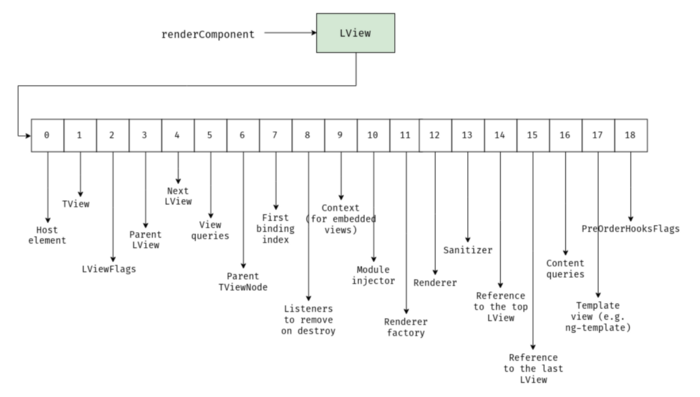
renderComponent creates an "LView" ("L" for "logical"). Every component has its own LView, which is a data structure that stores all the information needed to initialize a component or an embedded template. An LView is an array with a minimum of 18 elements, where each index holds a specific data structure.
One issue I've run into with the renderComponent function is that styles aren't projectable. Let's say we have a ButtonComponent:
import { Component } from '@angular/core';

@Component({
  selector: 'app-button',
  template: `
    <button>Click me</button>
  `,
  styles: [
    `
      button {
        background: red;
      }
    `
  ]
})
export class ButtonComponent {}
If we lazy-load this component and bootstrap it into an existing host element:
import { Component, ɵrenderComponent as renderComponent, Injector } from '@angular/core';

@Component({
  selector: 'app-root',
  template: `
    <app-button></app-button>
  `
})
export class AppComponent {
  constructor(injector: Injector) {
    import('./button.component').then(({ ButtonComponent }) => {
      renderComponent(ButtonComponent, { injector });
    });
  }
}
The button will not turn red, and the styles declared in the styles property won't be injected into the style element.
An interesting note about renderComponent: if you're wondering why lifecycle hooks don't run for asynchronous components, you need to add the necessary features. These can be passed via the hostFeatures option. Features are functions that take the component instance and its definition as arguments.
If we want these methods to be called by Angular:
import { Component, OnInit, AfterViewInit } from '@angular/core';

@Component({
  selector: 'app-button',
  template: `
    <button>Click me</button>
  `
})
export class ButtonComponent implements OnInit, AfterViewInit {
  public ngOnInit(): void {
    console.log(`${ButtonComponent.name} ngOnInit...`);
  }

  public ngAfterViewInit(): void {
    console.log(`${ButtonComponent.name} ngAfterViewInit...`);
  }
}
We need to enable lifecycle hooks by including the LifecycleHooksFeature:
import {
  Component,
  ɵrenderComponent as renderComponent,
  Injector,
  ɵLifecycleHooksFeature as LifecycleHooksFeature
} from '@angular/core';

@Component({
  selector: 'app-root',
  template: `
    <app-button></app-button>
  `
})
export class AppComponent {
  constructor(injector: Injector) {
    import('./button.component').then(({ ButtonComponent }) => {
      renderComponent(ButtonComponent, {
        injector,
        hostFeatures: [LifecycleHooksFeature]
      });
    });
  }
}
What about change detection? For instance, if we want to set the button's text after creation from the parent component:
import { Component, OnInit, AfterViewInit } from '@angular/core';

@Component({
  selector: 'app-button',
  template: `
    <button>{{ text }}</button>
  `
})
export class ButtonComponent implements OnInit, AfterViewInit {
  public text: string = null;

  public ngOnInit(): void {
    console.log(`${ButtonComponent.name} ngOnInit...`);
  }

  public ngAfterViewInit(): void {
    console.log(`${ButtonComponent.name} ngAfterViewInit...`);
  }
}
We have to manually mark the view as dirty:
import {
  Component,
  ɵrenderComponent as renderComponent,
  Injector,
  ɵLifecycleHooksFeature as LifecycleHooksFeature,
  ɵmarkDirty as markDirty
} from '@angular/core';

@Component({
  selector: 'app-root',
  template: `
    <app-button></app-button>
  `
})
export class AppComponent {
  constructor(injector: Injector) {
    import('./button.component').then(({ ButtonComponent }) => {
      const buttonComponent = renderComponent(ButtonComponent, {
        injector,
        hostFeatures: [LifecycleHooksFeature]
      });

      buttonComponent.text = 'Click me';
      markDirty(buttonComponent);
    });
  }
}
By the way, markDirty performs the same function as ViewRef.markForCheck, but it also schedules change detection via requestAnimationFrame.
You might not need renderComponent
There's an alternative to this function. You can simply load the component asynchronously and get its factory using ComponentFactoryResolver.resolveComponentFactory. There's no need to add the component to the entryComponents of any module, as Ivy's ComponentFactoryResolver can generate a ComponentFactory directly from the ngComponentDef. Let's look at the following code:
import {
  Component,
  ChangeDetectionStrategy,
  ViewChild,
  ViewContainerRef,
  ComponentFactoryResolver,
  Injector
} from '@angular/core';

@Component({
  selector: 'app-root',
  template: `
    <ng-container #button></ng-container>
  `,
  changeDetection: ChangeDetectionStrategy.OnPush
})
export class AppComponent {
  @ViewChild('button', { read: ViewContainerRef, static: true })
  public button: ViewContainerRef;

  constructor(resolver: ComponentFactoryResolver, injector: Injector) {
    import('./button.component').then(({ ButtonComponent }) => {
      const componentFactory = resolver.resolveComponentFactory(ButtonComponent);
      const componentRef = this.button.createComponent(componentFactory, 0, injector);
      componentRef.instance.text = 'Click me';
      componentRef.changeDetectorRef.markForCheck();
    });
  }
}
Summary
Ivy enables loading modules and components asynchronously because it keeps all the necessary initialization data in static class properties, rather than in a separately compiled NgModuleDefinition or ViewDefinition. The most significant advantage Ivy offers is its remarkable extensibility and the ability to isolate business logic.
The code can be found on GitHub: ivy-asynchronous-module.