Core Operations During Change Detection
When Angular initiates change detection on a component view, it executes a sequence of operations.
These are commonly called side effects, meaning they impact state beyond the immediate computation:
In computer science, an operation, function or expression is said to have a side effect if it modifies
some state variable value(s) outside its local environment, which is to say if it has any observable effect other
than its primary effect of returning a value to the invoker of the operation.
The central side effect of change detection in Angular is translating application state into the target platform.
Typically, the target platform is the browser, the application state consists of component properties,
and the rendering process modifies the DOM.
Angular performs several additional operations when checking a component.
These can be identified by inspecting the refreshView function.
A simplified version of the function body, annotated with my explanations, looks like this:
function refreshView(tView, lView, templateFn, context) {
  enterView(lView);

  try {
    if (templateFn !== null) {
      // update input bindings on child components
      // execute ngOnInit, ngOnChanges and ngDoCheck hooks
      // update DOM on the current component
      executeTemplate(tView, lView, templateFn, RenderFlags.Update, context);
    }

    // execute ngOnInit, ngOnChanges and ngDoCheck hooks
    // if they haven't been executed from the template function
    const preOrderCheckHooks = tView.preOrderCheckHooks;
    if (preOrderCheckHooks !== null) {
      executeCheckHooks(lView, preOrderCheckHooks, null);
    }

    // First mark transplanted views that are declared in this lView as needing a refresh at their
    // insertion points. This is needed to avoid the situation where the template is defined in this
    // `LView` but its declaration appears after the insertion component.
    markTransplantedViewsForRefresh(lView);

    // Refresh views added through ViewContainerRef.createEmbeddedView()
    refreshEmbeddedViews(lView);

    // Content query results must be refreshed before content hooks are called.
    if (tView.contentQueries !== null) {
      refreshContentQueries(tView, lView);
    }

    // execute content hooks (AfterContentInit, AfterContentChecked)
    const contentCheckHooks = tView.contentCheckHooks;
    if (contentCheckHooks !== null) {
      executeCheckHooks(lView, contentCheckHooks);
    }

    // execute logic added through @HostBinding()
    processHostBindingOpCodes(tView, lView);

    // Refresh child component views.
    const components = tView.components;
    if (components !== null) {
      refreshChildComponents(lView, components);
    }

    // View queries must execute after refreshing child components because a template in this view
    // could be inserted in a child component. If the view query executes before child component
    // refresh, the template might not yet be inserted.
    const viewQuery = tView.viewQuery;
    if (viewQuery !== null) {
      executeViewQueryFn<T>(RenderFlags.Update, viewQuery, context);
    }

    // execute view hooks (AfterViewInit, AfterViewChecked)
    const viewCheckHooks = tView.viewCheckHooks;
    if (viewCheckHooks !== null) {
      executeCheckHooks(lView, viewCheckHooks);
    }

    // reset the dirty state after the component is checked
    if (!isInCheckNoChangesPass) {
      lView[FLAGS] &= ~(LViewFlags.Dirty | LViewFlags.FirstLViewPass);
    }

    // this one is tricky :) requires its own section, we'll explore it later
    if (lView[FLAGS] & LViewFlags.RefreshTransplantedView) {
      lView[FLAGS] &= ~LViewFlags.RefreshTransplantedView;
      updateTransplantedViewCount(lView[PARENT] as LContainer, -1);
    }

  } finally {
    leaveView();
  }
}
The “Inside Rendering Engine” section will provide a thorough examination of each operation.
For now, let’s focus on the primary operations executed during change detection as derived from the function above.
The following list outlines these operations in their execution order:
- executing a template function in update mode for the current view
- validates and updates input properties on a child component/directive instance
- executes the hooks on a child component
ngOnInit,ngDoCheckandngOnChangesif bindings changed - updates DOM interpolations for the current view when properties on the current view component instance have changed
- executeCheckHooks when they were not run in the previous step
- markTransplantedViewsForRefresh
- identifies transplanted views further down the LView chain that need refreshing and flags them as dirty
- refreshEmbeddedViews
- runs change detection for views created via
ViewContainerRefAPIs (largely repeating the steps in this list)
- runs change detection for views created via
- refreshContentQueries
- refreshes the
ContentChildrenquery list on a child view component instance
- refreshes the
- execute Content CheckHooks (
AfterContentInit,AfterContentChecked)- invokes the
AfterContentCheckedlifecycle hook on a child component instance (AfterContentInitruns only during the initial check)
- invokes the
- processHostBindingOpCodes
- validates and updates DOM properties on a host DOM element decorated with
@HostBinding()within the component class
- validates and updates DOM properties on a host DOM element decorated with
- refreshChildComponents
- runs change detection for child components referenced in the current component’s template.
OnPushcomponents are skipped when they are not marked dirty
- runs change detection for child components referenced in the current component’s template.
- executeViewQueryFn
- refreshes the
ViewChildrenquery list on the current view component instance
- refreshes the
- execute View CheckHooks (
AfterViewInit,AfterViewChecked)- invokes the
AfterViewCheckedlifecycle hook on a child component instance (AfterViewInitruns only during the initial check)
- invokes the
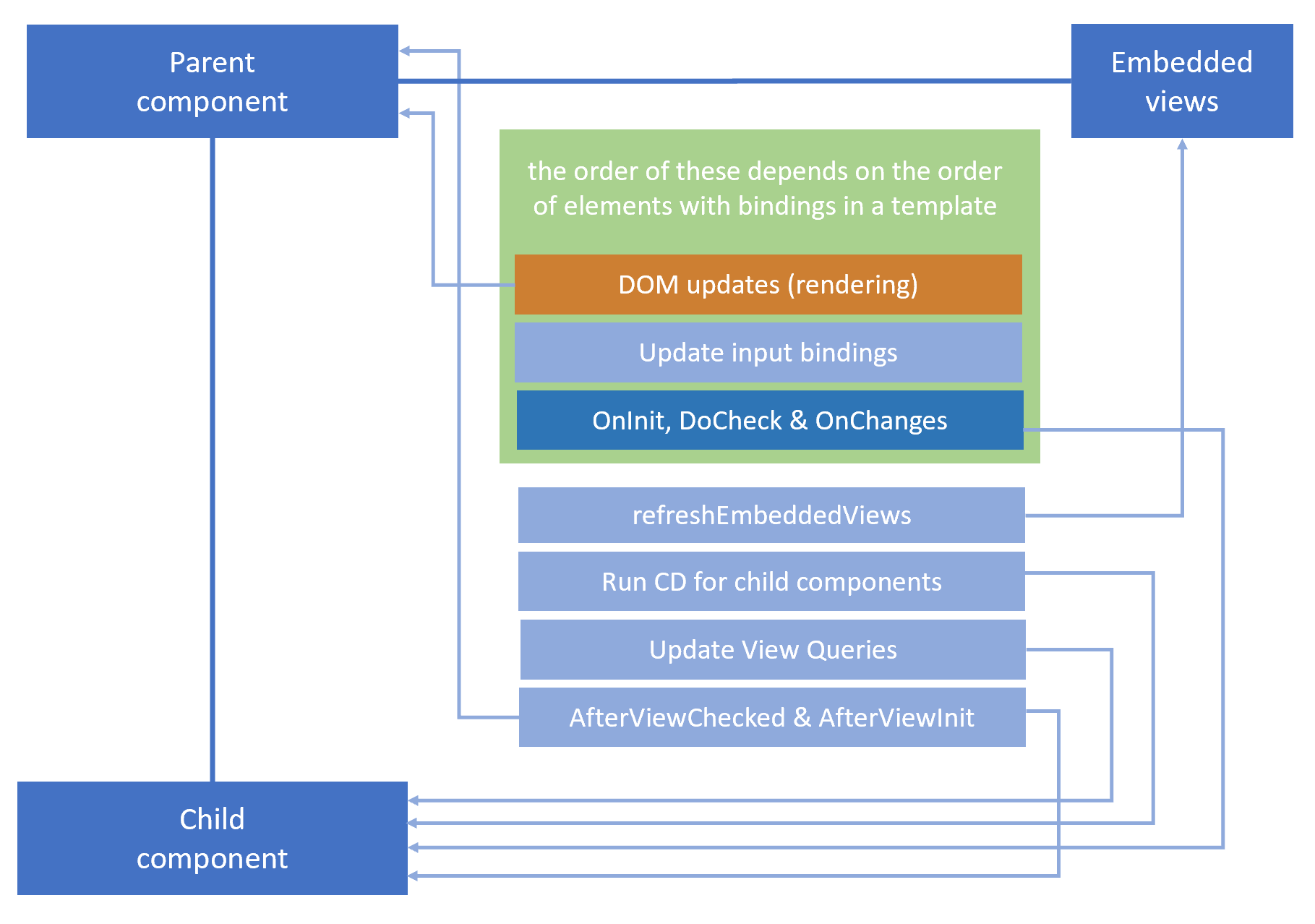
The diagram below illustrates these operations:
Key Observations from the Operations
Several noteworthy points emerge when examining the operations outlined earlier. Perhaps the most striking insight is that
change detection on a given view is what triggers change detection for its child views.
This stems directly from the refreshChildComponents operation (#8 in the sequence).
For every child component, Angular invokes the
refreshComponent
routine:
function refreshComponent(hostLView, componentHostIdx) {
  const componentView = getComponentLViewByIndex(componentHostIdx, hostLView);
  // Only attached components that are CheckAlways
  // or OnPush and dirty should be refreshed
  if (viewAttachedToChangeDetector(componentView)) {
    const tView = componentView[TVIEW];
    if (componentView[FLAGS] & (LViewFlags.CheckAlways | LViewFlags.Dirty)) {
      refreshView(tView, componentView, tView.template, componentView[CONTEXT]);
    } else if (componentView[TRANSPLANTED_VIEWS_TO_REFRESH] > 0) {
      // Only attached components that are CheckAlways
      // or OnPush and dirty should be refreshed
      refreshContainsDirtyView(componentView);
    }
  }
}
A conditional check determines whether a component is eligible for checking:
  if (viewAttachedToChangeDetector(componentView)) { ... }
  if (componentView[FLAGS] & (LViewFlags.CheckAlways | LViewFlags.Dirty)) { ... }
The fundamental requirement is that the component's changeDetectorRef remains attached to the component tree.
If it has been detached, neither the component itself, nor its descendants, nor any transplanted views it contains will undergo checking.
Provided the primary condition passes, the component gets checked unless it's marked as OnPush and clean, or if it is OnPush but flagged as dirty.
At the conclusion of the refreshView function, there is routine that clears the dirty marker on an
OnPush component:
// reset the dirty state after the component is checked
if (!isInCheckNoChangesPass) {
  lView[FLAGS] &= ~(LViewFlags.Dirty | LViewFlags.FirstLViewPass);
}
Lastly, if the component hosts any transplanted views, those are processed as well:
if (componentView[TRANSPLANTED_VIEWS_TO_REFRESH] > 0) {
  // Only attached components that are CheckAlways or OnPush and dirty should be refreshed
  refreshContainsDirtyView(componentView);
}
Template Execution
The executeTemplate function, which Angular invokes at the start of change detection,
is responsible for running the template function stored in the component's definition.
This template function is produced by the compiler individually for each component.
Consider the component labeled as A:
@Component({
  selector: 'a-cmp',
  template: `<b-cmp [b]="1"></b-cmp> {{ updateTemplate() }}`,
})
export class A {
  ngDoCheck() {
    console.log('A: ngDoCheck');
  }
  ngAfterContentChecked() {
    console.log('A: ngAfterContentChecked');
  }
  ngAfterViewChecked() {
    console.log('A: ngAfterViewChecked');
  }
  updateTemplate() {
    console.log('A: updateTemplate');
  }
}
Its definition takes the following form:
import {
  ɵɵdefineComponent as defineComponent,
  ɵɵelement as element,
  ɵɵtext as text,
  ɵɵproperty as property,
  ɵɵadvance as advance,
  ɵɵtextInterpolate as textInterpolate
} from '@angular/core';

export class A {}

A.ɵfac = function A_Factory(t) { return new (t || A)(); };
A.ɵcmp = defineComponent({
    type: A,
    selectors: [["a-cmp"]],
    template: function A_Template(rf, ctx) {
      if (rf & 1) {
        element(0, "b-cmp", 0);
        text(1);
      }
      if (rf & 2) {
        property("b", 1);
        advance(1);
        textInterpolate(" ", ctx.updateTemplate(), "");
      }
    },
    ...
  }
);
All functions imported from the package are prefixed with ɵɵ to denote their private status.
The template may contain an array of instructions. In this example, the creation-time instructions element
and text run during initialization, while property, advance, and textInterpolate
are executed during the change detection pass:
function A_Template(rf, ctx) {
  if (rf & 1) {
    element(0, 'b-cmp', 0);
    text(1);
  }
  if (rf & 2) {
    property('b', 1);
    advance(1);
    textInterpolate(' ', ctx.updateTemplate(), '');
  }
}
These are the precise instructions that run sequentially during each change detection cycle.
Lifecycle Hooks
Angular components rely on lifecycle hook methods to observe critical events throughout the life of a component or directive.
This lifecycle commences when Angular instantiates the component class and renders its view along with any child views.
Change detection then drives the lifecycle forward as Angular monitors data-bound property changes,
refreshing both the view and the component instance where needed.
The lifecycle concludes when Angular disposes of the component instance and removes its template from the DOM.
Keep in mind that lifecycle hook methods are invoked during the change detection process.
Below is the complete roster of lifecycle hook methods:
- onChanges
- onInit
- doCheck
- afterContentInit
- afterContentChecked
- afterViewInit
- afterViewChecked
- ngOnDestroy
Among these, onInit, afterContentInit, and afterViewInit fire solely during the initial change detection pass (the first run).
The ngOnDestroy hook is called exactly once just before the component is torn down.
The remaining four methods execute on every change detection cycle:
- onChanges
- doCheck
- afterContentChecked
- afterViewChecked
One might view the component's constructor as a kind of lifecycle event, invoked as the component instance comes into existence.
However, a significant distinction exists between the constructor and lifecycle methods regarding the component's initialization flow.
The Angular bootstrap sequence is split into two major phases:
- building the component tree
- performing change detection
During the tree construction phase, the constructor of each component is called. All lifecycle hooks, including ngOnInit, are triggered later as part of the change detection phase.
Another crucial detail is that the majority of lifecycle hooks execute on the child component while Angular is processing change detection for the current component.
The only exception is the ngAfterViewChecked hook, which behaves differently.
To illustrate the sequence, we can arrange a hierarchy of three components, [A -> B -> C], and log the order of method invocations:
@Component({
  selector: 'a-cmp',
  template: `<b-cmp [b]="1"></b-cmp> {{ updateTemplate() }}`,
})
export class A {
  ngDoCheck() {
    console.log('A: ngDoCheck');
  }
  ngAfterContentChecked() {
    console.log('A: ngAfterContentChecked');
  }
  ngAfterViewChecked() {
    console.log('A: ngAfterViewChecked');
  }
  updateTemplate() {
    console.log('A: updateTemplate');
  }
}

@Component({
  selector: 'b-cmp',
  template: `<c-cmp [b]="1"></b-cmp> {{updateTemplate()}}`,
})
export class B {}

@Component({
  selector: 'c-cmp',
  template: `{{ updateTemplate() }}`,
})
export class C {}
The order in which hooks and bindings are updated appears as follows:
Entering view: A
    B: updateBinding
    B: ngOnChanges
    B: ngDoCheck
        A: updateTemplate
    B: ngAfterContentChecked
    Entering view: B
        С: updateBinding
        C: ngOnChanges
        С: ngDoCheck
            B: updateTemplate
        С: ngAfterContentChecked
        Entering view: C
            С: updateTemplate
            С: ngAfterViewChecked
    B: ngAfterViewChecked
A: ngAfterViewChecked
You can verify this in this live example.
As observed, while Angular is checking A, the ngOnChanges and ngDoCheck methods
are triggered on component B. This might seem surprising at first, yet it is entirely consistent.
When Angular runs change detection on A, it processes the instructions in its template,
which in turn update bindings on the child B component.
Once the properties on B are refreshed, it is natural to inform B
by invoking ngOnChanges on that component.
View and Content Queries
View and content queries are our tools for accessing elements within a component's template at runtime.
The results of a query are typically accessible within the ngAfterViewChecked or ngAfterContentChecked hooks.
Examining the operation order makes this placement clear:
// Content query results must be refreshed before content hooks are called.
if (tView.contentQueries !== null) {
  refreshContentQueries(tView, lView);
}

// execute content hooks (AfterContentInit, AfterContentChecked)
const contentCheckHooks = tView.contentCheckHooks;
if (contentCheckHooks !== null) {
  executeCheckHooks(lView, contentCheckHooks);
}

...

// View query results must be refreshed before content hooks are called.
const viewQuery = tView.viewQuery;
if (viewQuery !== null) {
  executeViewQueryFn<T>(RenderFlags.Update, viewQuery, context);
}

// execute view hooks (AfterViewInit, AfterViewChecked)
const viewCheckHooks = tView.viewCheckHooks;
if (viewCheckHooks !== null) {
  executeCheckHooks(lView, viewCheckHooks);
}
These correspond to operations #5 and #6 for Content Queries, and #9 and #10 for View Queries in the earlier sequence.
Angular updates query results by executing a function defined in the component's definition.
For a component definition that looks like this:
@Component({
  selector: 'c-cmp',
  template: ``,
})
export class C {
  @ViewChild('ctrl') viewChild: any;
  @ContentChild('ctrl') contentChild: any;

  title = 'c-comp is here';
}
the corresponding query update function appears as:
C.ɵcmp = defineComponent({
  type: C,
  selectors: [["c-cmp"]],
  contentQueries: function C_ContentQueries(rf, ctx, dirIndex) {
    if (rf & 1) {
      contentQuery(dirIndex, _c0, 5);
    }
    if (rf & 2) {
      let _t;
      queryRefresh(_t = ["loadQuery"]()) && (ctx.contentChild = _t.first);
    }
  },
  viewQuery: function C_Query(rf, ctx) {
    if (rf & 1) {
      viewQuery(_c0, 5);
    }
    if (rf & 2) {
      let _t;
      queryRefresh(_t = ["loadQuery"]()) && (ctx.viewChild = _t.first);
    }
  },
  template: function C_Template(rf, ctx) {},
  ...
});
Embedded Views
Angular offers a way to introduce dynamic behavior into a component's template through view containers.
A view container is established using the ng-container element within the template and is accessed via an @ViewChild query.
These containers allow you to instantiate template code, making it easy to reuse and adjust on the fly.
View containers expose an API for creating, manipulating, and deleting dynamic views.
I refer to these as dynamic views to distinguish them from static views, which Angular generates automatically for components in the template.
For static views, Angular does not rely on a view container; instead, it maintains references to child views within the node dedicated to the respective child component.
We will explore the differences between view types further in the "Inside Rendering Engine" section.
Embedded views originate from templates when a TemplateRef is instantiated via the viewContainerRef.createEmbeddedView() method.
View containers can also host host views, created by instantiating a component via the createComponent() method.
A view container may hold other view containers, leading to a nested view hierarchy.
Every structural directive, such as ngIf or ngFor, relies on a view container to generate dynamic views from the directive's template.
These embedded views get processed during step #4 in the operation list:
// Refresh views added through ViewContainerRef.createEmbeddedView()
refreshEmbeddedViews(lView);
For a template such as this:
<span>My component</span>
<ng-container
  [ngTemplateOutlet]="template"
  [ngTemplateOutletContext]="{$implicit: greeting}"
>
</ng-container>
<a-comp></a-comp>
<ng-template>
  <span>I am an embedded view</span>
  <ng-template></ng-template
></ng-template>
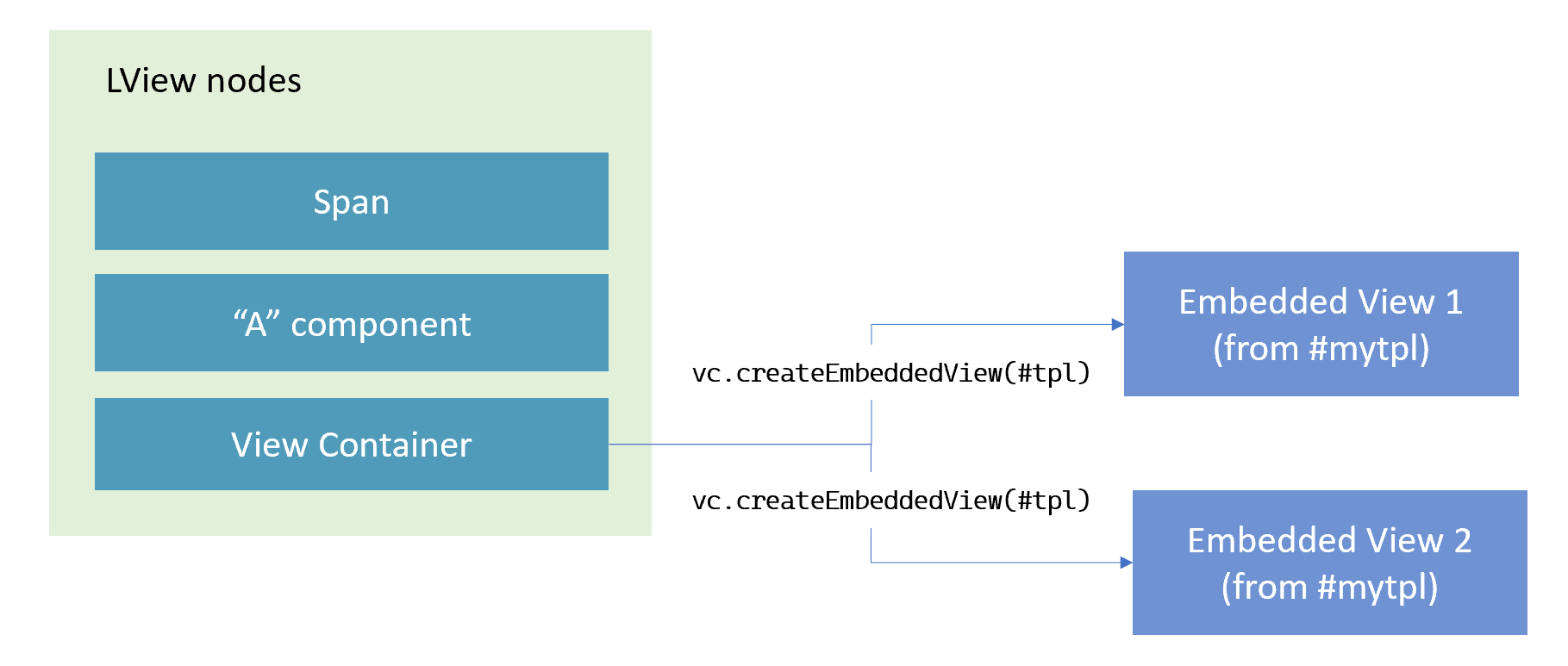
the nodes inside the LView can be visualized in this manner:
There is a special category of embedded view known as a transplanted view.
A transplanted view is an embedded view whose template is defined outside the template of the component that hosts the view.
The component containing the original <ng-template> declaration is not the same
as the component that uses a view container to insert the embedded view created from that template.
In this example, a template is declared within AppComp but rendered inside LibComp,
meaning the embedded view derived from that template is considered transplanted:
@Component({
  selector: 'lib-comp',
  template: `
    LibComp: {{ greeting }}!
    <ng-container
      [ngTemplateOutlet]="template"
      [ngTemplateOutletContext]="{ $implicit: greeting }"
    >
    </ng-container>
  `,
})
class LibComp {
  @Input()
  template: TemplateRef;
  greeting: string = 'Hello';
}

@Component({
  template: `
    AppComp: {{ name }}!
    <ng-template #myTmpl let-greeting> {{ greeting }} {{ name }}! </ng-template>
    <lib-comp [template]="myTmpl"></lib-comp>
  `,
})
class AppComp {
  name: string = 'world';
}
Operation #3, markTransplantedViewsForRefresh, handles the refresh of such views.