
When Change Detection Knowledge Saved My App's Performance
In typical Angular development, performance rarely crosses our minds. The framework handles so much optimization out of the box that we become complacent, losing the habit of thinking about performance implications as we code. But as applications expand and business logic accumulates layer upon layer, performance metrics start to suffer, and with them, the user experience. This article focuses on runtime performance and the steps I took to address it in a production application.
Performance is a critical success factor for online platforms. A case in point: Pinterest saw a 15% increase in search traffic and sign-ups after reducing perceived wait times by 40%.
The Application That Wouldn't Stop Growing
Let me describe the scenario. The platform I'm currently building has a highly interactive interface with constant back-and-forth communication. We rely on WebSockets for pushing updates between clients, routed through a broker before reaching the browser. This isn't your conventional web application. There are few screens—one user initiates a request, another receives it in real time and takes action, which triggers an update back to the original sender. This interaction can bounce back and forth several times before the transaction reaches its final state.
The architecture follows standard Angular conventions—two modules, each with routed, lazy-loaded components forming a component tree. The performance bottleneck sits in a list rendered using the ngFor directive. Every list item is a transaction component. Here's a snippet from list.component.html:
...
<tr [ngClass]="getRowClass(row)"
  #transaction
  (click)="lock(row, $event)"
  [model]="row"
  ngFor="let row of rows; trackBy:rowIdentity">
</tr>
...
The transaction component's template consists mainly of td containers displaying business data: creation date, status, owner identifier, and so forth. Each transaction has one of two statuses—active or completed—and new ones arrive dynamically through WebSocket, appended at the bottom. Users either accept or reject each transaction before moving to the next. The screenshots below illustrate the interface:
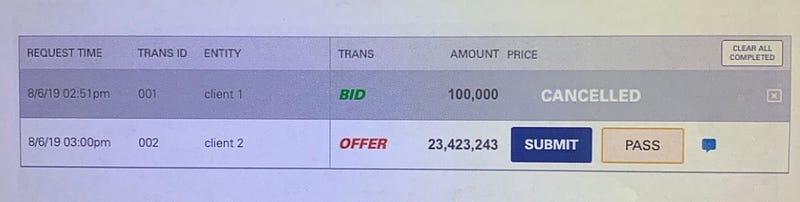
The list shows two transactions—one marked completed, the other active. Users click Submit or Pass for accepted or cancelled transactions. This action becomes progressively slower as the list expands, as demonstrated here:
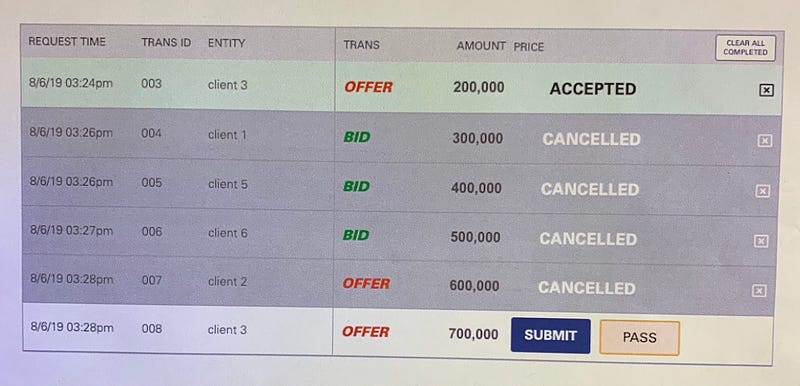
Completed rows accumulate at the top while active ones remain below. Each user action triggers a row background color change plus other visual indicators signifying the row's transition to inactive (completed). The problem: larger lists mean longer delays in applying those style updates. Let's investigate the root cause.
Measure First, Then Fix
Benchmarking JavaScript applications is inherently tricky. With JavaScript's async nature, profiling can feel overwhelming. The performance.measure Web API offers some insight into execution times, but achieving a comprehensive view demands considerable effort.
Chrome DevTools' Performance Analyzer is the go-to tool here. It's arguably the most thorough instrument for measuring both network and runtime metrics in web apps. I'll admit, the learning curve was steep—the volume of output can be daunting initially. To pinpoint what was causing the slowdown with larger lists, I needed to collect concrete data.
On my development machine (2.6 GHz Intel Core i7, 16GB DDR4), the lag was barely perceptible. But one client running older hardware experienced it clearly. To simulate that environment, I throttled CPU performance by 6x and ran comparative tests. Specifically, I measured the time to complete or reject a trade across lists containing 1, 5, and 10 transactions, on both normal and throttled CPUs. Each scenario ran 10 times; I averaged the results:

The millisecond values reflect pure scripting time—from button click through REST call, server response, and row restyling. The trend is evident: more rows in the table translate to longer processing time per individual transaction, even with just one active transaction and the rest completed.
What's causing the delay?
Let's examine the key sections of list.component.ts:
...
@Component({
  selector: 'list',
  templateUrl: './list.component.html',
  styleUrls: ['./list.component.scss']
})

export class ListComponent implements OnChanges {

  @Input() rows: Transaction[];

...

  public getRowClass(row: Transaction) {
    return {
      'active': this.trService.isActive(row),
      'rejected': this.trService.isRejected(row),
      'accepted': this.trService.isAccepted(row)
    };
  }

...

}
There are clear opportunities for improvement here. Any seasoned Angular developer would immediately spot the missing ChangeDetectionStrategy. Setting it to onPush is a well-documented optimization, covered extensively in Angular performance literature. For those unfamiliar, I'd recommend this comprehensive guide by Max Koretskyi aka Wizard, which explores Angular's Change Detection Mechanism in depth.
My first change was straightforward: adding changeDetection: ChangeDetectionStrategy.onPush to the Component decorator. With onPush strategy, a component only re-checks when its Inputs change by reference (or when an event originates from the component itself or its children). This means input mutations require deep copies—objects copied by value—to trigger detection properly. Reference checks are far quicker, hence the performance gain.
Next, I tackled getRowClass. This method was executing on every change detection cycle for every list item. I modified it to cache its results per row identifier, recalculating only when rows actually change. The updated code:
...
@Component({
  selector: 'list',
  templateUrl: './list.component.html',
  styleUrls: ['./list.component.scss'],
  changeDetection: ChangeDetectionStrategy.OnPush
})

export class ListComponent implements OnChanges {

  @Input() rows: Transaction[];

  private _rows: {[key: string]: Transaction} = {};
  public rowClasses: {[key: string]: any} = {};

...

  ngOnChanges() {
    this.rows.forEach((row) => {
      if (!this._rows[row.id] || this._rows[row.id].version !== row.version) {
        this._rows[row.id] = row;
        this.setRowClasses(row);
      }
    });
  }

  private setRowClasses(row) {
    this.rowClasses[row.id] = {
      'active': this.trService.isActive(row),
      'rejected': this.trService.isRejected(row),
      'accepted': this.trService.isAccepted(row)
    };
  }

  public getRowClasses(row: Transaction) {
    return this.rowClasses[row.id];
  }

...

}
With the list component optimized, I turned to transaction.component.ts. Once again, onPush was absent—so that got added. But there's another subtle issue: every child component gets checked whenever its sibling updates. For completed rows, this is wasted work—they shouldn't execute any code after reaching their final state. Why keep them then? Users explicitly want to see completed transactions on screen for a time after finishing, for record-keeping. Given that requirement, the list must be as efficient as possible. There's a mechanism for this: we can disable change detection for a component once it becomes inactive. The ChangeDetectorRef API provides detach, which removes the component's view from the change detection tree, so subsequent parent-triggered detections skip this child. Here's that implementation:
...

@Component({
  selector: 'transaction',
  templateUrl: './transaction.html',
  styleUrls: ['./transaction.scss'],
  changeDetection: ChangeDetectionStrategy.OnPush
})
export class TransactionComponent implements OnChanges {

  @Input() model: Transaction;

  ...

  ngOnChanges() {
    if (this.trService.isInactive(this.model)) {
      this.ref.detach();
    }
  }

  ...

}
Progress is being made. After these modifications, I re-ran the benchmarks:

Execution times nearly halved—a substantial win. Yet there's more to squeeze out. The ngFor directive deserves closer scrutiny. It renders collections by cloning templates for each element and uses the IterableDiffer interface to detect collection changes between detection runs. The resulting IterableChanges object drives view updates. For a thorough explanation of ngFor's internals, see this detailed post.
The takeaway: running a Differ over a collection containing items that never change is wasteful. Completed rows are being re-evaluated each detection cycle without reason. The fix is to separate these static items into their own collection. I created a completedTransactions array and looped over it in the template with ngFor, just as before. Performance tests after this change:
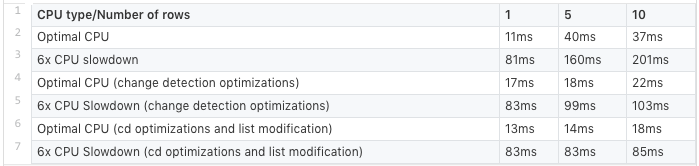
Success. The collection size no longer impacts processing time. Updating one active transaction takes roughly the same time whether the list has 1 or 10 items (83 ms vs 85 ms on throttled CPU, with 9 inactive rows in the latter case). This is exactly what we aimed for.
Summary of Optimizations Applied:
- set
onPushchange detection on both parent and child components; - introduced caching for expensive child component methods to avoid redundant recalculations;
- disabled change detection for components in their terminal (completed) state;
- moved completed items into a separate collection for faster
ngForprocessing.
Other Ideas Worth Exploring?
Although I haven't personally tested it, virtual scrolling looks promising. The concept is simple: render only the rows visible in the viewport, which reduces DOM nodes and improves performance. Fewer rows mean a snappier app. Notably, ag-Grid, a well-known Angular datagrid library, employs this technique to handle hundreds of thousands of records without perceptible performance loss.
Offloading housekeeping tasks—server logging, WebSocket heartbeats, and similar chores—to Web Workers is another avenue. This guide on improving performance with Web Workers covers the approach well.