
Creating Components at Runtime with Ivy
Ivy's private APIs open the door to runtime component creation. The demonstration below builds a routed component on demand:
const routes: Routes = [
  {
    path: 'comic/:comicId',
    component: withRoute(ComicComponent)
  }
];
As an architect, I'm always looking for ways to strengthen application structures. The aim is usually to deliver more resilient and maintainable solutions. This topic features prominently in myadvanced Enterprise Angular workshop.
Ivy brings a set of impressive capabilities that support these objectives. In this article series, I walk through several examples to illustrate them. I examine the inner workings of Angular's new view engine, which helps clarify what is happening and hints at where Angular is headed.
This installment focuses on generating components at runtime with Ivy and constructing higher-order components. Thesource code for the example is hosted on myGitHub profile.
Special thanks to Angular'sAlex Rickabaugh for reviewing this material and sharing insights on Ivy.
DISCLAIMER: The samples presented here are an experiment that leverages Ivy's private APIs to reveal how it operates underneath. This is not meant for production use, nor does it represent the Angular team's official position. However, it's a valuable exercise for understanding Ivy's mechanics and the possibilities that might arrive through public APIs once Ivy is fully rolled out.
For now, the Angular team is focused on ensuring a smooth transition without breaking changes. After that, they plan to introduce Ivy-based features incrementally.
The Demonstration
Our example is a straightforward comic viewer:

When a comic is selected from the list, the router stores the corresponding comicId in the URL and triggers a RoutedComicComponent:
@Component({
  selector: 'app-routed-comic',
  templateUrl: './routed-comic.component.html'
})
export class RoutedComicComponent implements OnInit {

  constructor(private route: ActivatedRoute) { }

  params: any = {};

  ngOnInit() {
    this.route.params.subscribe(params => {
      this.params = params;
    });
  }

}
That component fetches the parameters from the URL. Its template passes them along to the ComicComponent, which renders the comic:
<app-comic [comicId]="params.comicId"></app-comic>
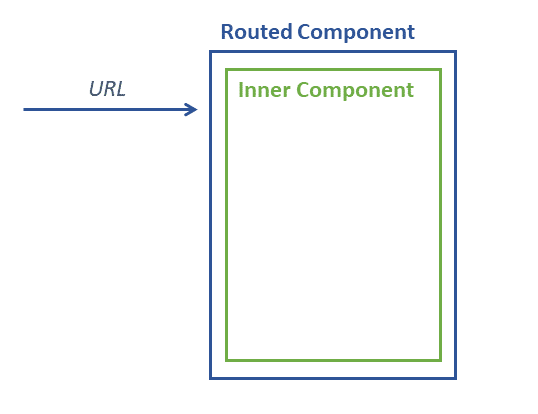
Essentially, we have a routed component whose sole job is to forward routing parameters to an inner component like app-comic:
The Objective
In this setup, RoutedComicComponent acts as wiring code. It exists purely to read parameters and hand them off.
One option would be to embed this logic directly into the ComicComponent. The downside is that the component would then need to understand the router and its specific configuration, reducing its reusability.
Conversely, a generic RoutedComicComponent would look nearly identical for any target component; only the component it wraps would change. So, we can generate this wrapper dynamically for various inner components.
As the following sections demonstrate, Ivy makes this surprisingly straightforward.
Examining the Ivy Compiler's Output
Before moving forward, let's see how Ivy transforms our RoutedComicComponent during compilation. To make the generated code more legible, we should ensure the output is set to ES2015. Check the target property in your tsconfig.json file and set it to ES2015:
{
  [...]
  "compilerOptions": {
    [...]
    "target": "es2015",
    [...]
  },
  [...]
}
Additionally, confirm that Ivy is active. The proper angularCompilerOptions block in your tsconfig.app.json should look like this:
{
  "extends": "./tsconfig.json",
  "compilerOptions": {
    [...]
  },
  "include": [
    [...]
  ],
  "exclude": [
    [...]
  ],
  "angularCompilerOptions": {
    "enableIvy": true
  }
}
Once you execute ng build --aot, the downleveled version of our RoutedComicComponent should appear in the main bundle under the dist directory.
class RoutedComicComponent {
    constructor(route) {
        this.route = route;
        this.params = {};
    }
    ngOnInit() {
        this.route.params.subscribe(params => {
            this.params = params;
        });
    }
}
const _c0 = [3, "comicId"];

RoutedComicComponent.ngComponentDef = ɵɵdefineComponent({
    type: RoutedComicComponent,
    selectors: [["app-routed-comic"]],
    factory: function RoutedComicComponent_Factory(t) {
        return new (t || RoutedComicComponent)(ɵɵdirectiveInject(ActivatedRoute));
    },
    consts: 1,
    vars: 1,
    template: function RoutedComicComponent_Template(rf, ctx) {
        if (rf & 1) {
            ɵɵelement(0, "app-comic", _c0);
        } if (rf & 2) {
            ɵɵproperty("comicId", ctx.params.comicId);
        }
    },
    directives: [ComicComponent],
    styles: ["..."]
});
I've reformatted this snippet and stripped the webpack-related imports for clarity. The key takeaway is that Ivy attaches a static ngComponentDef property during compilation. This property holds everything Angular needs to run the component at runtime. Most fields are self-explanatory:
type: The component's class.selectors: Each selector is stored as an array within this outer array.factory: A function that instantiates the component, including dependency injection. Thetparameter is relevant only for subclasses. When a componentMyCompextendsBaseComp,MyComp's factory must callBaseComp's factory, passingMyCompastso that it can inherit the injections defined forBaseComp.const: The number of nodes, template references, and pipes in the template; used to initialize an internal array with the correct length.vars: The count of bindings, serving a similar purpose.template: The compiled version of the HTML template.directives: Other directives and components available to this component. Ivy fills this array fromNgModules for backward compatibility. Yet,as I demonstrated in a previous post,NgModules are no longer required by Ivy.styles: The associated CSS rules.
Note that the helper functions are prefixed with ɵɵ, indicating they are part of Ivy's internal, non-public API. Their signatures may evolve over time.
Let's take a closer look at the template function. It's essentially a JavaScript representation of the HTML template. Instead of string-based placeholder substitution, Angular uses this function to optimize binding and rendering performance.
The first argument, rf (RenderFlags), signals the current rendering phase. The first bit indicates component creation, while the second bit triggers binding updates. Accordingly, the function either constructs the template's elements or refreshes their bindings.
The second parameter, ctx (Context), points to the component instance.
When creating an element, ɵɵelement takes a unique id and the element's tag name. These ids increment from 0 and can later reference the element. In our case, the name corresponds to the component with the app-comic selector. The final parameter, _c0, carries attributes, properties, and similar metadata. The value 3 signals that the next item is a property binding, followed by its name comicId.
To update that binding, ɵɵproperty takes the property name and its new value. You might wonder how ɵɵproperty identifies the target element. In this instance, it's straightforward since there's only one element.
By default, ɵɵproperty operates on element id 0. To target a different element, Ivy calls ɵɵselect with the appropriate id. For example, to work with element id 2, you'd write:
ɵɵselect(2);
ɵɵproperty("comicId", ctx.params.comicId);
Armed with this understanding of Ivy's internals, we can now build the logic to create components like our RoutedComicComponent at runtime.
Building a higher-order or dynamic component
To create an Ivy component at runtime, all you need is a factory function that accepts arguments and returns a component. In this scenario, the sole argument is the Angular component that should be routed to — more specifically, the type of the inner component, such as ComicComponent.
What this function returns is a dynamically generated routed component that both renders the provided component and forwards every routing parameter it receives. This makes the routed component a higher-order component, since it is itself parameterized by another component.
Suppose the factory function goes by the name withRoute. In that case, the routing configuration can employ it like this:
const routes: Routes = [
  {
    path: 'comic/:comicId',
    component: withRoute(ComicComponent)
  }
];
As a result, there is no longer any need to manually write a RoutedComicComponent.
The overall shape of such a function appears as follows:
export function withRoute(inner: Type<any>) {

    // Step 1: Create a class on the fly
    class HigherOrderComponent implements OnInit {
      [...]
    }

    // Step 2: Assign ngComponentDef
    HigherOrderComponent.ngComponentDef = ɵɵdefineComponent({
      [...],
      template: function(rf, ctx) {
        // Step 2a: Call the inner component
        [...]
      }
    });

    // Step 3: Return component
    return HigherOrderComponent;
}
At the top of this function, the selector of the passed-in component must be fetched so it can be rendered dynamically later:
// At runtime component will be a ɵComponentType<any> with
// a static ngComponentDef property
const ngComponent = inner as ɵComponentType<any>;

// Step 1: Get needed information from ngComponentDef
const def = ngComponent.ngComponentDef as ɵComponentDef<any>;

// Simplification: We assume a single element name
const elementName = def.selectors[0][0] as string;
The class that gets declared inside the function looks like this:
class HigherOrderComponent implements OnInit {

    static ngComponentDef: ɵComponentDef<HigherOrderComponent>;

    params: any = {};

    constructor(private route: ActivatedRoute) {
    }

    ngOnInit() {
        this.route.params.subscribe(params => {
          this.params = params;
        });
    }
}
As can be seen here, this method simply stores the incoming routing parameters into the params property.
Bear in mind that each invocation of the function declares a brand-new class. Technically, a local variable named HigherOrderComponent points to this dynamically created class.
The assigned ngComponentDef carries the same kind of information that was encountered in the bundle discussed earlier:
HigherOrderComponent.ngComponentDef = ɵɵdefineComponent({
    consts: 1,
    vars: 1,
    directives: [
        component
    ],
    changeDetection: ChangeDetectionStrategy.Default,
    factory: () => new HigherOrderComponent(
        ɵɵdirectiveInject(ActivatedRoute)),
    selectors: [[]],
    template: (rf, ctx) => {
        [...]
    },
    type: HigherOrderComponent,
});
To enable this component to render the inner component, the latter is added to the directives array. Still, the genuinely intriguing part is the template function, which handles the binding of routing parameters:
template: (rf, ctx) => {

    if (rf & ɵRenderFlags.Create) {
        ɵɵelement(0, elementName);
    }
    if (rf & ɵRenderFlags.Update) {
        for (const prop in ctx.params) {
            const compProp = def.inputs[prop];
            if (compProp) {
                ɵɵproperty(prop, ctx.params[compProp]);
            }
        }
    }
},
Rather than hardcoding render flags, this function relies on the ɵRenderFlags enumeration. During the creation phase, it sets up an element for the inner component.
In the update phase, the template function loops through all received routing parameters and checks whether the passed component exposes inputs with matching names. To do this, it inspects the inputs map within the component’s ngComponentDef.
When a match is found, the corresponding property can be located inside that map. In Angular, inputs typically share the same name as their properties. Under those circumstances, the inputs map takes this form:
{
  "comicId": "comicId"
}
However, the Input decorator allows assigning a different name to an input via a parameter:
@Input('cid') comicId: string;
In that scenario, the input property would map cid to comicId:
{
  "cid": "comicId"
}
This demonstrates that looking up the property name within this map keeps things on solid ground.
Once a match is found, the template function updates the relevant property through ɵɵproperty.
The outcome is a factory that produces the routed component on demand — no need to handwrite it any longer.
Wrapping up
Ivy makes it possible to spin up components dynamically and, in turn, construct higher-order components. For this, only a class with a valid ngComponentDef property is required.
To figure out how such an ngComponentDef should be organized, one can AOT-compile an example and inspect the generated bundles.
Although this process is quite straightforward, remember that it involves Ivy’s private APIs. Still, enabling such functionality was an explicit goal for Ivy, and eventually the Angular team will — hopefully — expose these capabilities through the public API.
Extra: Compiling at runtime
If performance and bundle size are irrelevant and if you are completely immune to discomfort, the Angular compiler can also be invoked at runtime:
To do so, the compiler must be imported somewhere in the application, for instance during bootstrap:
import '@angular/compiler';
Next, a component class is generated on the fly, for example inside a factory function:
@Component({ template: '' })
class HigherOrderComponent { [...] }
Note that this decorator is never actually used. Nevertheless, an arbitrary decorator is required to force TypeScript to emit the metadata needed for dependency resolution.
To obtain an ngComponentDef, the compiler gets called:
ɵcompileComponent(HigherOrderComponent, { template: '<b>Hello</b>' });
The second argument accepts the conventional options that would normally be passed to @Component. Clearly, this object can be constructed dynamically.
An interesting trait of ɵcompileComponent is that it runs asynchronously when it must resolve external files such as templates or CSS resources. In all other cases, it completes synchronously. In the former situation, the ngComponentDef property is not immediately available, which would break any subsequent operations on that component. To avoid this, call ɵresolveComponentResources right after ɵcompileComponent and await the resulting promise.