
Decorators in JavaScript: A Practical Look
Decorators are a well-established concept in languages like Java and Python. This pattern serves two main functions:
- altering an object's behavior at runtime without affecting its current functionality
- breaking down behaviors into small, reusable pieces while minimizing repetitive code
While decorators are essentially syntactic sugar – they let us wrap and annotate classes and functions – skipping them is entirely possible. However, they significantly enhance code clarity. A frequent application is adding caching to API requests. For an in-depth explanation, see this article.
JavaScript is also getting decorators. This feature is currently at Stage 2 of the TC39 proposal process. The proposal outlines their capabilities:
Decorators are functions called on classes, class elements, or other JavaScript syntax forms during definition. Decorators have three primary capabilities: They can replace the value that is being decorated with a matching value that has the same semantics. They can associate metadata with the value that is being decorated. This metadata can then be read externally and used for metaprogramming and introspection. They can provide access to the value that is being decorated, via metadata.
In essence, a JavaScript decorator is a higher-order function: it takes a function as input and returns another function. In many implementations, the returned function reuses the original input, though this isn't a strict requirement.
Although the standardization process is gradual, progress is being made, and decorators are likely to be a native language feature soon. In the meantime, TypeScript and Babel can transpile them, allowing us to use decorators in daily development. They're already popular in frontend frameworks like Angular, Mobx, and Vue.js.
The JavaScript proposal specifies four decorator types:
- class decorator;
- property decorators;
- method decorators;
- accessor decorators.
This article explores decorators applied to methods in class-based code and functions in a functional style. We'll tackle a business requirement to delay a notification under specific conditions, using both approaches.
Putting Decorators into Practice
We'll start with a Notification class containing a type property and a simple notifyUser method that logs Success notification to the console.
Next, we'll create an instance and invoke the method:
class Notification {
	type: string;

	constructor() {
		this.type = 'Success';
	}

	notifyUser = function() {
		console.log(`${this.type} notification`);
	}
}

const notification = new Notification ('Success')

notification.notifyUser();

// You will see in console - 'Success notification'
The new requirement is to show this message in the console after a 3-second delay.
We could create a new DelayedNotification class, but it would be nearly identical to Notification. This scenario calls for a minor behavior tweak, making it a perfect case for the decorator pattern.
The Decorator Pattern via Higher-Order Functions
We need to wrap the existing notifyUser method with the setTimeout API. The setTimeout function requires a delay in milliseconds. To make this configurable, we'll pass the delay as a parameter to our decorator.
Let's create a generic higher-order function, delayMiliseconds, which accepts any function and returns a decorated version that introduces a delay.
const delayMiliseconds = (fn: Function, delay:number = 0) => () => {
     setTimeout(() => fn(), delay);
     return 'notifyUser is called';
};
Here's how to invoke the decorator:
delayMiliseconds(notification.notifyUser, 3000);
To apply this to our class, we modify the notifyUser method as follows:
class DelayedNotification {
	type: string;

	constructor(type) {
		this.type = type;
	}

	public notifyUser = delayMiliseconds(() => {
		console.log(`${this.type} notification` 'checkTime:' new Date().getSeconds());
	}, 3000);
}

const notification = new DelayedNotification ('Success')

console.log(notification.notifyUser() 'checkTime:' new Date().getSeconds())
The console will then print 'Success notification' after a 3-second wait:

This example shows that delayMiliseconds is a higher-order function, as it takes a function and returns a new one.
Many standard JavaScript functions, like those on arrays, strings, and DOM methods, are also higher-order because they accept functions as arguments.
An important characteristic of using higher-order functions as decorators on classes is that the new behavior isn't added to the object's prototype. When we use property definition syntax (class A { prop = value}) instead of method definition syntax (class A { prop() {}), the functionality isn't shared across instances via the prototype.
To inspect this, let's log an instance of DelayedNotification to the console:
console.log(notification)
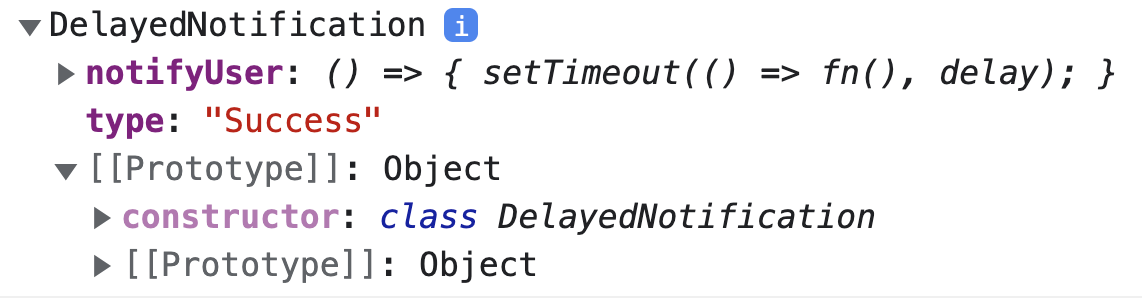
To better understand, check the console to see if the notifyUser method exists directly on the notification instance.
In JavaScript, property lookup starts on the object itself and then moves up the prototype chain. The hasOwnProperty method checks only the object's own properties, bypassing the prototype. To check for a property anywhere in the chain, use the in operator. Our inspection shows:
console.log('notifyUser' in notification); // true
console.log(Object.getPrototypeOf(notification).hasOwnProperty('notifyUser')); // false
The first check logs true because the DelayedNotification instance has its own notifyUser method.
The second check logs false because the method isn't found on the prototype.
In functional programming, classes and this are typically avoided, so the factory pattern is a common way to create objects. The higher-order function we built fits perfectly here:
function functionBasedNotificationFactory() {
	const type = 'Success';

	 notifyUser() {
		console.log(`${type} notification`);
	}

	return {
		name: 'Success',
		notifyUser: delayMiliseconds(notifyUser, 300);
	}
}
const notification = functionBasedNotificationFactory();

notification.notifyUser();

// 'Success notification' in console after 3 seconds
As shown, the factory functionBasedNotificationFactory returns an object with the decorated notifyUser method.
The Class-Based Approach
Now, let's see how the decorator pattern is implemented as a native language feature. The class-based version looks like this:
function delayMiliseconds( milliseconds: number = 0 ) {
  return function (
    target: Object,
    propertyKey: string | symbol,
    descriptor: PropertyDescriptor
  ) {

   const originalMethod = descriptor.value;

   descriptor.value = function (...args) {
		  setTimeout(() => {
		    originalMethod.call(this, ...args);
		   }, milliseconds);
		};

    return descriptor;
  };
}
The delayMiliseconds decorator takes a single parameter, milliseconds, with a default value of 0. This value is passed to the setTimeout function as the delay.
As you can see, delayMiliseconds receives three arguments:
target– the class constructor for static members or the class prototype for instance members. In this case, it'sNotification.prototype.propertyKey– the name of the decorated method.PropertyDescriptor– describes the property on an[[Object](https://developer.mozilla.org/en-US/docs/Web/JavaScript/Reference/Global_Objects/Object/defineProperty)]:
interface PropertyDescriptor {
    configurable?: boolean;
    enumerable?: boolean;
    value?: any;
    writable?: boolean;
    get? (): any;
    set? (v: any): void;
}
To alter the method's behavior, we redefine the value within the property descriptor:
const originalMethod = descriptor.value; // a reference to the original

descriptor.value = function (...args) {
		  				setTimeout(() => {
		   					originalMethod.call(this, ...args); // bind a context of Notification
		  	}, milliseconds);
};

return descriptor;   // return descriptor with a new behaviour
We apply the decorator to our method using the special @ syntax:
class DelayedNotification {
	type: string;

	constructor(type) {
		this.type = type
	}

 	@delayMiliseconds(300)
 	notifyUser() {
		console.log(`${this.type} notification`);
	}
}
Let's log a DelayedNotification instance to the console, as we did earlier:
console.log(new DelayedNotification('Success'))
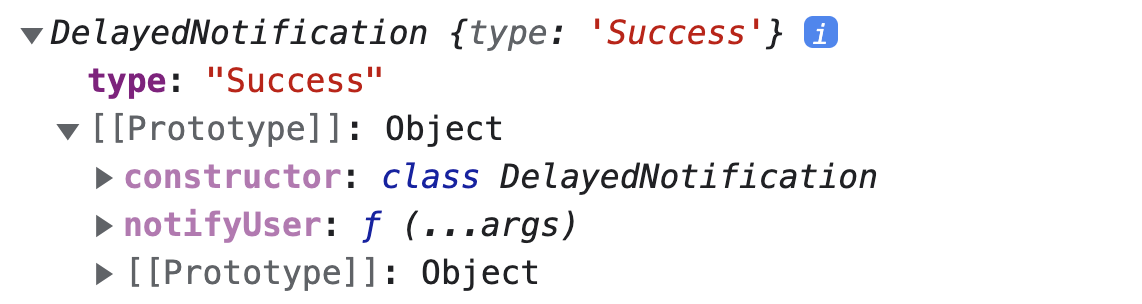
This screenshot shows that the DelayedNotification instance doesn't have its own notifyUser method; it resides on the prototype. This is because delayMiliseconds is designed to work with prototype methods, relying on the descriptor.
Running the same verification as in the functional approach confirms this:
console.log('notifyUser' in notification); // true
console.log(Object.getPrototypeOf(notification).hasOwnProperty('notifyUser')) ; // true
Both checks return true this time because the method is on the notification prototype.
This highlights a key difference: the class-based decorator modifies the prototype method, while the functional approach decorates the instance's own property.
Factory patterns with classes are less common than with functions, as classes can be instantiated directly. However, if we wanted a class-based factory, the decorator would be applied automatically upon instantiation. Let's create one:
// classBased factory

function classBasedObjectAFactory() {
  return new Notification('Success');
}

const notification = classBasedObjectAFactory();

notification.notifyUser();

// 'Success notification' in console after 3 seconds
As the screenshot shows, a factory function can produce an object by creating a class instance with the new keyword.
5. Where are Decorators commonly used?
You'll encounter decorators in these frameworks:
- Angular –
@Component,@Directive,@Injectable,@Pipe
For a deep dive into how Angular's component decorator works, refer to this article.
- Mobx –
@observable,@computedand@action - React –
HoC(for higher-order components) - Core-decorators library –
@**readonly,@**extendDescriptor,@**override,**@autobind
An explanation of Angular's @Injectable decorator under the hood in Ivy is available here
Conclusion
A decorator is a function that enables dynamic modification of existing functionality:
- through higher-order functions in a functional style;
- by altering functionality with method or property decorators in a class-based style.
Their primary purpose is to add logic to objects dynamically and compose behavior without altering the original function.
Consider using decorators when:
- you need to add a feature to an object that can be easily removed later
- you want to avoid inheritance by composing behavior with decorators
Here are the pros and cons of using decorators in JavaScript:
Advantages:
- reusability – the same logic can be applied to different methods without duplication.
- improved code readability and extensibility;
- less boilerplate code;
- implements the Decorator pattern.
Disadvantages:
- The pattern can produce many similar decorators that are difficult to maintain.
- Multiple decorators can make subclasses and overall architecture complex.
- Removing a specific wrapper from a stack of wrappers is challenging.