
Libraries known as sanitizers exist to shield applications from Cross Site Scripting (XSS) attacks. They come into play whenever HTML stored as a plain string has to be rendered.
A sanitizer takes an HTML string, parses it, and strips out the dangerous parts that could let an attacker slip malicious JavaScript or CSS into the page. On paper that sounds solid, but parsing HTML is a genuinely hard problem. Why?
At first glance HTML looks tractable: tags nest inside each other, attributes hang off them, so a regular expression that splits the text on < and > and inspects every spot where unsafe code could hide ought to be enough. In practice, several loopholes appear:
- The markup does not have to be valid — closing tags or attributes can be absent, extra characters can creep in, and so on:
<div><b onmouseover=alert(‘hello!’)>click me!</div> <IMG """><SCRIPT>alert("XSS")</SCRIPT>"\> <<SCRIPT>alert("XSS");//\<</SCRIPT> <IMG SRC="('XSS')" - Some parts may be expressed using an unusual UTF-8 notation:
<IMG SRC=jAvascript:alert(‘hello!’)> <IMG SRC=javascript:alert('XSS')> - Without deep analysis, JavaScript code is not always easy to flag as unsafe.
<IMG SRC=javascript:alert(String.fromCharCode(88,83,83))> <IMG SRC="jav ascript:alert('XSS');"> <IMG SRC="jav ascript:alert('XSS');"> - Certain attributes may simply be unfamiliar to whoever writes the sanitizer:
<IMG LOWSRC="javascript:alert('XSS')"> - Or the code may just be surprising:
<svg/onload=alert('XSS')>
<LINK REL="stylesheet" HREF="javascript:alert('XSS');">
<STYLE>@im\port'\ja\vasc\ript:alert("XSS")';</STYLE>
<STYLE>li {list-style-image: url("javascript:alert('XSS')");}</STYLE><UL><LI>XSS</br>
A larger collection of interesting cases lives here: https://cheatsheetseries.owasp.org/cheatsheets/XSS_Filter_Evasion_Cheat_Sheet.html.
What are the options?
Building a sanitizer, then, is far from trivial. Browsers evolve continuously, new features land, and each of them can introduce fresh vulnerabilities. Nobody can promise that what a sanitizer returns is 100% safe code.
On top of that, sanitizers are software too and can carry bugs. For a job as critical as blocking any code injection into our application, we want a solution that comes with a full security guarantee.
So what is left to do? How do we reach that 100% guarantee? Solutions that cannot offer it are simply off the table 🙂
CHECK OUR ARTICLE ABOUT ngTemplateOutlet: The secret to customisation
A different approach is required. The parsing problem is so hard that we can drop it altogether. Rather than producing HTML from a string, produce it from a structure that we can safely turn into DOM tree elements. The idea is to construct a nested structure that represents the HTML we intend to render.
type Text = {
  type: 'text';
  text: string;
};

type Link = {
  type: 'link';
  href: string;
  children: Content[];
};

type Paragraph = {
  type: 'paragraph';
  children: Content[];
};

type List = {
  type: 'list';
  children: Content[];
};

type ListItem = {
  type: 'list-item';
  children: Content[];
};

type Content = Paragraph | Link | Text | List | ListItem;

contentItems: Content[] = [
    {
      type: 'paragraph',
      children: [
        {
          type: 'text',
          text: 'This is a text in a paragraph with some JavaScript code: <script>alert("hello!")</script>.',
        },
      ],
    },
    {
      type: 'list',
      children: [
        {
          type: 'list-item',
          children: [
            {
              type: 'text',
              text: 'The first element',
            },
          ],
        },
        {
          type: 'list-item',
          children: [
            {
              type: 'text',
              text: 'The second element with a',
            },
            {
              type: 'link',
              href: 'https://google.com',
              children: [
                {
                  type: 'text',
                  text: 'link',
                },
              ],
            },
          ],
        },
      ],
    },
  ];
From there, ng-template can render the elements recursively:
<ng-template #textTemplate let-text="text">
  {{ text }}
</ng-template>

<ng-template #childrenTemplate let-children="children">
  <ng-container
    *ngFor="let child of children"
    [ngTemplateOutlet]="contentTemplate"
    [ngTemplateOutletContext]="{ content: child }"
  >
  </ng-container>
</ng-template>

<ng-template #paragraphTemplate let-children="children">
  <p>
    <ng-container
      [ngTemplateOutlet]="childrenTemplate"
      [ngTemplateOutletContext]="{ children }"
    >
    </ng-container>
  </p>
</ng-template>

<ng-template #listTemplate let-children="children">
  <ul>
    <ng-container
      [ngTemplateOutlet]="childrenTemplate"
      [ngTemplateOutletContext]="{ children }"
    >
    </ng-container>
  </ul>
</ng-template>

<ng-template #listItemTemplate let-children="children">
  <li>
    <ng-container
      [ngTemplateOutlet]="childrenTemplate"
      [ngTemplateOutletContext]="{ children }"
    >
    </ng-container>
  </li>
</ng-template>

<ng-template #linkTemplate let-href="href" let-children="children">
  <a [href]="href" _target="blank">
    <ng-container
      [ngTemplateOutlet]="childrenTemplate"
      [ngTemplateOutletContext]="{ children }"
    >
    </ng-container>
  </a>
</ng-template>

<ng-template #contentTemplate let-content="content">
  <ng-container [ngSwitch]="content.type">
    <ng-container
      *ngSwitchCase="'paragraph'"
      [ngTemplateOutlet]="paragraphTemplate"
      [ngTemplateOutletContext]="{ children: content.children }"
    ></ng-container>
    <ng-container
      *ngSwitchCase="'list'"
      [ngTemplateOutlet]="listTemplate"
      [ngTemplateOutletContext]="{ children: content.children }"
    ></ng-container>
    <ng-container
      *ngSwitchCase="'list-item'"
      [ngTemplateOutlet]="listItemTemplate"
      [ngTemplateOutletContext]="{ children: content.children }"
    ></ng-container>
    <ng-container
      *ngSwitchCase="'link'"
      [ngTemplateOutlet]="linkTemplate"
      [ngTemplateOutletContext]="{
        href: content.href,
        children: content.children
      }"
    ></ng-container>
    <ng-container
      *ngSwitchCase="'text'"
      [ngTemplateOutlet]="textTemplate"
      [ngTemplateOutletContext]="{ text: content.text }"
    ></ng-container>
  </ng-container>
</ng-template>

<ng-container
  *ngFor="let content of contentItems"
  [ngTemplateOutlet]="contentTemplate"
  [ngTemplateOutletContext]="{ content }"
>
</ng-container>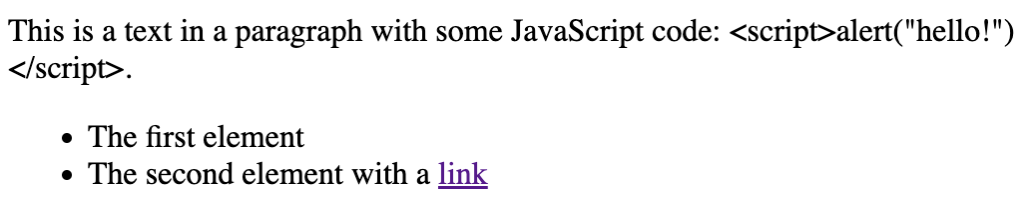
Full example: https://stackblitz.com/edit/angular-ivy-iquuzz?file=src/app/app.component.ts.
In practice
Sanitizers are used because we allow users to work with HTML. Adopting the solution described above means converting user-created HTML into our structure first — and that conversion is straightforward:
@Component({
  selector: 'my-app',
  templateUrl: './app.component.html',
  styleUrls: ['./app.component.css'],
})
export class AppComponent implements AfterViewInit {
  private converter = new Converter([
    new TextNodeConverter(),
    new ParagraphNodeConverter(),
    new LinkNodeConverter(),
    new ListNodeConverter(),
    new ListItemNodeConverter(),
  ]);

  @ViewChild('container')
  container: ElementRef<HTMLElement>;

  ngAfterViewInit(): void {
    console.log(
      this.converter.convertNodes(this.container.nativeElement.childNodes)
    );
  }
}
class Converter {
private nodeConvertersMap = new Map<string, NodeConverterInterface>();
constructor(nodeConverters: NodeConverterInterface[] = []) {
nodeConverters.forEach((nodeConverter) => {
this.registerNodeConverter(nodeConverter);
});
}
registerNodeConverter(nodeConverter: NodeConverterInterface): void {
this.nodeConvertersMap.set(nodeConverter.nodeName, nodeConverter);
}
convertNodes(nodes: NodeListOf<ChildNode>): Content[] {
return Array.from(nodes)
.map((node) => this.convertNode(node))
.filter((contentObj) => contentObj !== null);
}
private convertNode(node: Node): Content | null {
if (this.nodeConvertersMap.has(node.nodeName)) {
return this.nodeConvertersMap
.get(node.nodeName)
.convert(node, this.convertNodes.bind(this));
}
return null;
}
}interface NodeConverterInterface {
readonly nodeName: string;
convert(
node: Node,
convertChildren: (nodes: NodeListOf<ChildNode>) => Content[]
): Content;
}
class TextNodeConverter implements NodeConverterInterface {
readonly nodeName = '#text';
convert(
node: Node,
convertChildren: (nodes: NodeListOf<ChildNode>) => Content[]
): Text {
return {
type: 'text',
text: node.textContent,
};
}
}
class LinkNodeConverter implements NodeConverterInterface {
readonly nodeName = 'A';
convert(
node: Node,
convertChildren: (nodes: NodeListOf<ChildNode>) => Content[]
): Link {
const hrefAttribute = (node as HTMLAnchorElement).attributes.getNamedItem(
'href'
).textContent;
const acceptedProtocols = ['https://', 'http://'];
return {
type: 'link',
href: acceptedProtocols.some(
(acceptedProtocol) => hrefAttribute.indexOf(acceptedProtocol) === 0
)
? hrefAttribute
: '',
children: convertChildren(node.childNodes),
};
}
}
class ParagraphNodeConverter implements NodeConverterInterface {
readonly nodeName = 'P';
convert(
node: Node,
convertChildren: (nodes: NodeListOf<ChildNode>) => Content[]
): Paragraph {
return {
type: 'paragraph',
children: convertChildren(node.childNodes),
};
}
}
class ListNodeConverter implements NodeConverterInterface {
readonly nodeName = 'UL';
convert(
node: Node,
convertChildren: (nodes: NodeListOf<ChildNode>) => Content[]
): List {
return {
type: 'list',
children: convertChildren(node.childNodes),
};
}
}
class ListItemNodeConverter implements NodeConverterInterface {
readonly nodeName = 'LI';
convert(
node: Node,
convertChildren: (nodes: NodeListOf<ChildNode>) => Content[]
): ListItem {
return {
type: 'list-item',
children: convertChildren(node.childNodes),
};
}
}What this code does is construct a valid, secure structure and verify that the “href” attribute is valid. New tags can be added to it.
The full example: https://stackblitz.com/edit/angular-ivy-qtcyzo?file=src/app/app.component.ts.
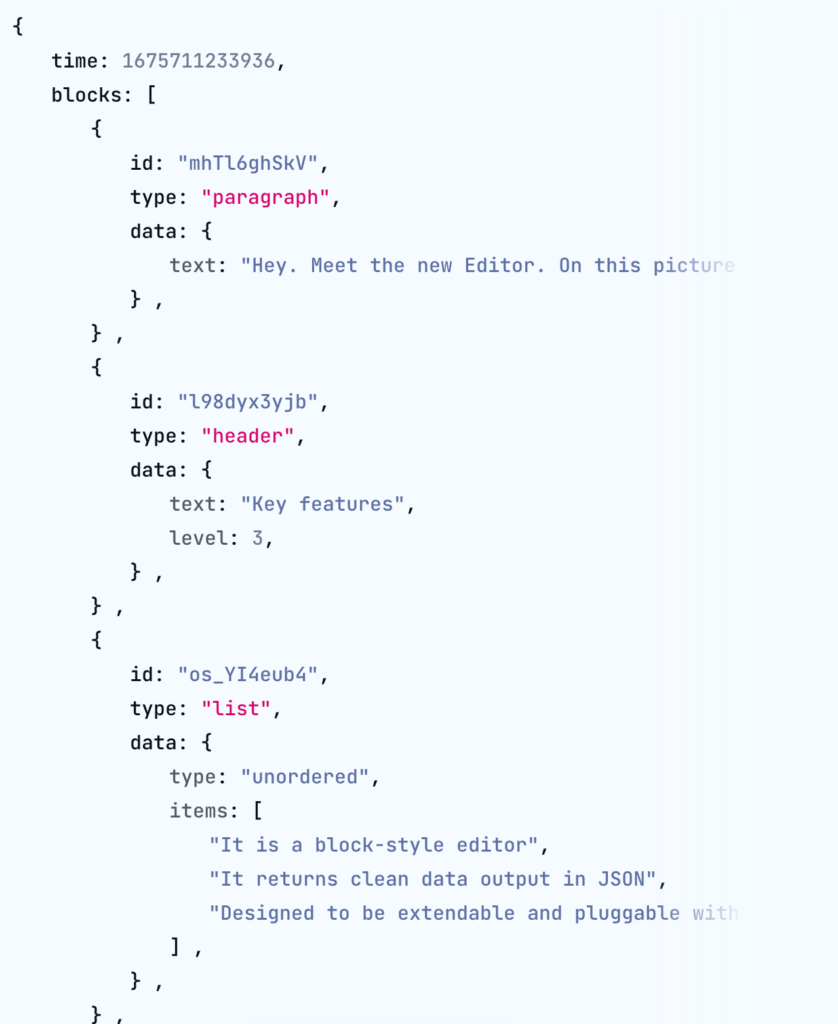
Well-known text editors hand back comparable structures:
- https://editorjs.io/ – an example is shown directly on its homepage:
- https://quilljs.com gives back structures called Blots (https://github.com/quilljs/parchment#blots):
<!-- Include stylesheet -->
    <link
      href="https://cdn.quilljs.com/1.3.6/quill.snow.css"
      rel="stylesheet"
    />

    <!-- Create the editor container -->
    <div id="editor">
      <p>Hello World!</p>
      <p>
        The second line with a <a href="https://google.com">link</a> to Google
      </p>
    </div>

    <!-- Include the Quill library -->
    <script src="https://cdn.quilljs.com/1.3.6/quill.js"></script>

    <!-- Initialize Quill editor -->
    <script>
      var quill = new Quill('#editor');
      console.log(quill.getLines());
    </script>
- In https://draftjs.org (a text editor built by Facebook), developers get access to a ContentState object (https://draftjs.org/docs/api-reference-content-state), which holds the structure of the entire document.
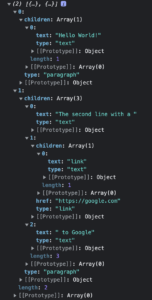
Below is an example that converts quill.js Blots output into a plain object:
type Text = {
  type: 'text';
  text: string;
};

type Link = {
  type: 'link';
  href: string;
  children: Content[];
};

type Paragraph = {
  type: 'paragraph';
  children: Content[];
};

type Content = Paragraph | Link | Text;

interface BlotConverterInterface {
  readonly nodeName: string;
  convert(
    blot: Quill.Blot,
    convertChildren: (blocks: Quill.LinkedList<Quill.Blot>) => Content[]
  ): Content;
}

class TextBlotConverter implements BlotConverterInterface {
  readonly nodeName = '#text';

  convert(
    blot: Quill.Blot,
    convertChildren: (blocks: Quill.LinkedList<Quill.Blot>) => Content[]
  ): Text {
    return {
      type: 'text',
      text: blot.domNode.textContent,
    };
  }
}

class LinkBlotConverter implements BlotConverterInterface {
  readonly nodeName = 'A';

  convert(
    blot: Quill.Blot,
    convertChildren: (blocks: Quill.LinkedList<Quill.Blot>) => Content[]
  ): Link {
    const hrefAttribute = (
      blot.domNode as HTMLAnchorElement
    ).attributes.getNamedItem('href').textContent;
    const acceptedProtocols = ['https://', 'http://'];

    return {
      type: 'link',
      href: acceptedProtocols.some(
        (acceptedProtocol) => hrefAttribute.indexOf(acceptedProtocol) === 0
      )
        ? hrefAttribute
        : '',
      children: convertChildren(blot.children),
    };
  }
}

class ParagraphBlotConverter implements BlotConverterInterface {
  readonly nodeName = 'P';

  convert(
    blot: Quill.Blot,
    convertChildren: (blocks: Quill.LinkedList<Quill.Blot>) => Content[]
  ): Paragraph {
    return {
      type: 'paragraph',
      children: convertChildren(blot.children),
    };
  }
}

class Converter {
  private blotConvertersMap = new Map<string, BlotConverterInterface>();

  constructor(blotConvertersMap: BlotConverterInterface[] = []) {
    blotConvertersMap.forEach((blotConverter) => {
      this.registerBlotConverter(blotConverter);
    });
  }

  registerBlotConverter(nodeConverter: BlotConverterInterface): void {
    this.blotConvertersMap.set(nodeConverter.nodeName, nodeConverter);
  }

  convertBlots(linkedList: Quill.LinkedList<Quill.Blot>): Content[] {
    let element = linkedList.head;
    const converted = [];
    while (element !== null) {
      converted.push(this.convertBlot(element));
      element = element.next;
    }

    return converted;
  }

  private convertBlot(blot: Quill.Blot): Content | null {
    const nodeName = blot.domNode.nodeName;

    if (this.blotConvertersMap.has(nodeName)) {
      return this.blotConvertersMap
        .get(nodeName)
        .convert(blot, this.convertBlots.bind(this));
    }

    return null;
  }
}

@Component({
  selector: 'my-app',
  standalone: true,
  imports: [CommonModule],
  template: `
    <div #editor>
      <p>Hello World!</p>
      <p>
        The second line with a <a href="https://google.com">link</a> to Google
      </p>
    </div>
  `,
})
export class App implements AfterViewInit {
  private converter = new Converter([
    new TextBlotConverter(),
    new ParagraphBlotConverter(),
    new LinkBlotConverter(),
  ]);

  @ViewChild('editor')
  editor: ElementRef<HTMLDivElement>;

  ngAfterViewInit(): void {
    const editor = new Quill(this.editor.nativeElement);
    console.log(this.converter.convertBlots(editor.scroll.children));
  }
}
The complete example: https://stackblitz.com/edit/angular-bywfc1?file=src/main.ts.
Advantages
Three substantial advantages come with working on such a structure.
First, the way elements are rendered stays fully under our control. Swapping one view layer for another is easy. Where a standard element such as a link would normally appear, we can place a custom component instead, giving it extra behaviour — for instance rendering the link together with a suitable icon.
Second, content held in this structure can be reused without friction in other applications, including ones that do not render through HTML at all; a mobile app, for example, could feed it into native mobile components.
Third, the room for an XSS attack on this code is far narrower.
By choosing this solution over HTML plus a sanitizer, we also align ourselves with the open-close SOLID principle: the code becomes open for extension while remaining closed for modification.
Consider, for instance, the trouble of adding a component that has no native HTML counterpart, or of changing how previously stored content is displayed. With raw HTML in storage, pulling that off requires hacky modifications so that user-created markup is always processed correctly. With the structure described here, it is trivially achievable.
Wrap-up
Reaching for a sanitizer is a very direct and fairly widespread way of guarding against XSS attacks. This article has laid out the risks that come with it. It may be worth the extra investment early in a project to handle a non-HTML structure instead, so that the benefits above can be collected at a later stage.