
Angular Signals are here, and they are reshaping how we think about reactivity in Angular applications. This article is your starting point for working with these new reactive primitives.
In simple terms, a signal is a container for a value that can alert other parts of your application when that value changes. You can wrap any type of data—whether it is a simple number or a complex object—inside a signal. Signals behave like functions: you call them to read the current value, and they automatically manage the notification of any dependent code.
Seeing Signals in a Real Project
We will start with a sample project that does not use signals yet. Our task is to transform it step by step, introducing these reactive tools along the way.
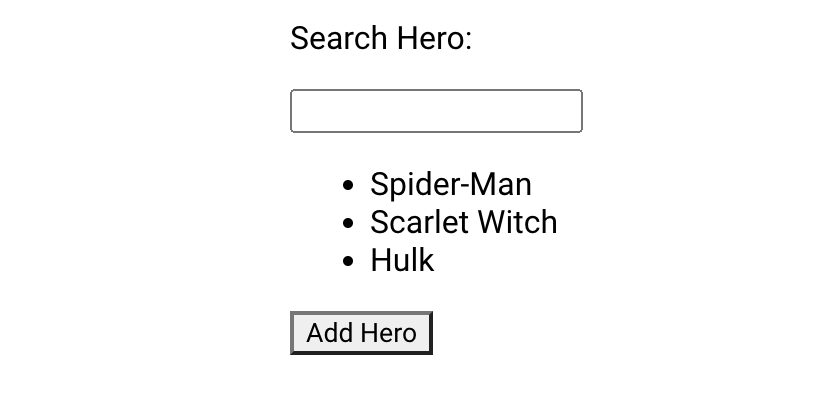
<p>Search Hero: {{search}}</p>

<input type="text" (input)="setSearchHero($event)">
<ul>
    <li *ngFor="let hero of filteredHeroes">{{hero.name}}</li>
</ul>

<button (click)="addHero()">Add Hero</button>
export class SearchHeroComponent {
search = ''
heroes = [
{id: 1, name: 'Spider-Man'},
{id: 2, name: 'Scarlet Witch'},
{id: 3, name: 'Hulk'}
];
filteredHeroes = this.heroes;
setSearchHero(e: Event) {
this.search = (e.target as HTMLInputElement).value
this.filteredHeroes = this.heroes.filter(
hero => hero.name.startsWith(this.search)
)
}
addHero() {
this.heroes = [...this.heroes, {id:4, name: 'Iron Man'}]
}
}Nothing fancy right now, right? 😄 Let’s move on to the core part: working with the Signal API.
The Signal API provides a handful of utilities for common scenarios. We can split signals into two groups: writable signals, where you can directly change the stored value, and computed signals, which produce values based on other signals and are immutable from the outside.
Let’s go through each category, one by one 😉
Writable Signals
Creating Your First Writable Signal
First, we have to pull the signal function into our project from the @angular/core module.
import { ..., signal } from '@angular/core';Making a signal is as easy as calling signal with the starting value. TypeScript normally infers the type of the signal from that initial value. I am explicitly typing the search property just for clarity in this example 😉
export class SearchHeroComponent {
 	search: WritableSignal<string> = signal('')
	...
}
As noted earlier, any data structure can live inside a signal, so let's also convert our array of heroes into a signal.
heroes = signal([
  { id: 1, name: 'Spider-Man' },
  // ...
])
Updating the Value of a Signal
Whenever the user enters new text in the input field, we need to reflect that in the search signal. The set() method is our choice here: it assigns a fresh value and informs all dependent signals about the change. The code below shows how to wire this up.
setSearchHero(e: Event) {
    this.search.set((e.target as HTMLInputElement).value)
    //...
}
When handling non-primitive types, however, a different strategy is often required—especially when the new state depends on the previous state. This is exactly the situation with our array of heroes. For these cases, the Signals API offers the update() method.
update(): this method changes the signal's value, but it requires a pure approach. For instance, adding a new hero means providing a callback that receives the current heroes array and returns the brand-new array.
To keep things immutable, we spread the existing heroes array into a new one using [...hero], and then we append the new hero at the end.
addHero() {
  this.heroes.update(heroes => [...heroes, {id:3, name: 'Iron Man'}])
}
NOTE! This specific step matters. If you were to use something like Array.push to mutate the original array directly, other dependent signals would never find out about the change.
Reading What’s Inside a Signal
To read the current value, we simply unwrap the signal—in templates, this means using parentheses. It is conceptually similar to calling Observable.subscribe() to get a value from a stream, a topic we touched on in Streams Analogs In Real Life.
<p>Search Hero: {{search()}}</p>A Read-Only View of a Signal
Writable signals come with one more useful method: asReadOnly(). This returns a signal that you can read but cannot modify through set() or update().
...
readonly _search = this.search.asReadonly()
In the template, this read-only signal works just like any other signal for binding purposes:
<p>Search Hero: {{_search()}}</p>Note! One key caveat: asReadOnly() guards against replacing the value, but it does not protect against deep changes. If the signal actually holds an object, its properties are still mutable (though that is not advised).
Computed signals
Building Derived Values from Multiple Sources
computed(): this creates a new signal that gets its value reactively, based on one or more source signals. Angular tracks those source signals when the computation runs, and the result is a fresh derived value. This gives you a clean way to build reactive, dynamic values.
filteredHeroes = computed(
  () => this.heroes().filter(
    hero => hero.name.startsWith(this._search())
  )
)
In this example, filteredHeroes is a computed signal that filters the hero list using the current search term. Anytime heroes() or search() is changed, the filtering logic runs again, automatically keeping filteredHeroes up to date.
To render the computed list, we use the new @for block from Angular’s fresh control-flow syntax. This modern loop is more concise, faster, type-safe, and easier to read when iterating over collections.
<ul>
  @for (hero of filteredHeroes(); track hero.id) {
    <li>{{hero.name}}</li>
  }
</ul>
Side Effects with Signals
Sometimes you want to run extra logic in response to signal changes. For example, saving the search text into local storage so it can be restored on a page reload. The effect() function is built for exactly this.
It brings extra versatility by letting you attach behaviors that react to signal updates. Effects run asynchronously, executing as a part of the change detection cycle.
logger = effect(() => {
    localStorage.setItem('searchHero', this._search())
})
effect(): runs a given operation whenever one or more dependencies change, and it always fires at least once. This keeps your application state consistent and allows side effects to happen just in time.
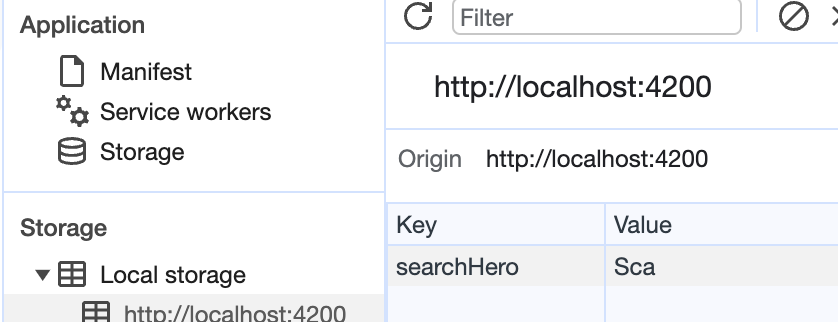

As the final polish, let's set the starting value of our search signal to anything saved in the browser’s local storage, or to an empty string if nothing is there. We achieve this by adjusting the initialization logic when the signal is created:
search = signal(localStorage.getItem('searchHero') || '')Conclusion
I hope 🤓 this guide pushes you to start rewriting your enterprise apps with signals and strip away some of the ceremony. But choose your tools wisely. Signals are perfectly suited for synchronous state and reactivity. When you step into the async world or need event streams, RxJS is still the way to go.
Are you thinking, 🤔 What about RXJS? Can I turn my Observables and Subjects into Signals? You are in luck. The Angular team has addressed this through the RxJS Interop API, a topic for an upcoming post. Keep your eyes peeled and keep your attention on Signals 🚦 while you are on the road.
Want to tinker with the demo project from this guide? Here is the StackBlitz.