
Component factories and the compiler
If you have experience with the original AngularJS framework—the first generation—you likely became comfortable with constructing HTML strings on the fly, feeding them through the $compile service, and binding them to a scope for two-way data binding:
const template = '<span>generated on the fly: {{name}}</span>'
const linkFn = $compile(template);
const dataModel = $scope.$new();
dataModel.name = 'dynamic'

// link data model to a template
linkFn(dataModel);
AngularJS directives could manipulate the DOM in almost any way imaginable, leaving the framework entirely unaware of what those modifications would be. The challenge with such a dynamic environment is that it's inherently difficult to optimize for performance. Dynamic template evaluation wasn't the primary reason AngularJS earned a reputation for being slow, but it certainly played a part.
From what I've gathered studying Angular's internals, the design of the newer framework appears heavily motivated by performance. You can find numerous comments in the source code reflecting this priority:
Attention: Adding fields to this is performance sensitive!
Note: We use one type for all nodes so that loops that loop over all nodes of a ViewDefinition stay monomorphic!
For performance reasons, we want to check and update the list every five seconds.
The Angular team decided to trade away some flexibility in exchange for significantly better speed. That meant introducing JIT and AOT compilers, static templates, factories, a factory resolver, and a host of other concepts that might seem foreign and intimidating to those coming from AngularJS. No need to worry though—if you've encountered these ideas and wondered what they actually mean, keep reading.
In Angular, every component gets created from a factory, and the compiler generates those factories based on the data you pass to the @Component decorator. If you've read various articles online but still feel uncertain about what this decorator does, check out Implementing custom component decorator.
Internally, Angular operates around the concept of a View. The running application is essentially a tree of views, and each view consists of various node types—element nodes, text nodes, and so on. Each node is highly specialized for its role so that processing can happen as quickly as possible. Nodes carry associated providers such as ViewContainerRef and TemplateRef, and they know how to answer queries like ViewChildren and ContentChildren.
That's a substantial amount of information per node. To stay fast, all of it must be available at construction time and remain immutable afterward. This is precisely what the compilation step accomplishes—it gathers all required details and packages them into a component factory.
Imagine you define a component along with its template as follows:
@Component({
  selector: 'a-comp',
  template: '<span>A Component</span>'
})
class AComponent {}
From this data, the compiler produces the following slightly simplified factory:
function View_AComponent_0(l) {
  return jit_viewDef1(0,[
      elementDef2(0,null,null,1,'span',...),
      jit_textDef3(null,['A Component ',...])
    ]
This factory outlines the component's view structure and gets used when the component is instantiated. The first node is an element definition, while the second is a text definition. Each node receives the data it needs at instantiation time through parameter lists. The compiler's job is to resolve dependencies and supply them at runtime.
Once you have access to a factory, creating a component instance becomes straightforward, and you can insert it into the DOM using viewContainerRef. I covered this in a previous piece on Exploring Angular DOM manipulations, which looks like this:
export class SampleComponent implements AfterViewInit {
    @ViewChild("vc", {read: ViewContainerRef}) vc: ViewContainerRef;

    ngAfterViewInit() {
        this.vc.createComponent(componentFactory);
    }
}
The immediate concern now is how to actually obtain a component factory—let's get to that.
Modules and ComponentFactoryResolver
AngularJS had modules, but they lacked true namespaces for directives. There was a real possibility for naming conflicts, and no clean way to isolate utility directives within a particular module. Angular corrected this by providing proper scoping for declarative types—directives, components, and pipes.
Though the original framework also had modules, every component in Angular belongs to a module. Components can't exist in isolation; if you want to use a component that belongs to another module, that module has to be imported:
@NgModule({
    // imports CommonModule with declared directives like
    // ngIf, ngFor, ngClass etc.
    imports: [CommonModule],
    ...
})
export class SomeModule {}
Likewise, a module that intends to make its components available to other modules must export them. Here's how CommonModule manages this:
const COMMON_DIRECTIVES: Provider[] = [
    NgClass,
    NgComponentOutlet,
    NgForOf,
    NgIf,
    ...
];

@NgModule({
    declarations: [COMMON_DIRECTIVES, ...],
    exports: [COMMON_DIRECTIVES, ...],
    ...
})
export class CommonModule {
}
Each component is thus tied to one specific module, and you cannot declare the same component in multiple modules. Attempting that triggers an error:
Type X is part of the declarations of 2 modules: ...
During application compilation, Angular takes the components listed in a module's entryComponents or those appearing in component templates and generates factories for them. If you open the Sources tab, you can inspect these factories:
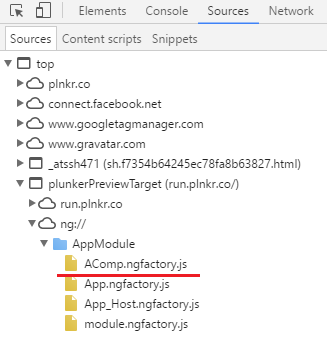
Earlier we established that a component factory enables us to create a component and attach it to a view. Every module makes available a service for its components to retrieve factories—this service is called ComponentFactoryResolver. So if you declare a BComponent in a module and want its factory, you can use this service from another component in the same module:
export class AppComponent {
  constructor(private resolver: ComponentFactoryResolver) {
    // now the `f` contains a reference to the cmp factory
    const f = this.resolver.resolveComponentFactory(BComponent);
  }
This approach works only when both components share a module, or when the module that holds the resolved factory has been imported.
Lazy module loading and compilation
What if a component lives in a module you'd prefer not to load until it's actually needed? That's possible and somewhat resembles what the router does with the loadChildren configuration.
There are two strategies for loading a module at runtime. The first involves the SystemJsNgModuleLoader that Angular supplies. The router uses this loader with SystemJS to load child routes. It exposes a single method, load, which fetches a module into the browser, then compiles that module along with all its declarations. This method takes a file path and an export name, returning a ModuleFactory:
loader.load('path/to/file#exportName')
If an export name isn't supplied, the loader falls back to the default export. It's also important to note that SystemJsNgModuleLoader depends on certain DI configuration, so you'd register it as a provider this way:
providers: [
    {
      provide: NgModuleFactoryLoader,
      useClass: SystemJsNgModuleLoader
    }
  ]
Feel free to choose any token for provide, but since the router module uses NgModuleFactoryLoader, sticking with that same token seems sensible.
With that, loading a module and grabbing a component factory looks like this:
@Component({
  providers: [
    {
      provide: NgModuleFactoryLoader,
      useClass: SystemJsNgModuleLoader
    }
  ]
})
export class ModuleLoaderComponent {
  constructor(private _injector: Injector,
              private loader: NgModuleFactoryLoader) {
  }

  ngAfterViewInit() {
    this.loader.load('app/t.module#TModule').then((factory) => {
      const module = factory.create(this._injector);
      const r = module.componentFactoryResolver;
      const cmpFactory = r.resolveComponentFactory(AComponent);

      // create a component and attach it to the view
      const componentRef = cmpFactory.create(this._injector);
      this.container.insert(componentRef.hostView);
    })
  }
}
There's one catch, though, with SystemJsNgModuleLoader. Internally it invokes the compileModuleAsync method on the compiler. That method only generates factories for components listed in entryComponents or appearing within templates. If you'd rather not declare components as entry components, there's another option—load the module yourself and use compileModuleAndAllComponentsAsync. This generates factories for every component in the module and returns them within a ModuleWithComponentFactories instance:
class ModuleWithComponentFactories<T> {
    componentFactories: ComponentFactory<any>[];
    ngModuleFactory: NgModuleFactory<T>;
Here's the full approach for loading a module yourself and accessing all of its component factories:
ngAfterViewInit() {
  System.import('app/t.module').then((module) => {
      _compiler.compileModuleAndAllComponentsAsync(module.TModule)
        .then((compiled) => {
          const m = compiled.ngModuleFactory.create(this._injector);
          const factory = compiled.componentFactories[0];
          const cmp = factory.create(this._injector, [], null, m);
        })
    })
}
Bear in mind that this approach uses the compiler directly, which is not considered part of the public API. As the documentation states:
One intentional omission from this list is
@angular/compiler, which is currently considered a low level api and is subject to internal changes. These changes will not affect any applications or libraries using the higher-level apis (the command line interface or JIT compilation via@angular/platform-browser-dynamic). Only very specific use-cases require direct access to the compiler API (mostly tooling integration for IDEs, linters, etc). If you are working on this kind of integration, please reach out to us first.
Runtime component creation
From the earlier sections, you now know how dynamic components are created in Angular—it hinges on accessing component factories stored on a module. So far, we've dealt with modules defined ahead of runtime, loaded either eagerly or lazily. The nice part is that you don't need to predefine modules and then load them. You can literally create both a module and a component on the spot, similar to how AngularJS operated.
Let's revisit the initial example and see how we'd replicate it in Angular. Here's that same code once again:
const template = '<span>generated on the fly: {{name}}</span>'
const linkFn = $compile(template);
const dataModel = $scope.$new();
dataModel.name = 'dynamic'

// link data model to a template
linkFn(dataModel);
The overall recipe for creating and attaching dynamic content is:
- Define a component class with its properties, and apply the decorator
- Define a module class, add the component to that module's declarations, and apply the module decorator
- Compile the module and all its components to obtain the component factory
A module is simply a class with a decorator attached, and the same goes for a component. Since decorators are just functions available at runtime, we can apply them to classes whenever needed. This is how you'd create and attach a component dynamically on the fly:
@ViewChild('vc', {read: ViewContainerRef}) vc: ViewContainerRef;

constructor(private _compiler: Compiler,
            private _injector: Injector,
            private _m: NgModuleRef<any>) {
}

ngAfterViewInit() {
  const template = '<span>generated on the fly: {{name}}</span>';

  const tmpCmp = Component({template: template})(class {
  });
  const tmpModule = NgModule({declarations: [tmpCmp]})(class {
  });

  this._compiler.compileModuleAndAllComponentsAsync(tmpModule)
    .then((factories) => {
      const f = factories.componentFactories[0];
      const cmpRef = this.vc.createComponent(f);
      cmpRef.instance.name = 'dynamic';
    })
}
For easier debugging, consider replacing anonymous classes with named ones inside the decorators.
Ahead-of-Time Compilation
The compiler used in the examples above is called the Just-In-Time (JIT) compiler. You've probably also encountered the Ahead-Of-Time (AOT) compiler. In truth, Angular has just one compiler—it's simply called JIT or AOT depending on when you use it. Running it at runtime in the browser earns the JIT name. Compiling components before execution in the browser is AOT compilation. The latter is the preferred route, and the official manual lists solid reasons—including faster rendering and a smaller Angular framework download size.
When you go with AOT compilation, there typically isn't a compiler instance available at runtime. The earlier examples that bypass the compiler and rely solely on ComponentFactoryResolver still operate normally, but runtime compilation won't be possible. There's no rule preventing you from loading the compiler into the browser when needed, though it does require some setup. That setup looks like this:
import { JitCompilerFactory } from '@angular/compiler';

export function createJitCompiler() {
  return new JitCompilerFactory([{
    useDebug: false,
    useJit: true
  }]).createCompiler();
}

import { AppComponent }  from './app.component';

@NgModule({
  providers: [{provide: Compiler, useFactory: createJitCompiler}],
  ...
})
export class AppModule {}
Here we use the JitCompilerFactory function from the @angular/compiler package to create a compiler factory. We tell the compiler to run in JIT mode, then create an instance and register it under the standard Compiler token. Everything else in the application stays unchanged.
Cleaning up components
One last note: if you've added components manually, be sure to remove them when the parent component gets destroyed:
ngOnDestroy() {
  if(this.cmpRef) {
    this.cmpRef.destroy();
  }
}
This eliminates the DOM by detaching the component's view from the view container and then destroying the view itself.
ngOnChanges behavior
Dynamically added components participate in change detection just like statically declared ones, so the ngDoCheck lifecycle hook fires. However, ngOnChanges will not be triggered—even if the dynamic component declares an @Input and the parent changes a bound property. The root cause is that the inputs-checking function is produced by the compiler at build time and embedded in the factory, generated strictly from template information. Because the dynamic component isn't referenced in any template, the compiler has no occasion to generate that function.
Source Code
The complete set of examples from this article is hosted in the accompanying repository.