Improved Error Logging by the Angular AOT Compiler
For a long time, debugging errors in Angular was a significant challenge. Error messages often lacked clear stack traces, making it difficult to pinpoint the source of the problem. The introduction of Ivy brought substantial improvements due to its locality principle, providing developers with line numbers alongside error messages. Angular 10.1 introduces another enhancement to error logging through the AOT compiler. This article explores how error logging has evolved and what this latest change offers.
Pre-Ivy Error Handling
To understand the improvements, let's start by creating an Angular 8 application and then migrate it through versions 9 and 10. This progression will illustrate the evolution of the stack traces available to developers, showcasing how the compiler's error logging has matured.
You can scaffold a new Angular 8 application with the following command:
npx @angular/cli@8.3.28 new errordemo
Consider an example where we attempt to bind a variable to a template property in a component.
import { Component } from '@angular/core';

@Component({
  selector: 'app-root',
  template: `${title}`,
  styleUrls: ['./app.component.css']
})
export class AppComponent {
  title = 'errordemo';
}
In the code above, we are binding a variable to a template property that expects a string. However, the error we encounter is as follows:
ERROR in src/app/app.component.ts(5,16): error TS2304: Cannot find name 'title'.
This message is quite confusing, as it claims the variable title cannot be found, even though it clearly exists. The actual issue should have been identified as a type mismatch, such as template property must be string.
Let's examine another scenario where we try to bind a variable that doesn't exist at all.
import { Component } from '@angular/core';

@Component({
  selector: 'app-root',
  template: `{{name}}`,
  styleUrls: ['./app.component.css']
})
export class AppComponent {
  title = 'errordemo';
}
Remarkably, no error is thrown in this case until we attempt to create a production build.
Transitioning to Angular 9 with Ivy and AOT
Now, let's update the application to Angular 9 and observe the difference.
The same template now produces a much more meaningful error.
ERROR in src/app/app.component.ts:5:16 - error TS2339: Property 'name' does not exist on type 'AppComponent'.

5   template: `{{name}}`,
With this update, identifying the line number and understanding the actual problem becomes straightforward.
But what about the following template?
import { Component } from '@angular/core';

@Component({
  selector: 'app-root',
  template: `${name}`,
  styleUrls: ['./app.component.css']
})
export class AppComponent {
  title = 'errordemo';
}
ERROR in src/app/app.component.ts:5:13 - error NG1010: template must be a string

    5   template: `${name}`,
                  ~~~~~~~~~
    src/app/app.module.ts:9:5 - error NG6001: The class 'AppComponent' is listed in the declarations of the NgModule 'AppModule', but is not a directive, a component, or a pipe. Either remove it from the NgModule's declarations, or add an appropriate Angular decorator.

    9     AppComponent
          ~~~~~~~~~~~~

      src/app/app.component.ts:9:14
        9 export class AppComponent {
                       ~~~~~~~~~~~~
        'AppComponent' is declared here.
We now receive a more informative error with both line number and message. However, some of the information provided can still be misleading or confusing, such as in this error:
The class 'AppComponent' is listed in the declarations of the NgModule 'AppModule', but is not a directive, a component, or a pipe. Either remove it from the NgModule's declarations, or add an appropriate Angular decorator.
Examining the code reveals that there is nothing wrong with the component itself. The underlying issue is that the template needs to be a string containing a property name in curly braces, rather than a template expression.
When the compiler processes the component, the compilation fails initially, preventing it from being recognized as a valid component. Consequently, the compiler then throws the subsequent line of errors.
What if the compiler could recognize cases where certain values need to be known at compile time? It would be beneficial to receive a more targeted and meaningful error in such situations.
Angular 10 Provides a Solution
Angular 10 introduces a compiler feature aimed at generating more meaningful errors. A new capability arriving in Angular 10.1 will provide more accurate information and a clear reason for why a compilation failed.
With the current Angular 10.0, errors appear as follows:
ERROR in src/app/app.component.ts:5:16 - error TS2552: Cannot find name 'text'. Did you mean 'Text'?

5   template: `${text}`,
                 ~~~~

  node_modules/typescript/lib/lib.dom.d.ts:15438:13
    15438 declare var Text: {
                      ~~~~
    'Text' is declared here.
This still isn't as precise or helpful as one would hope. In the upcoming release, the error message will be clearer and more understandable.
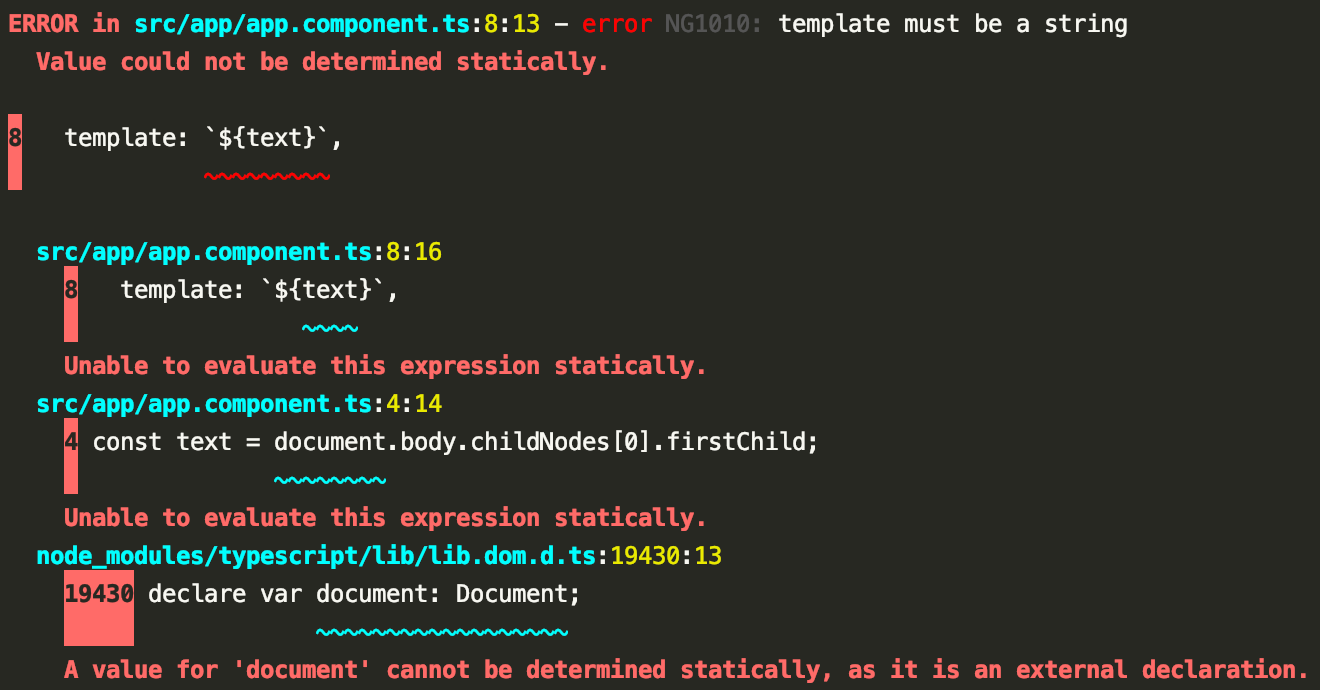
This new message offers a better explanation, indicating that the template should be a string and its value must be defined before compilation. In this scenario, the text variable contains an HTMLElement.
Further details on this feature are available in this Pull Request.
Conclusion
In the early versions of Angular, deciphering compiler errors was a genuine struggle. Fortunately, the quality and clarity of compiler error messages have advanced considerably over time.
Ivy began providing errors with useful information, such as line numbers. With this new feature, identifying issues where values cannot be dynamically determined and must be known to the compiler ahead of time will become even more straightforward.
For a deeper understanding of how compilers operate, refer to these articles by Ajit Singh:
- Under the hood of the Angular Compatibility Compiler (ngcc)
- An in-depth overview of Angular compilers