Implementing AG-UI with the SDK on the server and client
Now that AG-UI defines the domain-specific messages exchanged between client and agent, the practical question immediately arises: How do you actually implement these messages on both ends? That is precisely where the official SDKs step in, offering ready-made building blocks for TypeScript and Python.
This second part of the series demonstrates how the AG-UI SDK for TypeScript is used on the server and in the browser, how tool calls flow through it, and how client-side tools are described and transmitted to the agent.
📂 Source Code (see branch copilotkit)
What the AG-UI SDK Provides
To avoid starting from scratch, AG-UI ships not only with a protocol specification but also with SDKs for TypeScript and Python. Many of the adapters for agent frameworks build on top of these. The Microsoft Agent Framework, however, brings its own implementation to enable server-side AG-UI support in C# as well. In addition, the official AG-UI repository contains community implementations for other languages such as Java and C++ as well as for frameworks like Spring AI.
The official SDKs for TypeScript and Python support HTTP via Server-sent Events (SSE): Each run triggers a single HTTP request, after which the server-side agent streams its response to the client piece by piece, consisting of individual text messages and tool calls. These messages can be encoded either as JSON or in binary form using Protocol Buffers.
Using the TypeScript SDK on the Server
To illustrate the server-side use of the TypeScript SDK, the following example sends simple AG-UI-compliant messages without involving a language model — everything is hardcoded. To that end, the server follows an old Smalltalk rule that talking about the weather is never a bad idea:
import { HttpAgent } from '@ag-ui/client';
import { BaseEvent, EventType, RunAgentInput } from '@ag-ui/core';
import { Observable } from 'rxjs';

export class FlightWeatherAgent extends AbstractAgent {
  run(input: RunAgentInput): Observable<BaseEvent> {
    return new Observable((observer) => {
      const { threadId, runId } = input;
      observer.next({ type: EventType.RUN_STARTED, threadId, runId });
      observer.next({
        type: EventType.TEXT_MESSAGE_START,
        messageId: '1001',
        role: 'assistant',
      });
      observer.next({
        type: EventType.TEXT_MESSAGE_CONTENT,
        messageId: '1001',
        delta: 'Checking flight weather for Frankfurt...',
      });
      observer.next({ type: EventType.TEXT_MESSAGE_END, messageId: '1001' });
      [...]
      observer.next({ type: EventType.RUN_FINISHED, threadId, runId });
      observer.complete();
    });
  }
}
The FlightWeatherAgent shown here inherits from AbstractAgent. The run method processes user requests. It starts a run, sends a text message to the client, and then completes the run.
Typically, run delegates to an agent framework such as Mastra, LangGraph, Google ADK, Microsoft Agent Framework, or Spring AI and converts the received information into AG-UI-compliant messages. In most cases, you don't have to write this integration yourself: the AG-UI SDK provides adapters for many frameworks, and some frameworks ship their own bindings as well.
It is important to note that the SDK does not handle the connection to the chosen transport protocol — that is, it does not deal with sending Server-sent Events (SSE) over HTTP. For this reason, the accompanying demo project includes a small piece of glue code that subscribes to the agent and forwards all messages as SSE.
Using the TypeScript SDK in the Browser
On the client side, the TypeScript SDK allows us to define an AgentSubscriber with event handlers for incoming messages:
import { AgentSubscriber } from '@ag-ui/client';

const subscriber: AgentSubscriber = {
  onRunStartedEvent: ({ event }) => {
    console.log(
      `RUN_STARTED: threadId=${event.threadId}, runId=${event.runId}`,
    );
  },
  onTextMessageStartEvent: ({ event }) => { [...] },
  onTextMessageContentEvent: ({ event }) => { [...] },
  onTextMessageEndEvent: ({ event }) => { [...] },
  [...]
  onRunFinishedEvent: ({ event }) => { [...] },
};
A dedicated handler exists for each message type. Using the HttpAgent — also provided by the SDK — you can establish a connection to the agent on the server:
import { FlightWeatherAgent } from './server.js';

const threadId = '4711';
const url = 'https://...';
const agent = new HttpAgent({ url, threadId });

const userMessage = {
  id: 'msg-user-1',
  role: 'user' as const,
  content: 'What is the flight weather in Frankfurt?',
};

agent.addMessage(userMessage);
await agent.runAgent({ runId: '0815' }, subscriber);
The addMessage method initially only appends the userMessage to a client-side array. The locally collected messages are only transmitted when runAgent starts the next run. Once the agent's responses arrive via SSE, runAgent invokes the corresponding handlers on the passed AgentSubscriber.
Depending on whether the agent retains the conversation history between individual runs, the client either sends all messages exchanged so far or only the newly added ones.
Agentic UI with Angular
If you want to not merely integrate AG-UI but embed it cleanly into larger architectures:
My book Agentic UI with Angular covers precisely these patterns and trade-offs in detail.
Server-Side Tool Calling with the AG-UI SDK
So far, our demo has only exchanged plain text messages. However, the agent requesting tool calls works in a very similar fashion. The relevant information is again typically supplied by the language model of choice and prepared by the agent in an AG-UI-compliant format. For simplicity, our demo continues to rely on a few hardcoded messages:
// Server Code
// Step 1: Tool Call
observer.next({
  type: EventType.TOOL_CALL_START,
  toolCallId: '2001',
  toolCallName: 'loadFlightWeather',
});
observer.next({
  type: EventType.TOOL_CALL_ARGS,
  toolCallId: '2001',
  delta: '{"city":"Frankfurt"}',
});
observer.next({
  type: EventType.TOOL_CALL_END,
  toolCallId: '2001',
});
// Step 2: Execute Server-side Tool
const weatherResult = [...];
// Step 3: Answer Tool Call
observer.next({
  type: EventType.TOOL_CALL_RESULT,
  toolCallId: '2001',
  messageId: '3001',
  role: 'tool',
  content: JSON.stringify(weatherResult),
});
With the first three messages, the agent indicates that the LLM has requested a tool call. Since this is a server-side tool, the agent executes it itself and feeds the result back to the language model. Additionally, it logs the outcome via another AG-UI message.
Based on these messages, the client can inform the user about the tool call. This creates transparency and prevents a noticeable stall in the UI.
Client-Side Tool Calling with the AG-UI SDK
Executing client-side tools proceeds much like server-side ones. Again, the agent notifies the caller about the invocation and the parameters using the tool-call messages discussed earlier. The difference is that the client now reacts to these messages by running a tool and sending the result back in the next run.
This raises an initial challenge: The language model needs to know about the available client tools. Here too, the TypeScript SDK comes to the rescue. It offers a Tool data type for defining client tools. In addition to a name and a textual description, this type also carries information about the expected parameters:
// Client Code
import { Tool } from '@ag-ui/client';
import { z } from 'zod';

const weatherSchema = z.object({
  condition: z.string().describe('e.g., sunny, cloudy, rainy.'),
  temperature: z.string().describe('e.g., 25°C, 77°F.'),
  wind: z.string().describe('e.g., 5 km/h, 3 mph.'),
});

export const showWeatherTool: Tool = {
  name: 'showWeather',
  description: 'Provide weather data the client can render.',
  parameters: z.toJSONSchema(weatherSchema),
};
Parameters are stored as a JSON Schema. Our example uses the popular schema library zod to produce this schema. Based on the tool's description and its parameters, the LLM can decide when and how to invoke the tool.
The runAgent method accepts the tool descriptions and forwards them to the agent:
// Client Code
// 1st run
await agent.runAgent({ runId: '0815', tools: [showWeatherTool] }, subscriber);
// Look into received client-side tool calls and perform respective actions
const toolCallResultMessage = [...];
// Add Tool Call Result
agent.addMessage(toolCallResultMessage);
// 2nd run
await agent.runAgent({ runId: '0816', tools: [showWeatherTool] }, subscriber);
After each run, the client checks whether the AgentSubscriber has received requests for client-side tool calls. If so, it executes those tools and sends the results back to the agent as part of another run.
AG-UI, the Message History, and Client Tools
The messages stored via addMessage and the metadata about client tools are transmitted through the payload of the HTTP request that triggers the next run. In contrast to the messages discussed above, the AG-UI protocol does not define the structure of this payload. It is merely an implementation detail of the AG-UI SDK. Given the official nature of this SDK, one can hope that other implementations will follow suit.
Reading Client Tool Information on the Server
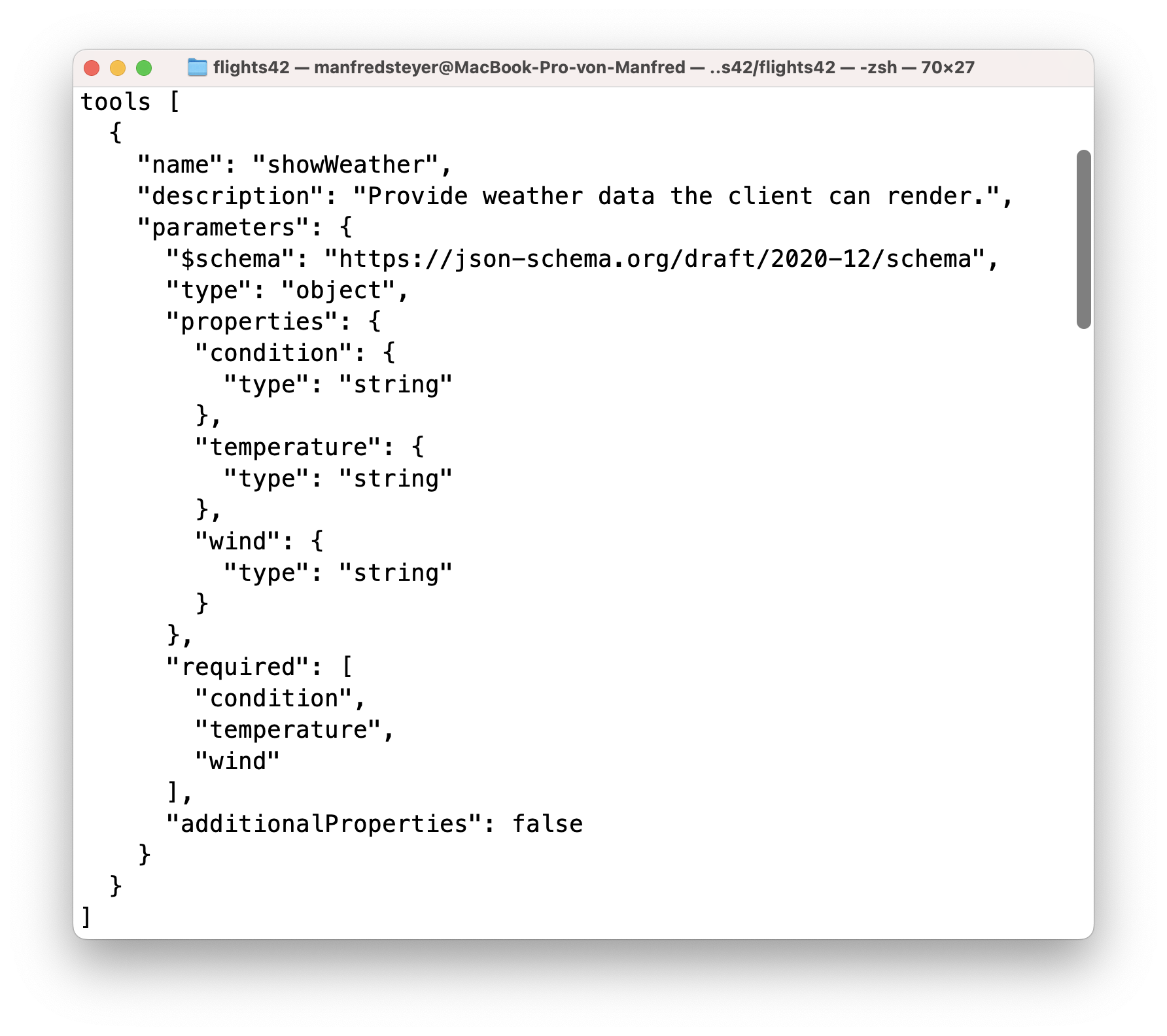
As mentioned earlier, the adapters of the individual agent frameworks pass the received client-tool information through to the LLM. If you prefer to work with this data manually inside the agent, you can find it in the tools property of the parameter object passed to run:
class FlightWeatherAgent extends AbstractAgent {
  run(input: RunAgentInput): Observable<BaseEvent> {
    return new Observable((observer) => {
      console.log('tools', input.tools);
      [...]
    });
  }
}
This is a JSON Schema containing the parameter descriptions and the textual details that the client defined using Zod:
Summary
The TypeScript SDK takes care of a large portion of the integration work required for AG-UI. It handles the correct representation and processing of messages. It also offers event handlers so that the client can react to incoming messages.
The SDK is deliberately low-level. As the second part of the series, this article lays the technical groundwork for the subsequent use in a concrete frontend framework.
The Next Step
Working directly with the SDK leads to an unnecessary amount of boilerplate. The next article shows how all of this can be comfortably abstracted for Angular.
Interested in Production-Ready Agentic UI Architectures?
In my workshop, we focus on AG-UI, A2UI, MCP Apps, HITL patterns, and modern Angular architectures for real-world agentic systems.
FAQ
What does the AG-UI SDK for TypeScript do?
The SDK provides building blocks for generating, sending, and processing AG-UI messages on both the server and in the browser. This includes agent base classes, subscribers for incoming events, and data types for client tools.
Does the AG-UI SDK support Server-sent Events?
The SDK works well with Server-sent Events but does not handle the transport layer itself. The actual delivery of SSE over HTTP must therefore be implemented by the application through glue code or a framework.
How do server-side and client-side tool calls differ?
Server-side tools are executed by the agent itself, which reports their results back to the model. Client-side tools, by contrast, are requested by the agent, executed in the browser, and their results are sent back to the agent in the next run.
Why is the TypeScript SDK still low-level?
The SDK accurately mirrors AG-UI communication but deliberately leaves out many convenience features. In frameworks such as Angular, an additional abstraction layer is therefore usually advisable to reduce boilerplate and make the integration more idiomatic.