Excluding theme files from the build
Consider a scenario where, in addition to the primary styles.css, your project contains two theme stylesheets:
- src/styles/themes/theme-light.css
- src/styles/themes/theme-dark.css
You would typically register these files in the styles section of your workspace configuration file, angular.json:
"styles": [
    "src/styles.css",
    "src/styles/themes/theme-light.css",
    "src/styles/themes/theme-dark.css"
  ]
Your application likely decides which theme to apply based on user preference or system settings. The functionality works as expected, but a downside is that both theme stylesheets are always included in the main application bundle, regardless of which theme is actually used.
Removing themes from the main bundle
To prevent these theme files from being part of the primary bundle, you can adjust the configuration in angular.json as follows:
"styles": [
    "src/styles.css",
    {
      "input": "src/styles/themes/theme-light.css",
      "inject": false,
      "bundleName": "theme-light"
    },
    {
      "input": "src/styles/themes/theme-dark.css",
      "inject": false,
      "bundleName": "theme-dark"
    }
  ]
This introduces two important configuration options:
inject: When set tofalse, the stylesheet specified in theinputpath will not be injected into the application bundle.bundleName: This option creates a distinct output bundle specifically for the stylesheet referenced in theinputpath.
After building the project, you will notice separate files generated for the themes, as shown in the output:
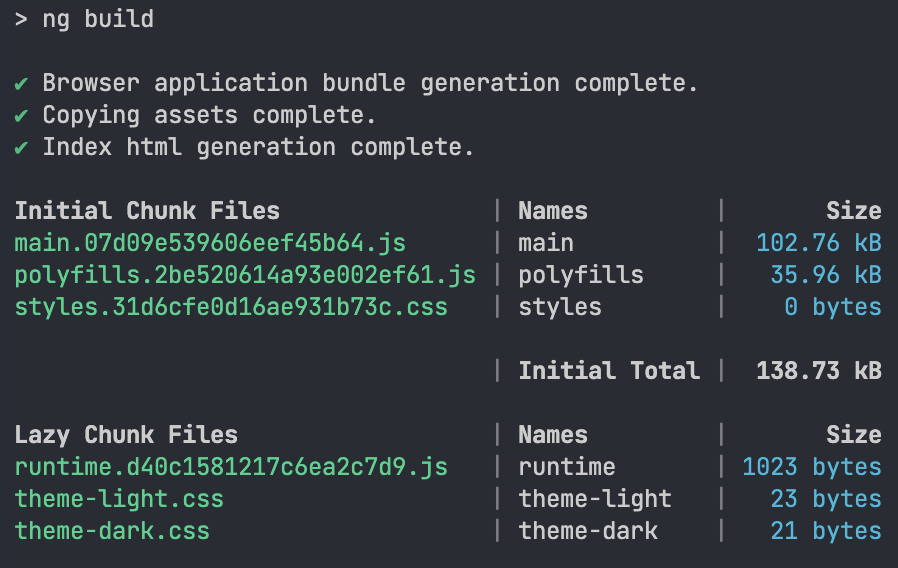
You can see that theme-light.css and theme-dark.css are now categorized under Lazy Chunk Files. These files are only fetched when needed, which can significantly reduce the initial loading time of your application.
Loading the theme files on demand
With the themes excluded from the main bundle, the next step is to figure out how to actually apply them. One straightforward method is to reference the generated files directly using a link tag in your HTML:
<link
  rel="stylesheet"
  href="theme-dark.css"
  media="(prefers-color-scheme: dark)" />
<link
  rel="stylesheet"
  href="them-light.css"
  media="(prefers-color-scheme: light)"
/>
You may need to adjust the document's base URL using the base tag for the links to resolve correctly.
Final thoughts
We have seen that by setting the inject flag to false in angular.json, you can exclude stylesheets from the main bundle. The bundleName option then allows you to load these files on demand.
The primary benefit of this approach is a smaller initial bundle size. This leads to faster load times and an improved experience for your users.