
Angular was built as a platform-agnostic framework, which is what lets the same application run in the browser, on a server, in a web-worker, or even on mobile.
Related articles:
- Angular Platforms in depth. Part 1. What are Angular Platforms?
- Angular Platforms in depth. Part 2. Application bootstrap process
- Angular Platforms in depth. Part 3. Rendering Angular applications in Terminal

Table of contents
- Angular is a cross-platform framework
- What are Angular platforms?
- How do Angular platforms allow cross-platform execution?
Angular is a cross-platform framework
As I noted earlier, Angular was built with flexibility at its core. Consequently, Angular functions as a cross-platform framework, unconstrained by the browser. For Angular to run, all it demands is a JavaScript engine. Let's examine the most common environments where Angular operates.
Browser
When you generate a fresh Angular project via the CLI command ng new MyNewApplication, the browser environment is selected as the default for your application.
Server
Angular apps can be compiled and run on the server side. In this scenario, the application is compiled into static HTML files, which are subsequently delivered to clients.
This method accelerates application loading and guarantees that search engines can index the application properly.
Web worker
Additionally, a portion of the Angular application can be offloaded to a separate thread—the web worker thread. In this setup, only a minimal segment of the app remains on the main thread, serving solely to enable the web worker portion to interact with the document APIs.
This technique yields a smoother UI, devoid of "janks," since the bulk of your application’s processing occurs independently of the UI.
The web worker environment was experimental from its inception and has been deprecated since Angular 8.
NativeScript
Numerous third-party libraries also facilitate running Angular apps across diverse environments. A case in point is NativeScript, which empowers Angular to operate on mobile devices, harnessing the full capabilities of native platforms.
But what makes it feasible to execute Angular applications in such varied environments?
The answer lies in platforms!
What are Angular platforms?
To understand what Angular platforms are, we must inspect the entry point of every Angular application—the main.tsfile:
import { platformBrowserDynamic } from '@angular/platform-browser-dynamic';

platformBrowserDynamic().bootstrapModule(AppModule);
Two key elements stand out here:
- The
platformBrowserDynamic()function is invoked and yields an object as its return value. - That returned object then serves to bootstrap the application.
Rewriting slightly, a notable peculiarity emerges:
import { platformBrowserDynamic } from '@angular/platform-browser-dynamic';
import { PlatformRef } from '@angular/core';


// Create Browser Platform
const platformRef: PlatformRef = platformBrowserDynamic();

// Bootstrap Application
platformRef.bootstrapModule(AppModule);
platformBrowserDynamic serves as a platform factory, meaning it is a function responsible for generating fresh platform instances. Invoking platformBrowserDynamic returns a PlatformRef object. This PlatformRef acts as a standard Angular service equipped with the logic to launch our applications. To gain clearer insight into the creation process of this PlatformRef instance, let’s examine the inner workings of platformBrowserDynamic more closely:
export const platformBrowserDynamic = createPlatformFactory(

  // Parent platform factory
  platformCoreDynamic,

  // New factory name
  'browserDynamic',

  // Additional services
  INTERNAL_BROWSER_DYNAMIC_PLATFORM_PROVIDERS,
);
The platformBrowserDynamic function, as illustrated above, is created by invoking createPlatformFactory, which takes these parameters:
- The parent platform factory —
platformCoreDynamic - A label for the new platform —
‘browserDynamic’ - Extra providers —
INTERNAL_BROWSER_DYNAMIC_PLAFORM_PROVIDERS,
In this context, platformCoreDynamic serves as the parent factory. The connection between platformCoreDynamic and platformBrowserDynamic can be understood as a form of inheritance, and createPlatformFactory is the utility that enables this derivation from one factory to another. It’s that straightforward.
Deeper down the inheritance chain, things get more intriguing. Notably, platformCoreDynamic itself derives from platformCore, which stands without any parent.
Thus, the complete chain for platformBrowserDynamic looks like this:
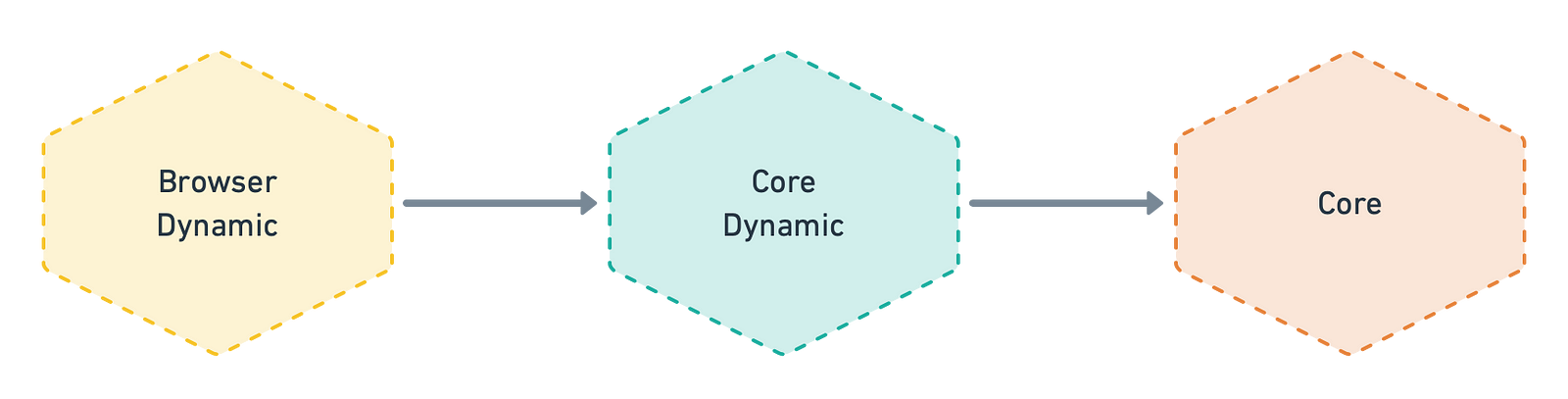
Angular platform factories, when inherited, do not alter how their parent factories behave. Their role is to supply extra tokens and services for use within an application.
That may sound a bit involved. Let’s take a closer look at the createPlatformFactory function to clarify the exact process behind creating Angular platform factories.
Below is an extremely simplified version of that function’s code:
type PlatformFactory = (extraProviders?: StaticProvider[]) => PlatformRef;

export function createPlatformFactory(
  parentPlatformFactory: PlatformFactory,
  name: string,
  providers: StaticProvider[] = [],
): PlatformFactory {

  return (extraProviders: StaticProvider[] = []) => {
    const injectedProviders: StaticProvider[] = providers.concat(extraProviders);

    if (parentPlatformFactory) {
      return parentPlatformFactory(injectedProviders);
    } else {
      return createPlatform(Injector.create({ providers: injectedProviders }));
    }
  };
}
Invoking that function produces a platform factory. This factory accepts additional StaticProviders intended for our applications. When a parent platform factory is supplied, createPlatformFactory invokes it and returns its result; otherwise, it constructs and returns a new platform. To clarify how platformBrowserDynamic is built, let’s walk through its creation sequence:
platformBrowserDynamicoriginates from acreatePlatformFactoryinvocation whereplatformCoreDynamicserves as the parent platform.
2. The platformBrowserDynamic function is then called to establish a fresh platform.
3. It verifies whether parentPlatformFactory is present, and if so, executes it with the additional providers array, subsequently returning its output.
if (parentPlatformFactory) {
  return parentPlatformFactory(injectedProviders);
}
4. On that stage we could see that the value returned by platformBrowserDynamic is, in reality, the output of platformCoreDynamic after combining it with all the services that platformBrowserDynamic supplies.
5. The way platformCoreDynamic is constructed mirrors that of platformBrowserDynamic, but with two key distinctions — it builds upon platformCore and brings its own set of providers into the mix.
export const platformCoreDynamic = createPlatformFactory(
  platformCore,
  'coreDynamic',
  CORE_DYNAMIC_PROVIDERS,
);
At this point, the pattern repeats: since a parent platform is already present, the parent platform factory's outcome is simply returned, enriched with extra providers.
platformCore([ ...CORE_DYNAMIC_PROVIDERS, ...BROWSER_DYNAMIC_PROVIDERS ]);
6. When we look inside platformCore, however, the circumstances are a bit different.
export const platformCore = createPlatformFactory(
  null,
  'core',
  CORE_PLATFORM_PROVIDERS,
);
Within this context, the CORE_PLATFORM_PROVIDERS array includes the key provider — namely, the PlatformRef service. Since a null value is passed as the parent platform factory, the createPlatformFactory function simply returns whatever createPlatform produces.
7. Next, the createPlatform function merely obtains PlatformRef via the injector, then hands it back to the caller.
function createPlatform(injector: Injector): PlatformRef {
  return injector.get(PlatformRef);
}
8. Now we have PlatformRef created:
const ref: PlatformRef = platformBrowserDynamic();
However, platforms do not directly alter the PlatformRef behavior through inheritance. What they actually do is supply fresh collections of services that the PlatformRef relies on when bootstrapping.
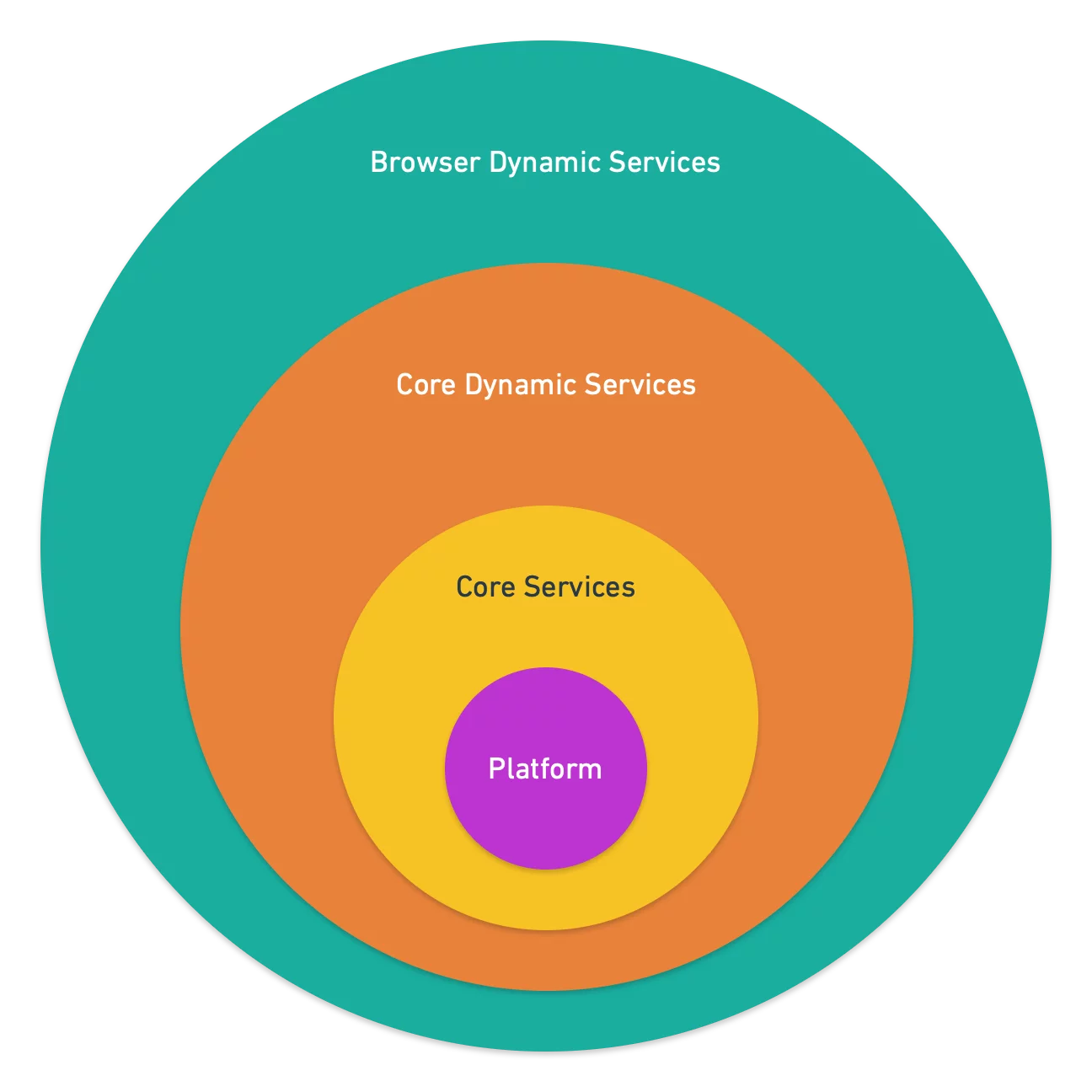
It is worth noting that platformCore stands apart from other platforms. This particular platform holds a unique status because it supplies PlatformRef during the platform creation sequence, which makes it the foundational platform for every other platform within the Angular ecosystem.
Consequently, we can conclude that every Angular platform is built from two essential components:
PlatformRef— a service responsible for launching the Angular application.- Providers — a collection of tokens and services available throughout the bootstrap and execution stages.
How do Angular platforms enable cross-platform execution?
Now that we understand what Angular platforms are and how they come into existence, we can examine their role in making Angular a cross-platform framework.
The key lies in abstraction. Angular depends heavily on its dependency injection system, and a significant portion of the framework is defined as abstract services:
- Renderer2
- Compiler
- ElementSchemaRegistry
- Sanitizer
- etc.
These services, along with many others, are declared as abstract classes within Angular. When you work with various platforms, each one provides its own concrete implementations for those abstract classes. To illustrate, consider the set of abstract services that Angular declares—I like to visualize them as blue circles:

However, these are merely abstract classes without any concrete behavior or logic. In practice, the Browser Platform supplies its own concrete implementations for each of these services:
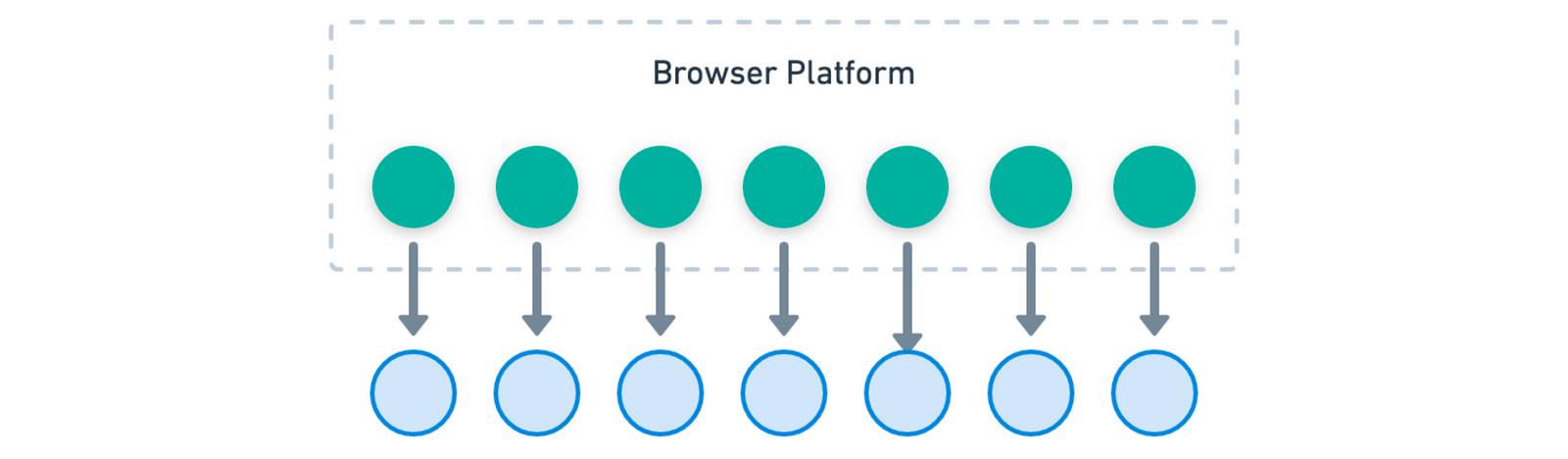
Server Platform, for example, supplies its own concrete implementations of these abstract core services.

Now, let’s look at a concrete example.
Angular depends on an abstraction called DomAdapter to handle DOM operations without being tied to a particular environment. Below is a simplified representation of this abstract class.
export abstract class DomAdapter {
  abstract setProperty(el: Element, name: string, value: any): any;
  abstract getProperty(el: Element, name: string): any;
  abstract querySelector(el: any, selector: string): any;
  abstract querySelectorAll(el: any, selector: string): any[];
  abstract appendChild(el: any, node: any): any;
  abstract removeChild(el: any, node: any): any;

  //... and so on
}
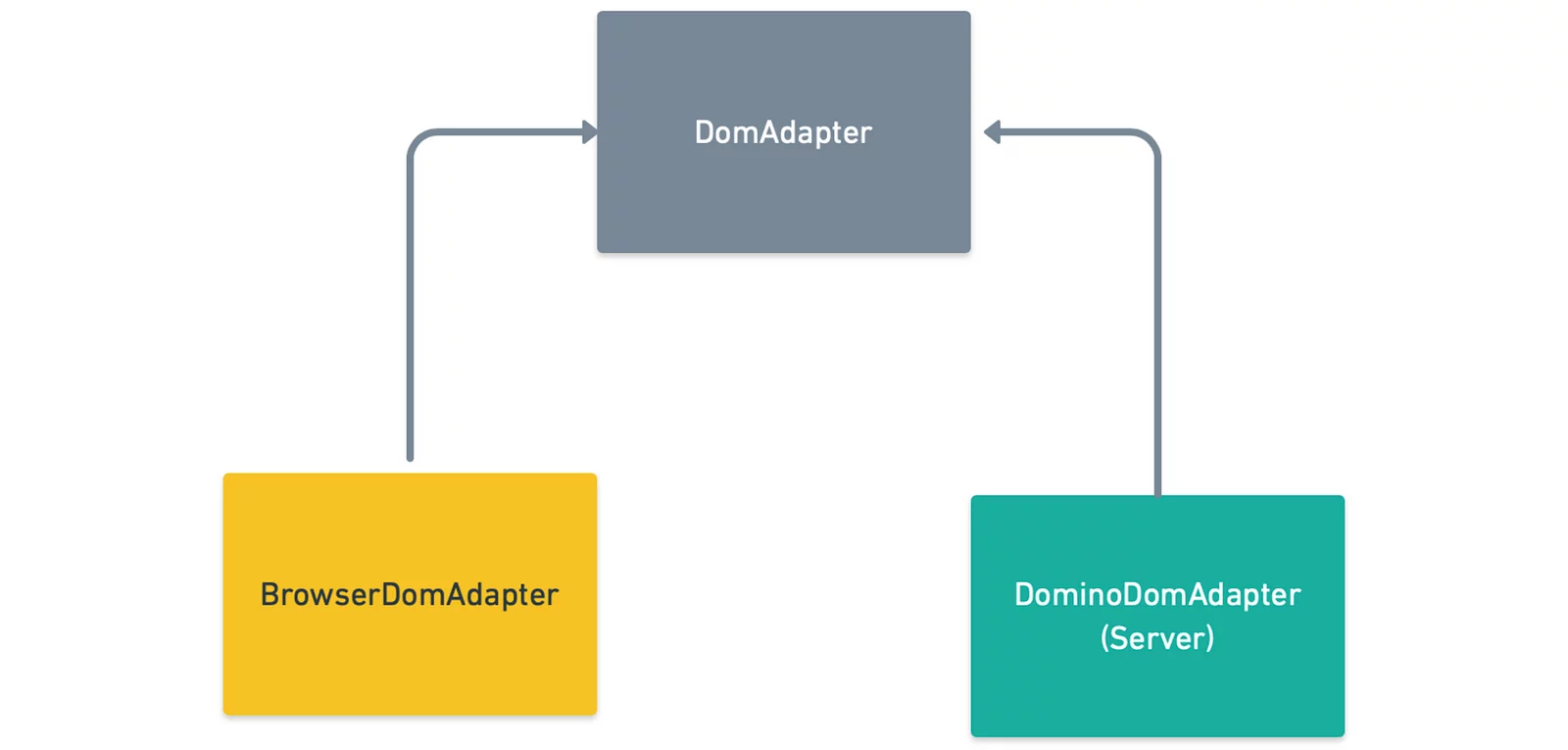
With Browser Platform in play, the browser-specific version of this abstract class is supplied.
export class BrowserDomAdapter extends DomAdapter { ... }
The BrowserDomAdapter performs direct manipulation of the browser’s DOM, which makes it unsuitable for any environment beyond the browser itself.
Consequently, to support server-side execution for rendering purposes, we rely on the Server Platform, which supplies an alternative implementation:
export class DominoAdapter extends DomAdapter { ... }
DominAdapter avoids DOM interaction, since the server environment lacks a DOM. It relies instead on the domino library, which simulates DOM behavior for node.js.
This yields the architecture shown below:
Conclusion
Well done — you've made it to the finish line. Throughout this read, we explored the essence of Angular platforms, their creation mechanism, and dissected the platformBrowserDynamic bootstrapping process step by step. In the end, we clarified how the platform abstraction makes Angular a framework that runs anywhere.
Craving more insights into Angular platforms? Check out the subsequent pieces in this series:
- Angular Platforms in depth. Part 1. What are Angular Platforms?
- Angular Platforms in depth. Part 2. Application bootstrap process
- Angular Platforms in depth. Part 3. Rendering Angular applications in Terminal
For instant updates on fresh Angular content, don’t forget to follow me on twitter!