Enabling full template type-checking in Ivy brings with it some important caveats worth knowing about.
In this article, we look at how Angular performs type-checking in templates, compare the approach used in ViewEngine with the one in Ivy, and explore what’s new in Ivy’s type-checking toolkit.
By the end of the article you’ll:
- understand the mechanics behind Angular’s template type-checking
- see how ViewEngine and Ivy differ in this area
- be familiar with the latest Ivy type-checking capabilities
- gain confidence debugging template errors by learning how to inspect the generated type-checking code
Let’s jump in.
Historical context
It’s hard to recall exactly which Angular release first surfaced those puzzling compilation errors in production builds, but many of us have seen them:
Property ‘resisterUser’ does not exist on type ‘LoginRegisterComponent’
Expected 0 arguments, but got 1
Supplied parameters do not match any signature of call target
These diagnostics reveal a key fact: Angular processes a component’s template as if it were a partial TypeScript file.
But how does that work?
Enter the Type Check Block
The answer is fairly straightforward.
Angular emits every binding expression in a form that the type checker can handle. More specifically, it constructs Type Check Blocks (often abbreviated as TCB) from the component template.
In essence, a Type Check Block is a chunk of TypeScript that can be inserted directly into source files. When the TypeScript compiler processes it, any type errors in the template expressions become visible.
Consider a simple component:
@Component({
  selector: 'app-root',
  template: '{{ foo }}'
})
export class AppComponent {}
For this component, the corresponding type check block looks like this:
var _decl0_1: AppComponent = (<any>(null as any));
function _View_AppComponent_1_0(): void {
  const currVal_0: any = _decl0_1.foo;
}
As you’d expect, this snippet won’t compile because _decl0_1.foo references a property foo that doesn’t exist on the AppComponent class.
That’s the core idea. Now let’s see how ViewEngine and Ivy each implement it.
Type-checking in View Engine
You’re likely aware that the Angular compiler generates factory files for every component and module.
Beyond that, each NgModule factory file also includes the type-check blocks for all components declared in that module. In other words, every module-based factory carries generated TCBs.
Take a basic module like this:
@NgModule({
  ...
  declarations: [
    AppComponent
  ]
})
export class AppModule {}
It produces a synthetic file similar to:
import * as i0 from '@angular/core';
import * as i1 from './app.module';
import * as i2 from '@angular/common';
import * as i3 from './foo.component';
import * as i4 from './app.component';
import * as i5 from '@angular/platform-browser';
import * as i6 from './foo.module';
export const AppModuleNgFactory:i0.NgModuleFactory<i1.AppModule> = (null as any);
var _decl0_0:i2.NgClass = (<any>(null as any));
var _decl0_1:i2.NgComponentOutlet = (<any>(null as any));
var _decl0_2:i2.NgForOf<any> = (<any>(null as any));
var _decl0_3:i2.NgIf = (<any>(null as any));
// ...
var _decl0_28:i0.TemplateRef<any> = (<any>(null as any));
var _decl0_29:i0.ElementRef<any> = (<any>(null as any));
function _View_AppComponent_Host_1_0():void {
  var _any:any = (null as any);
}
function _View_AppComponent_1_0():void {
  var _any:any = (null as any);
  const currVal_0:any = _decl0_12.title;
  currVal_0;
}
What exactly gets checked when fullTemplateTypeCheck is turned on? Let’s review.
# component member access
If you reference a property or method that doesn’t exist on the component, the type-checking system raises a diagnostic:
{{ unknownProp }}
The generated TCB for this scenario is:
var _decl0_12:i4.AppComponent = (<any>(null as any));
function _View_AppComponent_1_0():void {
  var _any:any = (null as any);
  const currVal_0:any = _decl0_12.unknownProp; //  Property 'unknownProp' does not exist on type 'AppComponent'.
  currVal_0;
}
# event bindings
The compiler will flag when you invoke a method from the template without the required arguments.
@Component({
  selector: 'app-root',
  template: '<button (click)="test($event)">Test</button>'
})
export class AppComponent {
  test() {}
}
Notice that I deliberately left the test method parameterless. Building this component in AOT mode yields the error Expected 0 arguments, but got 1.
var _decl0_1: AppComponent = (<any>(null as any));
function _View_AppComponent_1_0(): void {
  var _any:any = (null as any);
  const pd_1:any = ((<any>_decl0_1.test(_any)) !== false);
                                   ^^^^^^^^^^
}
# HostListener
Take this code inside your component:
@HostListener('click', ['$event'])
onClick() {}
The compiler will generate a TCB like this:
function _View_AppComponent_Host_1_0():void {
 var _any:any = (null as any);
 const pd_0:any = ((<any>_decl0_12.onClick(_any)) !== false);
}
This brings back a familiar error, similar to the one from event bindings:
Directive AppComponent, Expected 0 arguments, but got 1.
# handling of template expressions
The compiler understands nearly all template expression constructs, including:
{{ getSomething() }}
{{ obj[prop][subProp] }}
{{ someMethod({foo: 1, bar: '2'}) }}
# type-checking for pipe
The types of the pipe’s input value and its arguments are matched against the transform() signature.
<div>{{"hello" | aPipe}}</div>
// Argument of type "hello" is not assignable to parameter of type number

{{ ('Test' | lowercase).startWith('test') }}
// error TS2551: Property 'startWith' does not exist on type 'string'. Did you mean 'startsWith'?
# type-safety for directives using template reference variables
When a template reference variable (e.g., #) accesses a directive, the compiler enforces type correctness.
<div aDir #aDir="aDir">{{aDir.fname}}</div>
Property 'fname' does not exist on type 'ADirective'. Did you mean 'name'?
# **$any keyword**
To turn off type-checking for a specific binding expression, wrap it in a $any() call.
$any(this).missing // ok
This approach avoids errors even when a missing property isn't defined.
# non-null type assertion operator
This comes in handy when __“strictNullChecks”__: true is set in tsconfig.json.
{{ obj!.prop }}
# type guard for ngIf
Suppose strictNullChecks is enabled in your tsconfig.json and a component declares a property like this:
person?: Person;
A template could then be structured as:
<div *ngIf="person">{{person.name}}</div>
This capability allows guarding person.name access through two distinct approaches:
ngIfTypeGuardwrapper
By attaching a static property to the ngIf directive:
static ngIfTypeGuard: <T>(v: T|null|undefined|false) => v is T;
the compiler produces a TCB similar to:
if (NgIf.ngIfTypeGuard(instance.person)) {
 instance.person.name
}
The ngIfTypeGuard ensures the instance.person referenced in a binding will never be undefined.
2. Use expression as a guard
Adding another static property to ngIf:
public static ngIfUseIfTypeGuard: void;
enhances type-checking precision. It lets a directive treat the expression passed to a property as the guard itself, rather than narrowing the type through a type expression.
if (instance.person) {
  instance.person.name
}
Angular's official documentation covers this in detail at https://angular.io/guide/aot-compiler#type-narrowing
Ivy type-checking
Recall that in ViewEngine, TCBs live inside NgModule factories. TypeScript must re-parse and re-type-check those files as part of the type-checking program.
The Ivy compiler takes a much more efficient route. It augments the program with a single synthetic __ng_typecheck__.ts file, consolidating all TCBs there.
Ivy also introduces special methods known as **type constructors**.
A type constructor is a specially shaped TypeScript method that permits type inference of any generic type parameters of the class from the types of expressions bound to inputs or outputs, and the types of elements that match queries performed by the directive. It also catches any errors in the types of these expressions.
While never invoked at runtime, type constructors are used within type-check blocks to build directive types.
For the NgFor directive, a type constructor appears as:
static ngTypeCtor<T>(init: Partial<Pick<NgForOf<T>, ‘ngForOf’|’ngForTrackBy’|’ngForTemplate’>>): NgForOf<T>;
Its typical usage looks like:
NgForOf.ngTypeCtor(init: {ngForOf: [‘foo’, ‘bar’]}); // Infers a type of NgForOf<string>.
These type constructors are also embedded directly into the __ng_typecheck__.ts file.
There are exceptions where Ivy must inline TCB blocks into the file currently being processed:
- The component class lacks the
exportmodifier - The component uses constrained generic types, such as
class Comp<T extends { name: string }> {}
Yet, in typical scenarios, all TCBs can be found in the __ng_typecheck__.ts file.
Let's explore the type-checking improvements Ivy brings.
# Type checking of directive inputs
Errors are now triggered when a directive receives a property of an incompatible type:
<app-child [prop]="'text'"></app-child>
export class ChildComponent implements OnInit {
  @Input() prop: number;
ViewEngine would generate code like this:
function _View_AppComponent_1_0():void {
  var _any:any = (null as any);
  const currVal_0:any = 'text';
  currVal_0;
}
Ivy, however, offers an improved TCB:
const _ctor1: (init: Partial<Pick<i1.ChildComponent, "prop">>) => i1.ChildComponent = (null!);

function _tcb1(ctx: i0.AppComponent) {
 if (true) {
   var _t1 = document.createElement("app-child");
   var _t2 = _ctor1({ prop: "text" }); //  error TS2322: Type 'string' is not assignable to type 'number'.
 }
}
**Case with an unobvious directive:**
<input ngModel [maxlength]="max">
max = 100
// error TS2322: Type 'number' is not assignable to type 'string'.
The expected type comes from property 'maxlength' which is declared here on type 'Partial<Pick<MaxLengthValidator, "maxlength">>'
At first, one might expect no error here, since it could be confused with the maxLength property on native elements, which accepts numbers.
Yet an error surfaces due to the maxlength input property constraints imposed by the MaxLengthValidator directive.
**Case with a structural directive:**
<div *ngFor="let item of {}"></div>
error TS2322: Type '{}' is not assignable to type 'NgIterable<any>'.
In that example, the structural directive expands to its full form, exposing an input property binding [ngForOf]=”{}”, which is the source of the problem.
# Element property bindings
Ivy now can recognize the type of element where we use property binding.
Given a template like
<input type="checkbox" checked={{flag}}>
with a component property flag = true, the result is:
function _tcb1(ctx: i0.AppComponent) {
  if (true) {
    var _t1 = document.createElement("input");
    _t1.checked = "" + ctx.checked; // error TS2322: Type 'string' is not assignable to type 'boolean'.
  }
}
Notice how the compiler defines the element:
var _t1 = document.createElement("input");
Because TypeScript has a mapping from tag names to element types, the inferred type becomes HTMLInputElement rather than a generic HtmlElement. Consider the implications—**full type-safety for every property and method of HTML elements is now possible.**
What is even more interesting is that this approach can be extended to define custom web components. This required CUSTOM_ELEMENTS_SCHEMA before, but can now leverage full type checking!
For comparison, the ViewEngine TCB block would appear as:
function _View_AppComponent_1_0():void {
  var _any:any = (null as any);
  const currVal_0:any = i0.ɵinlineInterpolate(1,'',_decl0_12.flag,'');
  currVal_0;
}
Notably, there's no property assignment in that version at all.
# type-safety for any ‘#’ references
Ivy now identifies which directive a reference points to:
{{x.s}}
<app-child #x></app-child>
Its TCB:
const _ctor1: (init: Partial<Pick<i1.ChildComponent, "prop">>) => i1.ChildComponent = (null!);
function _tcb1(ctx: i0.AppComponent) {
  if (true) {
    var _t1 = _ctor1({});
    _t1.s; // Property 's' does not exist on type 'ChildComponent'.
    var _t2 = document.createElement("app-child");
  }
}
Furthermore, Ivy pinpoints the exact element type when a template reference variable is assigned:
{{x.s}}
<input #x type="text">
And the corresponding TCB:
function _tcb1(ctx: i0.AppComponent) {
  if (true) {
    var _t1 = document.createElement("input");
    _t1.s; // Property 's' does not exist on type 'HTMLInputElement'.
  }
}
# Guard for template context ngTemplateContextGuard
This stands out as a personal favorite. By adding an ngTemplateContextGuard static method to a structural directive, the correct type of the context for the template it renders can be maintained.
This method works as a user-defined type guard, enabling precise object type narrowing within a conditional block.
The widely used NgForOf directive defines its ngTemplateContextGuard like this:
static ngTemplateContextGuard<T>(dir: NgForOf<T>, ctx: any): ctx is NgForOfContext<T> {
  return true;
}
along with the NgForOfContext shape:
export class NgForOfContext<T> {
  constructor(
      public $implicit: T, public ngForOf: NgIterable<T>, public index: number,
      public count: number) {}

  get first(): boolean { return this.index === 0; }

  get last(): boolean { return this.index === this.count - 1; }

  get even(): boolean { return this.index % 2 === 0; }

  get odd(): boolean { return !this.even; }
}
This combination ensures type-safety for ngFor.
Consider these two scenarios:
**Suppose we render a list of names through ngFor:
<div *ngFor="let item of [{ name: '3'}]">
  {{ item.nane }}
</div>
Ivy generates this TCB:
import * as i0 from './src/app/app.component';
import * as i1 from '@angular/common';

const _ctor1: <T = any>(init: Partial<Pick<i1.NgForOf<T>, "ngForOf" | "ngForTrackBy" | "ngForTemplate">>) => i1.NgForOf<T> = (null!);

function _tcb1(ctx: i0.AppComponent) {
  if (true) {
    var _t1 = _ctor1({ ngForOf: [{ "name": "3" }] });
    var _t2: any = (null!);
    if (i1.NgForOf.ngTemplateContextGuard(_t1, _t2)) {
        var _t3 = _t2.$implicit;
        var _t4 = document.createElement("div");
        "" + _t3.nane;
    }
  }
}
Which results in an error:
error TS2339: Property ‘nane’ does not exist on type ‘{ “name”: string; }’
Remarkable, isn't it?
Let's break down what's happening under the hood (typescript playground).
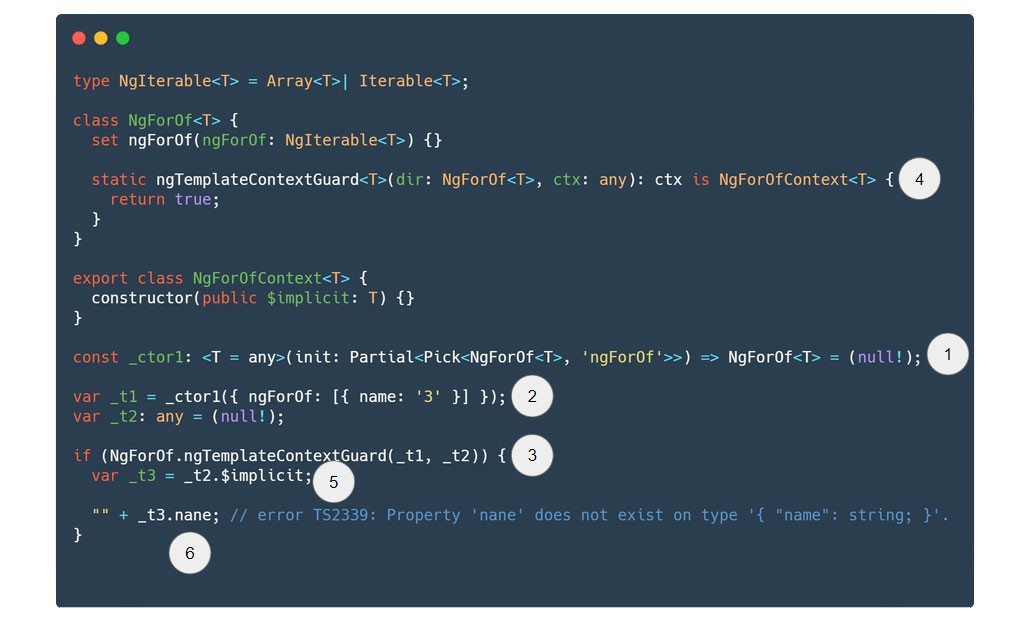
- A
_ctor1function is created, accepting aninitobject and returning the genericNgForOf<T>type. - Calling
_ctor1yields anNgForOfinstance of the type supplied, resulting in_t1: NgForOf<{ name: string; }> - We then apply the user-defined type guard, passing
_t1and_t2as arguments. - The
NgForOf.ngTemplateContextGuardaims to narrow the second argumentctxto anNgForOfContextmatching the generic type from the first argumentdir: NgForOf<T>. This is achieved through the generic type predicatectx is NgForOfContext<T>.
NgForOf.ngTemplateContextGuard(_t1, _t2)
                                /     \
      NgForOf<{ name: string; }> =>  NgForOfContext<{name: string;}>
5. Within the if (NgForOf.ngTemplateContextGuard(_t1, _t2)) { scope, _t2 is guaranteed to be of type NgForOfContext<{name: string;}>, meaning _t2.$implicit is an object of {name: string;} type.
6. Since {name: string;} type lacks the ‘nane’ property, an error is raised.
**Another interesting case is:
<div *ngFor="let item of '3'; let i = 'indix'"></div>
This triggers the error:
error TS2551: Property ‘indix’ does not exist on type ‘NgForOfContext<string>’. Did you mean ‘index’?
because the template generates this TCB:
const _ctor1: <T = any>(init: Partial<Pick<i1.NgForOf<T>, "ngForOf" | "ngForTrackBy" | "ngForTemplate">>) => i1.NgForOf<T> = (null!);

function _tcb1(ctx: i0.AppComponent) {
  if (true) {
    var _t1 = _ctor1({ ngForOf: "3" });
    var _t2: any = (null!);
    if (i1.NgForOf.ngTemplateContextGuard(_t1, _t2)) {
        var _t3 = _t2.$implicit;
        var _t4 = _t2.indix; // error TS2551: Property 'indix' does not exist on type 'NgForOfContext<string>'. Did you mean 'index'?
        var _t5 = document.createElement("div");
    }
  }
}
Consequently, the property names available for assignment to local template variables are constrained.
We've examined a variety of scenarios addressed by both ViewEngine and Ivy compilers.
Let's recap what Ivy now type-checks:
- **directive inputs**
- **element methods and properties**
- **more accurate type-checking for ‘#’ references**
- **ngFor context**
- **context of ng-template**
Next, we'll see where this generated code lives if you want to experiment on your own.
Exploring generated type-checking code
Angular CLI relies on webpack's internal virtual file system, so no files are actually written to disk; everything stays in memory.
All TCBs are generated into synthetic TypeScript files, allowing the TypeScript program to collect diagnostics from them as it would from any other source file.
The Angular compiler reports errors that refer to these synthetic files, which can make diagnosing and pinpointing the root cause tricky.
**So, how can we go?**
One approach is to debug the Angular CLI Node.js process. Another is modifying source code in the node_modules directory, though that can be daunting for those unfamiliar with Angular's internals.
I often resort to an alternative, somewhat unconventional method to inspect the root cause of template issues.
First, enable type-checking by editing tsconfig.app.json to include an angularComplierOption section with enableFulltemplateCheck set to true.
"angularCompilerOptions": {
  "fullTemplateTypeCheck": true,
}
Then, create a simple JS file, say typecheck.js, in your app's root directory and execute it with Node.js.
For ViewEngine (Angular CLI 8.1.0), the file would be:
const { AngularCompilerPlugin } = require('./node_modules/@ngtools/webpack/src/angular_compiler_plugin.js');

const old = AngularCompilerPlugin.prototype._createOrUpdateProgram;
AngularCompilerPlugin.prototype._createOrUpdateProgram = async function() {
  await old.apply(this, arguments);

  const sourceFile = this._program.tsProgram.getSourceFiles().find(sf => sf.fileName.endsWith('app.module.ngfactory.ts'));
  console.log(sourceFile.text);
};

require('./node_modules/@angular/cli/bin/ng');
For Ivy (Angular CLI 8.1.0 with the --enable-ivy flag):
const { TypeCheckFile } = require('./node_modules/@angular/compiler-cli/src/ngtsc/typecheck/src/type_check_file.js');

const old = TypeCheckFile.prototype.render;
TypeCheckFile.prototype.render = function() {
  const result = old.apply(this, arguments);

  console.log(result.text);
  return result;
};
require('./node_modules/@angular/cli/bin/ng');
In this code, I'm monkey-patching some internal methods and running the ng command within that context.
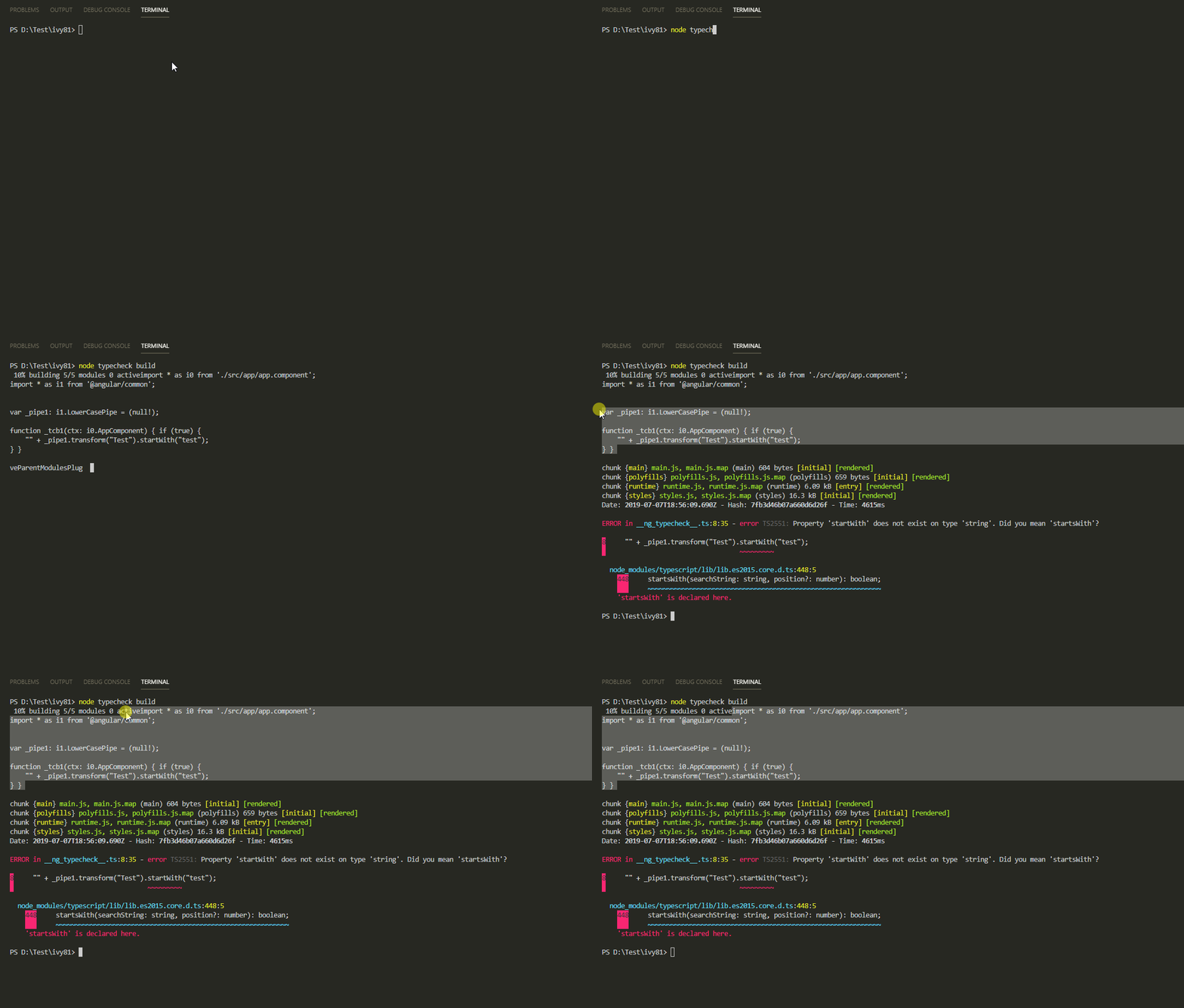
Then, run this command in your terminal:
node typecheck build --aot
This executes the typecheck.js script with the build — aot parameters.
Keep in mind, the --aot flag might be superfluous for Ivy if it's already the default as set in angular.json.
Summary
Angular's type-checking system is continuously improving, with Ivy catching numerous typing errors that ViewEngine misses.
While this opens up new possibilities for refinement, Ivy remains in active development. For instance, source mapping isn't enabled yet (though some attempts exist), and HostListener still lacks type-safety.
Hopefully, this sheds some light on Angular's type-checking internals.