AngularInDepth is moving away from Medium. This article, its updates and more recent articles are hosted on the new platform inDepth.dev
As a responsible developer, you always keep the end-user informed about the application's state, either through a loading indicator or an error notification.
Async Pipe
Employing the async pipe is a standard pattern across numerous Angular applications.
It’s as straightforward as this:
class AppComponent {
  obs$ = of(1).pipe(delay(500));
}
<div>
  {{ obs$ | async }}
</div>
The async pipe handles the subscription to the Observable. It also triggers change detection for the component, and you are freed from managing unsubscription.
Built-in *ngIfElse Solution
Let's attempt to display a loading indicator while an underlying asynchronous operation is pending:
<div *ngIf="obs$ | async as obs; else loading">
  {{ obs }}
</div>
<ng-template #loading>Loading...</ng-template>

We utilize the as keyword to bind the observable's resolved result to the obs local variable. Then, we employ the [ngIfElse](https://angular.io/api/common/NgIf#ngIfElse) conditional property to render the loading indicator when obs evaluates to a falsy value.
At first glance, this appears to be an excellent solution for most scenarios, but let's delve deeper…
The Problems
- Let's modify our observable so it returns a falsy value:
obs$ = of(0).pipe(delay(500))

2. Let's simulate an error within our stream:
obs$ = of(1).pipe(
  delay(500),
  map((x: any) => x()),
);
We are presented with the same view again:

3. Let's consider a component that accepts a loading property as an Input. How would you pass that property?
<div *ngIf="obs$ | async as obs; else loading">
  {{ obs }}
</div>
<ng-template #loading>Loading...</ng-template>
<ng-select [loading]="?????"
Each of these issues introduces a need for supplementary code, which can then be replicated repeatedly throughout the application.
Custom WithLoadingPipe to the Rescue
Not long ago, I shared a solution on twitter where I proposed building a custom pipe to manage the loading behavior.
import { Pipe, PipeTransform } from '@angular/core';
import { isObservable, of } from 'rxjs';
import { map, startWith, catchError } from 'rxjs/operators';

@Pipe({
  name: 'withLoading',
})
export class WithLoadingPipe implements PipeTransform {
  transform(val) {
    return isObservable(val)
      ? val.pipe(
        map((value: any) => ({ loading: false, value })),
        startWith({ loading: true }),
        catchError(error => of({ loading: false, error }))
      )
      : val;
  }
}
Here’s a straightforward example of how we can use that pipe:
<div *ngIf="obs$ | withLoading | async as obs">
  <ng-template [ngIf]="obs.value">Value: {{ obs.value }}</ng-template>
  <ng-template [ngIf]="obs.error">Error {{ obs.error }}</ng-template>
  <ng-template [ngIf]="obs.loading">Loading...</ng-template>
</div>
Let's test all the scenarios we detailed earlier with this pipe:
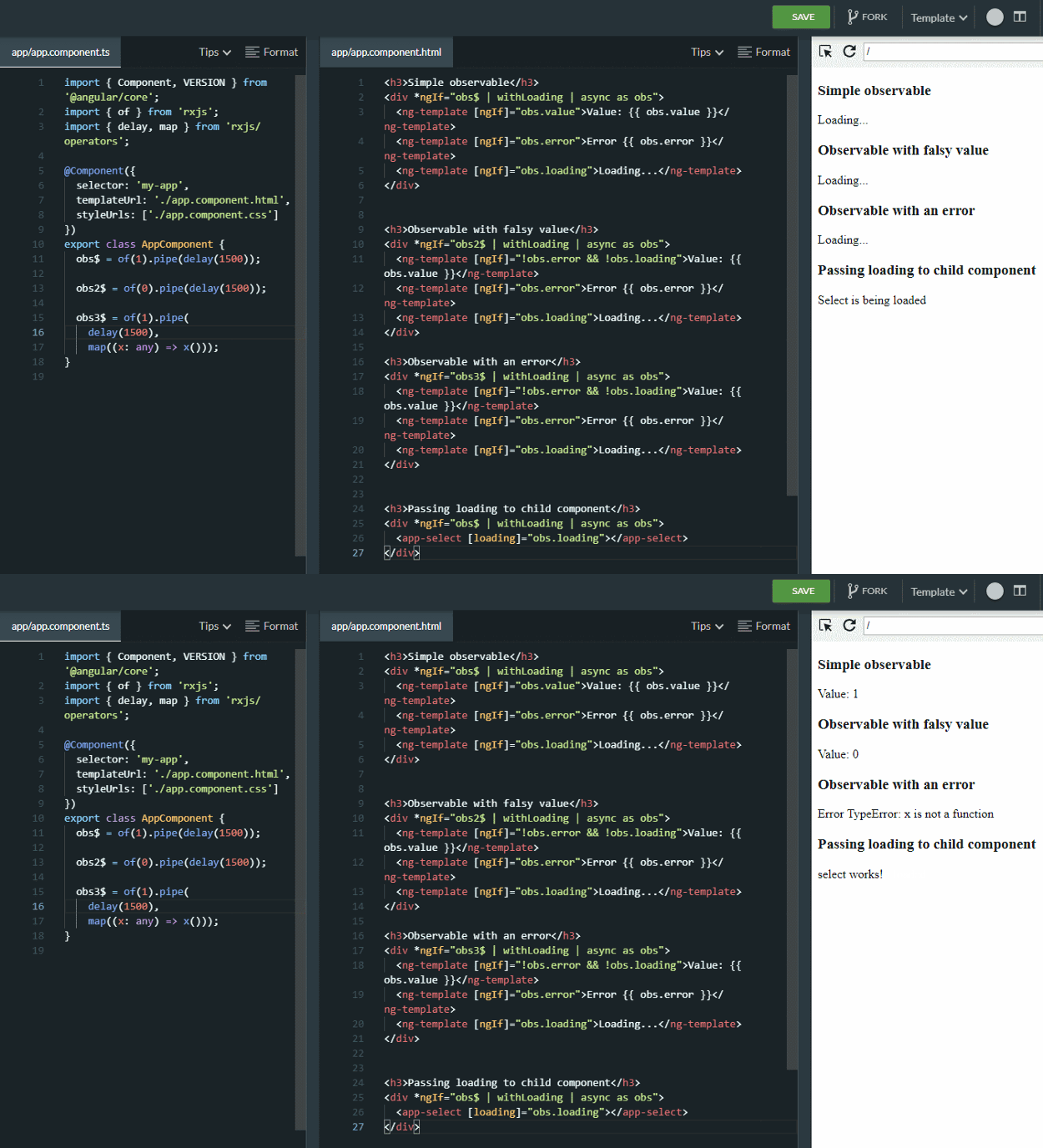
Using WithLoadingPipe
Feel free to open an ng-run example to experiment with it. As shown, it resolves all the cases.
Gotcha
Alright, it works effectively for those elementary cases. But what about observables that are long-lived?
Let's take it a step further and imagine we're building a products page that includes a search bar:
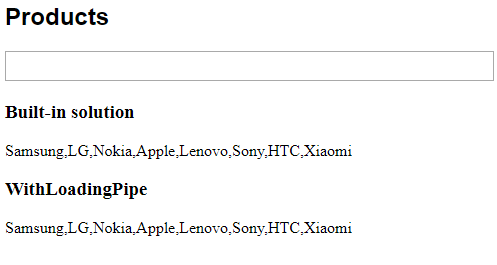
I implemented two approaches here: the ngIf method and the solution with the custom pipe. The complete code is available in ng-run.com
Our observable has evolved into the following:
searchStream$ = new BehaviorSubject('');
obs$ = this.searchStream$.pipe(
  debounceTime(200),
  distinctUntilChanged(),
  switchMap((query) => this.productsService.getByFilter(query))
);
Please be aware that in real-world applications, we should also handle errors within the inner observable. Thanks to Wojciech Trawiński for highlighting this.
We trigger a new value from searchStream$ whenever the user types something into the input field.
Let's examine how it behaves now:
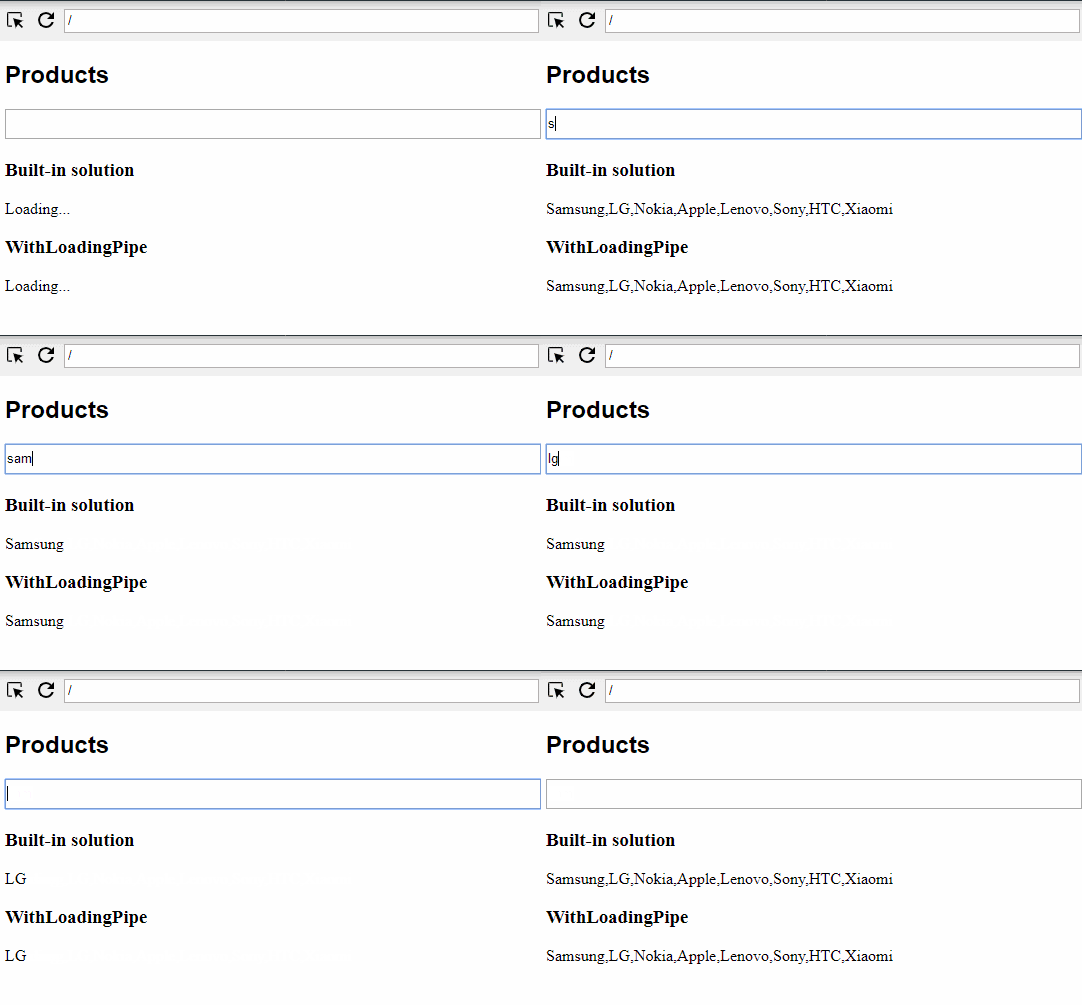
As you may observe, the loading indicator is visible only on the initial load for both options. Not ideal (:
Let's think about how we can resolve this issue without introducing a new component property, so that the loading indicator appears while the search is in progress.
Support for Long-Living Streams
Fortunately, we can employ one RxJS operator to handle this capability — concat.
Concat Subscribes to Observables Sequentially
With this in mind, let's wrap our service call in the concat operator:
obs$ = this.searchStream$.pipe(
  debounceTime(200),
  distinctUntilChanged(),
  switchMap((query) =>
    concat(
      // emit { type: 'start' } immediately
      of({ type: 'start'}),
      this.productsService.getByFilter(query)
            // map to the wrapped object with type finish
            .pipe(map(value => ({ type: 'finish', value })))
    })
);
Great, when a new event arrives from the input stream, we promptly emit a new object that signals the start of the loading process. As soon as we receive a response from the service, we also wrap the result in another object with type finish, allowing us to differentiate when our observable is resolved.
Now, let's adjust our custom WithLoadingPipe slightly:
import { Pipe, PipeTransform } from '@angular/core';
import { isObservable, of } from 'rxjs';
import { map, startWith, catchError } from 'rxjs/operators';

@Pipe({
  name: 'withLoading',
})
export class WithLoadingPipe implements PipeTransform {
  transform(val) {
    return isObservable(val)
      ? val.pipe(
        map((value: any) => ({
          loading: value.type === 'start',
          value: value.type ? value.value : value
        })),
        startWith({ loading: true }),
        catchError(error => of({ loading: false, error }))
      )
      : val;
  }
}
We've only modified the map handler.
map((value: any) => ({
  loading: value.type === 'start',
  value: value.type ? value.value : value
})),
Let's check the HTML changes for both the ngIfElse solution and the custom pipe:
<h2 class="title">Products</h2>

<div class="search-bar">
  <input (input)="searchStream$.next($event.target.value)">
</div>

<div class="results">
  <h3>Built-in solution</h3>
  <div *ngIf="obs$ | async as obs">
    <ng-template [ngIf]="obs.type === 'finish'">
      {{obs.value}}
    </ng-template>
     <ng-template [ngIf]="obs.type === 'start'">Loading...</ng-template>
  </div>

  <h3>WithLoadingPipe</h3>
  <div *ngIf="obs$ | withLoading | async as obs">
    <ng-template [ngIf]="obs.value">{{ obs.value }}
    </ng-template>
    <ng-template [ngIf]="obs.loading">Loading...</ng-template>
  </div>
 </div>
With these adjustments in place, we have a polished products page:

As always, you can review the complete code in the Ng-run example.
We could also use the startWith operator to achieve the same outcome. https://ng-run.com/edit/YeEFyf7DT9fk1H9E7vVZ However, concat offers greater flexibility in managing the loader's state. Consider a scenario where we make several http requests in parallel and need to update the loader's state after each individual http call.
Thank you for reading!