How Angular Validates Template Types: A Look Back
If you've been working with Angular for a while, you might recall encountering puzzling errors during production builds. Common examples include messages like:
Property ‘resisterUser’ does not exist on type ‘LoginRegisterComponent’Expected 0 arguments, but got 1Supplied parameters do not match any signature of call target
These errors reveal a key behavior: Angular processes a component's template as if it were a TypeScript file, even though templates are stored in separate html files. But how is this possible?
Introducing Type Check Blocks
The mechanism behind this is quite straightforward. Angular takes every binding expression from a template and emits it in a form that the type checker can evaluate. Specifically, Angular constructs Type Check Blocks (TCBs) from the component's template.
In essence, a Type Check Block is a fragment of TypeScript code. When this fragment is inserted into the source and processed by the TypeScript compiler, it surfaces any type mismatches present in the template's expressions.
Consider a basic component example:
@Component({
  selector: 'app-root',
  template: '{{ foo }}',
})
export class AppComponent {}
The corresponding type check block for that component looks like this:
var _decl0_1: AppComponent = <any>(null as any);
function _View_AppComponent_1_0(): void {
  const currVal_0: any = _decl0_1.foo;
}
As you might expect, the above code triggers a compile error at _decl0_1.foo, because the foo property isn’t defined on the AppComponent class.
This illustrates the core concept. Now, let’s examine how View Engine and Ivy each handle this process.
Type-Checking Under View Engine
As you may know, the Angular compiler produces factory files for every component and module. Additionally, the factory file for each NgModule contains the generated type check blocks for all components declared within that module. In other words, every module-based factory includes its associated TCBs.
For a module defined as:
@NgModule({
  ...
  declarations: [
    AppComponent
  ]
})
export class AppModule {}
the compiler generates a synthetic file that resembles:
import * as i0 from '@angular/core';
import * as i1 from './app.module';
import * as i2 from '@angular/common';
import * as i3 from './foo.component';
import * as i4 from './app.component';
import * as i5 from '@angular/platform-browser';
import * as i6 from './foo.module';
export const AppModuleNgFactory: i0.NgModuleFactory<i1.AppModule> = null as any;
var _decl0_0: i2.NgClass = <any>(null as any);
var _decl0_1: i2.NgComponentOutlet = <any>(null as any);
var _decl0_2: i2.NgForOf<any> = <any>(null as any);
var _decl0_3: i2.NgIf = <any>(null as any);
// ...
var _decl0_28: i0.TemplateRef<any> = <any>(null as any);
var _decl0_29: i0.ElementRef<any> = <any>(null as any);
function _View_AppComponent_Host_1_0(): void {
  var _any: any = null as any;
}
function _View_AppComponent_1_0(): void {
  var _any: any = null as any;
  const currVal_0: any = _decl0_12.title;
  currVal_0;
}
What does the compiler actually verify when fullTemplateTypeCheck is enabled? Quite a lot, as it turns out.
Accessing Component Members
If you reference a property or method that doesn’t exist on the component, the type-checking system flags it with a diagnostic:
{{ unknownProp }}
The corresponding TCB generated looks like:
var _decl0_12: i4.AppComponent = <any>(null as any);
function _View_AppComponent_1_0(): void {
  var _any: any = null as any;
  const currVal_0: any = _decl0_12.unknownProp; //  Property 'unknownProp' does not exist on type 'AppComponent'.
  currVal_0;
}
Event Bindings
The compiler will also catch missing arguments in methods called from the template:
@Component({
  selector: 'app-root',
  template: '<button (click)="test($event)">Test</button>',
})
export class AppComponent {
  test() {}
}
Notice that I deliberately kept the test method without parameters. Attempting an AOT build of this component results in the error Expected 0 arguments, but got 1.
var _decl0_1: AppComponent = (<any>(null as any));
function _View_AppComponent_1_0(): void {
  var _any:any = (null as any);
  const pd_1:any = ((<any>_decl0_1.test(_any)) !== false);
                                   ^^^^^^^^^^
}
HostListener
Take a look at this code inside a component:
@HostListener('click', ['$event'])
onClick() {}
The compiler then generates a TCB as shown:
function _View_AppComponent_Host_1_0(): void {
  var _any: any = null as any;
  const pd_0: any = <any>_decl0_12.onClick(_any) !== false;
}
This leads to an error similar to the one seen with event bindings:
Directive AppComponent, Expected 0 arguments, but got 1.
Other Template Expressions
The compiler is capable of understanding nearly all template expressions, such as:
{{ getSomething() }} {{ obj[prop][subProp] }} {{ someMethod({foo: 1, bar: '2'})
}}
Type-Checking for Pipes
The types of the pipe’s value and its arguments are validated against the transform() method signature.
<div>{{"hello" | aPipe}}</div>
// Argument of type "hello" is not assignable to parameter of type number {{
('Test' | lowercase).startWith('test') }} // error TS2551: Property 'startWith'
does not exist on type 'string'. Did you mean 'startsWith'?
Type-Safety for Template Reference Variables
Directives accessed via a template reference variable using ‘#’ are also checked for type correctness.
<div aDir #aDir="aDir">{{aDir.fname}}</div>
Property 'fname' does not exist on type 'ADirective'. Did you mean 'name'?
The $any Keyword
You can opt out of type-checking for a specific binding by wrapping the expression in a call to $any():
$any(this).missing // ok
With this, referencing an undefined property like missing won’t trigger an error.
Non-Null Assertion Operator
This operator proves useful when you have _"strictNullChecks"_: true set in your tsconfig.json.
{{ obj!.prop }}
Type Guards with ngIf
Suppose strictNullChecks is enabled in your configuration, and your component includes a property like this:
person?: Person;
You can then write a template such as:
<div *ngIf="person">{{person.name}}</div>
This setup enables guarding person.name access through two distinct approaches:
- Using the
ngIfTypeGuardwrapper
By adding a static property to the ngIf directive like so:
static ngIfTypeGuard: <T>(v: T|null|undefined|false) => v is T;
the compiler produces a TCB similar to:
if (NgIf.ngIfTypeGuard(instance.person)) {
  instance.person.name;
}
The ngIfTypeGuard ensures that instance.person within the binding expression is never undefined.
2. Treating the expression itself as a guard
Another option involves adding a static property to ngIf that looks like:
public static ngIfUseIfTypeGuard: void;
This approach refines type-checking by allowing the directive to use the expression handed directly to the property as a guard, rather than narrowing the type via a type expression.
if (instance.person) {
  instance.person.name;
}
Further details are available in the Angular documentation at https://angular.io/guide/aot-compiler#type-narrowing
Ivy type-checking
With View Engine, type-check blocks reside inside NgModule factories. That forced TypeScript to re-parse and re-verify those files when constructing the type-checking program.
Ivy takes a more efficient route. The new compiler adds a single synthetic __ng_typecheck__.ts file to the program, and every TCB ends up there.
Ivy also introduced a unique category of methods known as type constructors.
A type constructor is a specially shaped TypeScript method that permits type inference of any generic type parameters of the class from the types of expressions bound to inputs or outputs, and the types of elements that match queries performed by the directive. It also catches any errors in the types of these expressions.
Type constructors never run at runtime; they exist solely to build directive types inside type-check blocks.
For the NgFor directive, the type constructor looks like:
static ngTypeCtor<T>(init: Partial<Pick<NgForOf<T>, ‘ngForOf’|’ngForTrackBy’|’ngForTemplate’>>): NgForOf<T>;
Here is a typical usage:
NgForOf.ngTypeCtor(init: {ngForOf: [‘foo’, ‘bar’]}); // Infers a type of NgForOf<string>.
These constructors are also written directly into the __ng_typecheck__.ts file.
There are a few cases where Ivy must place TCB blocks in the file currently being processed:
- The component class lacks the
exportmodifier - The component class uses constrained generic types, like:
class Comp<T extends { name: string }> {}
Otherwise, you will generally find every TCB inside __ng_typecheck__.ts.
Now let’s examine the type-checking advances Ivy brings.
Checking directive inputs
You can now catch an error when a property of the wrong type is passed to a directive:
<app-child [prop]="'text'"></app-child>

export class ChildComponent implements OnInit {
  @Input() prop: number;
View Engine would generate code like this:
function _View_AppComponent_1_0(): void {
  var _any: any = null as any;
  const currVal_0: any = 'text';
  currVal_0;
}
Ivy gives us a smarter TCB:
const _ctor1: (
  init: Partial<Pick<i1.ChildComponent, 'prop'>>
) => i1.ChildComponent = null!;

function _tcb1(ctx: i0.AppComponent) {
  if (true) {
    var _t1 = document.createElement('app-child');
    var _t2 = _ctor1({ prop: 'text' }); //  error TS2322: Type 'string' is not assignable to type 'number'.
  }
}
An unobvious case:
<input ngModel [maxlength]="max">

max = 100// error TS2322: Type 'number' is not assignable to type 'string'.
The expected type comes from property 'maxlength' which is declared here on type 'Partial<Pick<MaxLengthValidator, "maxlength">>'
At first glance no error should appear, since we might mistake this for the native element property maxLength, which does accept numbers.
But an error surfaces because of the restriction imposed by the maxlength input on the MaxLengthValidator directive.
Structural directives:
<div *ngFor="let item of {}"></div>

error TS2322: Type '{}' is not assignable to type 'NgIterable<any>'.</any>
The structural directive above is desugared to its full form, which exposes the input binding [ngForOf]=”{}” and triggers the problem.
Element property bindings
Ivy can now determine the element type wherever a property binding is used. For a template such as:
<input type="checkbox" checked="{{flag}}" />
with flag = true declared in the component, we get:
function _tcb1(ctx: i0.AppComponent) {
  if (true) {
    var _t1 = document.createElement('input');
    _t1.checked = '' + ctx.checked; // error TS2322: Type 'string' is not assignable to type 'boolean'.
  }
}
Notice how the compiler defines the element:
var _t1 = document.createElement('input');
Because TypeScript maintains a mapping from tag names to element types, the result is HTMLInputElement, not a generic HtmlElement. That is a substantial win: every property and method on HTML elements is now type-safe.
Even better, this strategy could be stretched to cover custom web components. Previously that demanded CUSTOM_ELEMENTS_SCHEMA; now it can take advantage of full type checking.
View Engine’s TCB for the same template looks like:
function _View_AppComponent_1_0(): void {
  var _any: any = null as any;
  const currVal_0: any = i0.ɵinlineInterpolate(1, '', _decl0_12.flag, '');
  currVal_0;
}
As you can see, there is no property assignment at all.
Type-safety for ‘#’ references
Ivy can identify exactly which directive a template reference points to:
{{x.s}} <app-child #x></app-child>
The TCB:
const _ctor1: (
  init: Partial<Pick<i1.ChildComponent, 'prop'>>
) => i1.ChildComponent = null!;
function _tcb1(ctx: i0.AppComponent) {
  if (true) {
    var _t1 = _ctor1({});
    _t1.s; // Property 's' does not exist on type 'ChildComponent'.
    var _t2 = document.createElement('app-child');
  }
}
Ivy also knows the precise element type behind a template reference variable:
{{x.s}} <input #x type="text" />
Its TCB:
function _tcb1(ctx: i0.AppComponent) {
  if (true) {
    var _t1 = document.createElement('input');
    _t1.s; // Property 's' does not exist on type 'HTMLInputElement'.
  }
}
Guarding template context with ngTemplateContextGuard
This feature is one of my favourites. A structural directive can define a static ngTemplateContextGuard method to preserve the correct context type for the template it renders.
The method acts as a user-defined type guard, letting TypeScript narrow the object type inside a conditional block.
The widely used NgForOf directive defines its guard like this:
static ngTemplateContextGuard<T>(dir: NgForOf<T>, ctx: any): ctx is NgForOfContext<T> {
  return true;
}
And also declares the shape of NgForOfContext:
export class NgForOfContext<T> {
  constructor(
    public $implicit: T,
    public ngForOf: NgIterable<T>,
    public index: number,
    public count: number
  ) {}

  get first(): boolean {
    return this.index === 0;
  }

  get last(): boolean {
    return this.index === this.count - 1;
  }

  get even(): boolean {
    return this.index % 2 === 0;
  }

  get odd(): boolean {
    return !this.even;
  }
}
That is what makes ngFor type-safe.
Take a look at two examples.
Rendering a list of names with ngFor:
<div *ngFor="let item of [{ name: '3'}]">{{ item.nane }}</div>
Ivy produces this TCB:
import * as i0 from './src/app/app.component';
import * as i1 from '@angular/common';

const _ctor1: <T = any>(
  init: Partial<
    Pick<i1.NgForOf<T>, 'ngForOf' | 'ngForTrackBy' | 'ngForTemplate'>
  >
) => i1.NgForOf<T> = null!;

function _tcb1(ctx: i0.AppComponent) {
  if (true) {
    var _t1 = _ctor1({ ngForOf: [{ name: '3' }] });
    var _t2: any = null!;
    if (i1.NgForOf.ngTemplateContextGuard(_t1, _t2)) {
      var _t3 = _t2.$implicit;
      var _t4 = document.createElement('div');
      '' + _t3.nane;
    }
  }
}
And we get an error:
> error TS2339: Property ‘nane’ does not exist on type ‘{ “name”: string; }’
It works. Magic, right?
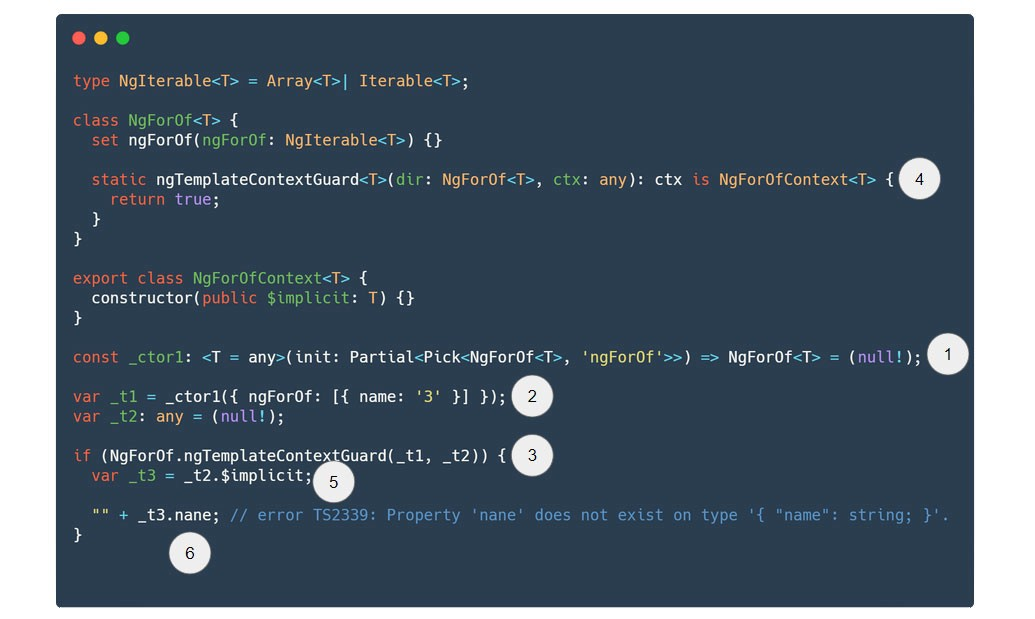
Let’s break down what happens (typescript playground).
TCB for ngFor template
- We declare a
_ctor1function that takes aninitobject and returns the genericNgForOf<T>type. - Calling
_ctor1yields anNgForOfinstance typed by whatever we pass in. So we obtain_t1: NgForOf<{ name: string; }>. - We then invoke the user-defined type guard with two variables,
_t1and_t2, as declared above. - The generic
NgForOf.ngTemplateContextGuardnarrows the second argumentctxto theNgForOfContextmatching the generic type of the first argumentdir: NgForOf<T>. This works via the generic type predicatectx is NgForOfContext<T>.
NgForOf.ngTemplateContextGuard(_t1, _t2)
                                /     \
      NgForOf<{ name: string; }> =>  NgForOfContext<{name: string;}>
5. Inside the if (NgForOf.ngTemplateContextGuard(_t1, _t2)) { block, _t2 is guaranteed to be NgForOfContext<{name: string;}>. Hence _t2.$implicit has the type {name: string;}.
6. That {name: string;} type has no property called ‘nane’.
Another interesting scenario:
<div *ngFor="let item of '3'; let i = 'indix'"></div>
Here you’ll see the error:
> error TS2551: Property ‘indix’ does not exist on type ‘NgForOfContext<string>’. Did you mean ‘index’?
since the template generates this TCB:
const _ctor1: <T = any>(
  init: Partial<
    Pick<i1.NgForOf<T>, 'ngForOf' | 'ngForTrackBy' | 'ngForTemplate'>
  >
) => i1.NgForOf<T> = null!;

function _tcb1(ctx: i0.AppComponent) {
  if (true) {
    var _t1 = _ctor1({ ngForOf: '3' });
    var _t2: any = null!;
    if (i1.NgForOf.ngTemplateContextGuard(_t1, _t2)) {
      var _t3 = _t2.$implicit;
      var _t4 = _t2.indix; // error TS2551: Property 'indix' does not exist on type 'NgForOfContext<string>'. Did you mean 'index'?
      var _t5 = document.createElement('div');
    }
  }
}
So the set of property names available for local template variables is strictly enforced.
Throughout this article, we have covered many scenarios handled by both the View Engine and Ivy compilers. Let’s recap what Ivy checks:
- directive inputs
- element methods and properties
- more precise type-checking for '#’ references
- ngFor context
- context of ng-template
Now let’s figure out where to find this generated code if you want to experiment.
Exploring generated type-checking code
Angular CLI relies on webpack internally and maintains a virtual file system. Nothing is written to disk; everything lives in memory. All TCBs are placed into synthetic TypeScript files, so the TypeScript program can collect diagnostics from them just like any other source file. Errors that reference these synthetic files can be difficult to trace back to the real template line.
So how can we actually inspect them?
One option is to attach a debugger to the Angular CLI node process. Another is to patch the source inside node_modules. Neither is friendly to developers unfamiliar with Angular’s internals.
There is a hacky but effective alternative I use when hunting the root cause of a template error. Start by enabling the type-checking feature in tsconfig.app.json by adding an angularComplierOption section and setting enableFulltemplateCheck to true.
"angularCompilerOptions": {
  "fullTemplateTypeCheck": true,
}
Next, drop a small JavaScript file, say typecheck.js, in the project root. We’ll run it with Node.
For View Engine (Angular CLI 8.1.0), the file looks like:
const {
  AngularCompilerPlugin,
} = require('./node_modules/@ngtools/webpack/src/angular_compiler_plugin.js');

const old = AngularCompilerPlugin.prototype._createOrUpdateProgram;
AngularCompilerPlugin.prototype._createOrUpdateProgram = async function () {
  await old.apply(this, arguments);

  const sourceFile = this._program.tsProgram
    .getSourceFiles()
    .find((sf) => sf.fileName.endsWith('app.module.ngfactory.ts'));
  console.log(sourceFile.text);
};

require('./node_modules/@angular/cli/bin/ng');
For Ivy (Angular CLI 8.1.0 created with the — enable-ivy flag):
const {
  TypeCheckFile,
} = require('./node_modules/@angular/compiler-cli/src/ngtsc/typecheck/src/type_check_file.js');

const old = TypeCheckFile.prototype.render;
TypeCheckFile.prototype.render = function () {
  const result = old.apply(this, arguments);

  console.log(result.text);
  return result;
};
require('./node_modules/@angular/cli/bin/ng');
The code above monkey-patches a few internal methods and then invokes the ng command within that context.
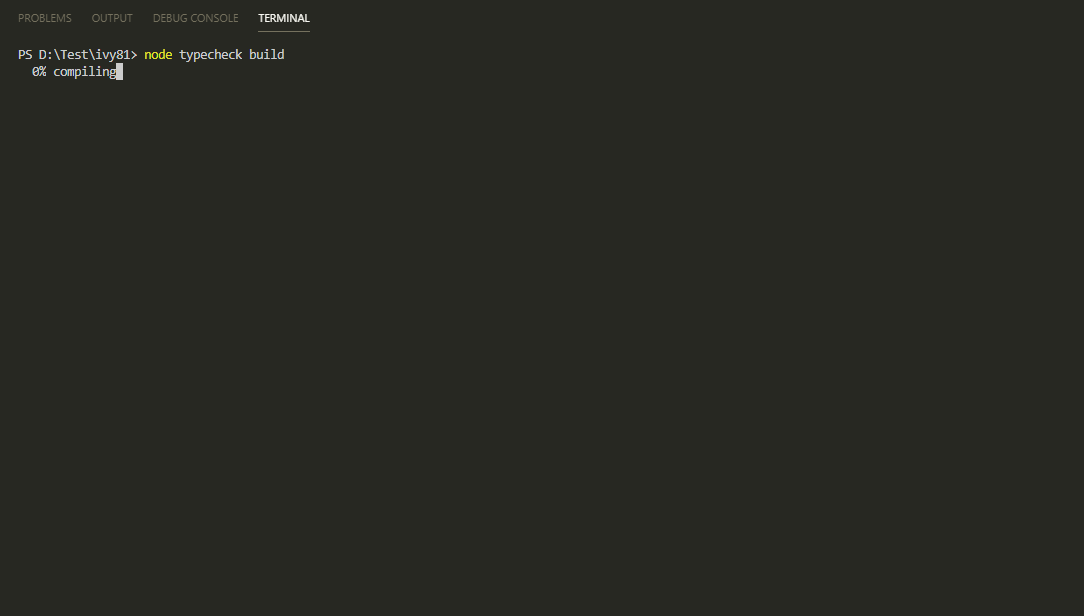
Finally, run this from your terminal:
node typecheck build --aot
This executes typecheck.js with the build — aot arguments.
If Ivy is already enabled by default in angular.json, you can skip the --aot flag.
Summary
Angular’s type-checking is maturing, and Ivy catches a wide range of typing mistakes that View Engine missed. That opens up many possibilities for further improvements, though Ivy is still in active development. Source mapping is not fully supported yet (though there are some attempts in progress), and HostListener still lacks type-safety.
I hope this article gave you a clearer picture of how Angular type-checking works.