
Keeping an eye on an application's bundle size is often far from simple. A seemingly harmless pull request can quietly add significant weight. Anyone who has spent time trimming initial load bundles knows that keeping things lean is an ongoing effort. Fortunately, several tools exist to help guard against bundle size regressions.
For a deeper dive into bundle optimization, you might find my earlier piece useful – How to Optimize Your Angular Bundle Size. It discusses the basics of bundle size, analyzer tools, and a range of optimization strategies.
The Case for Monitoring Bundle Size
Regular monitoring is a safeguard against the slow creep of bloat, which directly impacts load times. Optimization is often a marathon of small, incremental improvements. It makes much more sense to catch and address regressions as they happen, rather than discovering a problem weeks later and having to backtrack through commits.
It's surprisingly easy for a single import of a "small" feature from an internal library to drag in a significant amount of extraneous code, often due to tree-shaking not behaving as expected. While removing such an import is straightforward, finding it in the first place can be a time-consuming investigation, especially without a clear pointer to the commit that caused the issue.
Given these pitfalls, setting up automated bundle-size checks early in a project's life is a wise investment. It's a decision that will save considerable effort and frustration down the line.

BundleMon: A CI Tool for Bundle Vigilance
With the "why" clear, let's examine a practical example. BundleMon is designed to monitor your bundle with every commit, alerting you to any significant or unexpected changes in size.
It provides a comprehensive set of features for bundle tracking:
– Pull request checks that report the percentage change,
– Pull request comments detailing the specific files affected,
– The ability to set size limits on individual files,
– An interactive chart to visualize the bundle size history of a branch.
A Closer Look at BundleMon's Features
Let's break down these features one by one.
Pull Request Checks
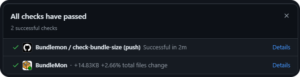
These checks can be configured to block a merge if the total file change exceeds a set percentage. This is particularly useful for protecting a production branch from unauthorized inclusions that might increase its size.
As the example below illustrates, the check highlights the size difference between the PR's branch and the main branch. In this case, the difference is 14.83KB, representing a 2.66% increase to the total bundle size.
Pull Request Comments
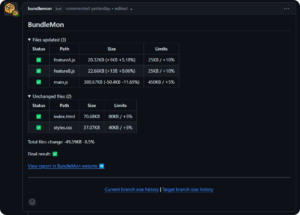
BundleMon also enhances pull requests with detailed comments. These comments offer a granular view of what has changed in the final bundle, clearly showing which files were added, updated, or removed.
These comments, as seen below, show the size change for each file, along with its configured limit. A summary at the bottom provides the total size and percentage change for all files.
Bundle Size Charts
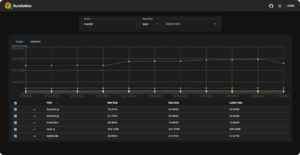
A standout feature that sets BundleMon apart is its charting capability. By clicking on the Current branch size history or Target branch size history link within a PR comment, you're taken to a chart page on the BundleMon website.
Here, you can track the size changes for specific files over time and identify the commits responsible for impactful changes. This historical perspective is incredibly valuable for anyone working on bundle optimization.
You can see an example chart for NGXS, a state management library for Angular.
Integrating BundleMon into Your Project
The setup process for BundleMon depends on your CI platform. For GitHub Actions, there's a dedicated guide to follow. If you're using CodeFresh, there's a separate guide for that. Once the CI action is configured, the next step is adding the BundleMon configuration file to your project's repository.
The BundleMon Config File
Here's a breakdown of the key properties you'll find in the BundleMon config file:
- baseDir – Indicates the folder where BundleMon should search for build output files. This needs to match your project's build configuration.
- defaultCompression – Specifies the compression algorithm used for size calculations. The options are "none", "gzip", or "brotli". For example, setting this to "none" would show the raw file size.
- files – This section defines the individual files to track. For each file, you can specify a "file path", a "maximum size", and a "maximum percent increase" allowed per pull request. You can also assign a user-friendly name and use regex patterns for file matching. More details are available in the official documentation.
- reportOutput – This controls which BundleMon features are active, such as check runs, commit statuses, and pull request comments.
.bundlemonrc.json
{
 "baseDir": "./dist/your-application-name/browser",
 "defaultCompression": "none",
 "files": [
  {
   "path": "index.html",
   "maxSize": "80kb",
   "maxPercentIncrease": 5
  },
  {
   "path": "main.js",
   "maxSize": "450kb",
   "maxPercentIncrease": 5
  },
  {
   "path": "styles.css",
   "maxSize": "40kb",
   "maxPercentIncrease": 5
  },
  {
   "path": "feature-a.js",
   "maxSize": "25kb",
   "maxPercentIncrease": 10
  },
  {
   "path": "feature-b.js",
   "maxSize": "25kb",
   "maxPercentIncrease": 10
  }
 ],
 "reportOutput": [
  [
   "github",
   {
    "checkRun": true,
    "commitStatus": true,
    "prComment": true
   }
  ]
 ]
}
The GitHub Action File
Adapting the GitHub Action for an Angular project requires only a few modifications from the standard example. The primary change is replacing the yarn build script with the Angular build command, which can include the optimization flags discussed in my previous article.
bundlemon.yml
name: Bundlemon


on:
 push:
   branches: [master]
 pull_request:
   types: [synchronize, opened, reopened]


permissions: write-all


jobs:
 check-bundle-size:
   runs-on: ubuntu-latest
   steps:
     - uses: actions/checkout@v2
     - name: Use Node.js 20
       uses: actions/setup-node@v2-beta
       with:
         node-version: '20.11.1'


     - name: Install dependencies
       run: npm ci


     - name: Build
       run: npx ng build --named-chunks=true --output-hashing=none --source-map=true


     - name: BundleMon
       uses: lironer/bundlemon-action@v1
Noting Potential Limitations
It's worth flagging that by default, BundleMon operates on a free, hosted server maintained by the library's author. This means the tool has certain limitations:
– Records generated by a pull request are deleted after 30 days,
– Records for branches with no new commits are deleted after 180 days,
– After 90 days, only the most recent record for any given day is retained.
These limits are subject to change in the future. However, the author does offer an option to self-host BundleMon on your own server, giving you full control.

Conclusion
As demonstrated, consistent monitoring can effectively prevent bundle bloat and save significant development time in the long run. It's important to remember that BundleMon is one of many such tools. Alternatives like bundlesize, bundlewatch, or size-limit are also viable, though they may not offer the same feature set as BundleMon. Don't overlook the built-in bundle-size budgets you can configure directly in your angular.json as a first line of defense.