Understanding Router States
Think of an Angular application as a component hierarchy. While some components, like the app shell, stay mounted for the entire session, others need to appear and disappear based on user interaction. The router provides a sophisticated mechanism for achieving this dynamism. By combining the router module and router-outlet directives, you can designate regions of your application that swap their content depending on the browser's URL. In a simple notes app, for instance, one URL might display the home screen while another shows the note list.
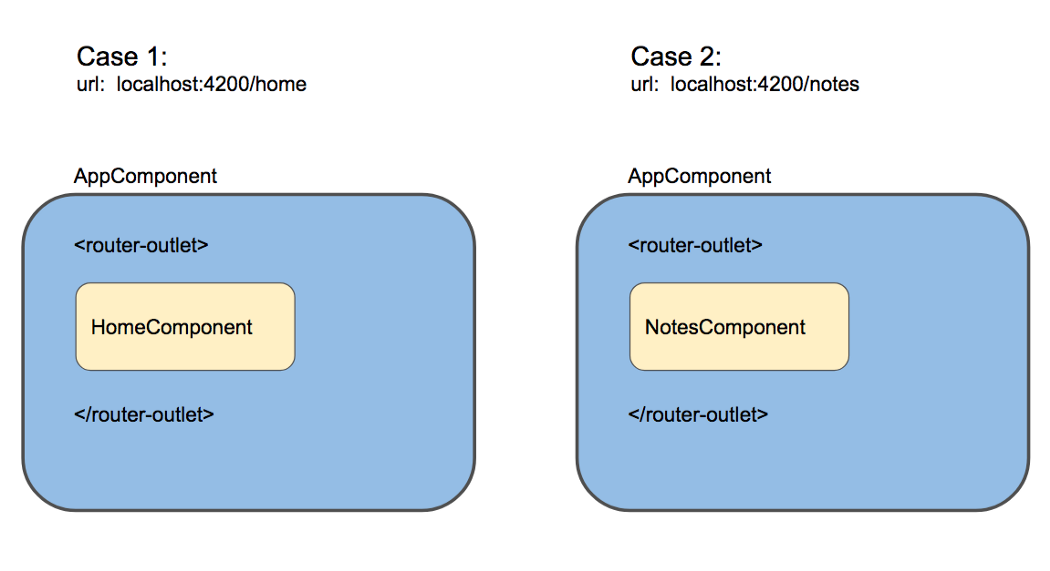
Here, the router-outlet acts as a placeholder, rendering different components based on the active URL.
Internally, these interchangeable component arrangements are referred to as router states. The router architecturally represents all possible routable combinations within an application as a hierarchical tree of router states. In the example above, the home view is one state, and the notes list view is another.
The router's primary mission is to orchestrate transitions between these states. This involves two concurrent tasks: rendering the correct component set within the outlet and synchronizing the URL to reflect the current arrangement. To achieve this, the router needs a map correlating URLs with their corresponding component configurations. Developers provide this map by defining a state configuration object—a blueprint for what the UI should look like at any given path.
This configuration is established by importing the RouterModule and supplying an array of Route objects to its forRoot method. Here's an example of a basic route configuration:
import { RouterModule, Route } from '@angular/router';

const ROUTES: Route[] = [
  { path: 'home', component: HomeComponent },
  { path: 'notes',
    children: [
      { path: '', component: NotesComponent },
      { path: ':id', component: NoteComponent }
    ]
  },
];

@NgModule({
  imports: [
    RouterModule.forRoot(ROUTES)
  ]
})
router_configuration.ts hosted with ❤ by GitHub This array outlines every possible router state for the application.
Processing this configuration through the router's internal logic generates the subsequent tree of states:
routerModule.forRoot() :
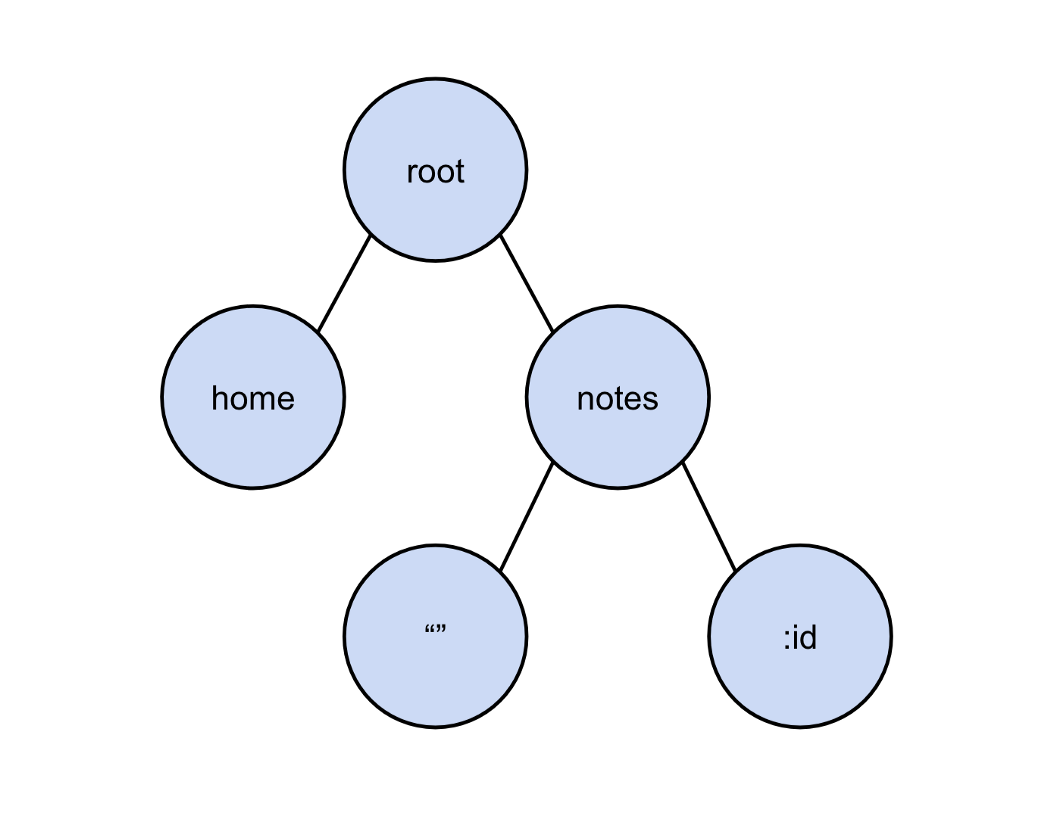
The visual representation of the router state tree derived from the configuration above.
A crucial concept is that only one router state is ever visible to the user at a time, dictated by the current URL. This active state, known as the active route, is a specific subtree within the larger state tree. For instance, navigating to /notes would activate the following branch:
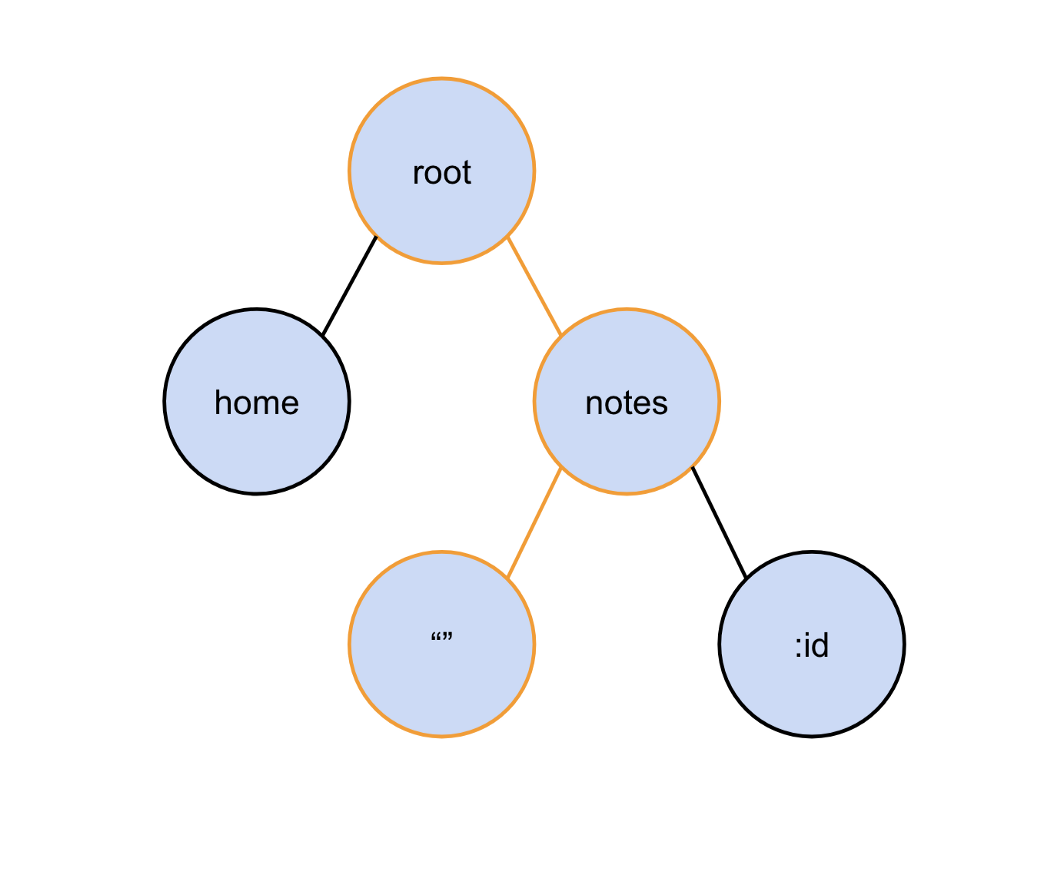
The active router state for the /notes URL, highlighted to show which components are rendered, which in this case would be the NotesComponent.
Several important characteristics of route configurations stand out:
- The
RouterModuleprovides a sibling method,forChild, which also accepts route definitions. While both methods return modules equipped with router directives and configurations,forRootadditionally instantiates the globalRouterservice. Because theRouterservice modifies the browser's location—a shared, application-wide resource—only a single active instance can exist. Therefore,forRootshould be invoked exactly once in the root module, while feature modules must rely exclusively onforChild. - When a route's path is matched, the components declared in its
componentproperty are displayed within router outlets. These outlets are dynamic placeholders and, technically, the activated component is rendered as a sibling to the outlet element itself, not as a child. Outlets can be nested to establish parent/child route hierarchies.
When a user performs navigation, the router receives the target URL and attempts to match it against paths defined in the state tree. Using the previous configuration:
const ROUTES: Route[] = [
  { path: 'home', component: HomeComponent },
  { path: 'notes',
    children: [
      { path: '', component: NotesComponent },
      { path: ':id', component: NoteComponent }
    ]
  },
];
router_configuration_routes.ts hosted with ❤ by GitHub
For example, the URL localhost:4200/notes/15 would align with the NoteComponent. The component can then read the id parameter, here 15, to fetch and display the appropriate note. Paths containing a colon, like :id, denote required parameter placeholders and will match nearly any value. Conversely, a request to a URL like localhost:4200/iamerror has no corresponding configured path and will trigger an error.
Essentially, the router maintains a perpetual equilibrium where the URL is a serialized representation of the active router state. Modifying the state updates the URL, and a change to the URL initiates a change in the state—they are two sides of the same coin.
The next article in this series will dissect the router's URL-matching algorithms. For now, it's important to note that the matching process operates on a first-match-wins principle, implemented via a depth-first search where the router selects the first path that fully consumes the URL.
Grasping the concept of modeling an application's routable options as a tree of states constitutes the first pillar. The second pillar focuses on the mechanism of transitioning between these states: navigation.
Deciphering the Navigation Cycle
Just like components, the router has a defined lifecycle. Each navigation between router states triggers a repetitive, sequential process.
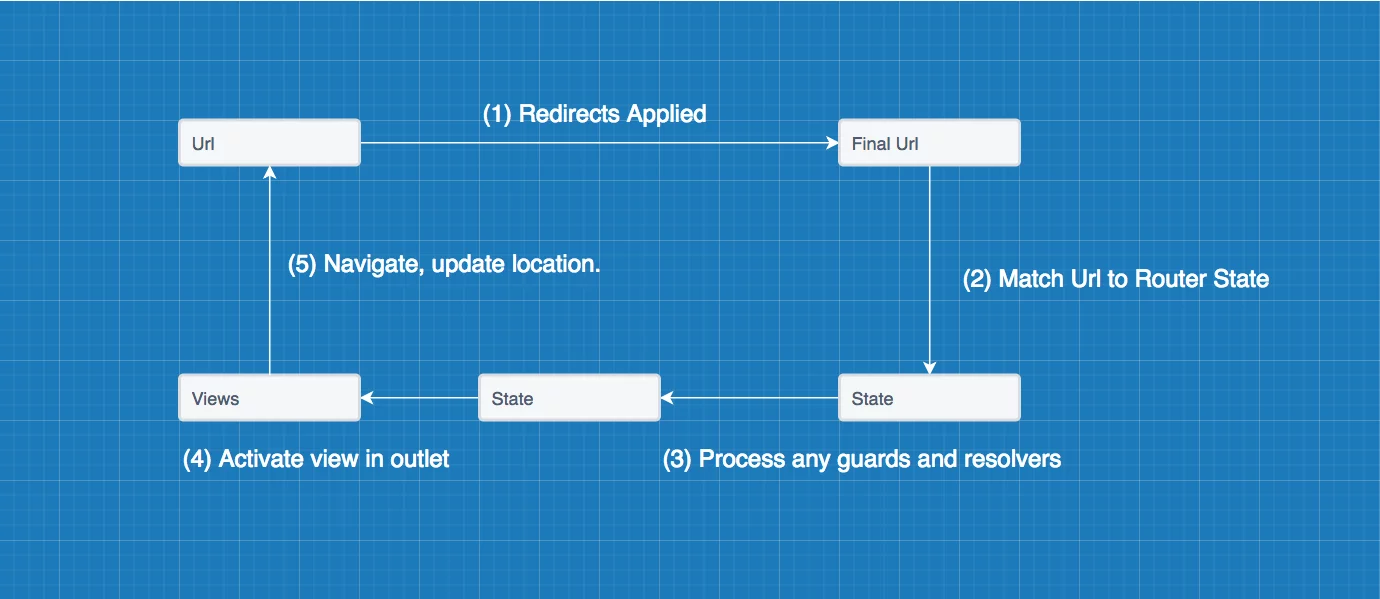
This diagram illustrates the cyclical steps the router performs on every state or URL change.
This cycle is accompanied by a stream of specific events emitted by the router. Developers can subscribe to the Router service's events observable to hook into this process. This is useful for implementing UI feedback, like loading bars, or for logging during debugging. Key events within the cycle include:
NavigationStart:Signals the beginning of a navigation.NavigationCancel:Indicates a guard has blocked the navigation.RoutesRecognized:Confirms a successful URL match to a route.NavigationEnd:Signifies the successful conclusion of a navigation.
A broadened list of all events inheriting from the RouterEvent class is available here.
const ROUTES: Route[] = [
  { path: 'home', component: HomeComponent },
  { path: 'notes',
    children: [
      { path: '', component: NotesComponent },
      { path: ':id', component: NoteComponent }
    ]
  },
];
router_configuration_routes.ts hosted with ❤ by GitHub
Let's trace the navigation process using the configuration above when a user visits http://localhost:4200/notes/42.
-
Process Redirects. The router first resolves any redirects to establish a finalized URL, as attempting to match a preliminary URL is pointless. This configuration declares none, so the URL remains unchanged.
-
Match the URL. Using a first-match-wins strategy with backtracking, the router correlates the URL components to router states. It first matches
path: notes, then the dynamic segmentpath: id, ultimately linking to theNoteComponent. -
Evaluate Guards and Resolvers. With a successful match, the router checks for any route guards that could cancel the navigation—for example, a guard in a notes app that only permits authenticated users. This example has none, and there are no resolvers defined, so the process proceeds.
-
Activate the Component. The router now activates and displays the component associated with the matched router state.
-
Complete Navigation. Once activation is done, the router finishes the cycle and awaits the next URL or state alteration to start the process anew.
You can observe these events in the browser's developer console by enabling enableTrace: true in the router's forRoot configuration:
RouterModule.forRoot(
  ROUTES,
  {
    enableTracing: true
  }
),
Alternatively, you can programmatically access these events by injecting the Router service and subscribing to its events property:
constructor(private router: Router) {
  this.router.events.subscribe( (event: RouterEvent) => console.log(event))
}
The Stackblitz example demonstrates this in practice, logging events to the console as you interact with the views.
The navigation pillar of this series will examine this lifecycle and its events in comprehensive detail.
Even if the router only managed routing states and the navigation lifecycle, it would be an invaluable tool. However, its capabilities extend further: the third pillar of Angular routing lies in its support for lazy loading feature modules. This optimization strategy, which we will explore next, allows the router to defer the loading of certain code bundles until they are explicitly needed, significantly enhancing initial page load performance.
Deferred Module Loading
The third foundational element of Angular routing centers on lazy loading feature modules. Over time, as an application expands, more of its capabilities become isolated into dedicated feature modules. Consider an online bookstore with separate modules for inventory, user accounts, and checkout. It is unlikely that every piece of data needs to be visible at the initial page load, so bundling it all into the main JavaScript file serves little purpose. Doing so merely inflates the file size, resulting in slower download times for users. Instead, it makes far more sense to fetch these modules only when a user actually visits their associated routes — and the Angular router enables this through lazy loading.
Here is how a typical lazy loading setup appears:
// from the Angular docs https://angular.io/guide/lazy-loading-ngmodules#routes-at-the-app-level
{
  path: 'customers',
  loadChildren: 'app/customers/customers.module#CustomersModule'
}
Using loadChildren to signal that the customers module should be fetched asynchronously.
Keep in mind that the argument passed to loadChildren is a string, not a component class. Be careful not to introduce any static import or other references to the lazily loaded module's contents (like importing from it). If such a reference exists, the compiler will establish a dependency on the module, forcing it into the main bundle — completely negating the benefits of deferred loading.
During the navigation lifecycle, the router initiates the retrieval of any lazy modules as soon as it reaches the phase where redirects are applied and URLs are matched:
/**
 * Returns the `UrlTree` with the redirection applied.
 *
 * Lazy modules are loaded along the way.
 */
export function applyRedirects(
    moduleInjector: Injector, configLoader: RouterConfigLoader, urlSerializer: UrlSerializer,
    urlTree: UrlTree, config: Routes): Observable<UrlTree> {
  return new ApplyRedirects(moduleInjector, configLoader, urlSerializer, urlTree, config).apply();
}
According to the documentation in config.ts:
To load the NgModule linked to the
loadChildrenstring, the router relies on a registered NgModuleFactoryLoader. After fetching it, the router identifies the route definitions within that module and seamlessly merges them into the main route configuration.
This means the routes coming from the lazily loaded module's configuration are integrated into the primary router setup, after which they become available for matching and navigation.
We will explore the details of lazy loading in greater depth coming up in this series.
In the following installments, we will examine the internal workings of each of the three principles discussed here, beginning with router states and the mechanics of path matching. Check back for more!