
Feel free to experiment with the ROUTES array above by opening this stackblitz.
**Before anything else, we need to grasp the router’s internal processing of URLs.** **This is the foundation for everything that follows.**
We’ll begin by breaking down a URL into its constituent elements and seeing how the router maps them into its own internal data structures.
Take this straightforward example URL:
In the series’ introduction, you saw an overview of the router’s architecture, where **the three pillars—router states, navigation, and lazy loading—were laid out. Now we zero in on the first pillar: how a given URL is matched against the {path:'',...} entries in the router configuration, which in turn define the application’s router states. **Our objective here is a thorough walkthrough of what occurs from the moment the router receives a new URL, right up to the point where it aligns with a path. We’ll explore the core subjects:
- Anatomy of a URL
- How redirects are processed
- Linking URLs to configuration objects
- Router states, activated routes, and state snapshots
As covered in the introduction, the router treats all routable segments of an application as a hierarchy of **router states**, defined through the route configuration objects:
{ path: '...', component: ...}
The route setup in an application is expressed declaratively, relying on the RouterModule being brought in while supplying a list of Route definitions to RouterModule.forRoot(). In the demo app, these route configuration objects are placed inside the ROUTES array, as demonstrated below:
const ROUTES: Route[] = [
  { path: 'home', component: HomeComponent },
  { path: '', redirectTo: 'home', pathMatch: 'full' },
  { path: 'redirectMe', redirectTo: 'home', pathMatch: 'full' },
  {
    path: 'users/:userid',
    component: UserComponent,
    children: [
      { path: 'notes', component: NotesComponent },
      { path: 'notes/:noteid', component: NoteComponent },
    ],
  },
  { path: 'secondary1', outlet: 'sidebar', component: Secondary1Component },
  { path: 'secondary2', outlet: 'sidebar', component: Secondary2Component },
  { path: '**', component: PageNotFoundComponent },
];
notes_app_router_config.ts hosted with ❤ by GitHub view raw The accompanying demo is available on this stackblitz
*A single Route object establishes a connection between a section of a URL and a routable state in your app—such as a component or a redirect. Its structure stays minimal. Typically, you only need a path to compare against a URL segment and a component to render once the path matches. Later on, we’ll see that components are displayed through [<router-outlet>](https://angular.io/api/router/RouterOutlet) directives. Additionally, you can define multiple named <router-outlet> directives in your app—these are called secondary outlets. For further details on secondary outlets, check out this primer I wrote.
Once you’ve finished reading, you’ll be able to interpret the diagram below, which illustrates how an incoming URL is consumed and checked against the entries in the ROUTES array.
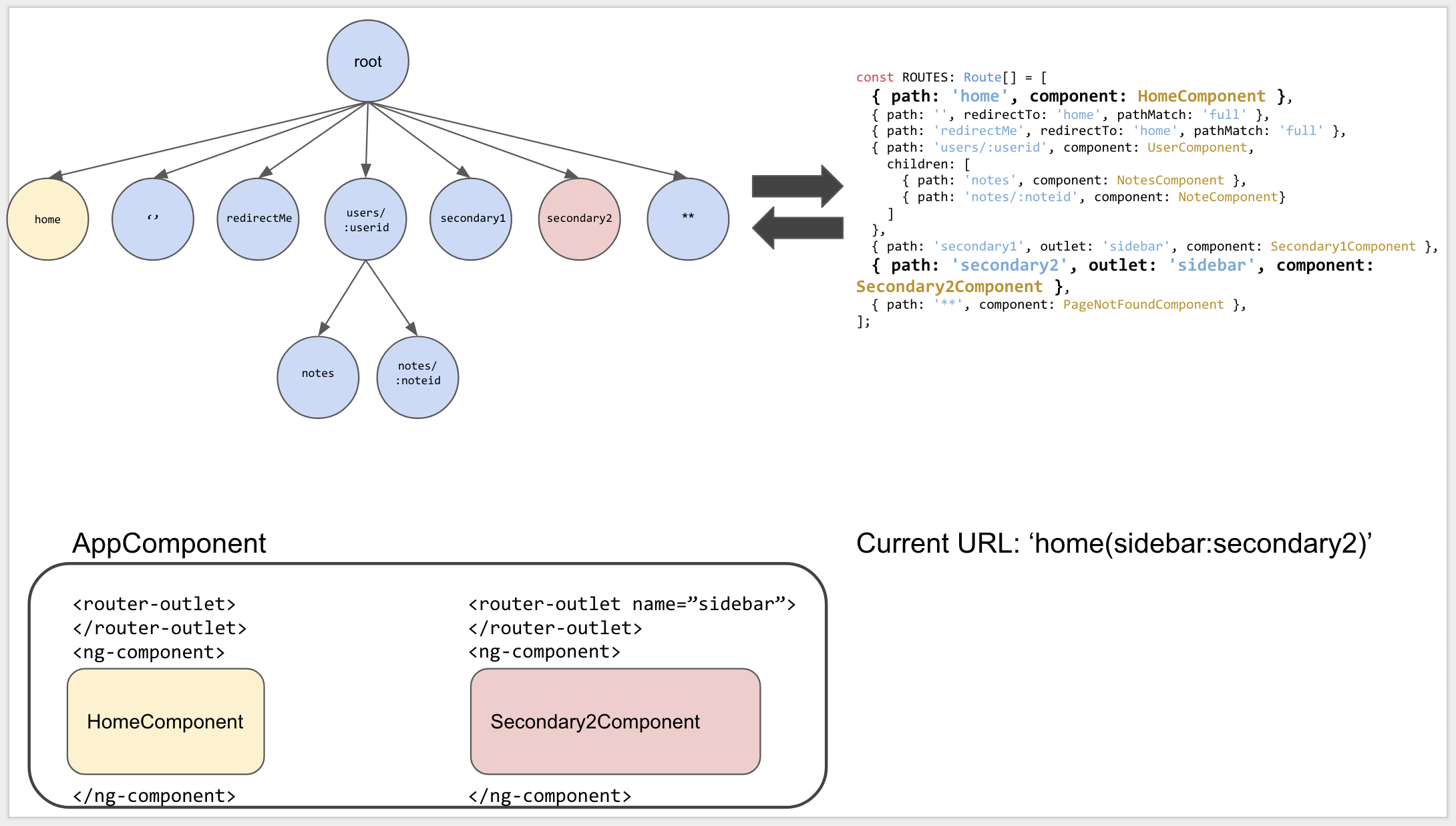
The ROUTES configuration in the top-right corner corresponds to a tree structure of that same configuration shown top-left. Meanwhile, the bottom-left displays the application's current state, and the bottom-right shows the URL presently being routed. The root component appears solely for illustration purposes, as it is never part of any URL. When the router places routed components, it inserts them into an <ng-component> element that sits alongside the <router-outlet> directive.
The ROUTES from the illustration can be explored further in this stackblitz.
Our initial goal is to examine how the router processes URLs internally.
Internal URL Representation and UrlSegmentGroups
First, we need to break down a URL into its individual parts and see how those parts map to internal router structures.
Take this straightforward URL:
/users/1/notes/42
Here, the URL contains four distinct segments: users, 1, notes, and 42. There are no parameters or secondary router outlets attached.
Because the URL is so basic, one could assume the router simply keeps URLs as plain strings. However, URLs are actually serialized versions of router state, and that state can get fairly involved. Therefore, the router relies on a more complex data structure when working with URLs internally.
For instance, think about a URL that includes a secondary outlet, query parameters, and a fragment:

The URL can get significantly more intricate. Parentheses wrap secondary outlets, while query parameters and fragments remain consistent throughout different routes.
Let’s dissect it with the Router service:
const url = '/users/1/notes/42(sidebar:secondary1)?lang=en#line99';
const tree = this.router.parseUrl(url); // '/users/1/notes/42(sidebar:secondary1)?lang=en#line99'

const fragment = tree.fragment; // line99
const queryParams = tree.queryParams; // lang=en
const primary: UrlSegmentGroup = tree.root.children[PRIMARY_OUTLET]; // gets the UrlSegmentGroup for the primary router outlet
const sidebar: UrlSegmentGroup = tree.root.children['sidebar']; // gets the UrlSegmentGroup for the secondary router outlet (sidebar)
const primarySegments: UrlSegment[] = primary.segments; // returns all UrlSegments for the primary outlet. ['users','1','notes','42']
const sidebarSegments: UrlSegment[] = sidebar.segments; // returns all UrlSegments for the secondary outlet. ['secondary1']
urlsegments.ts hosted with ❤ by GitHub view raw Data structures used to represent a url internally
Feel free to play around with the implementation at this Stackblitz link. It’s worth your time to look at the URL data structures directly in the console.
When you invoke router.parseUrl(url) on line 2, the URL string gets turned into a tree-shaped layout, like this:
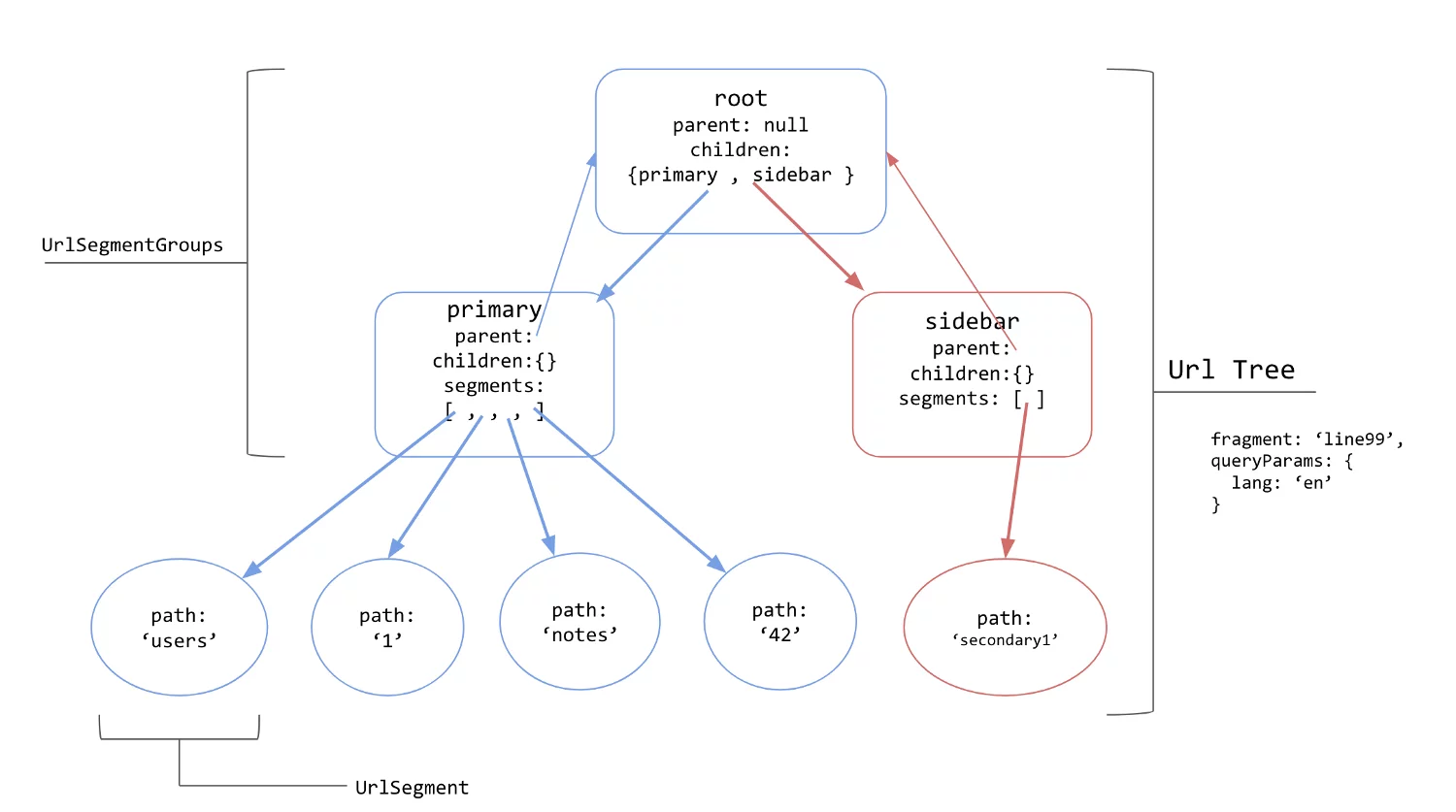
The tree structure shown above is derived from the URL /users/1/notes/42(sidebar:secondary1)?lang=en#line99. Some object properties are omitted here to keep the illustration concise. The primary outlet is highlighted in blue, while the secondary sidebar outlet appears in red.
- The complete URL maps to a UrlTree.
- Nodes that have child UrlSegments are called UrlSegmentGroups. These groups typically correspond to a named router outlet, like
primaryandsidebarin this instance. - Leaf nodes without children are referred to as UrlSegments. Any portion of a URL that sits between two slashes counts as a UrlSegment. For example,
/users/1/notes/42consists of four segments:users,1,notes, and42. **These segments are what get matched against******path******values in the router configuration inside******ROUTES******.** UrlSegments may also hold matrix parameters—data tied specifically to a segment—which are delimited by semicolons;, as in/users;name=nate;type=admin/wherenameandtypeare examples. - The root node creates a separate UrlSegmentGroup for each outlet. Here, two exist: one for the default outlet (primary) and another for the secondary outlet (sidebar). Under the hood, the router encodes secondary outlets inside parentheses in the URL, like
(secondary_outlet_name:secondary_path_name), and pairs them with configuration entries that share the sameoutletproperty, for instance{path: ‘secondary_path_name’, outlet: ‘secondary_outlet_name'}. **As we’ll discover, outlets operate independently of one another.* - Query parameters and fragment identifiers are stored as attributes on the UrlTree.
Every URL change triggers the creation of a fresh UrlTree. Building this tree is a synchronous process, separate from the act of matching the URL to entries in ROUTES. **This distinction is crucial, since matching may not be immediate.* Matching could, for instance, depend on loading a router configuration from a lazily-loaded module. More details on this appear in the upcoming section about redirects.
When a URL changes, the router attempts to align it with routes in the ROUTES array. **Its initial step is to process any redirects defined for each URL segment**.
Redirects swap a URL segment for another (or, with an absolute redirect, replace the whole URL). Internally, this produces a new UrlTree that incorporates the redirect. To declare a redirect in a route configuration, you use {redirectTo: 'some_path'}.
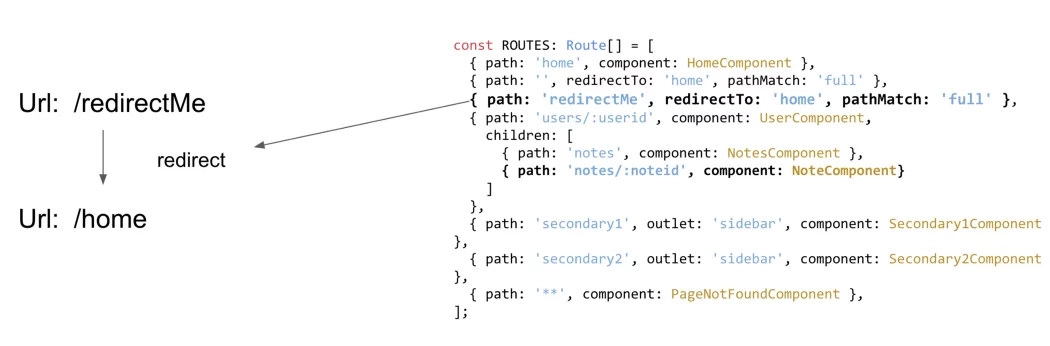
Handling a straightforward redirect that maps /redirectMe to /home
**What makes this worth your time?** Redirect transformations take effect prior to URL matching with a router state, so **they excel at URL normalization or easing migration pain.** Need legacy/user/name and user/name to load the identical component? A redirect is all it takes to align them:
// normalize a legacy url
[
  { path: 'legacy/user/:name', redirectTo: 'user/:name' },
  { path: 'user/:name', component: UserComponent}
]
The url_norm.ts file is displayed with ❤ by GitHub as raw content.
Redirect handling in the router relies on an internal utility named applyRedirects, which is invoked during the routing process:
function applyRedirects(
  moduleInjector: Injector,
  configLoader: RouterConfigLoader,
  urlSerializer: UrlSerializer,
  urlTree: UrlTree,
  config: Routes
): Observable<UrlTree> {
  return new ApplyRedirects(
    moduleInjector,
    configLoader,
    urlSerializer,
    urlTree,
    config
  ).apply();
}
apply_redirects_impl.ts hosted with ❤ by GitHub view raw
That’s quite a handful of parameters just for applying a redirect! Let’s break down what each one does.
**configLoader:** This is a RouterConfigLoader instance, responsible for compiling and loading lazy modules on the fly. The URL we’re matching might lead us to a module that hasn’t been fetched yet, and this loader pulls in that lazy module’s router configuration (check out its load function for details).
**urlSerializer:** We’ve seen this one before—it’s used to convert URL strings into UrlTrees and back again.
**urlTree:** The tree structure that represents our current URL.
**config:** This is the ROUTES array from forRoot. It’s the set of routes the router uses to match URL segments against.
For any given URL segment, the router can’t know in advance whether a redirect is required. So, at each route whose path aligns with that segment, the router examines whether the path includes a redirectTo property. Redirects are possible at every level of nesting in the router config tree, but only once per level—this constraint prevents infinite redirect loops.
if (allowRedirects && this.allowRedirects) {
    return this.expandSegmentAgainstRouteUsingRedirect(
        ngModule, segmentGroup, routes, route, paths, outlet);
  }
check_if_redirects_enabled.ts hosted with ❤ by GitHub view raw
Consider the following case:
{ path: 'redirectMe', redirectTo: 'home', pathMatch: 'full' }
When redirectTo is present and the current URL segment aligns with the path (detailed in the following section), the router calls [expandSegmentAgainstRouteUsingRedirect](https://github.com/angular/angular/blob/master/packages/router/src/apply_redirects.ts#L193) to execute the redirect.
The pathMatch option accepts either full or prefix, dictating how URL segments correspond to path definitions. Matching specifics are discussed shortly, but in essence, prefix verifies that path serves as a prefix of the remaining URL segments, and it is the default behavior. In contrast, full ensures the path matches all remaining URL segments exactly. For redirects, full is commonly selected because it allows the empty path path: '' to be redirected to another route. If prefix were applied here, path: '' would match every URL, as an empty string is a prefix for all strings. Further details on these distinctions are available here.
After the redirect is processed, a fresh UrlTree is constructed for comparison against the router configuration.
private applyRedirectCreatreUrlTree(
    redirectTo: string, urlTree: UrlTree, segments: UrlSegment[],
    posParams: {[k: string]: UrlSegment}): UrlTree {
  const newRoot = this.createSegmentGroup(redirectTo, urlTree.root, segments, posParams);
  return new UrlTree(
      newRoot, this.createQueryParams(urlTree.queryParams, this.urlTree.queryParams),
      urlTree.fragment);
}
applyRedirectCreateUrlTree.ts hosted with ❤ by GitHub view raw
The “Apply Redirects” stage takes a UrlTree as its input and produces a UrlTree as its output, after processing all redirects.
Having covered how URLs are structured as trees and how redirects generate fresh UrlTrees, we can now turn to the question of how a URL aligns with a concrete route path.
URL Matching
A robust URL matching engine sits at the router’s core. Without the capacity to link URLs to the right group of components for rendering, navigation inside an application would be impossible.
For our discussion of matching, we’ll rely on the array of ROUTES below, because it offers a clear view of how the matching algorithm operates in detail.
const ROUTES = [
  { path: 'view1', component: View1Component },
  { path: 'view2', component: View2Component,
    children: [
      { path: ':id', component: DisplayIdComponent }
    ]
  },
  { path: 'l1',
    children: [
      { path: 'l2',
        children: [
          { path: 'l3',
            children: [
              { path: 'view3', component: View3Component }
            ] }
        ] }
    ]
  },
  { path: ':directory',
    children: [
      { path: 'special',
        component: SpecialComponent
      }
    ]
  }
]
demo_router_configuration.ts hosted with ❤ by GitHub view raw Example router configuration to demonstrate matching
As you can see, a broad definition of a route consists of two key parts:
Its path, which dictates how it matches against a given URL segment, or
Its component, children, outlet, etc. — determining the action once a URL segment is matched.
This design introduces a clean separation of concerns: URL-to-route matching is entirely independent from route behavior.
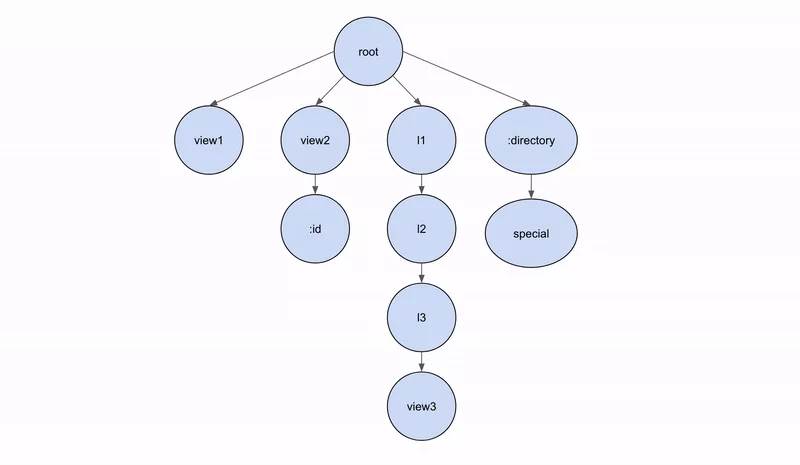
When represented visually, the new ROUTES array from above forms a tree structure:
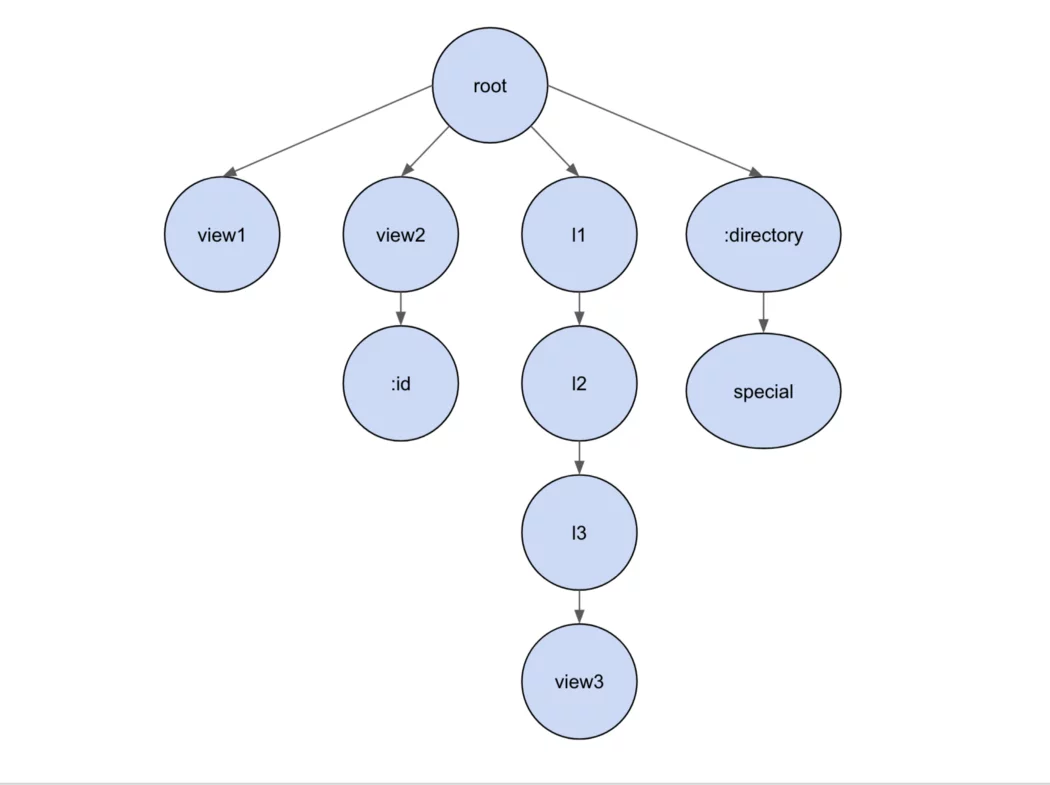
Tree of ROUTES. Nodes display their path properties
The fact that the objects inside the ROUTES array and the URL are both depicted as trees is not accidental. Because the configuration objects in the ROUTES array are organized into a tree of router states, and the URL itself is merely a serialized form of a router state, it follows that the URL can also be understood as a tree. Therefore, aligning any URL with a router state essentially involves comparing the segments of a UrlTree against a specific route path within ROUTES.
In the background, Angular relies on an implementation of the Recognizer class to carry out the matching of URLs to paths.
The router chooses the [DefaultUrlMatcher](https://github.com/angular/angular/blob/master/packages/router/src/recognize.ts#L193). Presented below is a portion of the DefaultUrlMatcher’s algorithm.
// Check each config part against the actual URL
for (let index = 0; index < parts.length; index++) {
  const part = parts[index];
  const segment = segments[index];
  const isParameter = part.startsWith(':');
  if (isParameter) {
    posParams[part.substring(1)] = segment;
  } else if (part !== segment.path) {
    // The actual URL part does not match the config, no match
    return null;
  }
}

return { consumed: segments.slice(0, parts.length), posParams };
segment_path_matching.ts hosted with ❤ by GitHub view raw A sneak peek at the matching logic — don’t get bogged down in every detail
As the router attempts to align a URL with a route, it examines the remaining segments of that URL, seeking a path that can match or consume a segment. Envision this as a depth-first traversal over the route definitions supplied in the ROUTES array.
When every segment of the URL has been used up, we declare that a match is successful. Take the configuration from earlier: the URL l1/l2/l3/view3 would be handled in this manner:
The router progresses through each item in ROUTES, starting with the first. That entry specifies path: 'view1'. Since view1 doesn’t equate to l1, it moves along. Next, view2 also fails to match l1, so it advances further. When l1 is compared to l1, the segment l1 is now considered matched or consumed.
Given that the URL still has unconsumed portions (namely l2/l3/view3), the router descends into the children of { path: 'l1' }.
Eventually, it works through the rest, because l2 matches l2, l3 aligns with l3, and view3 corresponds to view3. Consequently, View3Component gets rendered inside the primary router outlet.
Let’s trace what happens when we match the URL /l1/l2/l3/view3.
Occasionally, the router must reverse course and retry a match. Take the path l1/special as an example:
- The router iterates through its
ROUTESconfiguration.view1fails to matchl1, so it advances.view2also fails to matchl1, so it advances again. Eventually,l1matchesl1, and the URL segmentl1is consumed. - With unmatched URL segments remaining (specifically
special), the router descends into the children of{path: 'l1'}. - Within that level, **no child path aligns** — the sole child is
l2, which does not equate tospecial. At this point, the router **ascends one level in the configuration** to search for alternate matches forl1. - Now, the router identifies
:directoryas the subsequent contender. A path beginning with a colon is a wildcard, accepting any value, so:directorysuccessfully matchesl1. - The URL is still not fully consumed (since
specialremains), so the router descends into this path’schildren. path: 'special'matches the remainingspecialsegment, completing the URL consumption. Consequently,SpecialComponentrenders in the primary outlet.

Here is an example of backtracking in action.
When matching URL segments against paths, the router employs a **depth-first strategy**. Put simply, **the initial route whose path consumes the entire URL emerges as the winner.** Given the absence of any priority or specificity rules among routes, the configuration's arrangement is critical—since the first successful match is always chosen, the sequence of routes dictates the outcome.
For URLs that feature secondary outlets, like the one below:
'/users/1/notes/42(sidebar:secondary1)?lang=en#line99';
The outlets operate independently, meaning a navigation from secondary1 to secondary2 won't touch the URL segment tied to the primary outlet, /users/1/notes/42. A stackblitz demonstrating this behavior is linked here.
Router States
When a URL matches successfully, the outcome is that a collection of components gets routed to and displayed on screen via router-outlet directives. Yet, this process also yields a valuable byproduct—the generation of RouterState and state snapshot objects.
Once routing finishes, we often need details about the URL and the components just routed to—referred to as the current router state. The phrase "router state" carries a double meaning, since the entries in the ROUTES array are also described as defining an app's possible router states—i.e., the component sets that any given URL can resolve to. Nevertheless, routerState also exists as a property on the Router Service. In this discussion, router state points specifically to that routerState property on the Router service, which provides access to the currently routed URL and its components.
For example, inside a component or service, you might need to retrieve query parameters or other URL-encoded data. The Router service exposes a routerState: RouterState property, offering full visibility into the router's current status. Within this routerState, two properties stand out for our purposes: snapshot and root.

A snippet of the Router service
Both structures are trees that depict the current router state—the components navigated to, along with URL segments and parameters—yet they diverge in a crucial aspect: snapshot consists of ActivatedRouteSnapshot objects, **which are static,** whereas root comprises ActivatedRoute objects — **which are dynamic.**
Depending on the scenario, a static snapshot of state may suffice, or you might need to subscribe to an observable to react to state changes.
Take, for instance, a URL shift from /users/15/notes/41 to /users/15/notes/42: the router detects that only the :noteid parameter has changed, so it reuses the existing components on screen instead of generating a fresh tree of snapshots. Given that route parameters might change, the observable approach is the better choice in this situation.
The ActivatedRoutes get built within a function called[processSegmentAgainstRoute](https://github.com/angular/angular/blob/master/packages/router/src/recognize.ts#L132), invoked during the navigation’s matching phase, as a URL segment is matched against a route’s path:
const result: MatchResult = match(rawSegment, route, segments);
consumedSegments = result.consumedSegments;
rawSlicedSegments = segments.slice(result.lastChild);

snapshot = new ActivatedRouteSnapshot(
  consumedSegments,
  result.parameters,
  Object.freeze({ ...this.urlTree.queryParams }),
  this.urlTree.fragment!,
  getData(route),
  outlet,
  route.component!,
  route,
  getSourceSegmentGroup(rawSegment),
  getPathIndexShift(rawSegment) + consumedSegments.length,
  getResolve(route)
);
process_segment_against_url_excerpt.ts hosted with ❤ by GitHub view raw
It’s worth noting that a single routerState can maintain several ActivatedRoute trees simultaneously — each corresponding to a distinct outlet.
**This is the essence of the phrase "the URL is merely a serialization of the router state."**
We’ve explored how a URL gets converted into a UrlTree, how that tree is matched against a route definition, and how the router then builds a corresponding tree of ActivatedRoutes. Coming up next, we’ll dive into the internal workings of how the router renders the matching components and processes any guards or resolvers in its path. Thank you for following along — stay tuned for the next installment!